Waypoint — session status for Hermes Desktop
Never lose your place again. Waypoint puts a thin status bar next to every session in the Hermes sidebar, so you can see at a glance which conversations are still open, which are stuck on someone else, and which are finished.
Why
If you work with an AI agent all day, you start ten things, switch projects, and come back three days later to a sidebar of forty sessions. Which one did you finish? Which one was waiting on a supplier's documents? Where did you stop?
Waypoint answers those questions with four states, on purpose. More colours means more thinking, so it stays at four:
| Bar | State | What it remembers |
|---|---|---|
| ▯ grey | Not tracked | nothing |
| 🟨 yellow | Working | your next step: where you stopped |
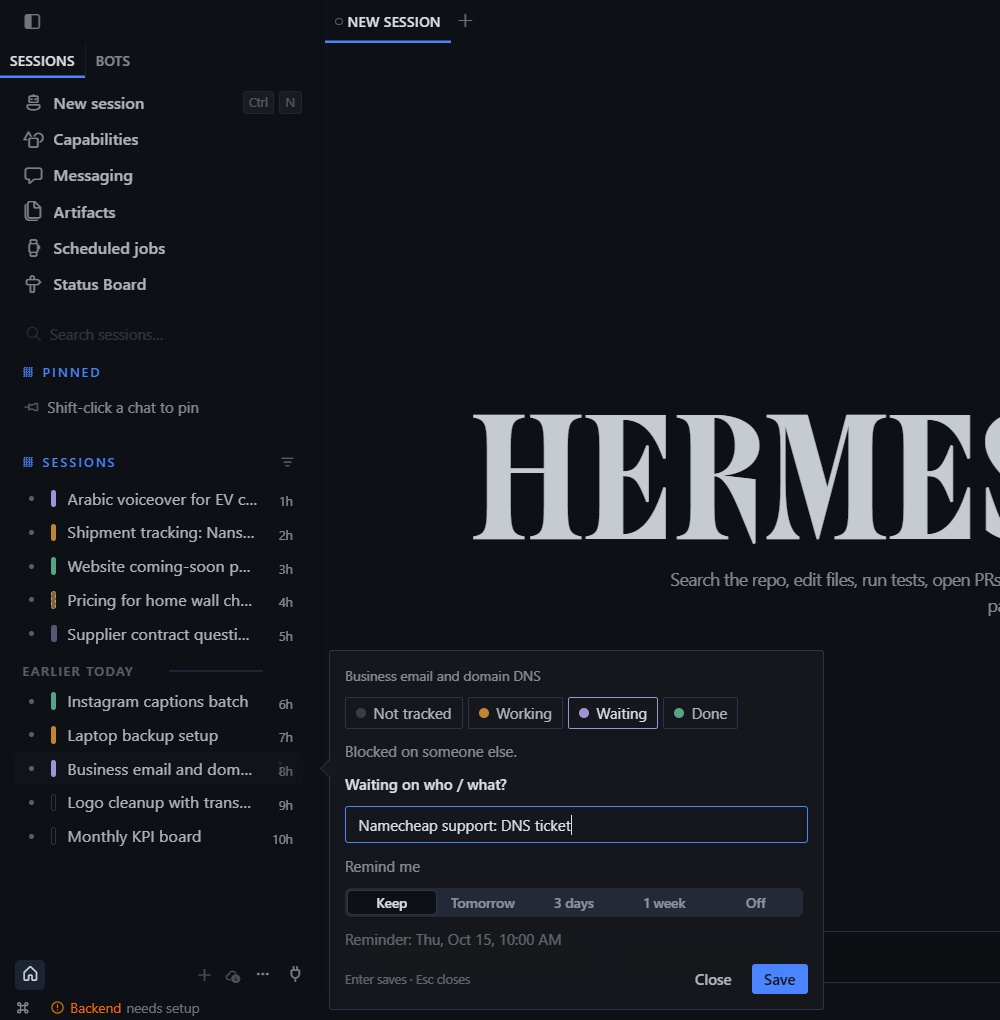
| 🟪 purple | Waiting | who/what you're waiting on, plus a follow-up reminder |
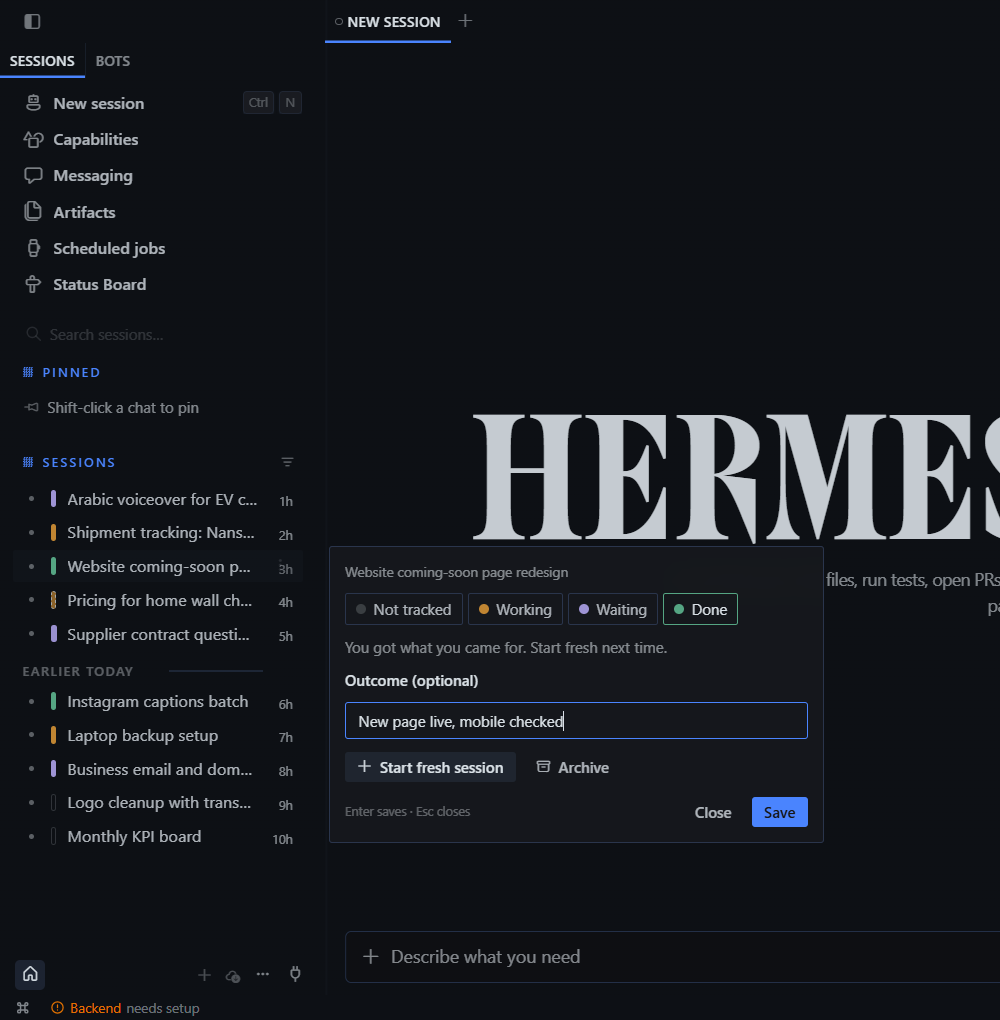
| 🟩 green | Done | the outcome, and a one-click fresh start |
New in 2.1: suggested next steps
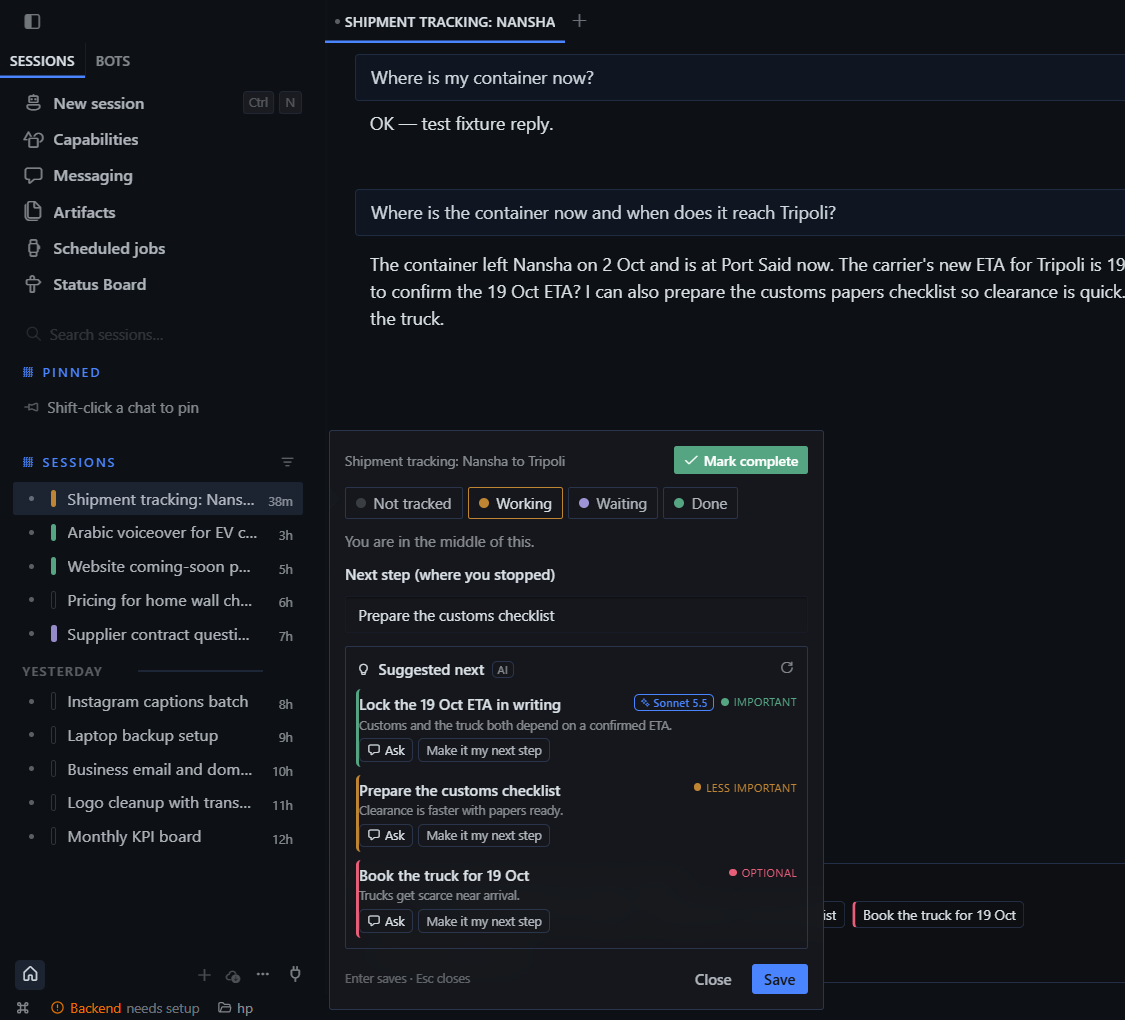
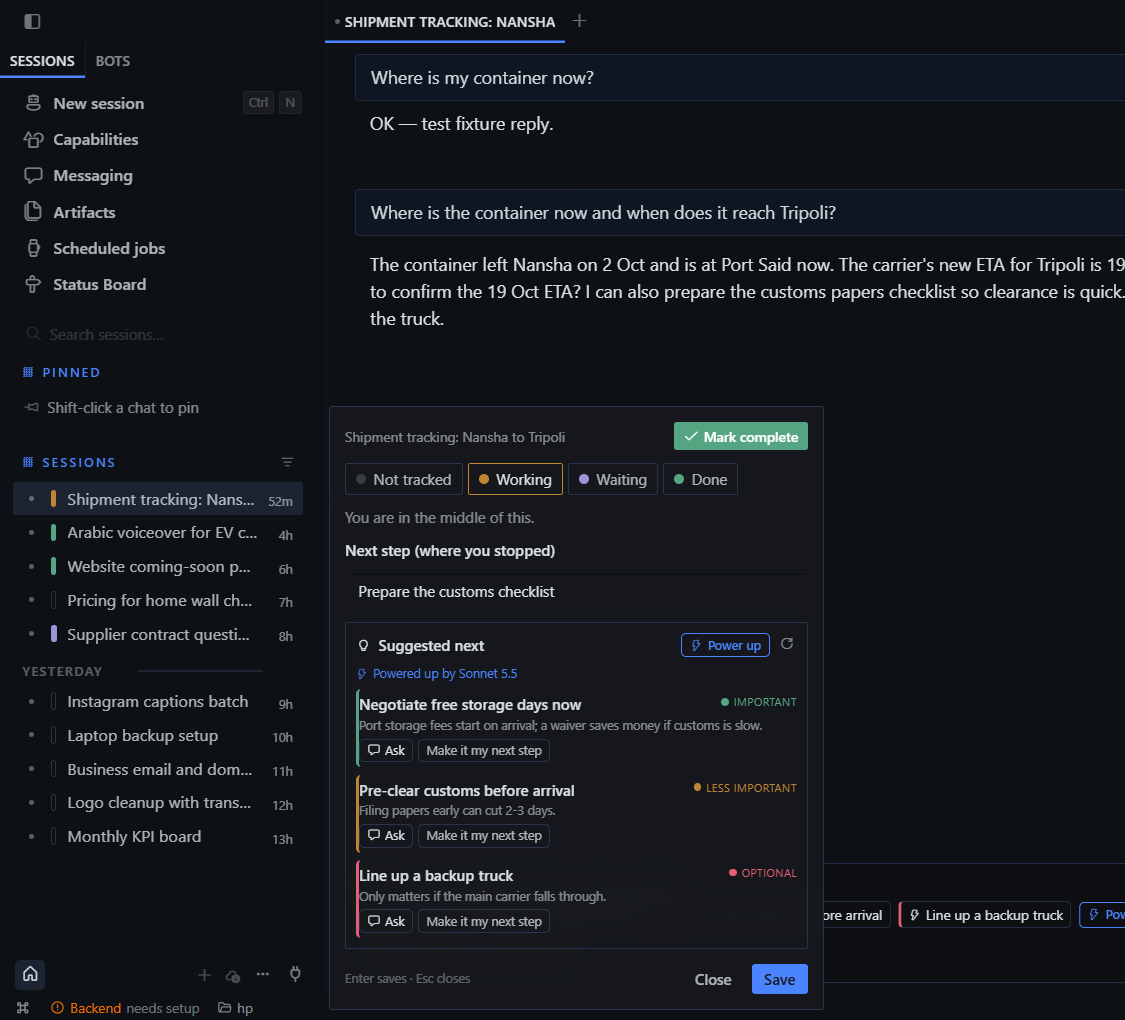
Every session gets 3 ideas for what to do next: in the status card, and as one-click chips above the message box (Next: Confirm the 19 Oct ETA · Prepare the customs checklist · …).
- Quick ideas are instant, free and never leave your computer. They come from offers the assistant just made ("Want me to…", "I can also…"), plus sensible defaults for the session's status: a follow-up draft when you're Waiting, a handoff summary when you're Done.
- AI ideas (opt-in) are written by your auxiliary model, the same cheap model Hermes uses to name your sessions, from the last messages of the open session. Each idea comes with a reason and a ready-to-send message. They refresh automatically after a reply, at most once every 90 seconds and only when there are new messages.
- Ask puts the idea's message in the chat box, and you press send. Make it my next step saves it as the Working note, so it shows up in the resume banner and on the board.
Turn AI ideas on from the card (Turn on AI suggestions) or in Board → Settings (Off / Tracked sessions / All sessions).
⚡ Power up: strong-model ideas on demand
Feeling stuck? Press ⚡ Power up in the status card or on the Next: row. Waypoint sends a longer slice of the chat to your strong model and gets back 3 sharper ways to continue, each with a reason, a priority and a ready-to-send message. It runs only when you press it, so your strong-model usage stays under your control. The ideas stay on screen until the chat moves on.
Choose the model with one click: the arrow next to the button opens a menu with Strong model 1, Strong model 2 and My chat model (the open session's own model). Picking one runs Power up right away and remembers it as the default.
Strong models 1 and 2 are Hermes auxiliary tasks. With the Python half enabled they appear as Waypoint power up (model 1/2) in the auxiliary picker, or set them directly:
hermes config set auxiliary.waypoint_ideas.provider anthropic
hermes config set auxiliary.waypoint_ideas.model claude-opus-5-5
hermes config set auxiliary.waypoint_ideas.reasoning_effort high
hermes config set auxiliary.waypoint_ideas_2.provider anthropic
hermes config set auxiliary.waypoint_ideas_2.model claude-sonnet-5-5
Then name them in Board → Settings (e.g. Opus 5.5 and Sonnet 5.5). If you leave them unset, they fall back to your cheap auxiliary model. There is also an optional switch that adds one strong-model "big idea" automatically in the background, refreshed at most every 10 minutes; it is off by default.
Priority colours: 🟢 important · 🟡 less important · 🔴 optional. Ideas are sorted by priority.
Mark complete: the green button at the top of the status card turns the bar green and stops suggestions for that session. Choose Working to bring them back.

Features
- One-click status. Click the bar to cycle grey → yellow → purple → green. Right-click (or Shift+click) opens the status card. Keys 1–4 pick a state, Enter saves and Esc closes.
- Waiting on someone. Turning a bar purple asks "Waiting on who / what?" and "Remind me: Tomorrow / 3 days / 1 week". When the reminder is due you get an in-app toast (Open session / Remind tomorrow) and a native OS notification if you're away. The bar also pulses until you deal with it.
- Resume banner. Open a Working session and the composer shows "Where you stopped: render the Arabic version", with Insert to drop it into the message box.
- Fresh start with a handoff. From a Done session, Start fresh session
opens a new chat already holding a
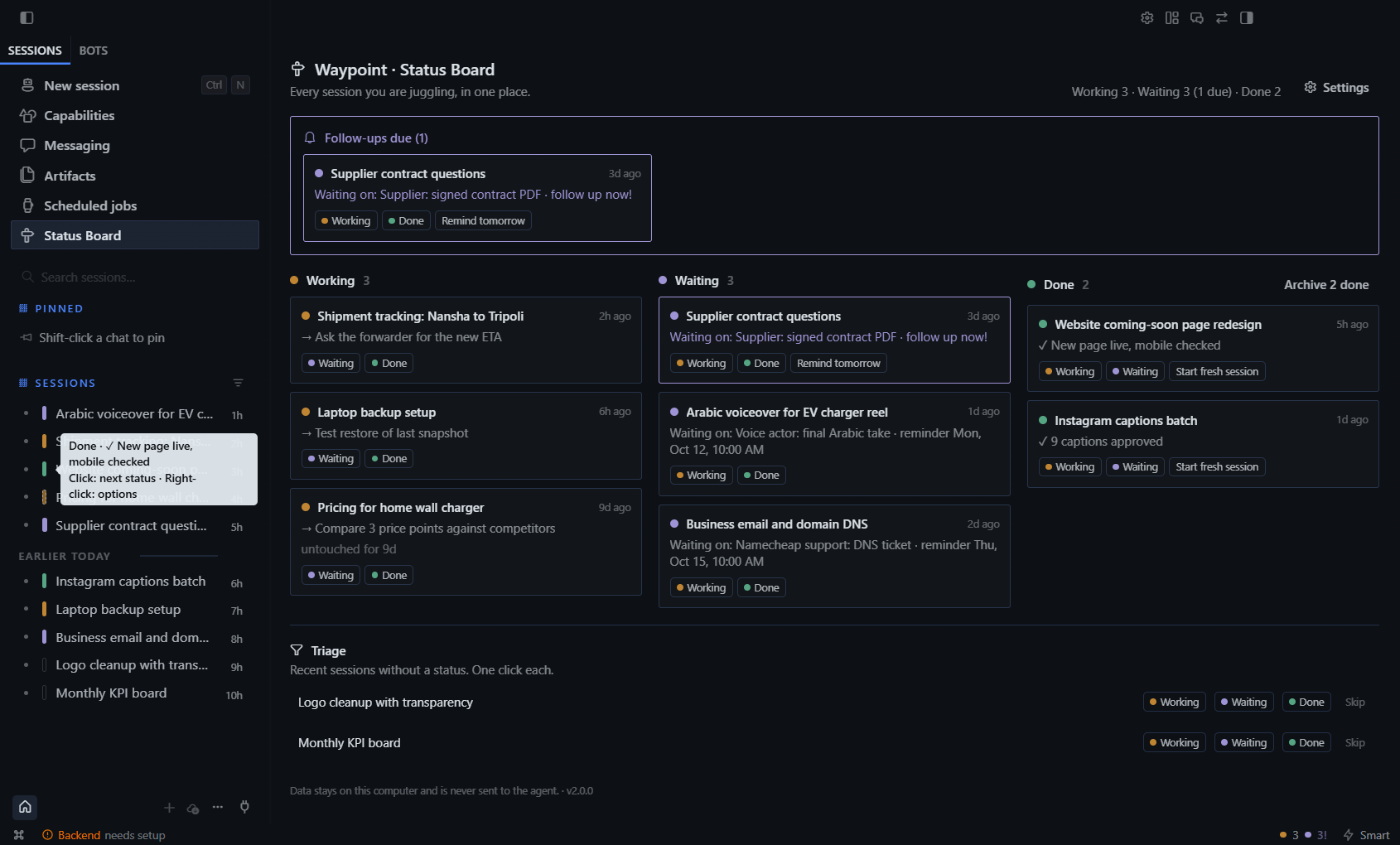
@session:link back to the old one, plus your outcome and next step. The agent can pull that context without you re-explaining anything, and the new session stays short and fast. - Status Board (sidebar → Status Board). Shows Working / Waiting / Done columns, a Follow-ups due strip at the top, stale detection (untouched for 9d), and Archive N done in one click. Archived sessions are moved out of the sidebar, not deleted.
- 30-second triage. The board lists recent sessions that have no status yet, each with one-click Working / Waiting / Done / Skip buttons.
- Status bar counter.
● 3 ● 2!shows Working, then Waiting (!means follow-ups are due). Click it to open the board. - Morning summary. Once a day: "2 working (1 stale) · 3 waiting (1 due)".
- ⌘K commands: mark the current session Working / Waiting / Done, clear its status, start fresh, or open the board.
- Your words. You can rename the states (e.g. Doing / Blocked / Shipped), choose the reminder hour, hide grey bars until hover, and set the stale threshold.
- English + Arabic with full RTL. The card always opens beside the sidebar, whichever side the sidebar is on.
- Backup / restore your statuses as JSON.
Privacy
- Everything is stored locally in the desktop app's plugin storage, keyed by the durable session id, so statuses survive context compression.
- AI suggestions are off by default. When you turn them on, Waypoint sends the
last ~12 messages (trimmed, up to ~7,000 characters) of the session you have open,
plus its title and your notes, through Hermes's own
llm.oneshotcall: to your cheap auxiliary model (title_generation), and to thewaypoint_ideasmodel for the one big idea, or to the session's own model if you pick My chat model. It never talks to any other service. Quick suggestions never leave your computer. Marking a session complete stops all suggestion calls for it. - Nothing is sent to the agent. Drafts (Ask, Insert, Start fresh session) are only placed in the chat box. You choose whether to send them.
- No network calls of its own and no telemetry. The plugin uses only the official
Desktop plugin SDK: session-row slots, a route, sidebar nav, status bar, composer
banner, palette, notifications, and the
session.list,session.archive,session.historyand (opt-in)llm.oneshotgateway calls.
Install
From the Hermes plugin catalog (once listed):
hermes plugins install waypoint
Then turn it on in Settings → Plugins → Waypoint. The desktop half of a catalog plugin is opt-in, so it stays off until you flip that switch.
Plugin folder (any Hermes Desktop ≥ 0.21.5):
- Unzip
waypoint-<version>-standalone.zipinto<HERMES_HOME>/desktop-plugins/(usually~/.hermes/desktop-plugins/; on Windows,%LOCALAPPDATA%\hermes\desktop-plugins\). You should end up withdesktop-plugins/waypoint/plugin.js. - Hermes Desktop picks it up within a few seconds. If it doesn't appear, run ⌘K → Reload desktop plugins.
Unified package: copy the waypoint/ folder into <HERMES_HOME>/plugins/,
then turn it on in Settings → Plugins.
Requirements
Hermes Desktop with the session-row decoration SDK (SESSION_ROW_AREAS),
Hermes ≥ 0.21.5.
Support
Questions or ideas: open an issue on this repository, or email support@dbtechglobal.com.
License
MIT © 2026 DB TECH. See LICENSE.