AceDataCloud
Ace Data Cloud model provider for Hermes Agent

Maintained by Ace Data Cloud. This plugin adds Ace Data
Cloud to Hermes's model and setup pickers using its public Chat Completions API.
It requires Hermes 0.21.5 or later and is listed in the
official Hermes plugin catalog
as a community plugin. It is installed separately and is not bundled with Hermes.
Native model selection and current distribution
After this named provider plugin is installed, Ace Data Cloud appears in
Hermes's own hermes model / setup picker. Choose it, enter your Ace API Token
and select gpt-4.1-mini or gpt-4.1; the endpoint and Chat Completions transport
are supplied by the profile. Users do not need to type an API base URL.
This is an official-catalog community plugin, installed separately. A fresh
Hermes installation does not list Ace until the plugin is installed: it is not
bundled or enabled by default. Hermes's current
third-party integration policy
requires new vendor integrations to remain standalone; the presence of older
bundled providers is not approval for adding another vendor to core.
The official model configuration guide
shows the real Models → Change → provider/model picker. Its historical screenshots
show other providers, not an Ace run. The named Ace picker and credential/endpoint
resolution are validated against unmodified Hermes 0.21.6 and 0.22.2 in fresh profiles;
this does not claim default bundling, a current GUI run, or new paid inference.
For music, video and images, install the separate
Ace Data Cloud Media
plugin and enable the service toolset you need. It supports service-name discovery
and Suno, Seedance, HappyHorse, GPT Image and Nano Banana guides.
The model provider itself adds no media tools.
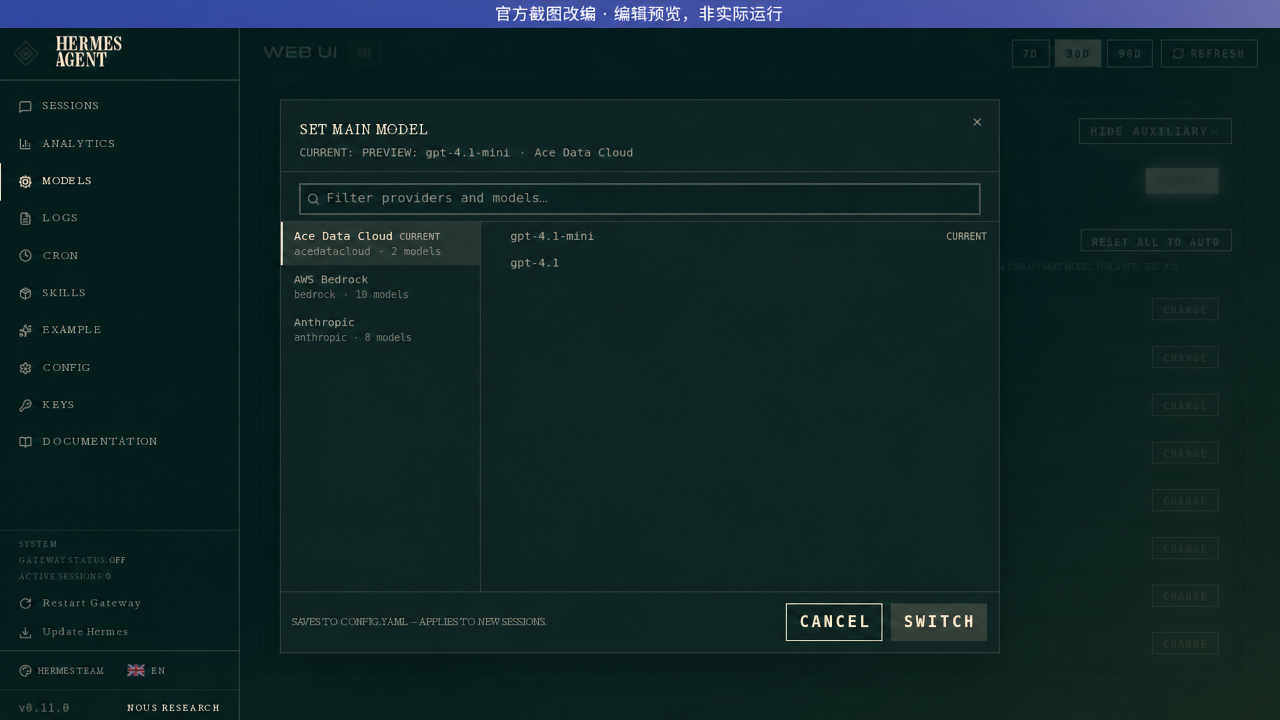
Official-screenshot edit preview, not an Ace execution screenshot. Edited
2026-10-17 from the official historical v0.11.0 screenshot (capture date unknown).
It illustrates the provider/model picker after installation, not default bundling,
new paid calls or current GUI validation. Source and limits.
Get your Ace Data Cloud API key
- Open Ace Data Cloud → Applications. Sign in, or register an account first.
- Find General application. If it has not been created, choose Initialize General Application. A general key can use the services available to your account; a dedicated application's key is limited to its service. Check the required service/model access and current pricing.
- Copy the API Key from the application card, or open Keys / Manage Keys → Create to create a separate key for this integration. Give it a recognizable name so you can revoke or rotate it independently.
- When creating a key, review Expiration Time, Set Usage Limitation, and Allowed APIs. Enable only the restrictions you need, allow the operations you will call, then click Create and copy the token from the key list. Task lookup does not grant permission to submit a generation. Confirm the application's balance can cover your first request; any trial allowance is whatever your account currently displays.
- Copy only the token value, without quotation marks, spaces, or
Bearer. An API Key / API Token field expects this raw value; only a manually configured HTTPAuthorizationheader needs theBearerprefix. Aplatform-...account-management token cannot replace a generation API key.
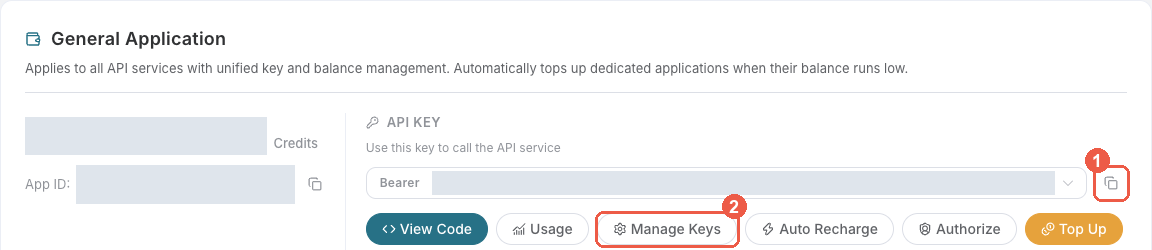
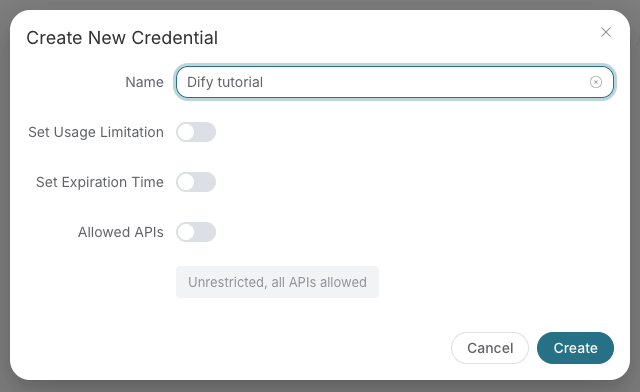
Save the key in the client's credential store or the environment variable shown below. Never put it in a prompt, shared workflow, screenshot, or Git commit. If authentication fails, check the full copied value, application/service access, expiration, usage limit, and balance before creating another key.
Install and configure
hermes plugins install acedatacloud --enable
hermes model
The catalog installs its reviewed source commit. For the latest repository version,
use hermes plugins install AceDataCloud/AceDataCloudModelProviderHermes --enable.
Repository releases and catalog pin updates are published separately.
Choose Ace Data Cloud, enter your API key, then select gpt-4.1-mini or
gpt-4.1. Get a key from your application in the
Ace Data Cloud console.
Enable the required chat service on that application. Keys scoped to other
services cannot make chat requests.
For an environment-based setup, set ACEDATACLOUD_API_KEY in the active Hermes
profile's .env file. Keep credentials out of config.yaml and source control.
Then run:
hermes chat --provider acedatacloud --model gpt-4.1-mini --oneshot "Reply only OK"
The plugin supplies the base URL https://api.acedata.cloud/openai and the
chat_completions transport. No custom-provider YAML is needed. Install it in
each Hermes profile that should use it.
Supported models
The picker offers gpt-4.1-mini and gpt-4.1. Both support text conversations,
streaming tool calls and subsequent tool-result turns. The plugin filters the
live catalog to these tested models; if the catalog is unavailable, the same
two IDs remain available in the picker. This is a picker list, not automatic
model substitution.
Ace Data Cloud's shared /models response also contains image-generation and
other-protocol models. They are intentionally excluded. This plugin does not
claim support for the full catalog, Responses, Messages, vision, prompt caching
or configurable reasoning. New model families will be added after validating
their Hermes transport behavior.
Calls use your Ace Data Cloud balance. See the
current model catalog and pricing and
your application's package rate. Hermes may not have an accurate cost estimate
for this provider; the Ace Data Cloud usage and billing records are authoritative.
Data and permissions
- Hermes sends chat messages, configured tool schemas and tool results to
https://api.acedata.cloud/openai/chat/completionswith your API key. Model
discovery callshttps://api.acedata.cloud/openai/modelsthrough Hermes's
standard credentialed client. A user-configured base URL overrides both. - The plugin declares only
ACEDATACLOUD_API_KEY; Hermes manages that secret.
It does not read other applications' credentials, write files, run shell
commands, start background processes, install dependencies or update itself. - It registers one model-provider profile. There are no tools, hooks,
middleware, telemetry or automatic model fallbacks in the plugin. - Updates installed from the Hermes catalog require a reviewed SHA pin update
andhermes plugins update acedatacloud.
Troubleshooting and support
For authentication errors, check the active profile's key and application
permissions. For quota or credit errors, inspect the application's balance.
For rate limits, retry later. The plugin leaves API errors to Hermes's standard
error handling rather than converting them into successful responses.
Report plugin issues in this repository. Account and billing support is
available through the Ace Data Cloud console.
Development
Tests use a real Hermes checkout, isolated temporary homes and a local HTTP
server. CI uses Hermes's official validation action against the stable release
and a pinned main commit. With a prepared Hermes interpreter, run:
HERMES_SOURCE=/absolute/path/to/hermes-agent python -m unittest discover -s tests -v
Validate the installable plugin before publishing:
hermes plugins validate /absolute/path/to/AceDataCloudModelProviderHermes --install-deps
Live checks use only disposable Hermes homes and explicitly supplied test keys.
README from the reviewed commit 568763e; it updates when the author re-pins.