AunySillyMe
Decompose (aunx-decompose)



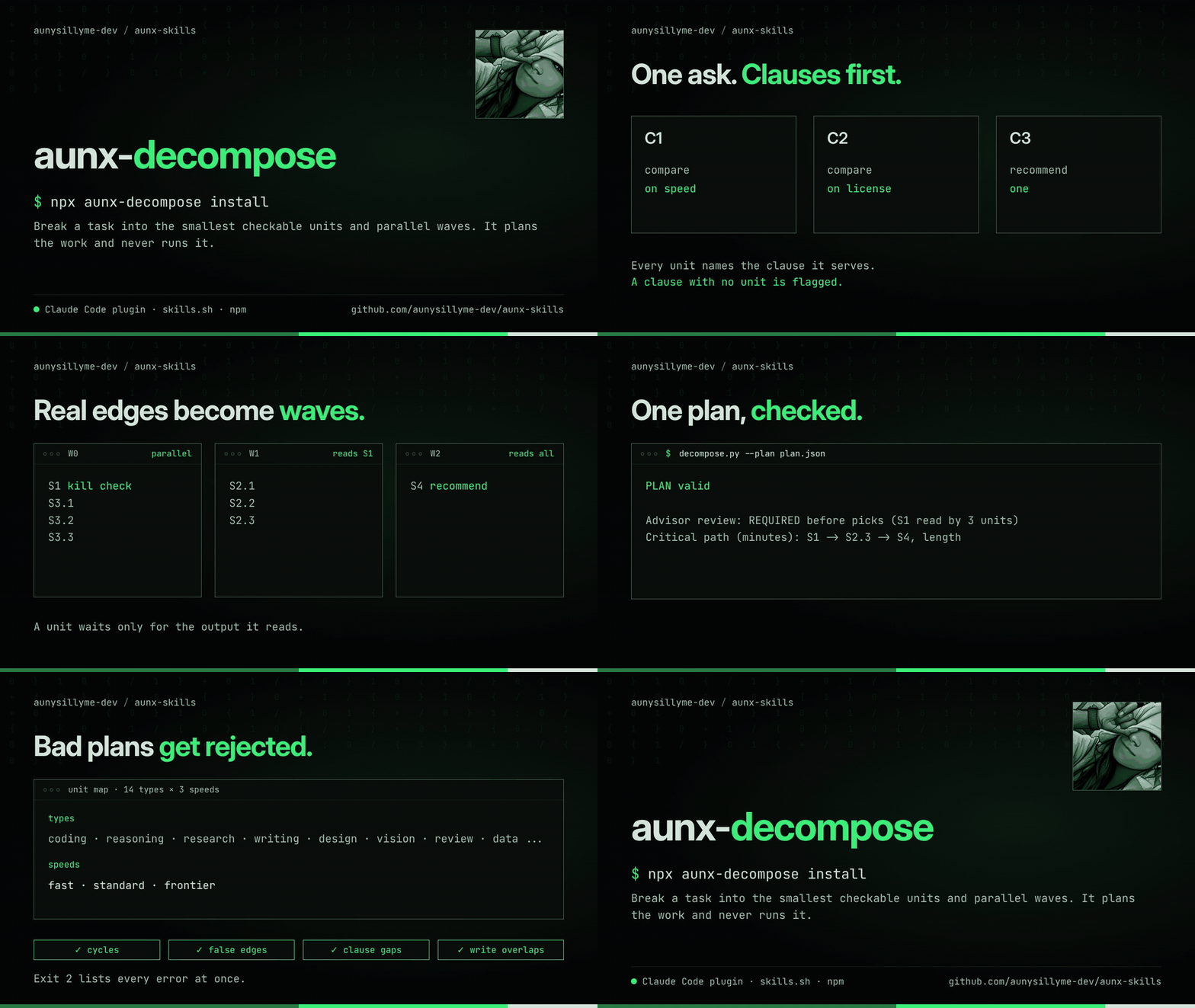
Decompose is a plugin and agent skill that breaks a task into the smallest units that can each be checked, and shows which units can run at the same time. It installs in Claude Code, Codex CLI, Gemini CLI, Cursor, GitHub Copilot CLI, OpenCode, Qwen Code and Hermes Agent. Your agent writes the plan. A Python helper that uses only the standard library checks it. Python 3.8+ is enough. No API keys or Python packages needed.
Version 0.2.0 adds unit maps, a fuller planning method:
- Split the ask into numbered clauses and tag every unit with the clauses it serves. A clause with no unit is flagged.
- Break the job into the smallest units, each with its own inputs, outputs and verifier. N similar items become N units.
- Give each unit one of 14 types (coding, reasoning, research, writing, four creative types, design, vision, review, data, agentic, cyber) and one of 3 speeds (fast, standard, frontier).
- Draw only real data edges: a unit depends on another only when it reads that unit's output. False and missing edges are rejected. Checks that can kill the plan run first.
- Build parallel waves, count how many units read each output, and raise importance with that count.
- Choose a dispatch shape per group: one call per unit, an agent's own subagents, a bulk prompt fan-out, an agent fan-out, or split worktrees for disjoint writes. The thresholds are tunable defaults.
- Send big or serial maps to an advisor review before any picks, and apply its patch (split, cut edges, re-tier, change the shape or the needs) all or nothing.
- Pick a model and a machine per unit with a written method: type first, then speed, family spread within a wave, context as a scored key, effort set apart from tier, and the smallest machine that fits.
- Print one plan table with the waves, the critical path and clause coverage.
The simpler step plans from 0.1.0 still work unchanged.
When to use it
Use it when a task has several steps, some can run in parallel, more than one agent or subagent may edit files, or you want a plan a script can verify. Skip it for a single-step task or a prose outline. It works alongside plan mode and to-do lists and does not replace them.
Install
One repository, one skill, a wrapper for each agent. Pick yours:
| Agent | Install |
|---|---|
| Claude Code | claude plugin marketplace add aunysillyme-dev/aunx-skills then claude plugin install aunx-decompose@aunx |
| Codex CLI | codex plugin marketplace add aunysillyme-dev/aunx-decompose then codex plugin add aunx-decompose@aunx-decompose |
| Gemini CLI | gemini extensions install https://github.com/aunysillyme-dev/aunx-decompose |
| GitHub Copilot CLI | copilot plugin install aunysillyme-dev/aunx-decompose |
| Cursor | cursor-agent plugin marketplace add https://github.com/aunysillyme-dev/aunx-decompose, then install it from Customize, Plugins |
| OpenCode | npx aunx-decompose install --agent opencode |
| Qwen Code | npx aunx-decompose install --agent qwen |
| Hermes Agent | hermes plugins install aunx-decompose then hermes plugins enable aunx-decompose — listed in the Hermes plugin catalog |
Skill only, from npm
npx aunx-decompose install copies the skill into an agent's skills folder. It defaults to Claude Code. Name another agent with --agent, repeat the flag for several, or use all:
npx aunx-decompose install --agent codex
npx aunx-decompose install --agent gemini --agent cursor
npx aunx-decompose install --agent all
--agent | User folder | With --project |
|---|---|---|
claude | ~/.claude/skills | .claude/skills |
codex | ~/.agents/skills | .agents/skills |
gemini | ~/.gemini/skills | .gemini/skills |
cursor | ~/.cursor/skills | .cursor/skills |
opencode | ~/.config/opencode/skills | .opencode/skills |
copilot | ~/.copilot/skills | .github/skills |
qwen | ~/.qwen/skills | .qwen/skills |
--force replaces an existing copy. npx aunx-decompose check --plan plan.json runs the checker without installing anything.
From skills.sh
npx skills add aunysillyme-dev/aunx-skills --skill decompose
Listed at skills.sh. The CLI asks which agent to install into.
Use it
Type /decompose <task> in Claude Code (namespaced as /decompose:decompose), Gemini CLI and Hermes, $decompose in Codex, or ask any agent to split a task into steps, plan dependencies, or check write-path overlap. Decompose plans work and does not execute the plan.
Unit map example
From the root of this repository:
python3 skills/decompose/scripts/decompose.py --plan skills/decompose/examples/plan.json
The bundled map compares three CSV libraries on speed and license, then recommends one. Actual output, exit 0 (table trimmed to four rows):
PLAN valid

Advisor review: REQUIRED before picks (S1 read by 3 units)

| unit | parent | clause | type x speed | wave | group | shape | model | machine | runner-up |
| --- | --- | --- | --- | --- | --- | --- | --- | --- | --- |
| S1 (invalidator) | - | C1 | data x fast | 0 | W0 | single | - | - | - |
| S3.1 | S3 | C2 | research x fast | 0 | W0 | single | - | - | - |
| S2.1 | S2 | C1 | coding x standard | 1 | W1 | single | - | - | - |
| S4 | - | C3 | writing x standard | 2 | - | single | - | - | - |

Waves:
  W0: S1, S3.1, S3.2, S3.3
  W1: S2.1, S2.2, S2.3
  W2: S4
Critical path (minutes): S1 -> S2.3 -> S4, length 11
Serial estimate: 29 minutes. Both figures come from the units' own needs.minutes.
Clause coverage:
  C1 (compare on speed): S1, S2.1, S2.2, S2.3
  C2 (compare on license): S3.1, S3.2, S3.3
  C3 (recommend one): S4
The advisor gate fired because S1 is read by three units. The bundled patch.json is a sample review: it splits S4 into a draft and a citation check. Apply it with --apply-patch skills/decompose/examples/patch.json. Add --json for machine-readable output. The model, machine and runner-up columns stay empty until you pick them by the method in references/picking.md.
Unit map exit codes: 0 valid, 2 every error listed, including unknown types or speeds, clause gaps, false or missing edges, cycles, substeps more than one level deep, and overlapping writes between units that could run at the same time. Dispatch and gate thresholds live under plan_defaults in the bundled recipes.json; override any of them in your own recipe store.
Step plan example
From the root of this repository, create CARD.md:
---
kind: audit
ask: "Review the parser"
---
Run:
python3 skills/decompose/scripts/decompose.py CARD.md --waves
Actual output, exit 0:
[
  [
    {
      "id": "audit",
      "kind": "audit",
      "inputs": [
        "ask"
      ],
      "outputs": [
        "audit-result"
      ],
      "deps": [],
      "paths": [],
      "needs": {
        "cpu": 1,
        "ram_gb": 1,
        "gpu": false,
        "disk_gb": 1,
        "tools": []
      }
    }
  ]
]
Each outer array entry is a wave. Independent steps share a wave; every
prerequisite finishes in an earlier wave. Resource and tool availability still
limit execution. Bundled card recipes are build, fix, research, read,
and audit. Set ship: no or push: no in a card to omit shipping.
For a custom plan, create a fresh temporary directory:
steps_dir=$(mktemp -d) || exit 1
steps_file="$steps_dir/steps.json"
Write the plan to that new "$steps_file" path using the schema in
SKILL.md. Never overwrite an
existing file. Use the same path for each command:
python3 skills/decompose/scripts/decompose.py --validate "$steps_file" --waves
python3 skills/decompose/scripts/decompose.py --validate "$steps_file" --save-recipe my-plan
Step plan exit codes: 0 valid, 2 error, 3 no matching card recipe (a schema is printed
so Claude can write the steps). Validation checks the required fields, known
kinds, unique IDs, known dependencies, cycles, absolute write paths, and
write-path overlap, including parent/child paths, symlink aliases, and existing
paths that refer to the same file. Each part of a resolved path is normalized
to Unicode NFC and case-folded, so paths differing only by Unicode normalization
or letter case are conservatively rejected even when they do not yet exist or
the filesystem treats them as distinct.
Overlapping writes are rejected even between dependent steps. Combine those
writes into one step. Empty paths declares no writes.
Recipes save to $DECOMPOSE_RECIPES or ~/.claude/decompose/recipes.json,
creating directories as needed. User recipes override bundled recipes by name;
tools_by_kind and scopes merge by kind. Saved names must be new. Saved
steps retain their literal inputs and paths. The helper never writes recipes
inside the plugin directory, including case variants and directory aliases.
Concurrent saves hold an exclusive lock beside the recipe store across reading,
checking names, merging, and atomic replacement. On systems without fcntl, an
exclusive lock file retries for up to 10 seconds, then reports an error. A stale
lock file left by an interrupted save on those systems must be removed before
saving again.
What it runs and writes
- Claude runs one Python 3 script,
skills/decompose/scripts/decompose.py, on the files you name. It uses only the standard library. - It makes no network requests, sends no data anywhere, installs no packages, and starts no other programs. The plugin has no hooks and no MCP servers.
- It reads the steps, card, plan or patch file you pass and the bundled
recipes.json. - It never picks or calls a model or a machine. Picking is a written method for the agent.
- It writes only when you save a recipe: to
$DECOMPOSE_RECIPESor~/.claude/decompose/recipes.json, plus a.lockfile and a temporary file beside it. It never writes inside the plugin folder. - Claude is told to keep its working
steps.jsonin a new temporary directory, so it does not overwrite your files.
Step kinds
| Kind | Purpose |
|---|---|
frame | Plan changes by file. |
code | Make scoped changes. |
test-run | Run the specified checks. |
audit-needed | Decide whether an audit is needed. |
ship | Prepare an authorized release operation. |
reproduce | Reproduce an issue. |
search | Find evidence. |
fetch | Retrieve sources. |
extract | Extract information. |
synthesize | Combine evidence. |
read | Read supplied material. |
audit | Review supplied material. |
Only code and ship are write kinds. Their paths must be absolute and
disjoint across steps. Tool names describe required capabilities, not installed
integrations. Bundled search and fetch steps request web.
Questions
What does Decompose do?
It turns a task into small units with dependencies, checks the map, and prints the units grouped into parallel waves with a plan table, a critical path and clause coverage. It plans work and never runs it.
When does the advisor review fire?
When the map has more than 5 steps, 12 or more units, a nearly serial shape, or a unit read by 3 or more others. These are defaults you can tune.
Are the speed figures measured?
No. The critical path and serial estimate come from the minutes you put on each unit. The formulas in the picking reference are illustrative and meant to be calibrated against your own runs.
Does it send my tasks anywhere?
No. It makes no network requests and has no hooks or MCP servers. It writes only when you save a recipe.
What counts as a conflict between two steps?
Two steps that write to the same file, or to a parent and a child path. Paths are compared without regard to letter case or Unicode form. Decompose rejects the plan and names both steps, so you can merge them into one step.
Which agents does it support?
Claude Code, Codex CLI, Gemini CLI, Cursor and GitHub Copilot CLI as a plugin or extension, and OpenCode and Qwen Code as a skill. Hermes Agent packaging is included, and it is listed in the Hermes plugin catalog. Any other agent that reads SKILL.md files and can run Python 3.8 can use the skill too. The Claude Code, Codex CLI, Gemini CLI and Copilot CLI packages are installed and checked with each agent's own CLI. Cursor, OpenCode and Qwen Code follow each agent's published format.
How do I install it with npm or skills.sh?
Run npx aunx-decompose install to copy the skill to ~/.claude/skills/decompose, add --agent <name> for Codex, Gemini CLI, Cursor, OpenCode, Copilot CLI or Qwen Code, or run npx skills add aunysillyme-dev/aunx-skills --skill decompose to install it from skills.sh into the agent you pick. All of them install the same skill as the plugin.
How is it different from plan mode or a to-do list?
Plan mode and to-do lists hold a plan. Decompose checks one: a script rejects cycles, false or missing data edges, clauses with no unit and overlapping writes, then computes the waves and the critical path from the units' own data.
Development
From the repository root:
python3 -m unittest discover -s tests -p 'test_*.py'
claude plugin validate .
gemini extensions validate .
For local use without a marketplace install, launch
claude --plugin-dir . from the repository root.
Credits
The method uses standard techniques: Kahn's topological layering for waves, the critical path method for the longest chain, the work and span bound for the best possible speedup, and the lead-and-workers and parallelization patterns from Anthropic's "Building effective agents". No code was copied. See CREDITS.md.
MIT licensed. See LICENSE.
README from the reviewed commit 024208f; it updates when the author re-pins.