 olric3015
aux-ledger
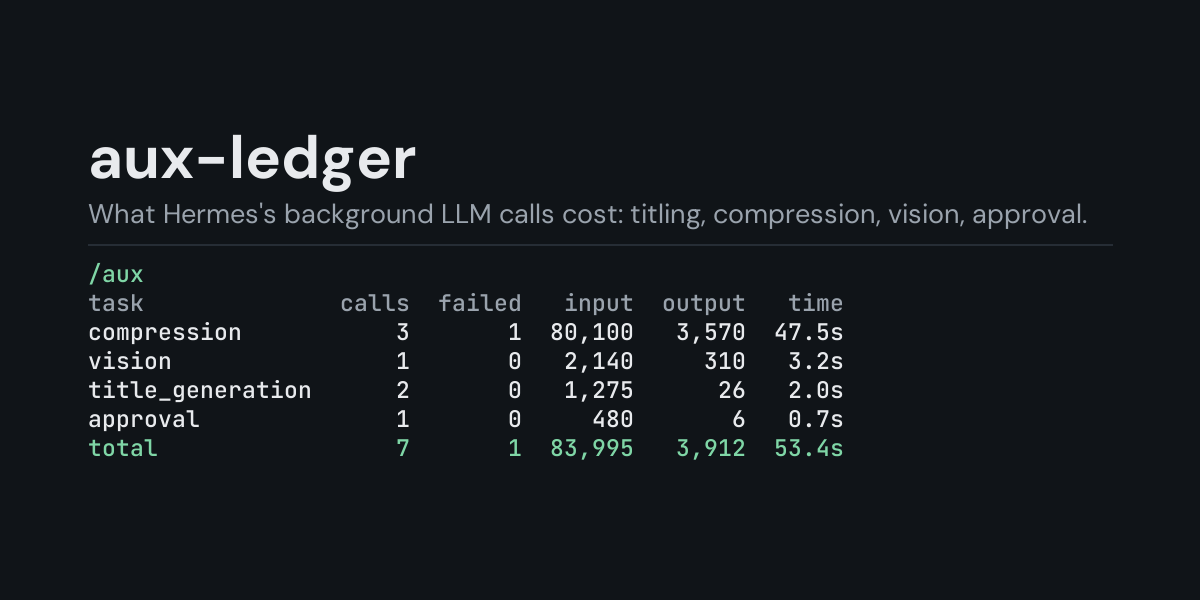
A local ledger of the LLM calls Hermes makes behind a turn, and a /aux command that shows what
they cost.
Hermes calls a model for more than your turns: session titles, context compression, vision,
approval checks and other auxiliary tasks each make their own requests, with retries and
fallbacks. Those requests do not pass through the main-loop pre_api_request /
post_api_request hooks, so usage plugins built on them do not count this traffic. aux-ledger
subscribes to post_auxiliary_call and records one row per provider attempt.
Install
hermes plugins install aux-ledger --enable
Requires Hermes 0.21.5 or newer (the first release with the auxiliary-call hooks). No API key,
no configuration, no dependencies.
Use
/aux             last 24 hours, by task
/aux session     the most recent session that made an auxiliary call
/aux all         everything in the ledger
/aux 7d          the last 7 days (any number of hours or days: 6h, 30d)
/aux models      add to any of the above to group by model instead of task
/aux providers   add to any of the above to group by provider instead of task
/aux days        add to any of the above to group by day, newest first
/aux recent      add to any of the above to list the newest 10 calls instead
/aux recent 25   the newest 25 instead (1 to 100)
/aux clear       delete the ledger
A time window counts back from now, so /aux 7d answers "what did the background calls cost
this week" and /aux 7d providers splits that bill by provider. The ledger keeps its newest
5,000 calls, so a long window on a busy install reaches back only as far as those rows do.
Example (/aux all, from the end-to-end test: one titling call, one compression call that
succeeded and three attempts of one that failed):
Auxiliary LLM calls, all recorded:

task              calls  failed  input  output  time
compression           4       3  1,000      50  0.0s
title_generation      1       0    321      12  1.1s
total                 5       3  1,321      62  1.1s

3 call(s) reported no token usage (streamed or failed).
- calls counts provider attempts, so a retried call shows up once per attempt.
- input is everything the provider read: fresh input plus cache reads and cache writes.
- time is the wall time of the attempts.
- Streamed and failed attempts carry no usage from Hermes; they are counted, with zero tokens,
and the footer says how many there were.
/aux days puts one day on each line, newest day first, so the day a long session kept
compressing stands out. Days are your computer's local calendar days, and a day with no
auxiliary calls has no line. Example (the plugin's own output for a sample week):
Auxiliary LLM calls, last 7 days:

day         calls  failed    input  output   time
2026-10-06      5       1  106,105   5,250  1m17s
2026-10-05      1       0      290       9   0.7s
2026-10-04      2       0   41,310   2,111  19.2s
total           8       1  147,705   7,370  1m37s

1 call(s) reported no token usage (streamed or failed).
/aux recent lists the newest 10 calls of the window one by one (/aux recent 25 lists 25,
up to 100), newest first, so a slow or
failed compression a few minutes ago can be found without reading the totals. result is
ok or the exception class Hermes reported (never the error message). Example (the plugin's
own output for sample rows):
Auxiliary LLM calls, last 7 days, newest 5 of 5:

when                 task     model   input  output   time           result
1m ago   title_generation   m-small     321      12   1.1s               ok
39m ago       compression   m-small  40,310   1,990  21.2s               ok
40m ago       compression   m-small       0       0  30.0s  APITimeoutError
3h ago        compression   m-small  41,020   2,104  18.7s               ok
2d ago             vision  m-vision   1,580      64   3.4s               ok
What is recorded
One JSON line per attempt in <HERMES_HOME>/plugin-data/aux-ledger/calls.jsonl (per profile):
ts, session_id, aux_task, provider, model, response_model, retry_count,
streaming, duration_s, error_type, has_usage, input_tokens, output_tokens,
cache_read_tokens, cache_write_tokens, reasoning_tokens.
Not recorded: prompts, system prompts, responses, error messages (only the exception class
name), base URLs, API keys.
The file is bounded: once it passes 2 MB it is rewritten to its newest 5,000 rows.
Security and footprint
register()only registers one hook (post_auxiliary_call) and one command (/aux).- No network access, no subprocesses, no downloads, no credentials read.
- Writes only
calls.jsonlunder its own plugin data directory./aux cleardeletes it. - Reads no Hermes state other than the hook payload it is handed.
- The hook is observer-only and never raises: if the ledger cannot be written, the auxiliary
call proceeds and the failure is logged at debug level. - Standard library only.
Development
python -m pytest tests                                   # unit tests, no Hermes needed
PYTHONPATH=<hermes checkout> python tests/e2e/hermes_e2e.py   # real loader + real auxiliary client
hermes plugins validate aux-ledger
Changes
- 1.4.0:
/aux recenttakes a row count,/aux recent 25(1 to 100; ten without
one). What is recorded did not change. - 1.3.0:
/aux recent, the newest 10 calls of any window, newest first, with their task,
model, tokens, time and result. What is recorded did not change. - 1.2.0:
/aux days, one line per day with auxiliary calls, newest day first; works with
every window (/aux 30d days). The ledger also reads correctly after a Windows tool has saved
it with a byte-order mark. What is recorded did not change. - 1.1.0: time windows (
/aux 6h,/aux 7d, any number of hours or days) and grouping by
provider (/aux providers). What is recorded did not change. - 1.0.0: first release.
MIT licensed.
README from the reviewed commit aee39a6; it updates when the author re-pins.