xBuildyTeam
Wave | BrainVault Mint for Hermes
Hermes puts your agent in any browser. Wave puts your agent's memory on any machine.
Part of Wave OS for Hermes. Wave OS: oswave.io · Wave Web: web.oswave.io
Portable, owner-held memory for Hermes Agent.
Hermes remembers on this install right away. When you want to keep those memories, you mint them to your own Wave vault on Theta. Private memories are encrypted to you, and nobody else can read them, not even Wave. Any new Hermes install pairs once with your wallet and gets its memories back from the chain.
- The plugin never signs, never mints and never sees your wallet key. Minting happens in Wave Web, and you approve each card in Wave Wallet Mint.
- Pairing gives this install a decrypt-only agent key. It can open only the cards you made readable by it, and you can revoke it in the wallet at any time.
- Every card read from chain is fingerprint-checked (keccak256 of the stored content).
- Recalled memories are labelled as data, never instructions. Text that looks like instructions is flagged as untrusted.
- Keys, tokens, recovery phrases and keystores are refused at capture. They are never stored, exported or minted.
Install
git clone https://github.com/xBuildyTeam/wave-os-hermes
cp -r wave-os-hermes/brainvault ~/.hermes/plugins/brainvault   # or $HERMES_HOME/plugins/
hermes config set memory.provider brainvault
hermes plugins enable brainvault
hermes memory status                              # brainvault ← active
Windows (PowerShell): Hermes keeps its files in %LOCALAPPDATA%\hermes, not ~/.hermes, so copy the plugin there:
git clone https://github.com/xBuildyTeam/wave-os-hermes
New-Item -ItemType Directory -Force "$env:LOCALAPPDATA\hermes\plugins\brainvault" | Out-Null
Copy-Item -Recurse -Force wave-os-hermes\brainvault\* "$env:LOCALAPPDATA\hermes\plugins\brainvault\"
hermes config set memory.provider brainvault
hermes plugins enable brainvault
hermes memory status
Not sure where your Hermes lives? hermes config set prints the path of its config.yaml, and the plugins folder sits next to it.
There are no extra Python packages to install: it uses cryptography (already a Hermes dependency) and the standard library. If keyring is installed, the agent key goes in your OS keychain. Otherwise it goes in a 0600 file.
Updating
cd wave-os-hermes && git pull
cp -r brainvault/. ~/.hermes/plugins/brainvault/
powershell -ExecutionPolicy Bypass -File "$env:USERPROFILE\wave-os-hermes\brainvault\scripts\update-windows.ps1"
That pulls, copies, stops Hermes so it loads the new code, and runs the setup check. Then reopen Hermes Desktop.
Copy the folder's contents (brainvault\*). If the plugin folder already exists, copying brainvault itself puts a second brainvault folder inside it, and Hermes keeps running the old version. Check with hermes brainvault doctor: the first line shows the version.
The Wave | BrainVault Mint page (Hermes Desktop, Webapp and dashboard)
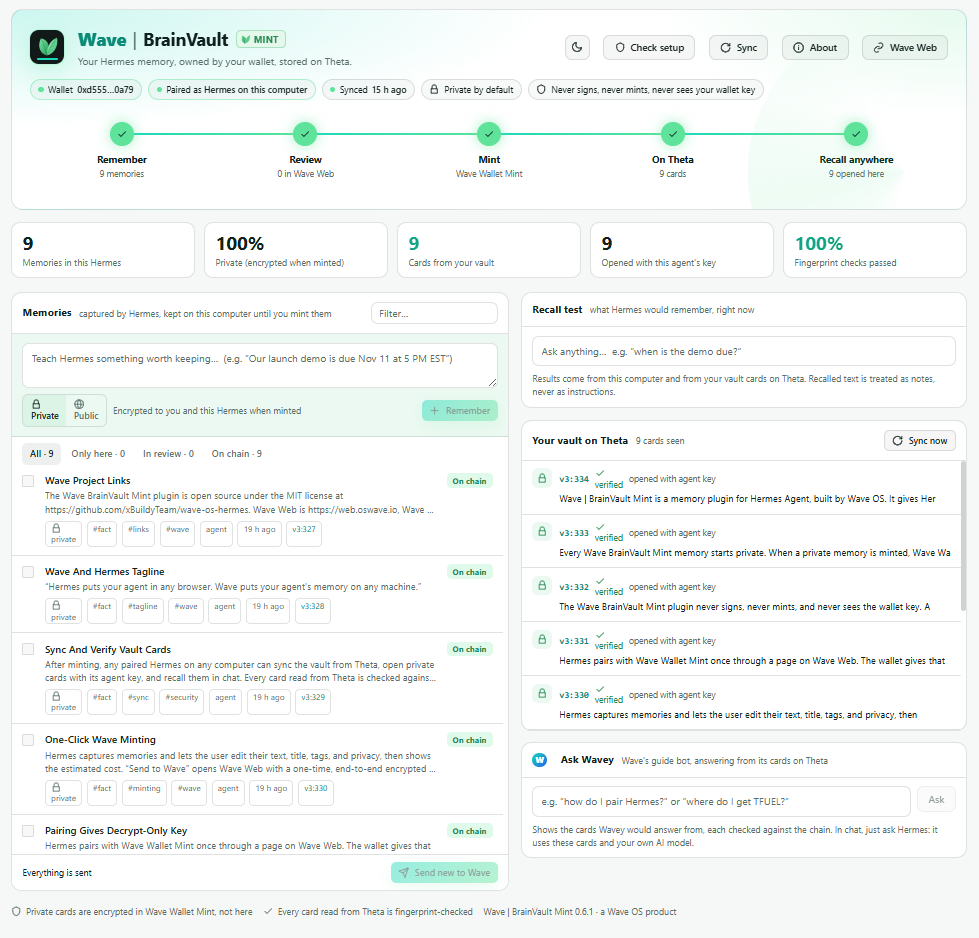
One screen for your whole memory: wallet, pairing and sync status, the Remember › Review › Mint › On Theta › Recall anywhere journey, your memories (add, filter, forget, send to Wave), a live recall test, and your vault cards on Theta with fingerprint checks. Pair and Sync are buttons.
hermes plugins enable brainvault # once: allows the page's backend to load
- Hermes Desktop or the Webapp (
hermes webapp): open Capabilities › Plugins, turn on Wave | BrainVault Mint, then click it in the sidebar (or search "BrainVault" in the command palette). - Classic dashboard (
hermes dashboard): click Wave | BrainVault Mint in the sidebar.
Paste a page, get cards. Paste notes, a doc or a web page into Hermes chat and say "turn this into Wave BrainVault Mint cards". Hermes calls brainvault_make_cards, which makes one self-contained card per idea (usually 200 to 1,200 characters, never over 1,500), keeps names, numbers and dates exact, adds a short title and up to 3 topic tags, keeps them private, and blocks secrets. The rules are enforced in the plugin itself (long cards are split, tiny ones merged, titles and tags cleaned), so any AI model gives good cards. Hermes tells you how many it made and about what minting will cost.
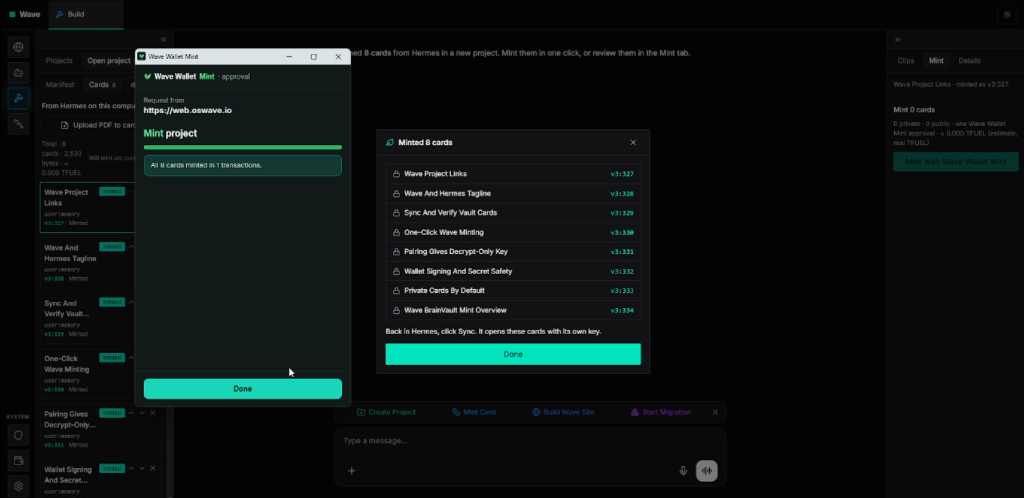
Edit before you send. Open a memory and click Edit to change its text, title, topic tags or Private/Public. The send bar shows about what minting will cost (Wave Wallet Mint shows the exact fee). Then Send to Wave opens Wave Web's Quick mint: it shows the cards, "Readable by: Me + Hermes on this computer" and the cost, and one Wave Wallet Mint approval mints them all. Back in Hermes, Sync marks them On chain with their card numbers.
Ask Wavey. Questions about Wave itself (pairing, minting, TFUEL, Wave Web, .theta names, bots) are answered from the public knowledge cards of Wavey, Wave's guide bot, read from Theta. Every card is checked on chain (same text, fingerprint, Wave's official signer) before Hermes uses it, and your own Hermes model writes the answer. Ask in chat, run /brainvault guide <question>, or use the Ask Wavey panel. A small built-in guide covers topics Wavey has no card for yet.
Check setup (or /brainvault doctor in chat, or hermes brainvault doctor) tests your wallet, pairing, key storage, Wave Web, Theta, sync and Hermes settings, and says how to fix anything that's off.
Developers: the UI lives in ui/app.js + ui/style.css. Run python3 ui/build.py to regenerate dashboard/dist/ and desktop/plugin.js.
Use
Everything works from the Hermes chat. Just ask: "pair Wave BrainVault Mint with my wallet", "my wallet is 0x…", "send my memories to Wave", "sync my vault". Or use the slash command:
| In chat | What it does |
|---|---|
/brainvault status | Wallet, pairing and memory counts |
/brainvault doctor | Checks the whole setup and says how to fix anything wrong |
/brainvault wallet 0x… | Your Wave Wallet Mint address (to find your vault cards) |
/brainvault pair | Opens Wave Web › Pair Hermes. Approve in Wave Wallet Mint, and the agent key arrives end-to-end encrypted. Finishes in the background. |
/brainvault send | Opens a one-time review page in Wave Web with your new memories already filled in. Check them, keep "Readable by: Me + Hermes", and mint with Wave Wallet Mint. The link works once, for 10 minutes, and its key never reaches Wave's servers. |
/brainvault sync | Read new cards from your vault now (also runs every 10 min) |
/brainvault guide <question> | Ask Wavey about Wave, answered from its cards on Theta |
The same commands work in a terminal as hermes brainvault status|wallet|pair|sync|doctor|guide|export|search|list|forget|unpair. export --file writes a migration file instead of a link.
Tools the agent gets: brainvault_recall, brainvault_remember, brainvault_make_cards, brainvault_forget, brainvault_status, brainvault_send_to_wave, brainvault_set_wallet, brainvault_pair, brainvault_sync, wave_guide, brainvault_doctor. Hermes's built-in memory writes (MEMORY.md / USER.md) are mirrored automatically, with provenance (operator, agent or external trust, session, date). Only the primary agent writes; subagents and cron runs can recall but never save.
How the memory loop works
- Capture. Facts and preferences go into a local store (
$HERMES_HOME/brainvault/brainvault.db). Recall is instant, and nothing leaves your machine. - Mint. Send to Wave encrypts the selected memories (AES-256-GCM, fresh key) into a one-time Wave Web drop and opens Quick mint. The key travels only in the link's
#fragment, so it never reaches Wave's servers. Wave Wallet Mint encrypts private cards (PV1) to you and this Hermes's agent key, and signs. You pay a small one-time TFUEL network fee; there is no subscription or storage fee, and reading is free. (export --filewrites a migration file for Wave Web's New migration › Paste instead.) - Recall anywhere. On a new install, run
pairand thensync. The plugin finds your cards through Wave Web's public index, reads each one from Theta, checks its fingerprint, and opens the private ones with its agent key.
What it touches (disclosure)
- Network. Only two services, both over HTTPS:
- Wave Web (
web.oswave.io): the public card index for your wallet (waveApi?action=creator_cards, sends your public wallet address), one-time encrypted drops for pairing and Send to Wave (agentDrop, 10-minute single-read), and Wavey's public listing and cards for Ask Wavey (bot_manifest,bot_pack). The Wave Web address is pinned tohttps://*.oswave.io. - Theta mainnet RPC (
eth-rpc-api.thetatoken.org): reads cards and their fingerprints (eth_call,eth_getLogs) and the gas price for cost estimates. Read-only; the plugin never sends a transaction. - No telemetry or usage reporting. Recall and search run locally; chat text leaves the machine only when you send memories to Wave.
- Wave Web (
- Browser. Pair and Send to Wave open a Wave Web page in your default browser.
- Stored data and credentials. Everything lives in
$HERMES_HOME/brainvault/:brainvault.db(memories and cached vault cards),config.json(wallet address, settings),wavey_cache.json(Wavey's public cards), and the decrypt-only agent key you approve at pairing: in the OS keyring if the optionalkeyringpackage is installed, otherwise inagent.key(mode 0600). It can't sign or spend, only open cards you made readable by this Hermes, and you can revoke it in Wave Wallet Mint.hermes brainvault unpairdeletes it. - Reads outside its own data. Hermes's
config.yaml, read-only, so the setup check can confirmmemory.providerandplugins.enabled, and Hermes's own plugin list (names, versions, enabled or not), so About can show which Wave plugins you have. Nothing from either leaves the machine. - Background work. A sync thread reads new vault cards every 10 minutes, and pairing waits up to 10 minutes in a background thread. Neither blocks the agent: a failed sync just tries again later, and an unanswered pairing times out on its own.
- No shell commands, no self-updating. The plugin never runs shell commands or downloads code. The dashboard reloads the plugin's own
.pyfiles from disk when they change (handy after a local update).scripts/update-windows.ps1is a separate helper you run yourself; the plugin never calls it. - Security review: docs/SECURITY-REVIEW.md.
Tests
python3 -m pytest brainvault/tests -q            # offline
BV_LIVE=1 python3 -m pytest brainvault/tests -q  # + Theta mainnet and Wave Web
The PV1 test vectors are made by Wave Wallet Mint's own code, so Python and the wallet stay byte-for-byte compatible.
README from the reviewed commit 3bb8a91; it updates when the author re-pins.