 Dgardenhire
The Clearing for Hermes
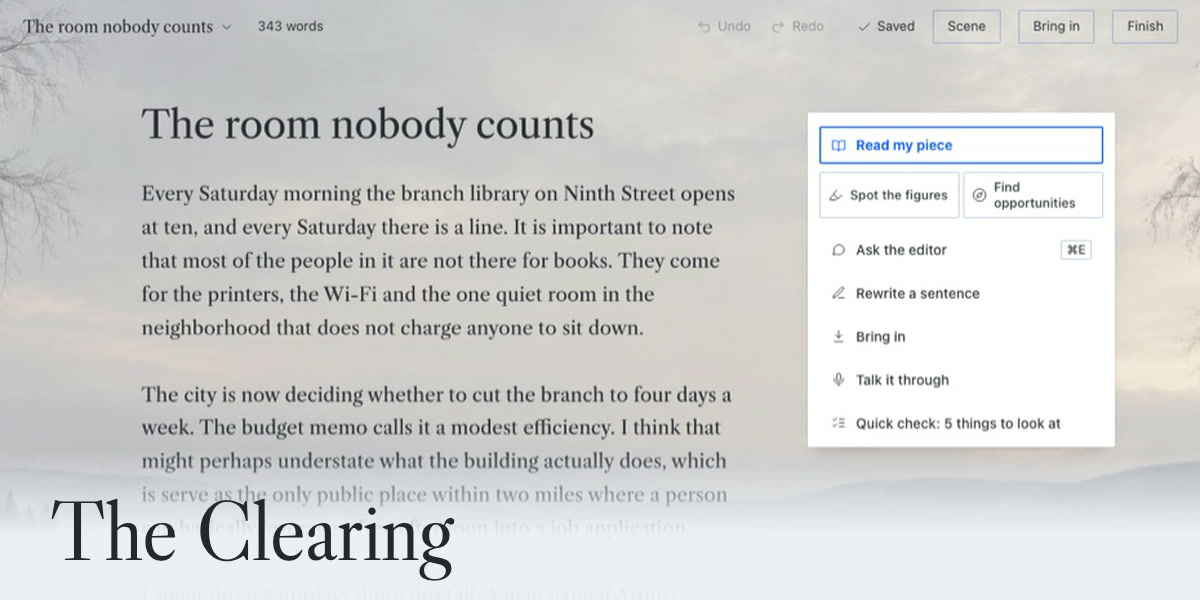
The Clearing is a writing editor inside Hermes Agent. Paste a draft and press Read my piece: it marks your own sentences with what to change, most important first, and changes nothing until you press Use this. Run any of 159 editing methods by name, from Strunk's composition rules to 44 figures of speech. Three reviewers can read it separately and argue it out. Your writing stays on your computer.
You write in one page, set in Libre Caslon Text, over a scene that follows your Hermes theme (Snow Light, Quiet Marsh, Night Tide, a plain page, or a picture of your own). The editor's notes are set in Hermes's own sans. Its suggested words are marked in the page so you can tell whose words are whose: a change inside a sentence keeps the page's typeface on a tinted wash with a dashed underline, a whole new passage is set in the sans with an accent rule beside it, and words you keep from the editor carry a faint tint and a tick in the margin until you type inside them. Every note sits beside the words it is about and names one change and why. Show me draws the change into your page: your words struck through, the editor's version after. Use this keeps it, Keep mine leaves your words, and Undo takes a kept change back out.
Requirements
- Hermes Desktop 0.21.6 or newer (
requires_hermesinplugin.yaml). - A model set up in Hermes, for everything the editor does. Quick check, Other words, Bring in (except a link and dictation), History, Trash and Finish work without one.
That means Hermes can already answer you in a chat. If you have chatted with Hermes, you have one. If not, open Hermes Settings, Model, and pick a provider and model there. - Tested on macOS. Windows and Linux are untested.
Install
From the Hermes plugin catalog: open Capabilities, then Plugins, search for The Clearing and click Install. Or in a terminal:
hermes plugins install clearing
To install from this repository instead: hermes plugins install Dgardenhire/hermes-clearing, or Capabilities, Plugins, Install from Git with https://github.com/Dgardenhire/hermes-clearing. Turn it on in Capabilities, Plugins. The Clearing appears in the sidebar and opens a sample piece with a welcome card the first time.
Optional: in Settings, Model, Auxiliary models, set The Clearing editor to the model you want for the editor. Without a choice it uses your main model. This lets the editor run on a faster or cheaper model than the one you chat with. There are no keys or accounts to set up for The Clearing itself. Its own choices (Scene, Text, Contrast and Suggested text) are in the room, described below.
Uninstall
Open Capabilities, then Plugins, and turn The Clearing off, or click Uninstall beside it. In a terminal: hermes plugins remove clearing.
Removing the plugin leaves your writing where it is, in <HERMES_HOME>/plugin-data/clearing/ (the database clearing.db, debug.log, Word exports, your scene picture and any writing home), so reinstalling picks up where you left off. To erase everything, delete that folder after removing the plugin. Files you exported to your own folders are not touched.
What it does
- Read my piece. The editor reads the whole piece and returns up to five changes, most important first, with your strongest line, a question to answer before you publish when there is one, and the one passage it would cut first. A piece over 1,500 words is read in sections. Find figures of speech and Where to add a technique sit beside it on the desk. The first marks the figures of speech you already use, from the library's list of 44, and changes nothing. The second lists up to eight places where one item from the library would lift the piece. Both can be tried in your own words with Try it, where the coach asks questions and writes nothing.
- One sentence at a time. Select a sentence or paragraph and a bar offers Rewrite (three versions), Tighten, Make it concrete and Ask. Select a single word and it offers Other words.
- Quick check, built in, no AI needed. Throat-clearing, stock openings, stacked hedges, filler, stock phrases, "not X, it's Y" setups and long sentences, marked in the page without a model call. Words inside quotation marks are left alone.
- Other words, built in, no AI needed. Double-click a word: its senses and other words for it open in a card beside the word, from Open English WordNet. Click one and it swaps in; your word and every word you tried stay in the card. Suggest wording asks your model for four more.
- The Ask line (Cmd E on a Mac, Ctrl E elsewhere). Say what you want in plain words ("my ending is weak", "where do readers get lost", "spelling") and it finds the matching pass in the library, or sends your words to the editor as typed. With a passage selected you get three versions of it.
- Notes pinned to your words. Every quote the model returns is checked against your text before you see it. A note whose words are not in your piece is dropped, never guessed at. If you rewrite a passage while the editor works, its note is set aside.
- Bring in a Word file, a PDF, a text or Markdown file, a public web page, pasted text, or your voice (Talk it through, which types at the cursor). Word files and PDFs come in as words only.
- Undo, History and Finish. Undo and Redo sit in the top line. History lists every saved version of the piece and the suggested text you used, with the model that wrote each. Finish copies as Markdown or plain text, saves a .md or .txt into a folder you choose, saves as Word through Hermes's save dialog, and marks a version finished.
- Pieces. Autosave on every pause, a version after two idle minutes, before a change you keep and at Finish. Move a piece to the Trash and restore it, or delete it forever there (it asks first). Mark pieces you wrote as voice samples, and keep rules in Your guidance that go to the editor on every pass.
- The room. Scene, Text (Regular or Larger), Contrast (Standard or Stronger) and Suggested text (Shown or Off). With Suggested text Off the editor points and asks but drafts no words, and the backend refuses suggestion requests too.
The library
The library is written for The Clearing in its own words. Find any item from the Ask line, or open All methods: it sits on the desk right under Read my piece, with the number of items it holds, and in the title menu.
| Items | |
|---|---|
| Built in, no AI needed: Quick check and Other words | 2 |
| Editor passes: Fix punctuation and typos, Find weak sentences, Find sentences that run long, Find tangled sentences, Find words that feel out of place, Find hedges and filler, Propose openings, Three ways to state the main point, Three ways to make the promise, Try a shorter draft, Suggest wording | 11 |
| Suggested text, as All methods lists it: Rewrite, Suggest a next sentence, Propose endings, Title ideas | 4 |
| Composition checks after Strunk, such as one job per paragraph and weight at the end | 9 |
| Editorial methods, such as Find the main point, See where readers get lost, Anticipate counterarguments and Build earned tension | 33 |
| Craft techniques in five paths: Shape true nonfiction, Find the human story, Make the language memorable, Sharpen the message, Hook them with a story | 56 |
| Figures of speech by effect, in six groups, each with a definition and an example | 44 |
That is 159 items, the number on the desk's All methods button. The code files eight more actions under Suggested text: Read my piece, Find figures of speech, Where to add a technique, Ask the editor, Start from an idea, Show me, Change it and Why?. They run from their own buttons, not from All methods, and are not counted here. With Suggested text Off, the nine items that draft words leave the list (Propose openings, Three ways to state the main point, Three ways to make the promise, Suggest wording, the four above and Turn material into a draft), and the count reads 150.
Most methods return notes pinned to your words. Eight have their own screen: Turn material into a draft (three drafts from your notes, with anything the notes lack listed apart), Check whether it sounds like you (against your voice samples, quoting the sample each judgment rests on), Get several editorial perspectives (a newcomer, a skeptic and a line editor in three separate model calls), Let reviewers argue it through (four calls, plus the three reviews if the piece has none yet), Keep a lesson for next time, Build your writing guidance, Set up a writing home (your guidance and pieces as a folder of plain files, no model) and Find the piece across drafts.
Where your words go
When you ask the editor for anything, the piece (or the passage you selected), its title and the rules in Your guidance go to the model you chose in Hermes, through Hermes's plugin model access, on The Clearing's own model setting, The Clearing editor. Hermes removes secrets from the text first; if that step is unavailable, The Clearing refuses the call rather than send raw text. A model on your own machine keeps the text there; a cloud model sends it to that provider. Read my piece, Find figures of speech and Where to add a technique send the whole piece. The Try it coach sends the passage, your try, the title and your rules. The voice check, Build your writing guidance and a next sentence also send the pieces you marked as voice samples. Find the piece across drafts sends the pieces you choose.
Not sent to a model: Quick check, Other words, reading Word files and PDFs, your scene picture, the writing home, and your pieces and history.
Disclosures
- Network calls to third-party services: none of its own. The Clearing has no LINCHPIN account or server. It reaches the network only through Hermes: editor passes go to the model you configured in Hermes, only when you start one. Bring in a link hands the address to Hermes's own
web_extracttool, and your web backend fetches the page. Before that, the plugin checks the address is public: it refuses anything that is not http or https and anything that resolves to a localhost, private or link-local address, using a DNS lookup of the host. Talk it through sends the recording to the speech-to-text set up in Hermes. When that is a cloud service (OpenAI, Groq, Mistral, xAI, ElevenLabs or DeepInfra), or Hermes decides at run time, The Clearing names the service and waits until you press Send for that service. The credit links on the About screen open in your browser only when you click one. - Reads outside its own data: only files you pick, and these two. (1) Hermes's
sttconfiguration, read-only throughhermes_cli.config.load_config_readonly, to learn which speech-to-text Hermes is set to use. (2) The shared Hugging Face model cache (HF_HUB_CACHE,HF_HOME,XDG_CACHE_HOME, or~/.cache/huggingface/hub), read-only, to look for a faster-whisper speech model already downloaded. The Clearing falls back to it only when Hermes's speech-to-text is unavailable or fails, and never downloads a model. On that path it also setsKMP_DUPLICATE_LIB_OK=TRUEin the process environment. - Microphone: the page records with the browser's own microphone access, only after you click the microphone or Talk it through, and stops when you click again or at ten minutes (25 MB at most). The recording is held in memory, sent once, written to
<HERMES_HOME>/plugin-data/clearing/only while it is turned into text, then deleted. Neither the audio nor a transcript is kept. - Shell commands: none. (Scripts under
scripts/andtests/are for development; Hermes does not load them.) - Background processes: none. No scheduled work and no self-updates. The page itself checks in with its own backend only while it waits: once a second while an editor pass you started is running (the
pass.endedevent usually answers first), and every five seconds while the backend is unreachable, until it answers. Both stop on their own. At start-up, passes left "running" by a restart are marked failed. - Stored credentials: none. It declares no
requires_env, asks for no keys, and does not read Hermes's credential stores. - Telemetry: none.
- Hook: one observe-only hook,
post_auxiliary_call. It ignores every model call except The Clearing's own (clearing_editor) and reads only the finish reason, the model name and the token counts, to catch an answer cut off at its length limit. It never reads or keeps prompt or reply text and never changes a call. The backend also emits onepass.endedevent to its own page through Hermes's plugin event bridge, so the page updates when a pass finishes. - Model use: each pass is one model call on your own Hermes model and account. Get several editorial perspectives makes three calls. Let reviewers argue it through makes four, plus the three reviews if the piece has none yet.
- Storage: pieces, versions, editor notes, the rules you keep, the suggestions you kept or skipped, and for each pass the model name, provider, token counts and finish reason, in
<HERMES_HOME>/plugin-data/clearing/clearing.db. Set up a writing home writes plain files into<HERMES_HOME>/plugin-data/clearing/home/and never over a file already there. Scene and text choices and words not yet saved are kept in Hermes's desktop plugin storage. When an editor pass fails, one line goes to<HERMES_HOME>/plugin-data/clearing/debug.log: the time, the kind of error, and an excerpt of the error message with anything in quotation marks removed, never your words. It keeps the last 200 lines and is there so a failure can explain itself; delete it whenever you like. - Files: it reads only files you pick and writes text exports only into a folder you grant. Word files are built in
<HERMES_HOME>/plugin-data/clearing/exports/and handed to Hermes's save dialog. PDFs (12 MB at most) are read with the Python standard library, with caps on objects, inflation, pages and time. Your own scene picture (JPEG, PNG or WebP, 6 MB at most, checked by its bytes) is kept in<HERMES_HOME>/plugin-data/clearing/scene/until you remove it. - Deleting: Move to trash is a flag you can undo. In the Trash, Delete forever (one piece) and Empty the trash (all of them) ask first, then remove the piece, its versions, its pass records and the suggestions you kept or skipped from
clearing.db, with SQLite's secure delete on so the words are overwritten. Rules you kept from that piece stay in Your guidance. Files you exported, and a writing home you set up, are yours and are left alone. Past 200 versions of one piece, the oldest pause-saves are dropped. - Suggested text: drafted only when you ask, put into the page only when you click Use this, and recorded (what it replaced, what went in, which model) for History. With Suggested text Off the backend refuses it.
- Not used: no camera, no tools of its own, no middleware.
- Private Hermes import:
dictation.pyimportstools.voice_mode.transcribe_recording, which is not in Hermes's public plugin API. The import is guarded and falls back to faster-whisper on this computer when it is there, and to a plain message when it is not. - Images: the three scene photographs (Snow Light, Quiet Marsh, Night Tide) were generated for The Clearing.
Credits
The named editorial methods come from Compound Writing by Every (Katie Parrott). The Clearing's instructions, checks and workflows are written independently, no Compound Writing file is included, and The Clearing is not affiliated with or endorsed by Every. The craft techniques draw on published books about writing, named in library/additions.json under credits; none of their text is reproduced. Libre Caslon Text is used under the SIL Open Font License 1.1 (desktop/assets/Libre-Caslon-Text-OFL.txt). Other words uses Open English WordNet 2025 (CC BY 4.0, by the Open English WordNet team) and WordNet 3.1 (Copyright 2011 Princeton University, under the WordNet license); the full notice is in library/thesaurus/NOTICE.txt. The About screen lists the typeface and the dictionary.
The Clearing is an independent plugin, not made by Nous Research.
Development
- Manual: linchpin.studio/hermes/clearing/manual, source in docs/MANUAL.md. What changed: CHANGELOG.
- Tests:
cd tests && /usr/bin/python3 -m unittest(Python, plus the page's JavaScript throughnode --test). - Desktop bundle:
node <hermes-ui-kit>/scripts/build.mjs .from this folder, with a checkout of hermes-ui-kit (add--checkto confirm the committed bundle is current). Assets:/usr/bin/python3 scripts/embed_assets.py(the typeface goes into the bundle as WOFF2; the scene photographs stay indesktop/assets/and reach the page from the backend'sGET /scene/builtin/{name}). - Library:
node scripts/port_library.mjsre-ports the methods and craft paths from the web app;/usr/bin/python3 scripts/overlap_check.py --source <upstream folder>checks that no 12-word run of shipped text appears in a source. SetCLEARING_UPSTREAMto that folder and the test suite runs the same check.scripts/release-check.shruns it before a release and fails if the variable is missing (docs/RELEASE.md). - Screens: serve the repo (
/usr/bin/python3 -m http.server 8794 --bind 127.0.0.1 --directory .) and runharness/shoot.sh(setPORTif 8794 is taken). The pictures are of the sample piece. - Live test and demo:
docs/LIVE-TEST.mdanddocs/DEMO-NOTES.md. - Catalog entry:
docs/catalog/clearing.yaml, withSHA_PLACEHOLDERreplaced by the commit to pin. The pull request text isdocs/catalog/PR.md.
License
The Clearing's own code and text are under the PolyForm Shield License 1.0.0 (Required Notice: Copyright (c) 2026 Damon Gardenhire). In plain English: it is free to use, including for paid writing work; you may not use this code to offer a competing product. The desktop bundle includes hermes-ui-kit, the author's own code, under the same license. The fonts, the WordNet data and the other third-party material listed under Credits keep their own licenses. All of this is in NOTICE.
README from the reviewed commit f6310b4; it updates when the author re-pins.