
 studioluftbruecke
Forgebrücke
A bridge to your Forgejo. Forgebrücke connects Hermes Agent to your self-hosted
Forgejo. Gitea works where its API matches. Hermes works there as its own
account on its own feature branches, and the merge into main stays yours.
Version 0.0.26. MIT. A Studio Luftbrücke Hermes plugin.
What it does
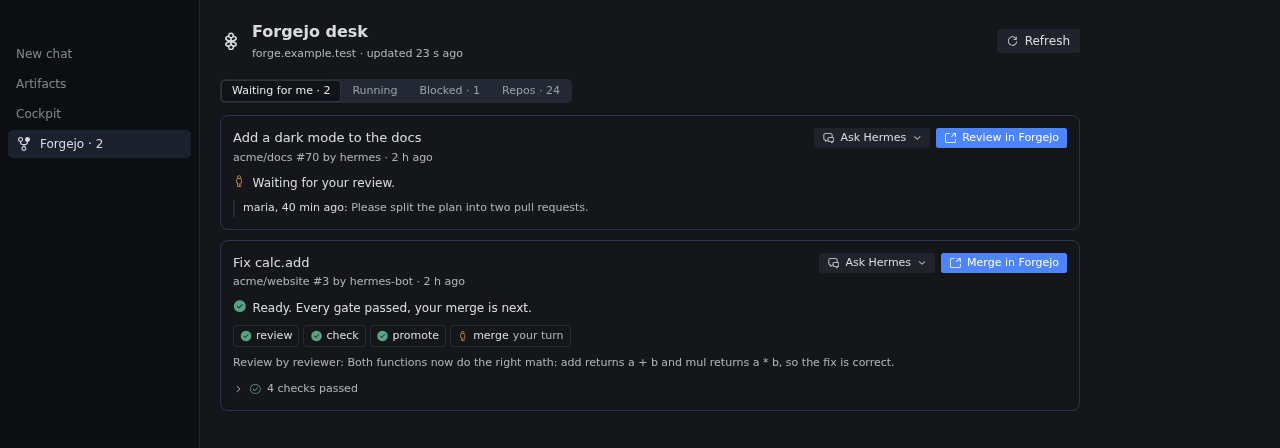
- Desk. The pull requests that wait for you, each with its state in one sentence, in Desktop
orhermes forgebruecke desk. - Parking. Park a waiting pull request with a note only you see. It leaves the count and comes
back on someone's comment, new commits, or when marked ready. - Chat and writes. Ask about issues, pull requests, checks and repos. Writes follow Hermes'
approval setting. - Receipts. "Pushed", "opened" or "merged" in a reply is checked against Forgejo and marked ✓ or ❌.
- Flows and mentions. Per repo: agent review, checks, optional staging, then you. Hermes
answers mentions of its account in the thread. - Repos and lessons. Access, presets, audit, import, mirrors, templates, and short Git lessons.
Install and update
Needs Hermes 0.23.0 or newer. Run the first line where Hermes runs; with Hermes on a server, the
second on the Desktop computer too.
hermes plugins install https://github.com/studioluftbruecke/hermes-forgebruecke --enable
hermes plugins install https://github.com/studioluftbruecke/hermes-forgebruecke
Then start a new chat. Update with hermes plugins update forgebruecke in the same places.
- The sidebar switch and position on the Forgebrücke settings page are kept per Desktop, so a second computer starts with the defaults.
Hermes on a server
Desktop draws the desk and settings from its own computer, so both places need the same version:
- On the server, add
-p <profile>to the install and update commands. - Then Capabilities → Plugins → Rescan; switch a new Desktop half on.
- Tokens and settings go into the server profile only; the Desktop computer's copy needs none.
- After a server update, switch Agent in off and on there, then start a new chat.
- The mention channel needs
hermes gateway restarton the server; off and on is not enough. - Compare
hermes plugins liston both computers.
First use
- A Forgejo account for Hermes. Create a user, for example
hermes. Add it to each repo under
Settings → Collaborators. Signed in as that user, create a token for all repositories with
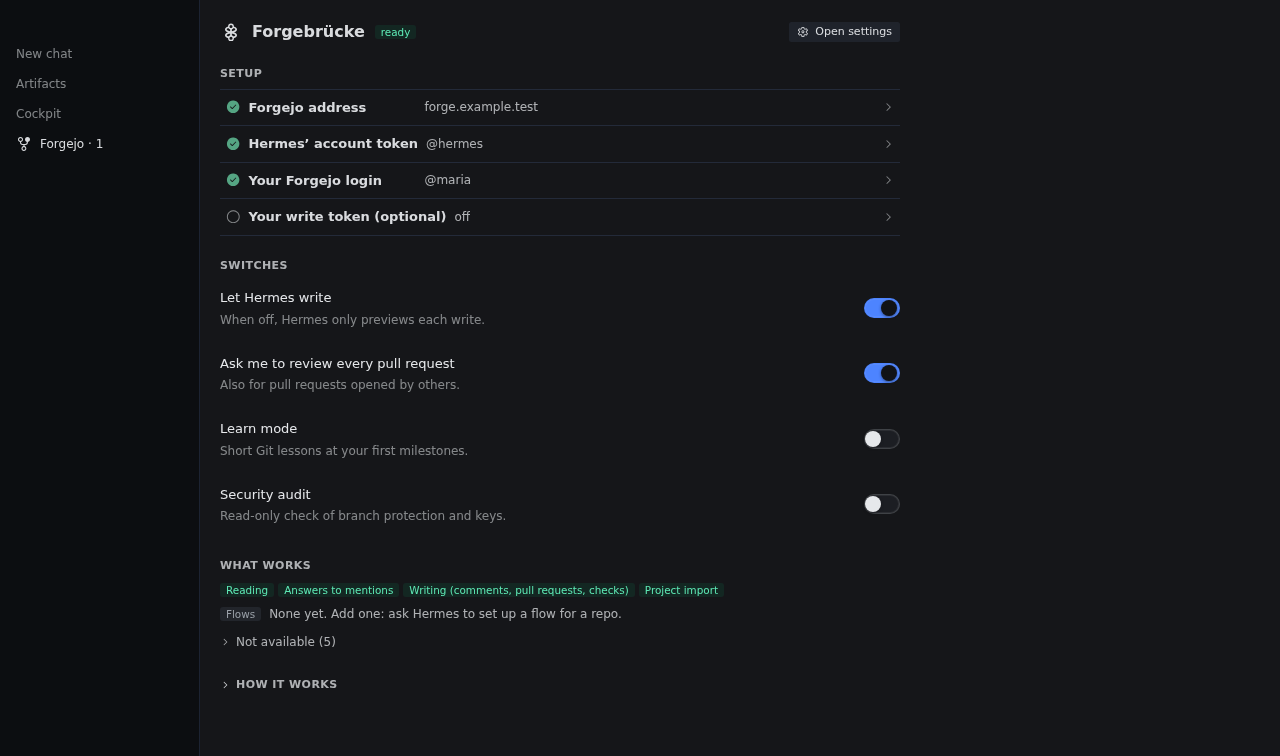
read:notification,write:issue,write:repository,read:user. - Address, token and you. In Hermes Desktop open Settings → Plugins → Forgebrücke. Enter your
Forgejo address and Hermes' token. Then click "Use @your-name" on the Forgebrücke page, so the
desk knows whose reviews to list. - Let Hermes write. A new setup only previews writes. Switch on "Let Hermes write". Then ask
"What waits for me on Forgejo?"
The Forgebrücke page and hermes forgebruecke doctor name the next step.
Optional:
-
Merge and comment from the desk. Add your write token, a token of your own account with
write:repository,read:userandwrite:issue. It is also exposed to Hermes, ultimately giving
Hermes full access to your account. -
Git as Hermes' account.
hermes forgebruecke git-credentialprints the threegit configlines. -
Mentions. Run these two commands. The doctor names what is still missing.
hermes -p <profile> config set platform_toolsets.forgebruecke '[forgebruecke]'
hermes -p <profile> config set platforms.forgebruecke '{enabled: true}'
Your rules
- The merge is yours. Nothing approves or merges
main. A flow can merge only into an
unprotected branch you named, such asstaging. - Forgejo decides where. Hermes reads and writes only where its account has access.
- Writes follow Hermes' approval setting. With approvals on, each write asks; with approvals
off, writes go out unasked. Protectmainso only you push and merge there. - Unattended runs do not write (cron jobs, single-query runs, mention turns), except a flow you
wrote and review requests to you. - A new commit or a changed flow is checked again. A push or a higher flow
versionreruns
every gate; a failed or edited gate reruns from there. - One flow per repo. A rule that lists several flows runs only the first one.
If something is wrong
- Start with the doctor.
hermes forgebruecke doctornames the next step, and why a feature is
not available. - A write changed nothing. A new setup only previews. Switch on "Let Hermes write".
- A write was refused. The refusal names the missing access and links the repo's Collaborators page.
- The desk lists no reviews. Check that "You" is set (setup step 3).
Settings
"You" and the four switches are on the Forgebrücke page. Everything else is in Hermes' settings.
| Setting | Default | What it does |
|---|---|---|
url | Your Forgejo address | |
token (FORGEBRUECKE_BOT_ACCOUNT_TOKEN) | Hermes' token | |
you | Your Forgejo user name | |
owner_token (FORGEBRUECKE_PERSONAL_WRITE_TOKEN) | Your write token, for the desk's Merge and Comment buttons | |
dry_run | on | Preview writes, send none |
review_every_pr | on | Ask you to review every open pull request |
learn_mode | off | Lesson cards |
audit_enabled | off | Allow the read-only audit |
writes | empty | One rule per repo: repo_glob, flows, mentions, targets |
flows_path | .forgebruecke/flows.yml | Where a repo keeps its flow |
default_review_profile | this profile | Profile that runs a flow's review; it needs Forgebrücke enabled |
mention_authors | everyone with write access | Narrows whose mentions get an answer |
poll_interval | 30 | Seconds between polls of Forgejo (30 to 3600) |
Disclosures
- Network. Only your Forgejo, polled on your interval. The doctor also reads its
/swagger.v1.json. While Desktop is visible, the desk page reads every 30 s and the settings
page every 2 min. The sidebar count reads every minute, or your interval if longer. A hidden
Desktop reads nothing. Remote HTTP URLs warn; use HTTPS outside localhost. - Scope detection. The doctor learns a token's write scopes from requests Forgejo must reject:
emptyPOSTs and aPATCHof a missing notification. Only the settings page checks your write token. - Credentials. Two tokens in your profile's
.env, written by Hermes' settings. Any agent shell
on that host can read them. The plugin never readsFORGEJO_TOKENor another tool's token. - Writes, under Hermes' approval setting.
- Comments with an AI-disclosure footer, and line comments as a
COMMENTreview - Pull requests with labels and review requests
- Checks on a commit
- Flow and pack files, as a branch plus a pull request
- Labels and protection presets
- Imports into Hermes' account
- Push mirrors. Forgejo stores Hermes' token in the mirror's settings
- Repos from templates
- Comments with an AI-disclosure footer, and line comments as a
- Writes without a card. Review requests to you (
review_every_pr). A flow you wrote posts
checks namedforgebruecke/<flow>/…, one status comment per pull request and notify comments. Its
promotegate opens a pull request and merges it into the branch the flow names. None of them
withdry_runon. - Unattended agent turns. A mention by someone with write access starts a turn without you. The
turn gets only the toolsplatform_toolsets.forgebrueckenames, reads only its thread's repo and
cannot write through tools. Its answer is posted as Hermes' account. Issue and comment text is
untrusted input. A tool list with the shell, file writes, code, memory, past-session search or an MCP
toolset keeps the channel off. The channel posts only answers, into the thread of a mention from the last hour on
a repo whose rule allows mentions. A cron delivery orsend_messageaimed at it is refused. - Background ticks. While a flow or review requests are on, a loop in the Hermes gateway ticks
everypoll_intervalseconds. A tick reads open pull requests, starts review workers and sends
what a flow names. The mention channel ticks too. If neither runs, the settings page says so; then
runhermes -p <profile> forgebruecke tickfrom cron, for example every five minutes. - Review workers. A flow's review gate starts
hermes -p <profile> chat --query-file <prompt> -t no_mcp --ignore-rules -Q, at most two at once. That profile must have Forgebrücke enabled;
otherwise the gate ends in an error that names the command to enable it. The turn runs in that
profile's gateway with its model. It gets no memory,SOUL.md, built-in toolsets or MCP servers.
Hermes still offers it the tool-search bridge and the profile's plugin tools, and Forgebrücke
refuses every call. The prompt holds the pull request's text and diff, which its author controls.
The worker writes nothing; its answer is the verdict. Its summary and findings are posted on the
pull request as plain text, cut to a fixed length. Links, issue and commit references, HTML and
mentions in them are made inert. - The desk. The page calls only this plugin's routes on your Hermes backend. Your write token
merges (/merge, pinned to the shown commit) and reads your merge rights (/desk,
/repo-pulls)./commentposts your words as you./parkand/unparkwrite only
parked.json./settingsavesyouand the four switches throughhermes config set. "Create a
reviewer profile" asks first. It runshermes profile create --clone-from, which copies
config.yaml,SOUL.mdand the.envwith all its keys. Thenhermes memory reseterases the
copy's memories andhermes config unsetremoves Forgebrücke's two tokens./reload-tokensreads
those two tokens again through Hermes' secret loader and keeps them in memory; it restarts
nothing. "Ask Hermes" opens a chat with a draft and sends nothing. A process that can call these
routes can do the same, so keep Hermes' approvals on. - Guard. A tool call that would edit the profile's settings or secrets, this plugin's files or
its data folder asks you first. The guard catches direct routes, not every script. - Git credential helper (only where you set it up). It prints Hermes' token for your Forgejo
address, nothing for another host, and never your write token. Git keeps no cached copy. - Process and state. The plugin runs inside the Hermes gateway. Under
plugins.isolation: host
it loads without the mention channel. State, run records,receipts.jsonl,desk-actions.jsonl
andlessons.jsonlive in your profile's plugin data folder. @forgejo:in any message expands, including text you paste.- No telemetry, no hosted service.
Uninstall
Run hermes plugins remove forgebruecke in every place you installed it. The tokens in the
profile's .env and the plugin's data folder stay. Revoke the tokens in Forgejo.
Contributing
See CONTRIBUTING.md.
License
MIT, see LICENSE. The Forgejo logo, used unmodified, is by Caesar Schinas and licensed CC BY-SA 4.0.
README from the reviewed commit 71bb5c1; it updates when the author re-pins.