
 studioluftbruecke
Shaderbrücke
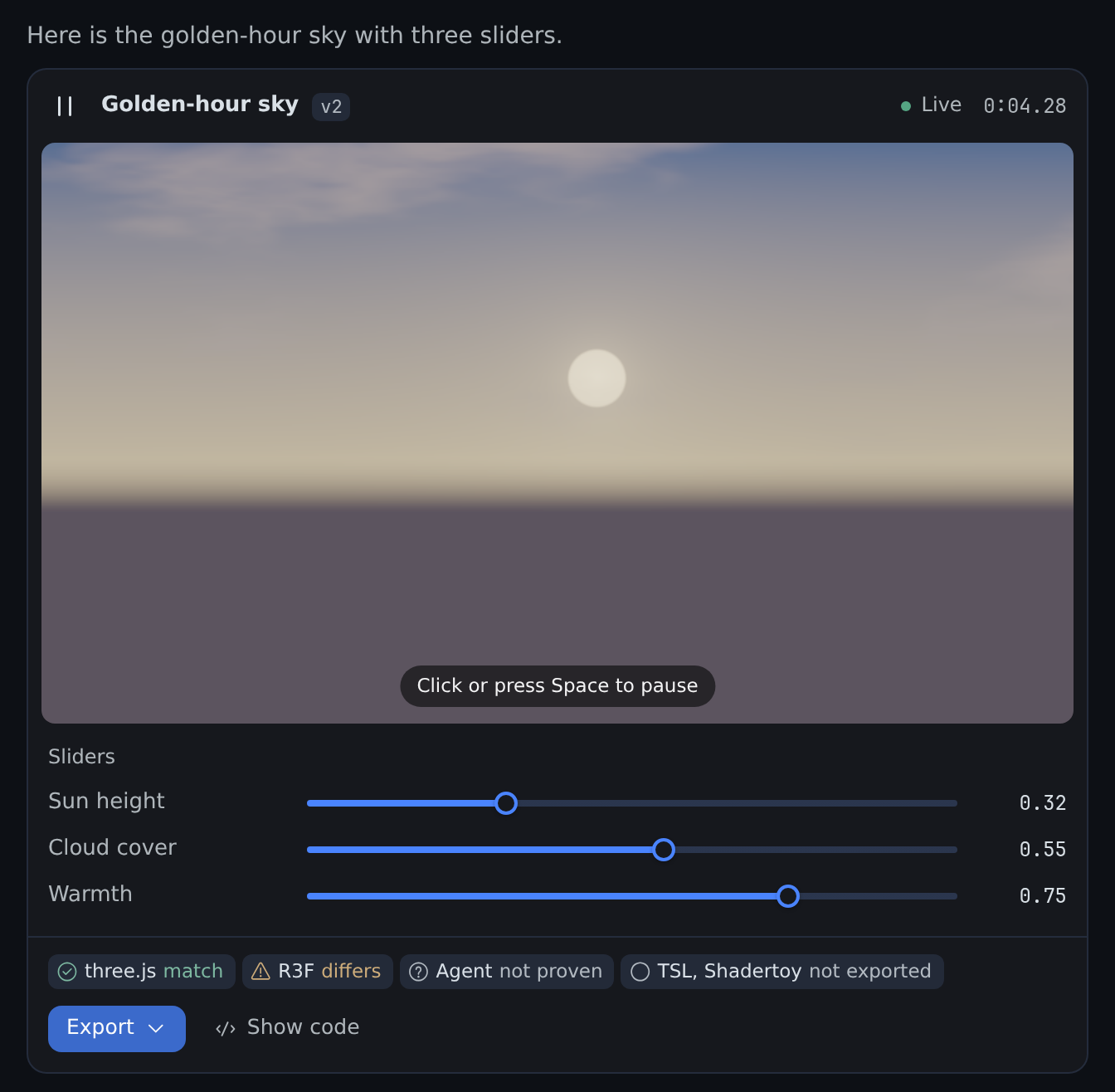
A shader lab where your Hermes agent checks its own work: it writes a GLSL shader, renders it, looks
at the frames, fixes them, and hands you a live card with sliders and exports that prove themselves.
What it does
- Checked before you see it. A headless Chromium on your Hermes host lints, compiles and renders
three frames. The agent looks at its own contact sheet and fixes flat, black or still frames
before it answers. - Live in the chat, with sliders. Hermes Desktop plays the shader in the chat. Each
@slider
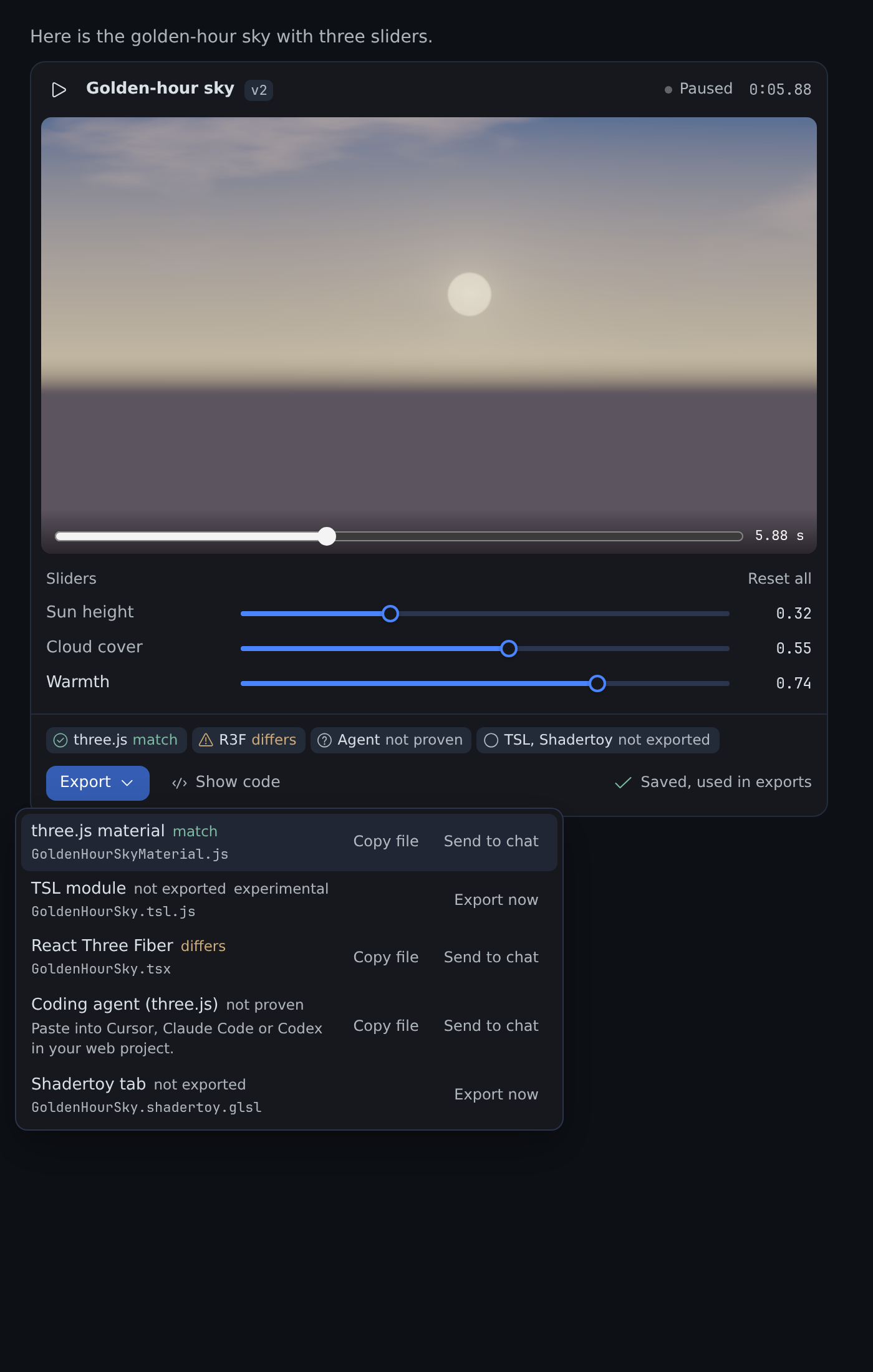
line becomes a slider you move without another agent turn. Your values become the export defaults. - Exports that prove themselves. three.js, React Three Fiber, TSL, Shadertoy, an agent handoff,
and experimental TouchDesigner and ISF. Each export is rendered next to the source and gets a
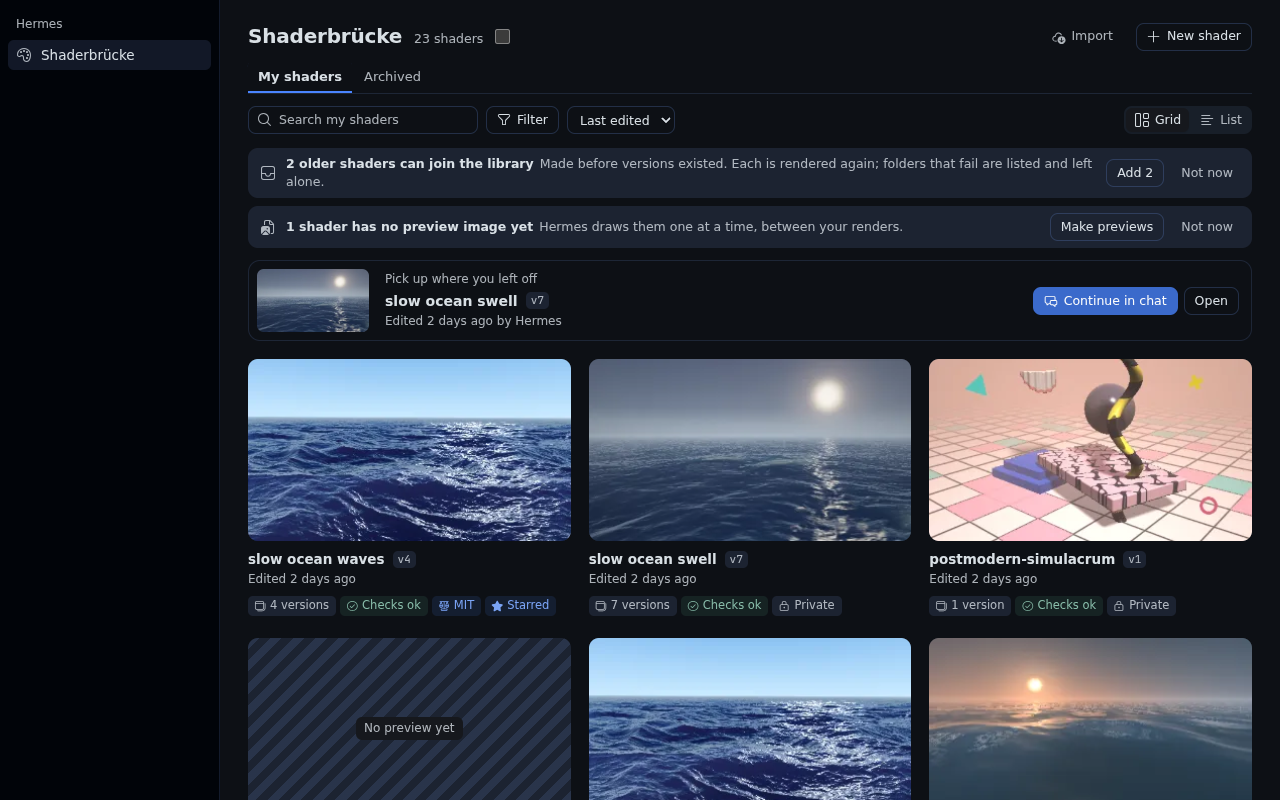
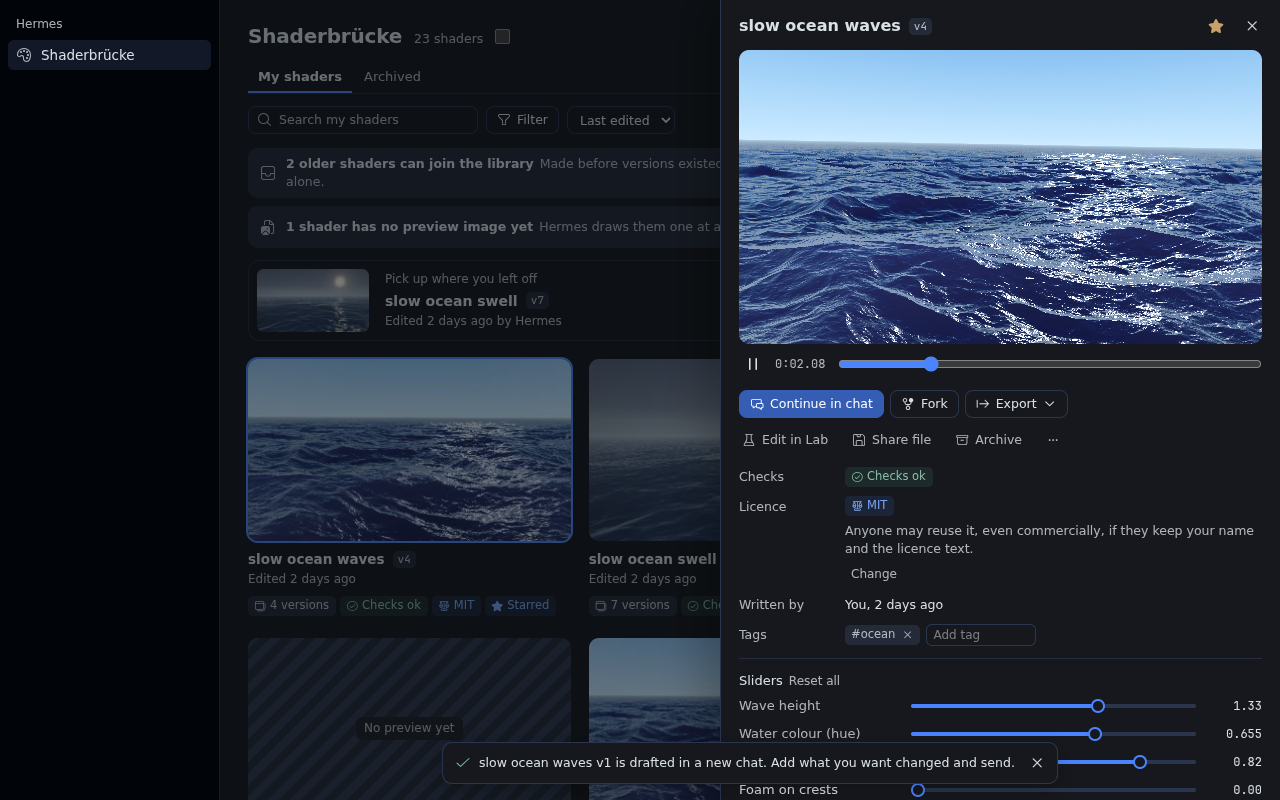
verdict:match,differsornot_proven. A silent pass does not exist. - A library you own. Every render is a version with its frames, forks and licence. Browse it on
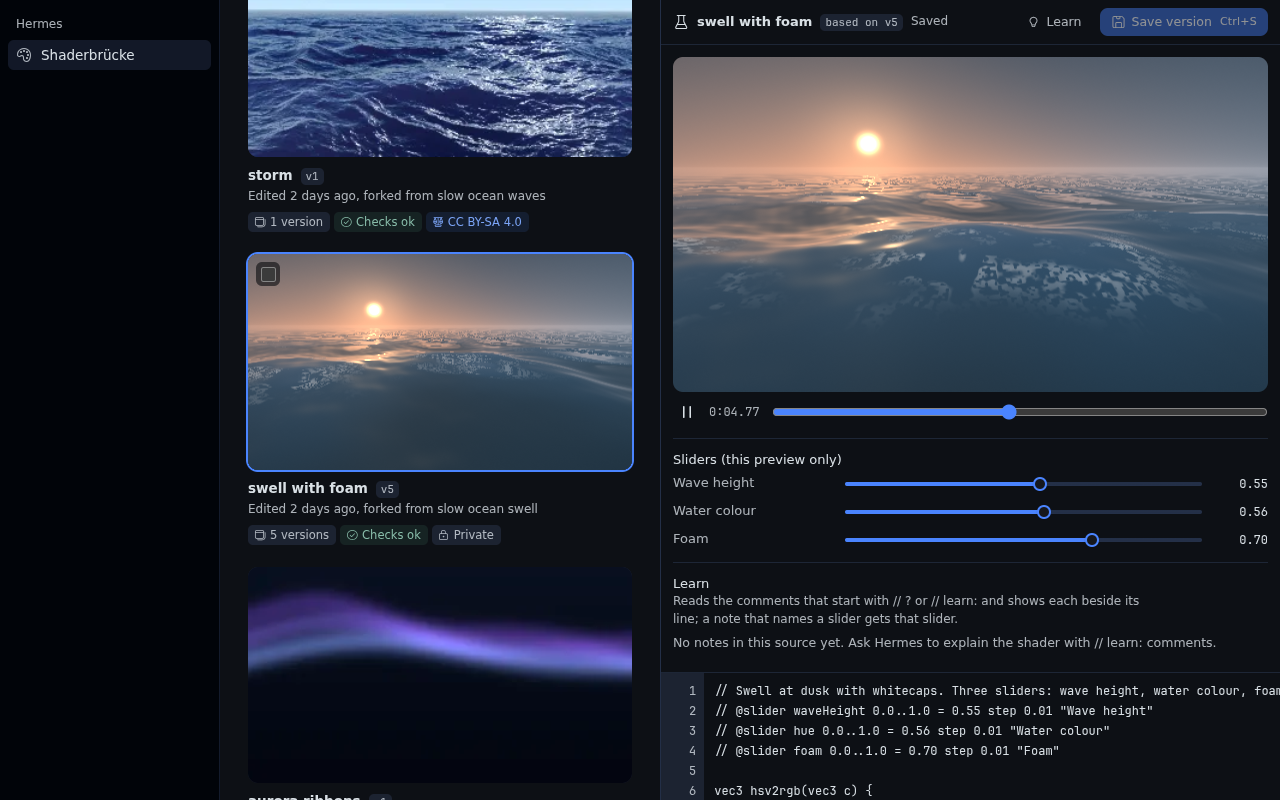
the Shaderbrücke page, edit the code yourself in the Lab, import Shadertoy, glslCanvas and ISF shaders,
and share a file anyone with Shaderbrücke can import.
Built for three.js and React Three Fiber developers first, and TouchDesigner and VJ artists second.
The full feature guide is docs/guide.md.
 |  |
 |  |
Install and update
hermes plugins install https://github.com/studioluftbruecke/hermes-shaderbruecke --enable
Hermes Desktop loads the card and the Shaderbrücke page (desktop/plugin.js) from the computer it runs
on. When Hermes runs on a server, install the plugin in both places, on the same version:
| Where | Install | Update |
|---|---|---|
| Server: tools, renderer, routes | hermes -p <profile> plugins install https://github.com/studioluftbruecke/hermes-shaderbruecke --enable | hermes -p <profile> plugins update shaderbruecke |
| Desktop computer: card and the Shaderbrücke page | hermes plugins install https://github.com/studioluftbruecke/hermes-shaderbruecke | hermes plugins update shaderbruecke |
- After either step on the Desktop computer: Capabilities → Plugins → Rescan. A new install's
Desktop half arrives switched off; switch it on there. - No Hermes on the Desktop computer: Capabilities → Plugins → Install from Git with the URL; to
update, the same with Advanced → Force reinstall. Desktop's Update button updates the server only. - After an update on the server, Desktop chats and the plugin's routes keep the old code: in
Capabilities → Plugins, switch Agent in off and on, then start a new chat. - Same version in both places? Compare the Version column of
hermes plugins liston the Desktop
computer andhermes -p <profile> plugins liston the server, or run
git -C ~/.hermes/profiles/<profile>/plugins/shaderbruecke log -1 --onelineon each
(~/.hermes/plugins/shaderbrueckefor the default profile). - The sidebar switch and position on the plugin's settings page are kept per Desktop, so a second
computer starts with the defaults.
Requirements. Hermes 0.23.0 or newer and a Chromium. The Hermes container image ships one, and
the plugin finds it on its own, and on a Mac it finds Chromium or Google Chrome in /Applications.
Elsewhere, put chromium on PATH or point SHADERBRUECKE_CHROMIUM at the binary. Without a Chromium every render answers no_browser. No
GPU, no Python dependencies, no npm.
First use
- Ask in a chat: "A golden-hour sky with a low sun and slow clouds, with sliders for sun height and
warmth." - Watch the card: the agent renders, looks at the frames, fixes what fails, and the card plays the
result. Move the sliders. - Ask "export it for three.js", or use the card's Export menu. The answer carries the files, the
steps and the proof verdict.
Settings
| Setting | Default | What it does |
|---|---|---|
allow_project_writes | false | Allow shader_export(dest_dir=…) and shader_library share(dest_dir=…) during unattended runs (cron, webhook, single query). |
credit_line | true | Append "Made with Shaderbrücke" to export headers. Author and licence lines always stay. |
keep_versions | 5 | Keep frames and proof images for the newest N versions of each shader. |
author_name | empty | Your name in export headers and share files. |
author_url | empty | A web link (http:// or https://) next to your name. |
starter_prompt | true | Start a new shader chat from the Shaderbrücke page with one of the example prompts; off starts an empty chat. |
Settings apply to the next call; no reload is needed.
In Desktop, Settings → Plugins → Shaderbrücke holds the sidebar row: Show in the sidebar and
Position (lower numbers sit higher). The settings above are beneath it, under Agent settings.
Safety and disclosures
-
A Chromium child process. Each render or proof starts Chromium
(--headless=new --remote-debugging-pipe) with a throwaway profile and Chromium's own sandbox.
Where the sandbox cannot start (a container that refuses user namespaces, a root user), the
first start in a process fails at once and the child runs with--no-sandboxfrom then on.
Ashader_renderresult that is a new version says which (browser_sandbox:onoroff).
The child also gets--enable-unsafe-swiftshader(software GL: no GPU is required)
and--host-resolver-rules=MAP * ~NOTFOUND, so the network is blocked (host names and IP
addresses alike).--webrtc-ip-handling-policy=disable_non_proxied_udpcloses the UDP path
WebRTC would otherwise have; a probe sent STUN to an IP literal and nothing arrived. Proofs open
the plugin's ownheadless/harness.htmlunder a placeholder origin: the browser asks the plugin
for each file over the DevTools pipe, and the plugin answers only fromheadless/, so the page
has nofile://access and reads no other local file. The child gets only PATH,
locale and a short temp folder from the environment, never the gateway's API keys. It starts
through a one-line/bin/shlauncher that turns core dumps off and runs it inside its throwaway
profile. A hard deadline (30 s per render, 90 s per proof) kills the whole process group. At most
two children run at a time per profile; a third call waits up to 120 s and says so. One shader gets
three browser attempts in 15 minutes, failed compiles included, beforekeep_iterating=trueis
required. Shader code never leaves the machine. -
Vendored three.js r187 (MIT, 4.5 MB).
headless/vendor/three-r187/carries the four build
files and the transpiler unmodified, used only server-side for proofs and the TSL transpile:
the plugin serves them over the DevTools pipe to its own headless Chromium child, never to
Desktop or any other browser. Three files exceed the security scanner's 1 MB per-file limit, so
their upstream SHA-256 is listed here:File SHA-256 build/three.core.js613e370f76638fdef83926642bf256dc9615684922de1ce1f63a8583e5d78578build/three.module.js104f56145899722094556490d787aae0617cc2fc3382f31df02d724ea1aee341build/three.webgpu.jseafead3154ec06093f3108bddceab360f048a6fcebd7c085d5aae0ab5404bd25build/three.tsl.jsd8f3cdb8b85b799a5631bd9a8d77e185d88ce1eb1bb051f48b332728a5423e3f -
Writes. Shader records, frames and exports go under
plugin_data_dir()(the profile's plugin
data folder). A version with its frames and proof images takes 1 to 3 MB; the frames of all but
the newestkeep_versionsversions per shader are pruned, and sources, records and export files
stay.shader_library sharewrites its share file to<data>/shares/first.
shader_export(dest_dir=…)andshader_library share(dest_dir=…)write into a project folder
only when you pass an absolute,
existing directory, never overwrites unlessoverwrite=true, never writes through a symlink
(an existing one at a target name is refused, and files are created withO_NOFOLLOW), copies
only proven files unless
accept_unproven=true, and is refused in unattended runs unless you turnallow_project_writes
on. Underplugins.isolation: hostthe plugin cannot tell a one-shothermes -zrun from a
terminal chat, so there it refusesdest_diron the terminal surface too (Desktop still works).
When the running Hermes does not say whether a person is present (the private
gateway.session_finitemodule is missing or its check fails),dest_diris refused as well,
with a sentence asking you to update the plugin.
Names, authors and other text that enter a generated file are cleaned of line breaks and
comment terminators, so they cannot add code. The TSL transpiler reads the shader without
comments and with its#definemacros already expanded, and only after the GLSL compiler
accepted that exact text. A quote, a backslash, a non-ASCII character or an#ifblock outside
comments makes the TSL export refuse instead, so a shader cannot carry JavaScript into the
.tsl.jsfile. -
Background work. Saving slider values (the card, the page or the Lab) starts a thumbnail
refresh for that version in a daemon thread of the process that serves the plugin's API; it
renders one frame in a Chromium child after the request has answered, and saves that arrive
while it runs join it. The Make previews and Add buttons on the Shaderbrücke page's notices
(andhermes shaderbruecke thumbs|adopt) start a job over the whole library the same way, one
Chromium child per item and at most two at a time. Jobs are recorded in the plugin database, end
with their last item and never start on their own. -
No telemetry, no accounts, no network calls. There are no credentials to configure.
-
Desktop half. Draws the
.fragthe tool produced, runs the same lint locally before a local
compile, and talks to the plugin's own API (/api/plugins/shaderbruecke/…) to read the
library, targets and proofs, save slider values, meta and Lab versions, and run an export or an
import. To start a chat about a shader (Continue in chat, New shader) it asks Desktop to create
and title a session (session.create,session.title) and puts a draft in its composer; it
never sends it. Share files from the page are read and written only in a folder you pick. It
neverevals shader-adjacent code. -
A context reference and a hook.
@shader:expands only in the profile that has the plugin,
with that profile's library. The expanded reference is capped at 6,000 characters and points to
shader_library getfor the full source. Apre_llm_callhook adds one line to the agent's next
turn after you save in the Lab; it adds nothing otherwise.
Uninstall
hermes -p <profile> plugins remove shaderbruecke
On a separate Desktop computer, run hermes plugins remove shaderbruecke there too, then
Capabilities → Plugins → Rescan. Your shaders stay in the profile's plugin data folder until you
delete it.
Changes
Releases from 0.2.3 on are in CHANGELOG.md. Earlier releases:
- 0.2.2: Shaderbrücke has its own page under Settings → Plugins, so the plugin is listed once,
under its name. The page shows or hides the sidebar row and sets its position (52, below
Kanban, kept per Desktop), and opens the agent settings beneath it. Needs Hermes 0.23.0. - 0.2.1: fixes from the first hands-on test of 0.2.0. Desktop names the page Shaderbrücke. The
Lab plays your edits live once you have pressed Play one time, and the Save button shows its
shortcut. The Export menu fits its options on every surface, and the agent handoff lives in it
as "Coding agent (three.js)". New shader starts from one of 100 example prompts, or from an
empty chat (settingstarter_prompt). Any shader can be deleted, one at a time or many from the
selection bar, with Select all, Shift-click ranges and Cmd or Ctrl+A.shader_library playputs
a stored version in the chat as the card, and a render with an unchanged source keeps no new
version. A shorter README with screenshots, the feature guide indocs/guide.md, a banner and
CONTRIBUTING.md. Needs Hermes 0.23.0. - 0.2.0: a library page in Desktop with every shader as a thumbnail, its versions, forks,
licence and lineage; the Lab;@shader:references in any chat; share files and import of
Shadertoy, glslCanvas and ISF shaders with their licence; a licence picker; and two new export
targets, TouchDesigner GLSL TOP and ISF. - 0.1.1: the card plays during a live turn; the first render works on a fresh profile; tuned
slider values become the export defaults; the lint stops a redeclared slider name; the render
result says whether the frames move. - 0.1.0: first release.
Contributing
Bugs, ideas and pull requests are welcome. Read CONTRIBUTING.md first: it says
how to run the tests and how a pull request lands.
License
MIT. Made by Studio Luftbrücke.
README from the reviewed commit 51fd317; it updates when the author re-pins.