mister-ideas
git-review for Hermes Desktop



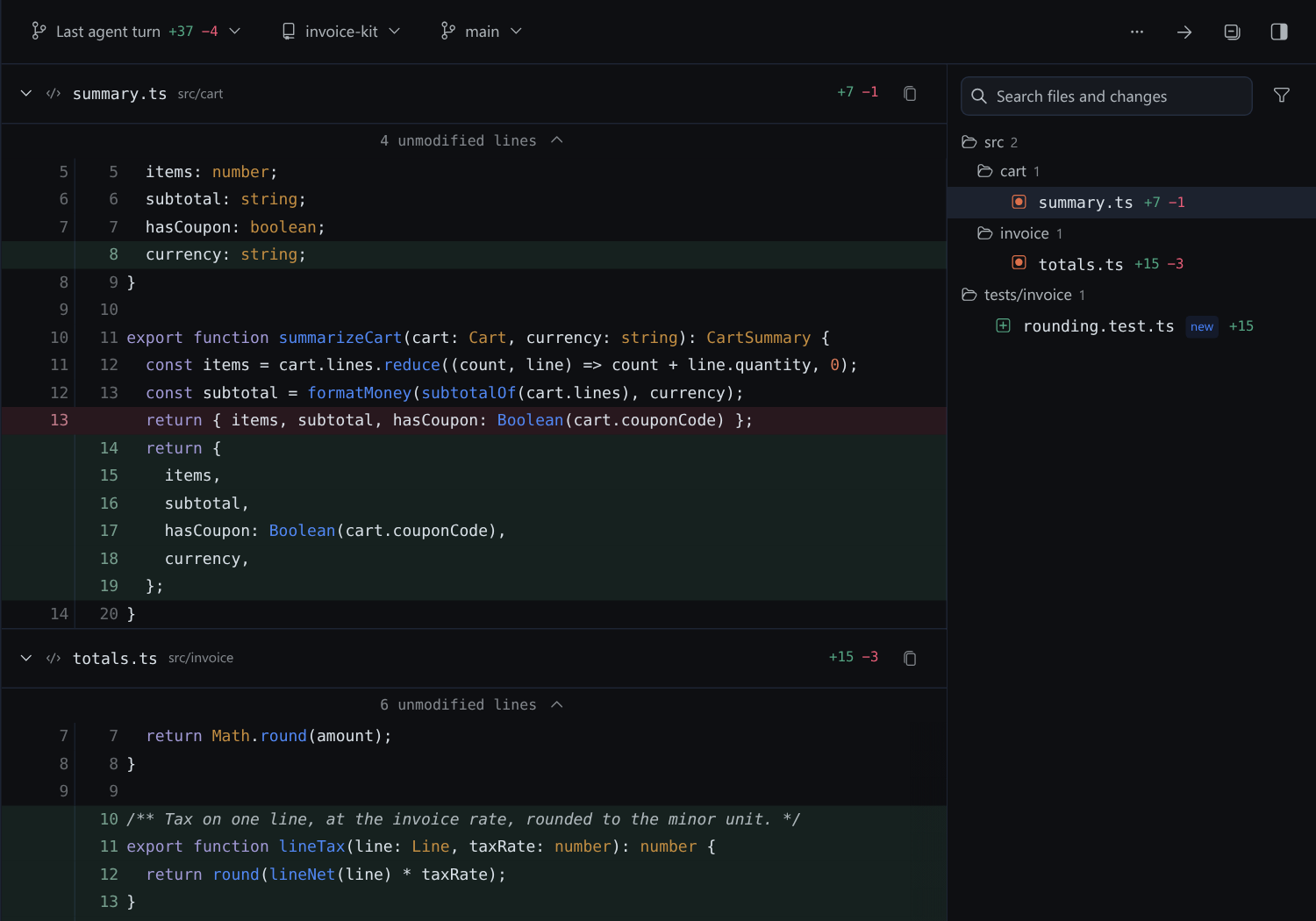
Review the whole change in one scroll, next to the chat. git-review is a review pane for Hermes Desktop. Every changed file is stacked in one continuous diff, so you read the agent's last turn, your uncommitted or staged work, the whole branch, or any range of commits the way you read a pull request, in unified or split layout, with syntax colours. Then it turns the lines you care about into @line: citations for your next message, and lets you stage, discard, commit, push and open the pull request without leaving the pane.
Why it exists
An agent that edits code leaves you reviewing its work somewhere else. You switch to a terminal, rebuild what the turn touched, and lose the conversation around it. The last turn is the hardest case: part of it is committed and part is not, and no Git client groups it that way.
git-review keeps the review next to the chat and makes its result usable. Click a line, choose Cite in message, and the reference goes into your draft, so "this is wrong, here" costs a drag instead of a paragraph. Nothing is sent until you send it. When the change is right, stage it, commit it with a message Hermes drafts for you, and push, from the same pane.
See it work
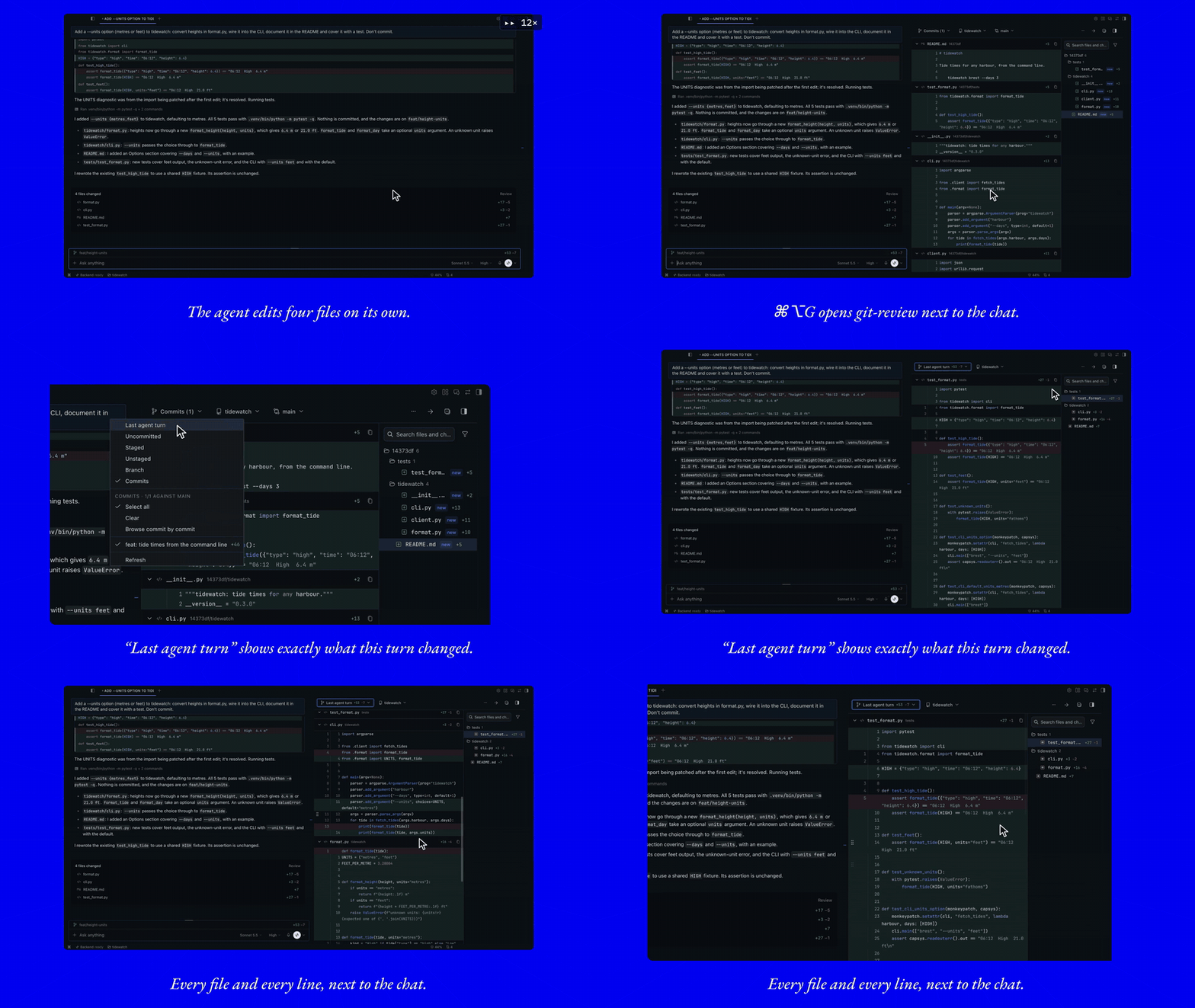
Select the lines that are wrong and cite them back: the agent fixes just those.
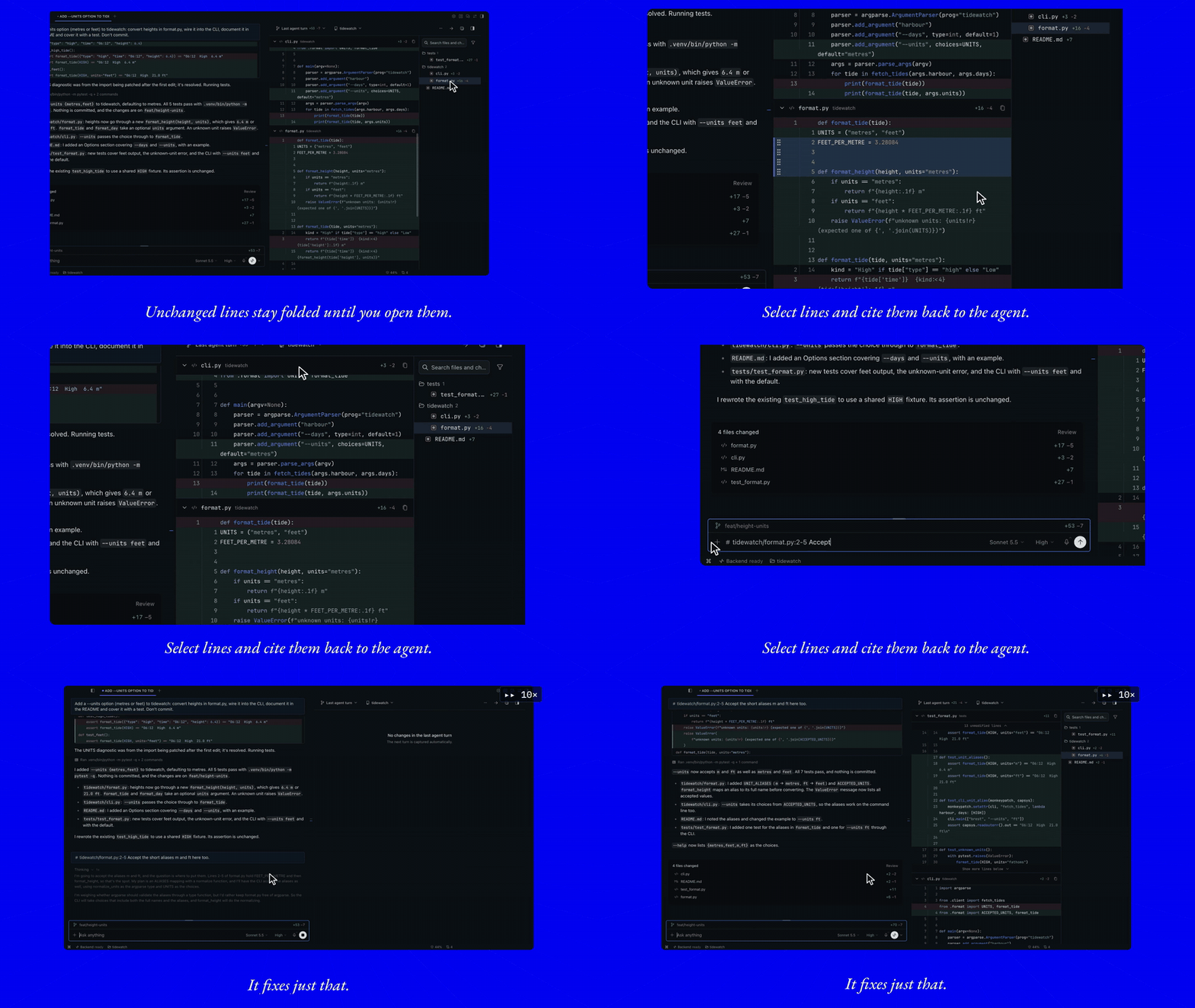
Ask Hermes to show you a change and it drives the pane. Then stage a file from its header, commit it with a generated message, commit and push the rest, and step through the branch one commit at a time.
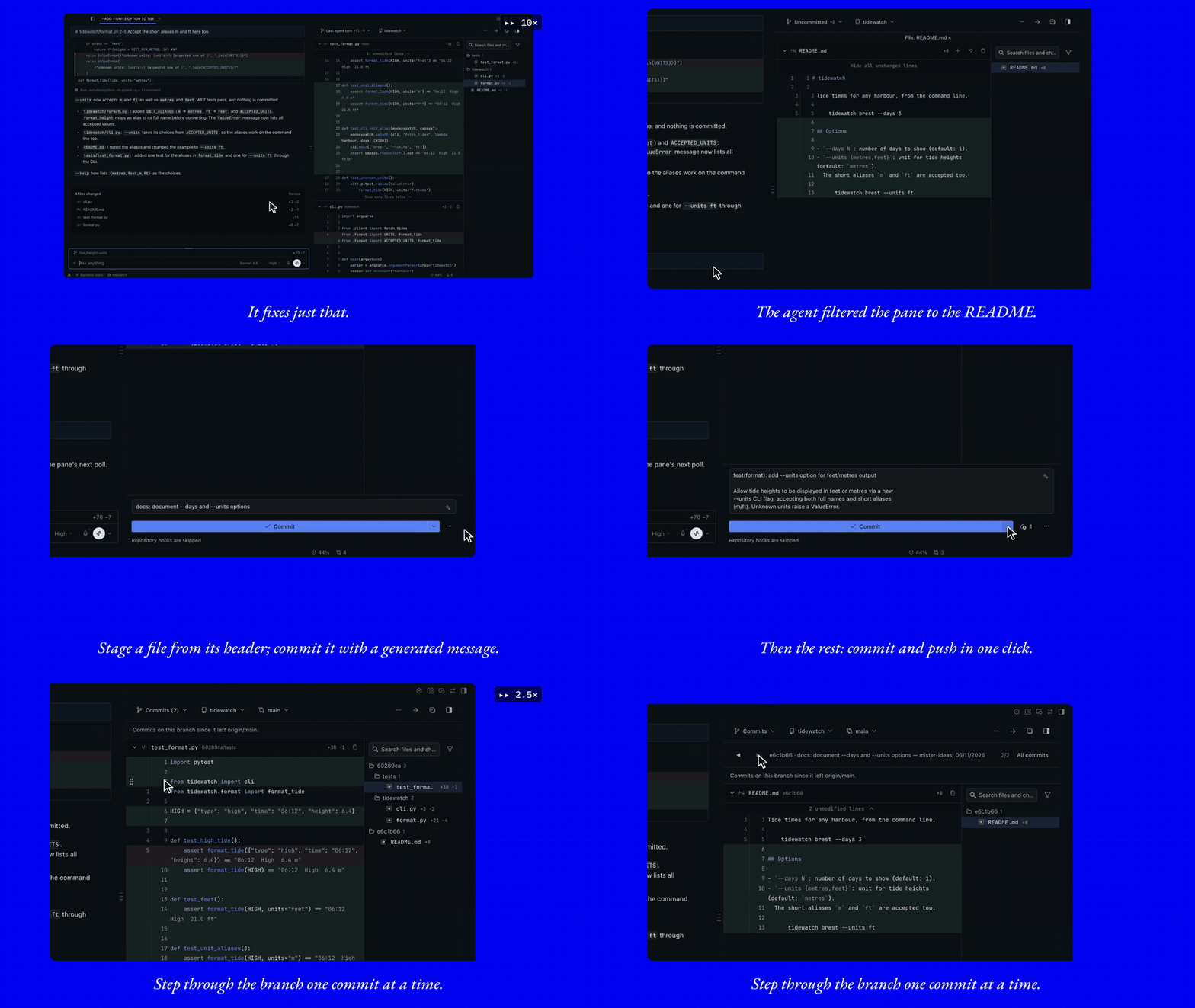
These clips are recorded in Hermes Desktop with the plugin as released.
Install
Requires Hermes Agent >=0.21.6 with Desktop, and git on your PATH.
hermes plugins install git-review
That installs the reviewed commit the Hermes plugin catalog pins. To track this repository instead, install it by URL: hermes plugins install mister-ideas/git-review.
Hermes asks whether to install Node dependencies, because the repository declares a package.json. Answer N. That file belongs to the test tooling, and the plugin needs nothing from npm at runtime.
Then:
- Enable git-review under Capabilities → Plugins, or run
hermes plugins enable git-review. Desktop copies the pane from the package into$HERMES_HOME/desktop-plugins/git-review/and loads it. - Restart the backend, or quit and reopen Desktop, so the plugin's routes mount.
- Open the pane from the command palette (Toggle git review), with ⌘⌥G / Ctrl+Alt+G (rebindable under keyboard shortcuts), from the changed-files count in the status bar, or by toggling Git review in the right dock. Pressed again while the pane is on screen, the shortcut minimizes it and keeps its place and settings. This needs a Hermes Desktop with
host.togglePane(NousResearch/hermes-agent#147157). On an older Desktop the shortcut only opens the pane, and the palette row reads Open git review.
Cloned it yourself? hermes plugins adopt git-review makes the directory a tracked install, so check-updates and update work on it.
To remove it: hermes plugins remove git-review.
Updating
hermes plugins check-updates          # read-only: is a newer version available?
hermes plugins update git-review
Restart the backend afterwards, then run Reload desktop plugins. If Desktop runs on a different machine from the backend, update the plugin on that machine too: the pane is copied from the package installed where the app runs.
What it shows
Six scopes cover the ways you review work. The first control in the toolbar picks one.
| Scope | What it shows | How it is computed |
|---|---|---|
| Last agent turn | Everything the agent changed in this repository during its latest turn: committed and uncommitted edits, terminal edits, new files. | When you send a message, the plugin records a snapshot of the working tree, even while the pane is closed. The turn is the diff from that snapshot to the working tree now. |
| Uncommitted | All work not yet committed: staged, unstaged and new files. | The working-tree diff against HEAD, plus new files. |
| Staged | Only what is in the index. | git diff --cached. |
| Unstaged | Working-tree edits not yet staged, and new files. | git diff on the working tree, plus new files. |
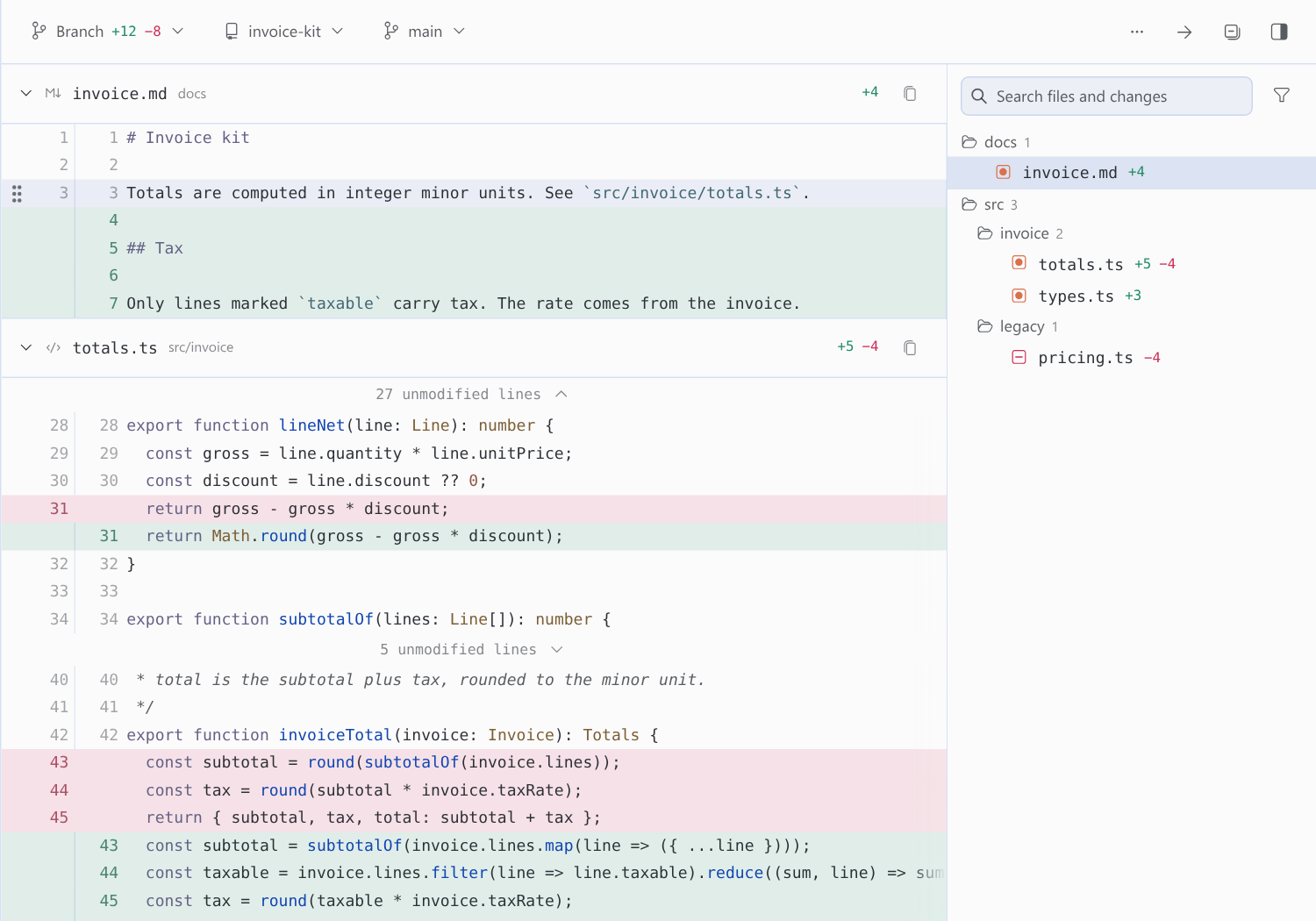
| Branch | The net change of your branch since it left the default branch: what its pull request will show. | git diff <merge-base> HEAD. The branch menu picks another branch to compare against. |
| Commits | The commits your branch added since it left the base (origin/main, for example). | Commit range since the merge base. Pick a subset, or browse one commit at a time. |
Edits you left uncommitted before the turn are part of the snapshot, so they do not show as the agent's. An untracked file the agent edits shows only the agent's lines. When a snapshot cannot be recorded (untracked files above 64 MiB in total, or a snapshot already pruned), the turn falls back to comparing against the commit the turn started from, and earlier uncommitted edits then show too.
New files that are not staged yet appear in Uncommitted and Unstaged with their content. Turn Show new files off in the display menu to hide them.
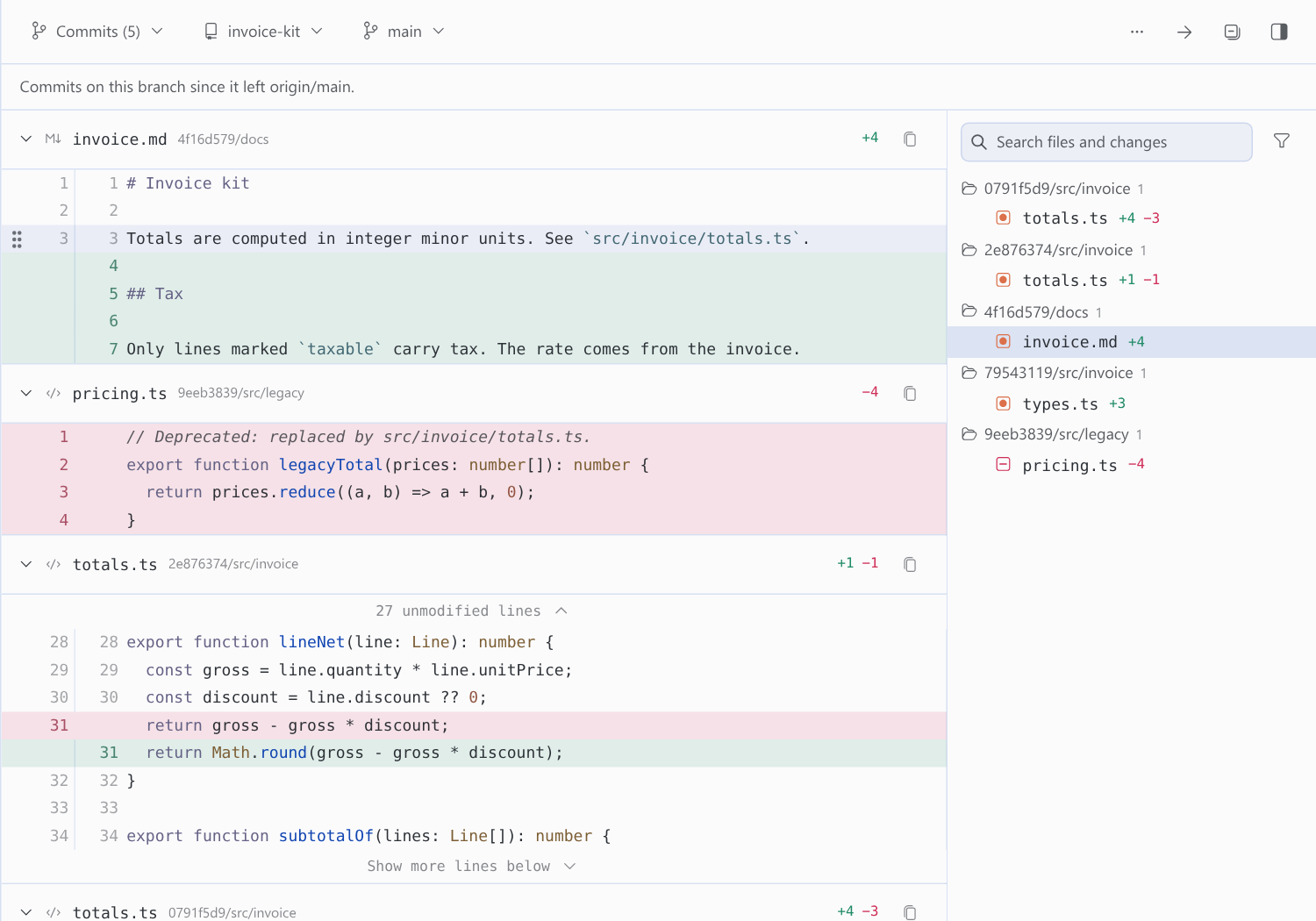
Commits
- The list starts with every commit your branch added, all selected. Select all selects the whole list again after you have narrowed it, and Load older commits fetches more history, up to 250 commits per load.
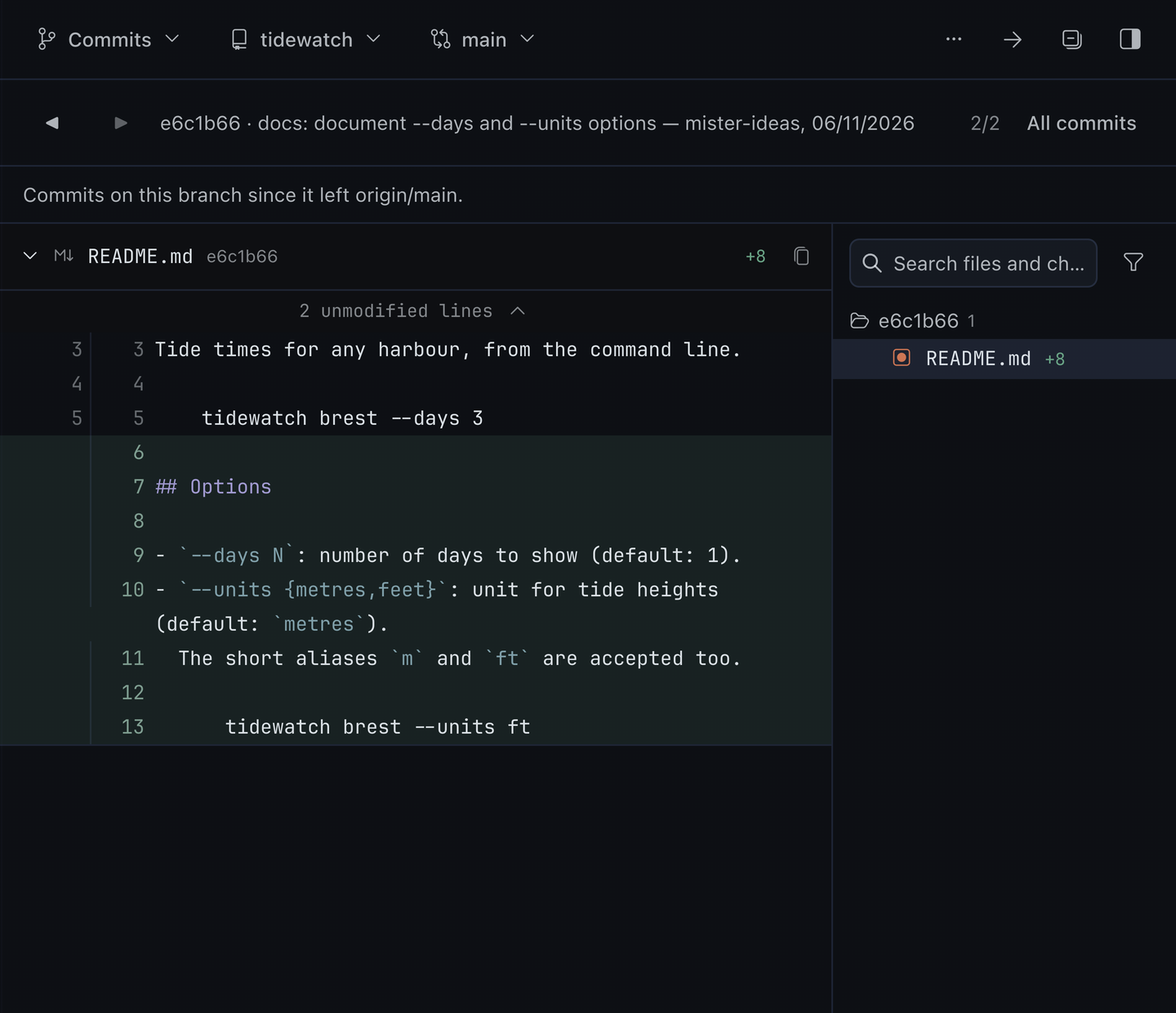
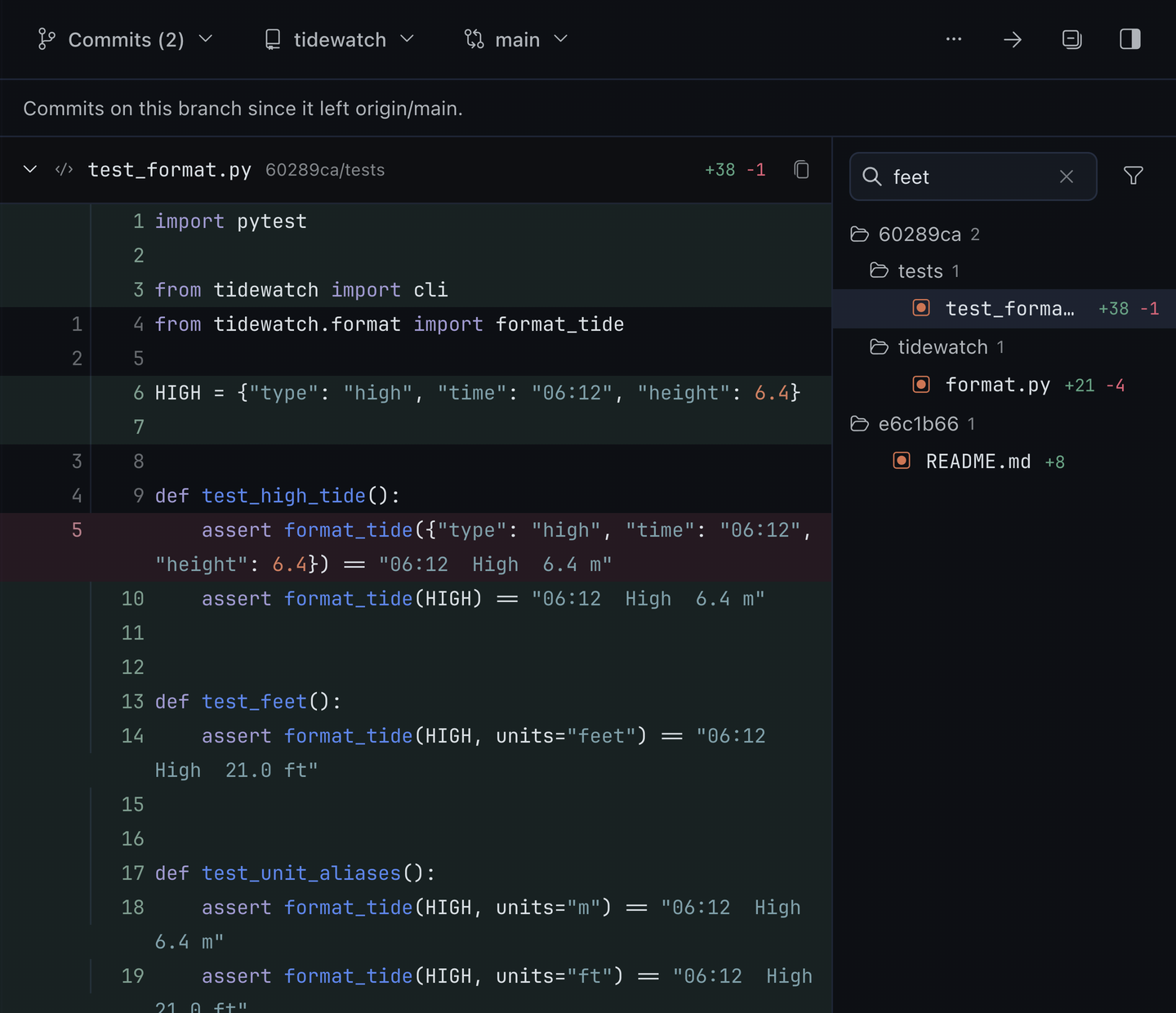
- Browse commit by commit steps through one commit at a time with the Newer and Older buttons. The navigator shows the commit, its subject, author, date and position, for example
4f16d57 · Document tax handling — mister-ideas, 10/23/2026followed by1/5. The position keeps its own place, so a long subject never hides it. All commits returns to the full selection. - The branch menu lists your local and remote branches. Pick one to show only the commits since it.
- A shallow clone has only the history it fetched, and the pane says so. Plugin installs from Hermes are shallow. To see the full history, run
git -C <plugin directory> fetch --unshallow.
Stage, discard, commit, push, pull request
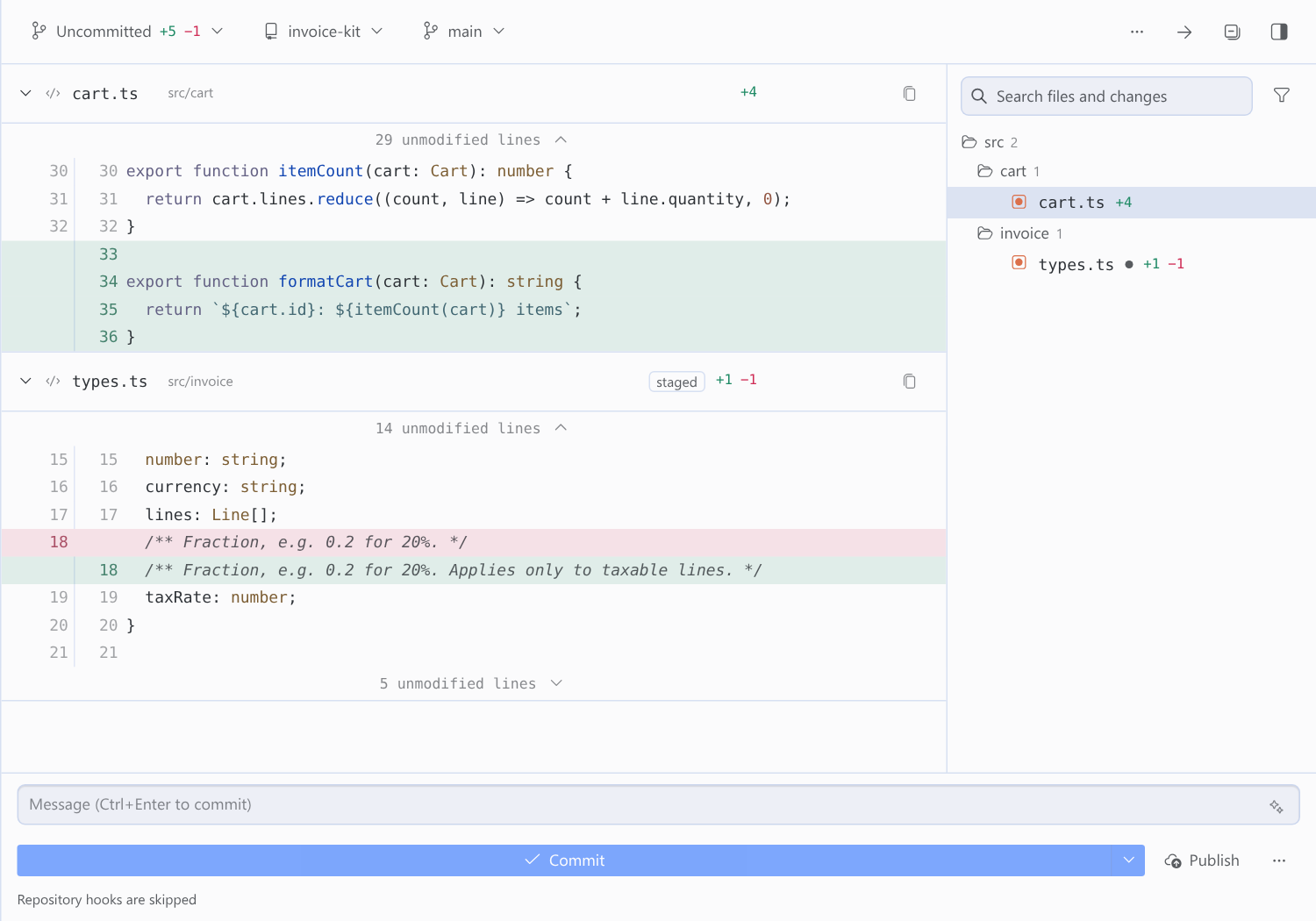
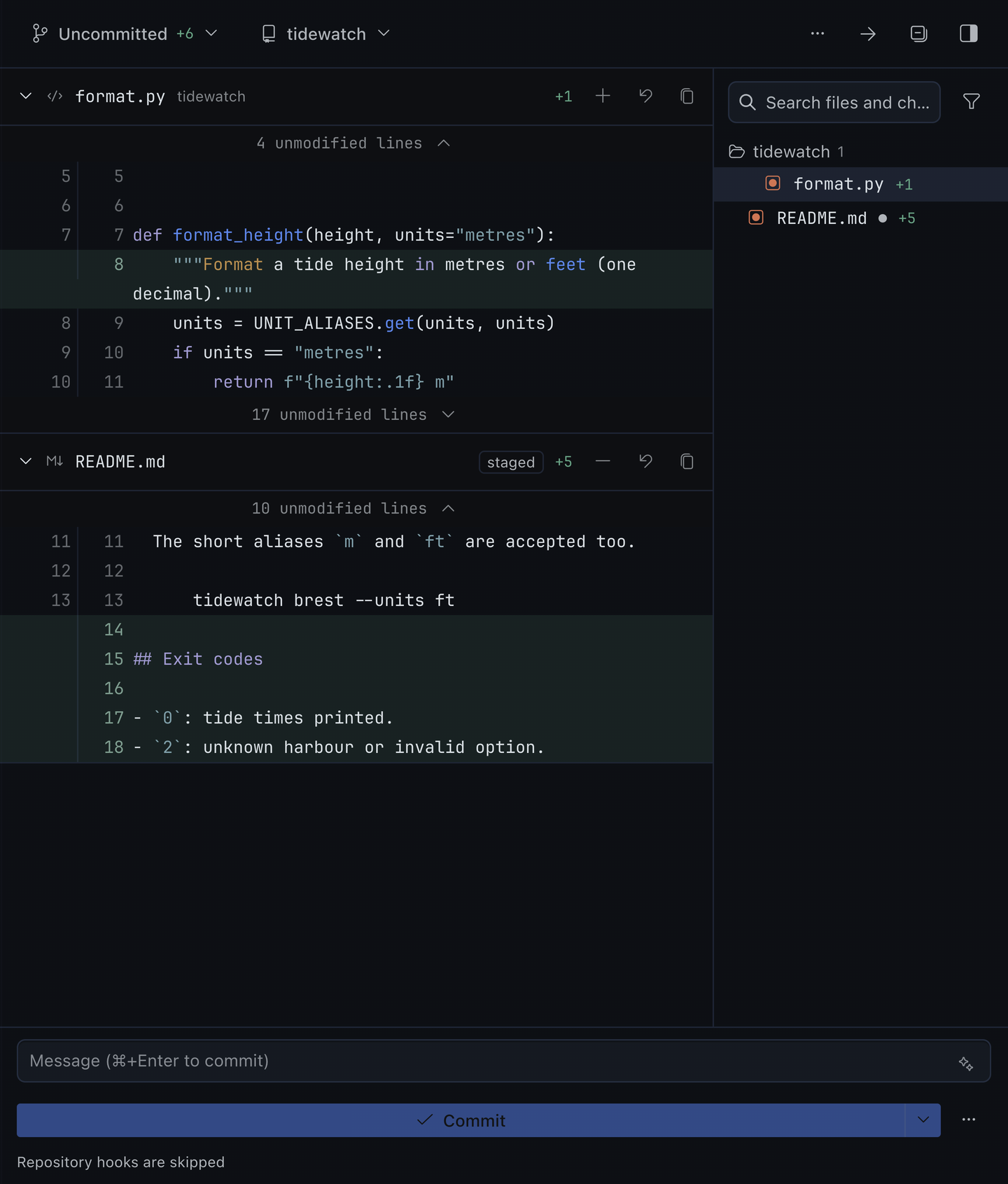
In the Uncommitted, Staged and Unstaged scopes, each file header carries its actions, always on screen:
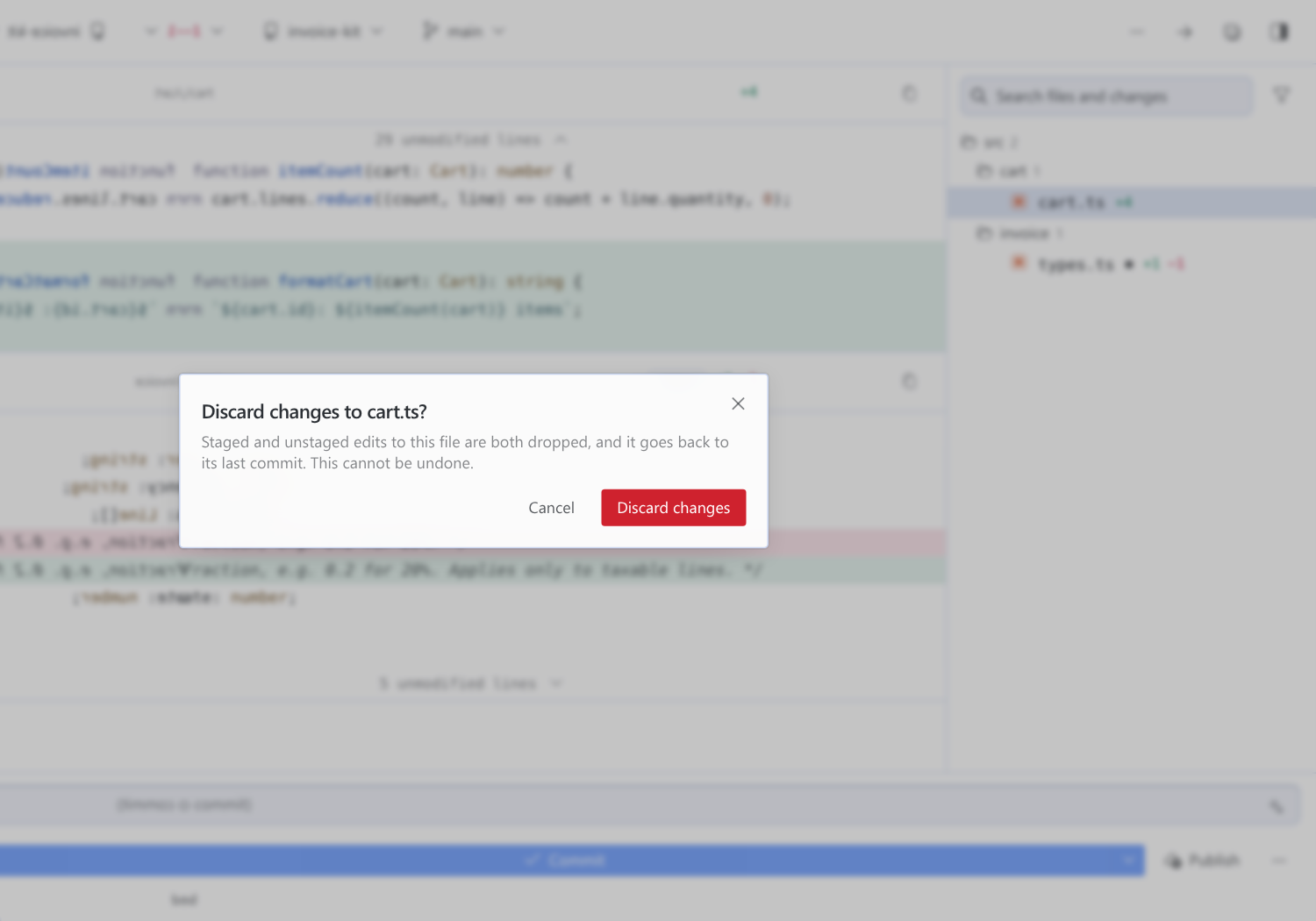
- Stage and Unstage follow where the file's changes are. A file with changes on both sides offers both, and Uncommitted marks it partly staged.
- Discard changes restores the file to
HEAD, staged and unstaged edits included. On a new file it becomes Delete new file. Both ask first, in Desktop's own confirmation dialog. A renamed file gets both of its names back. - The same actions, plus Copy path and Reveal in file manager, are on the right-click menu of every file in the tree.
Under the diff, the commit box:
- Commit commits what is staged. With nothing staged it stages everything first, the way VS Code and Desktop's own Review pane do. ⌘/Ctrl+Enter commits.
- The arrow next to it offers Commit & push, and makes either one the default.
- Generate commit message drafts the message with Hermes's own
commit_messagetemplate, on the focused chat's model, from exactly what the commit will contain and in the style of your recent subjects. Press again for a different draft, or to stop. - Push appears when the branch has commits to push, with their count. A branch without an upstream is published to
origin. - Create pull request pushes and runs
gh pr create --fill(orglab mr create --fillon GitLab), then opens the result. If the branch already has one, the button opens it. - Stage all, Unstage all, Discard all changes… and Ask Hermes to commit and open a PR are in the ⋯ menu. The last one puts the same request Desktop's own Review pane uses into the chat.
The Last agent turn, Branch and Commits scopes stay read-only: they describe history, not the index. To keep the whole pane read-only, turn on read_only in the settings.
Repository programs are off by default. A commit made here skips the repository's hooks, and a write is refused, with the reason, when the repository's own .git/config names a program git would run for it: a filter driver, a signing program, an SSH command or a credential helper. Turn on run_repo_programs to run git exactly as a terminal would. Your global and system git configuration, such as git-lfs or a credential manager, applies either way.
Layouts and colours
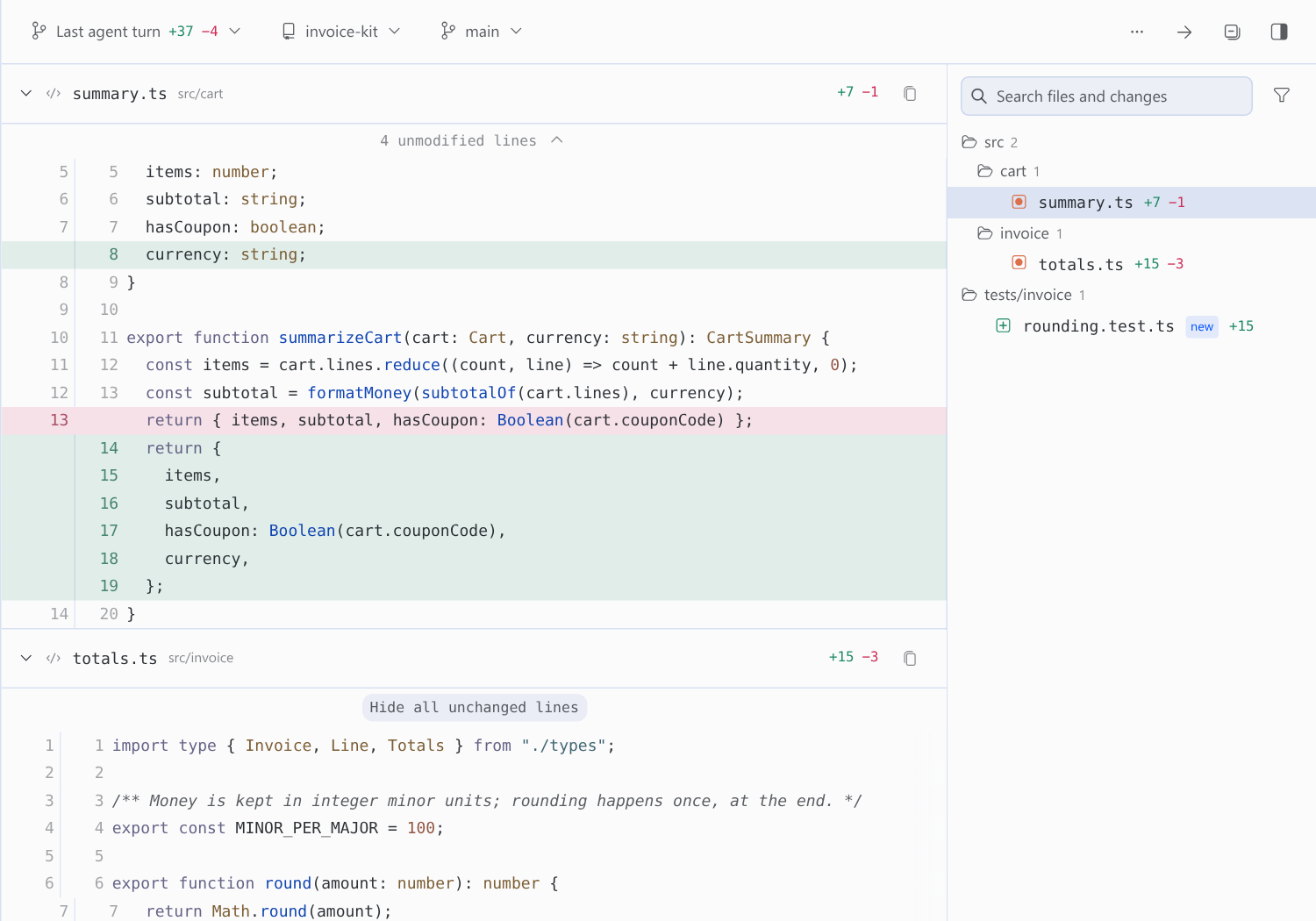
- Unified stacks every changed file, with old and new line numbers in one column.
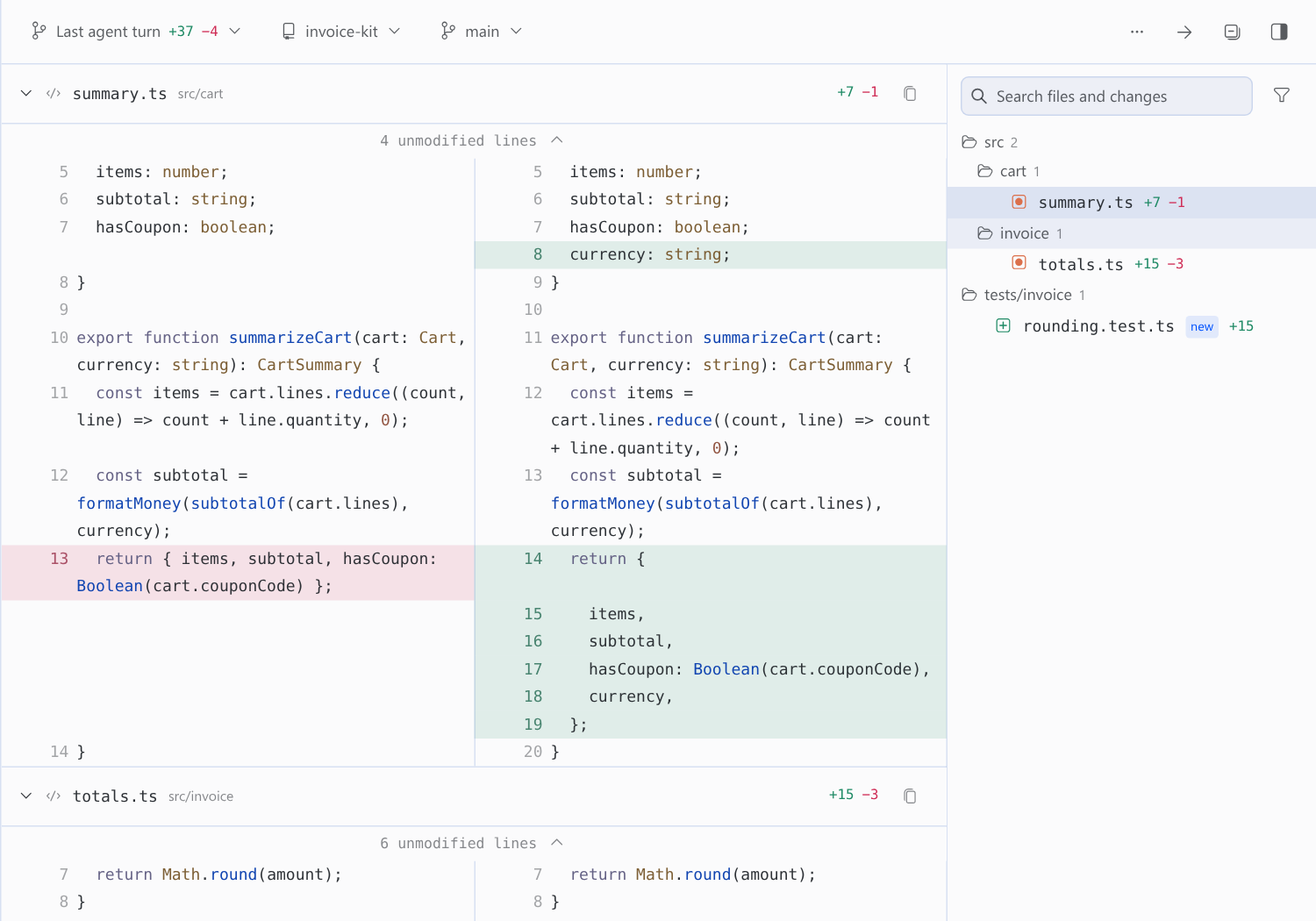
- Split puts old and new side by side, with filler rows that keep the two sides aligned.
- Narrow docks keep the toolbar on one line and give the width to the diff.
- Syntax colours mark keywords, strings, numbers, calls, types and comments in about thirty languages (59 file extensions), with the theme's own hues. Each file header shows Desktop's icon for its type. Turn colours off in the display menu.
Folding and gaps
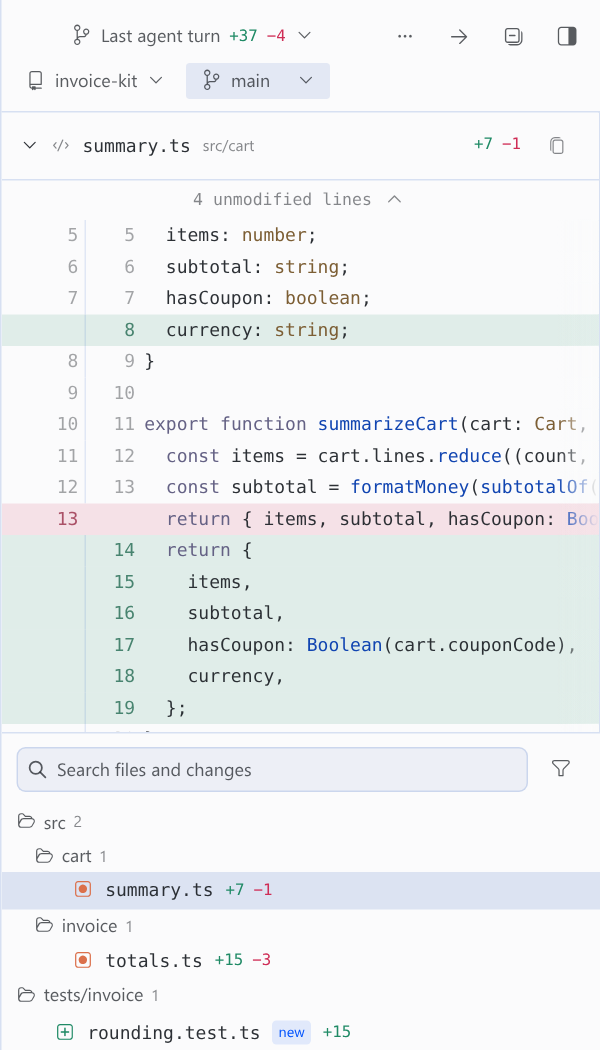
Unchanged runs are folded. Every change keeps three lines of context on each side, and the bar between changes says how many lines it hides, such as 29 unmodified lines. Expand a bar to reveal up to 20 lines at a time, or all of them. Runs above the first change and below the last fold too, so the end of a file is never a dead end.
Files
- A file tree on the right shows each file's status and churn. Folders roll up their totals. Files: List in the display menu shows every file on one level, with its folder beside it.
- Search covers file paths and the changed lines themselves. The tree keeps exactly the files the search found, so a match inside a file's changes lists that file even when its name does not match.
- The Deleted files and Test files filters hide what you are not looking for.
- Click a file to jump to its diff. Collapse one file, or use Collapse all and Expand all.
- Review next file steps through the changed files in order.
- Copy path copies the repository-relative path.
- Drag a file from the tree into the composer to insert its absolute path.
Citing lines
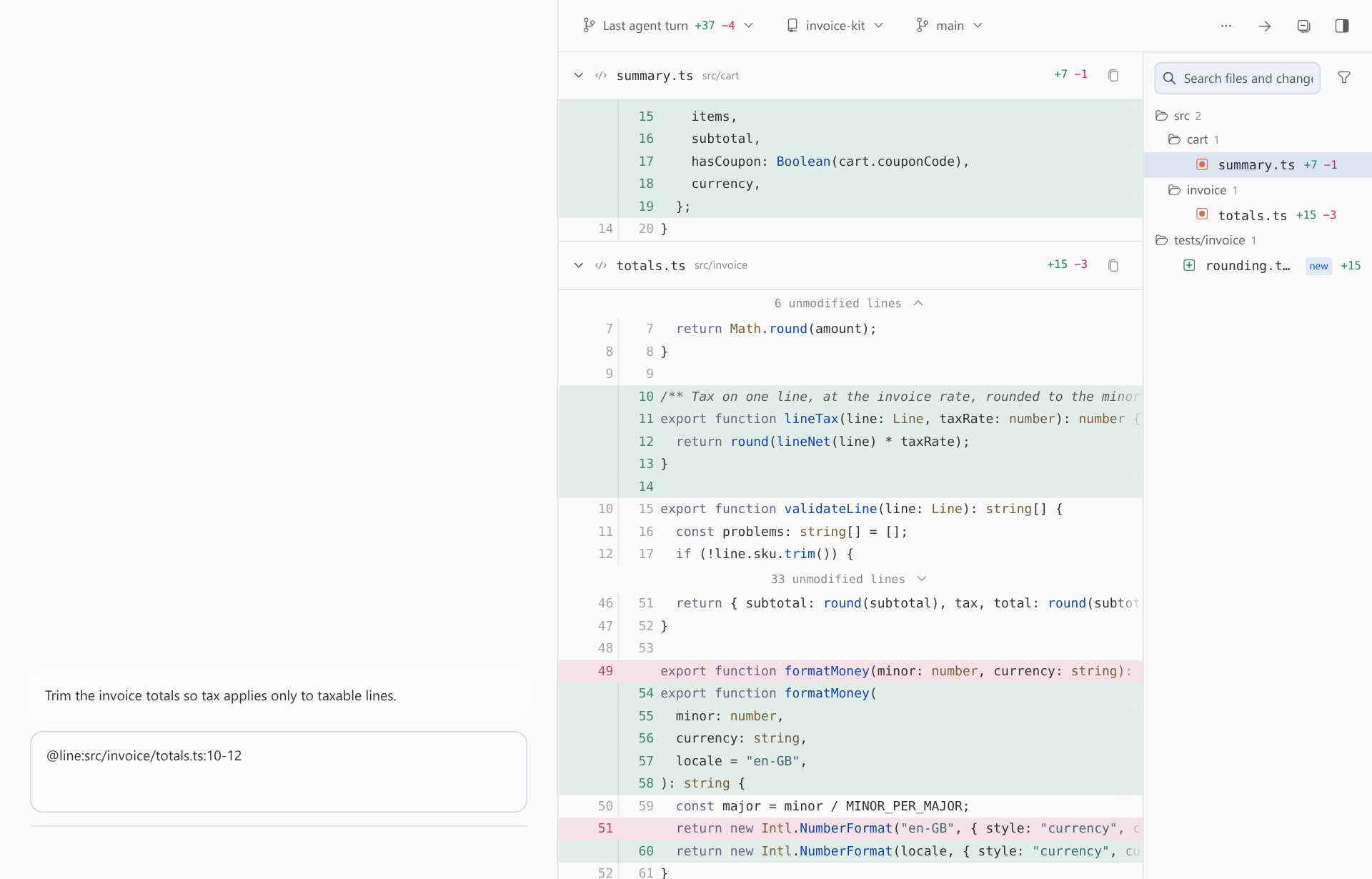
Click a line, then another, and choose Cite in message. You can also press and drag across the gutter, or drag the selected lines straight into the composer. The pane writes a reference into the draft and never sends it:
@line:src/invoice/totals.ts:10-12
Lines are citable in every scope, so you can cite from the last turn, from the commits you are reviewing, or from your staged work.
The agent can drive the pane
The agent tool git_review_select points the pane at a repository and scope. For example, when you ask "show me what changed in the parser", the agent can open the right view for you. It takes repo, scope (uncommitted by default, or staged, unstaged, branch or commits), ref for specific commits, base for a range, path to filter to one file, and ignore_ws. The tool validates the request before the pane applies it. A request with path shows a File: README.md × chip in the toolbar; click it to see every file again. With several profiles on one gateway, the request reaches the pane of the profile you are chatting in.
Pull and merge requests
If gh (GitHub) or glab (GitLab) is installed and authenticated, and the checked-out branch has an open pull or merge request, the toolbar shows a button that opens it. The commit box creates one when there is none (see above); without the CLI, creating one reports that gh or glab is missing.
Always at hand
- The status bar shows how many files changed in the focused workspace. Click it to open the pane.
- Coming back to the Desktop window re-reads the changes at once, so edits made in an editor or a terminal show up without waiting for the next refresh.
Dark theme
The pane is painted only with Desktop's theme tokens, the same ones native panes use, so it follows light, dark and every skin (Catppuccin, Solarized, your own) with no colours of its own.
What the pane remembers
Display state (layout, word wrap, ignore whitespace, syntax colours, new files, tree or list, the file filters, the file list's width and visibility, which files you collapsed), the scope, the comparison base and the repository you picked are saved in Desktop plugin storage, with the commit button's default. They are keyed by profile and connection, so switching chats keeps your view. A request from the agent replaces the scope and repository.
git-review and the native Review pane
Hermes Desktop ships its own Review pane. The two answer different reading styles, and this table shows where each one is ahead. It is based on the Desktop source of Hermes core bf0203a7; native behaviour can change between Hermes versions.
| git-review | Native Review pane | |
|---|---|---|
| How you read a change | Every changed file stacked in one continuous scroll, like a pull request | A file tree; clicking a file opens that one file's diff below it, in a panel capped at 55% of the sidebar |
| Moving between files | Scroll, click a file to jump, or Review next file | Click each file in turn |
| Scopes | Last agent turn, Uncommitted, Staged, Unstaged, Branch, Commits | Uncommitted, Branch (since the trunk), Last agent turn |
| Branch compared against | The default branch, or any branch you pick | The default branch |
| History | Pick any subset of the branch's commits, or step through them one at a time | Branch diff as a whole |
| Layout | Unified or split side by side | Unified |
| Hidden context | Gaps say how many lines they hide and expand 20 at a time or all at once | Three context lines per change, no expansion |
| Search | File paths and the changed lines themselves | — |
| Cite lines into your message | Yes, as @line:path:start-end | — |
| Agent can open the view | git_review_select tool | — |
| Stage, unstage | Per file (header or right-click) or all; partly staged files marked | Per file or all |
| Discard | Per file or all, confirmed in Desktop's dialog; deletes only the new files it names, never an untracked folder | Per file or all, confirmed; git clean -fd on the path |
| Commit, push, pull request | Commit, commit & push with a remembered default, AI-drafted message (same template), push and publish, create or open a PR or MR | Commit, commit & push, AI-drafted message, create or open a PR |
| Repository hooks and filters | Skipped or refused unless you allow them | Run |
| Syntax colours | Built-in tokenizer with theme hues | Shiki |
| Read-only switch | read_only setting | — |
| Changed-files count | Status bar, any workspace | — |
| Shortcut | ⌘⌥G toggles, rebindable | ⌘G toggles |
| Change list in the chat | — | "N files changed" card under the agent's turn |
Native still has two things git-review does not: Shiki's grammar-exact highlighting, and the card under an agent's turn. Neither is reachable from a plugin today: Desktop's plugin SDK does not export its highlighter, and has no slot under a turn.
Privacy and disclosure
- Shell commands, reading. To show changes the backend runs
gitas a subprocess:rev-parse,status,diff,log,show,cat-file,ls-files,for-each-ref,branch,remote,merge-base,rev-list,config(to read the repository's own program settings) andhash-object(without-w, to compute the empty tree). For the Last agent turn snapshot it also runsadd -Aandwrite-treewithGIT_INDEX_FILEandGIT_OBJECT_DIRECTORYpointed at the plugin's own data directory, so the repository's index and object database are never written. External diff and textconv drivers are disabled, and every call overridescore.fsmonitor,core.hooksPathandlog.showSignature. It also blanks the clean, smudge and process filter drivers that the repository itself defines, so a checkout cannot make the pane run its programs. Filters from your global and system git configuration, such as git-lfs, are left alone. Every call has a timeout and an output cap. - Shell commands, writing. Only when you press a button:
add,reset/restore/rm --cached(unstage),restore --source=HEADplus deleting the named new files (discard, after you confirm),commit,push, andgh pr create/glab mr create. Unlessrun_repo_programsis on, these run with hooks off andcore.fsmonitoroff, and are refused when the repository's own config names a program they would run. Paths are passed as literal pathspecs.read_onlyrefuses all of them in the backend. - Network. For the pull or merge request lookup, the backend runs your local
gh pr listorglab mr listfor the checked-out branch; for Push and Create pull request,git pushandgh/glabcontact your remote with your existing login.ghandglabget only yourGH_*,GITHUB*,GLAB_*andGITLAB_*environment, with prompts disabled. Generate commit message sends the diff of what you are about to commit, and your ten latest commit subjects, to the model of the focused chat through Hermes, the same request Desktop's own Review pane makes. The plugin itself contacts nothing else. - Reads outside its own data.
- Files and history inside authorized repositories: the focused workspace, configured
repos/roots, and the latest agent selection. - This profile's
config.yaml, for the plugin settings andterminal.cwd. - The
cwdcolumn of thesessionstable in this profile'sstate.db, opened read-only, so that recent chat workspaces appear without configuration. - A caller-supplied path never grants access to a repository.
- Files and history inside authorized repositories: the focused workspace, configured
- Discovery scope. Repositories are found by scanning, at most two levels deep, the focused workspace and the working directories of recent chats, plus any configured
repos/roots. A scan visits at most 256 directories and returns at most 128 repositories. It never follows symlinks and skips hidden directories, so credential and config directories are never entered. A filesystem root is never scanned, and a home directory is scanned only when it is the declared workspace: a chat that merely ran in your home directory does not expose every repository beneath it. - Plugin data.
$HERMES_HOME/plugin-data/git-review/select.sqlite3holds agent selection requests.$HERMES_HOME/plugin-data/git-review/turn-snapshots/holds the Last agent turn snapshots: a copy of the working tree's tracked and untracked (not ignored) files, as git objects, taken when you send a message. The newest 16 are kept, none older than three days. Desktop plugin storage holds display settings and turn baselines. Your repositories change only through the write actions above. - Background activity. While the pane is open it polls the local backend: every 3 seconds for agent selections, every 5 seconds for the diff on live scopes, and every 15 seconds for the branch's push state. The status-bar count polls
git statusfor the focused workspace every 15 seconds while Desktop is visible. When you send a message, the plugin records the turn's snapshot (git hashes only files that changed since the previous one). There are no background processes. - Credentials and telemetry. None. The plugin stores no credentials and reports no usage.
- Sensitive code. Diffs stay in the pane. The only way code reaches the chat is a citation or drag that you make yourself.
Limits
- Diffs above 8 MiB are refused with a note rather than silently truncated.
- The commit list fetches up to 250 commits per request. Load older commits fetches more, so no history is unreachable.
- Each unchanged-line expansion reads at most 5,000 lines.
- Untracked files in a turn diff are capped at 200.
- Display state is per workspace and profile, not per chat (see What the pane remembers).
- Syntax colours come from a line tokenizer, not a grammar: a block comment or a multi-line string is coloured only on the lines that show its delimiters. Files over 3,000 diff rows and lines over 1,000 characters stay plain.
- Writes act on the whole file. Staging or discarding single hunks or lines is not supported.
- The animated clips and the commit-by-commit, search and commit-box screenshots are captured in Hermes Desktop. The other screenshots were captured from the plugin's own code, running against a real backend and real repositories, in a Chromium harness that stands in for the Desktop window.
- A turn snapshot records untracked files up to 64 MiB in total. Above that, Last agent turn compares against the commit the turn started from.
Settings
The pane follows the focused chat's workspace automatically. To offer other repositories, open Settings → Plugins → git-review:
| Setting | Meaning |
|---|---|
repos | Newline-separated absolute repository paths. |
roots | Newline-separated absolute directories to scan for worktrees (two levels deep, at most 256 directories). |
read_only | Hide stage, discard, commit, push and PR, and refuse them in the backend. Off by default. |
run_repo_programs | Let writes run hooks, filter drivers, signing and SSH programs that a repository's own config names. Off by default. |
Settings live under plugins.entries.git-review.settings. None of them are secrets.
Troubleshooting
| Symptom | Check |
|---|---|
| No worktrees found / HTTP 403 | Open a chat whose workspace is a Git repository, or configure repos/roots. |
| Backend unavailable | Make sure the plugin is enabled and the backend is running. Backend updates need a backend restart. |
| Diff exceeds display limit | Narrow the scope, the selected commits or the file filter. |
| Pull/merge request button missing | Authenticate gh/glab and check that the branch has an open pull or merge request. |
| Pane missing or stale | Enable the plugin, then run Reload desktop plugins from the command palette. If Desktop runs on another machine than the backend, install the plugin on that machine too. |
| A write says the repository's config names programs | The repository defines a hook-like program (filter driver, signing or SSH command, credential helper) in its own .git/config. Review it, then turn on run_repo_programs, or run that command in a terminal. |
| Push or Create pull request fails | The message is git's or gh's own. Check that git push works in a terminal, and that gh auth status (or glab auth status) is signed in. |
| No Generate commit message button | Your Desktop does not offer plugins a gateway request. Update Hermes Desktop. |
| Commits list shows only a few commits | The reviewed repository is a shallow clone (a plugin directory installed by Hermes is one). Run git fetch --unshallow in that repository. |
Development
npm ci
npm test                 # unit, smoke and import-allowlist checks
python -m unittest discover -s tests -v
hermes plugins validate . --install-deps
python scripts/package.py
Python tests run against temporary real repositories and the actual FastAPI router. The Node tests render the real pane with test doubles for the Desktop SDK.
See CONTRIBUTING.md and SECURITY.md. Changelog: CHANGELOG.md.
Support, issues and releases
- Bugs and feature requests: the issue forms. The bug form asks for your versions, the scope you had selected and the
git-reviewlog lines. That evidence is what makes a report reproducible. - Questions and ideas: Discussions.
- Security: SECURITY.md. Report privately, never in a public issue.
- Community expectations: CODE_OF_CONDUCT.md.
- Contributing: CONTRIBUTING.md explains what is in and out of scope, and how releases are cut.
Releases are SemVer tags with a GitHub Release. The release workflow builds each zip only after the test suite passes, and published releases are immutable. The Hermes plugin catalog pins an exact commit, and moving that pin is a reviewed pull request against NousResearch/hermes-agent, so catalog users only receive reviewed code.
License
MIT. See LICENSE.
README from the reviewed commit a194437; it updates when the author re-pins.