mister-ideas
usage-guard for Hermes Agent



Stop your Hermes agent at the subscription wall. When a provider's usage window is used up, usage-guard refuses the next call instead of sending it, so an account that allows paid extra usage never spends overage by accident.
See it
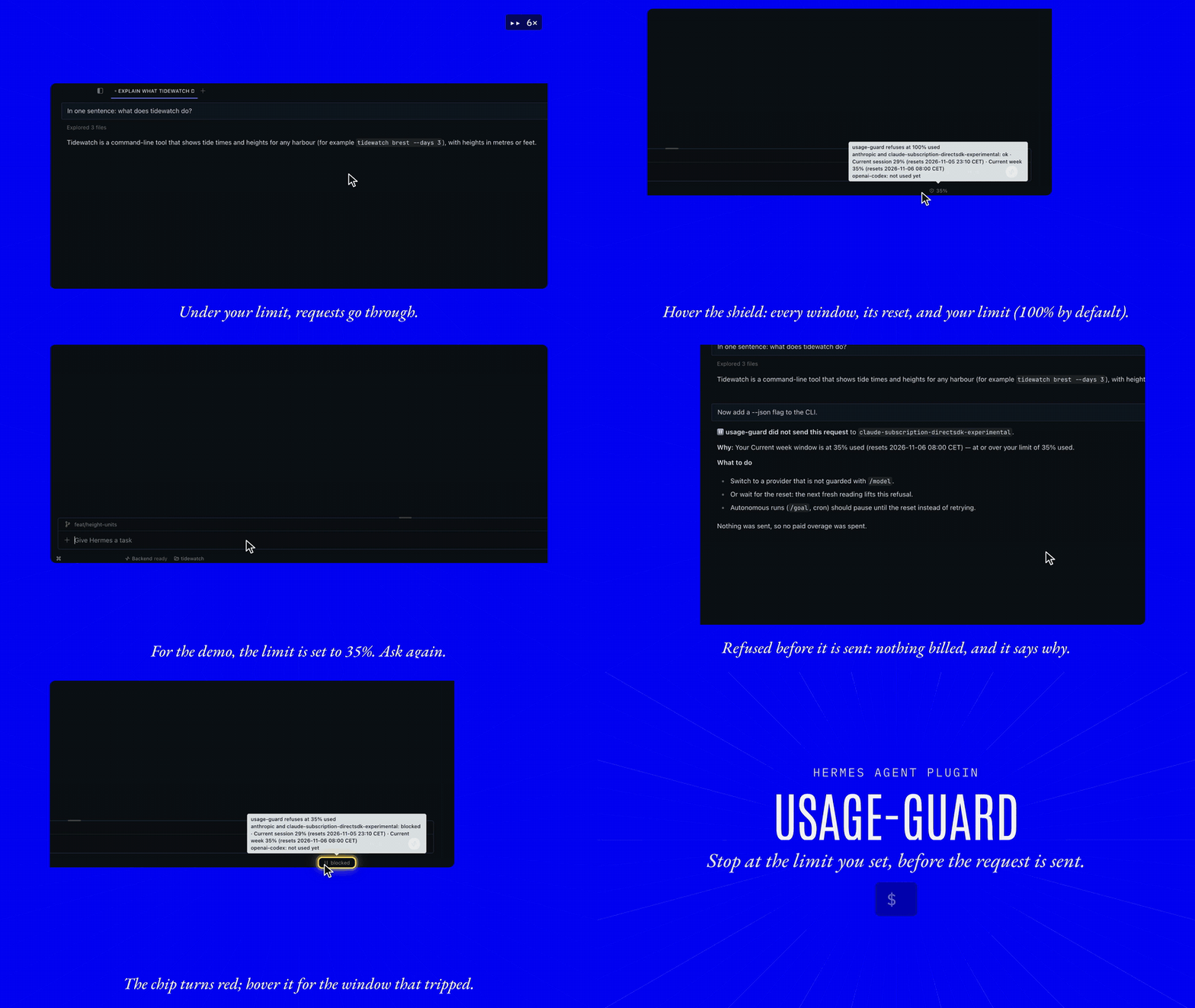
The status chip. A shield in the Hermes Desktop status bar shows the highest usage window. Hover it for every window, its reset time and your limit.
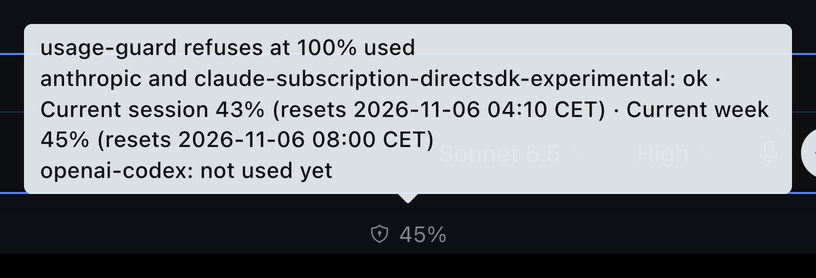
At the limit. The request is not sent, and the message says why and what to do next.
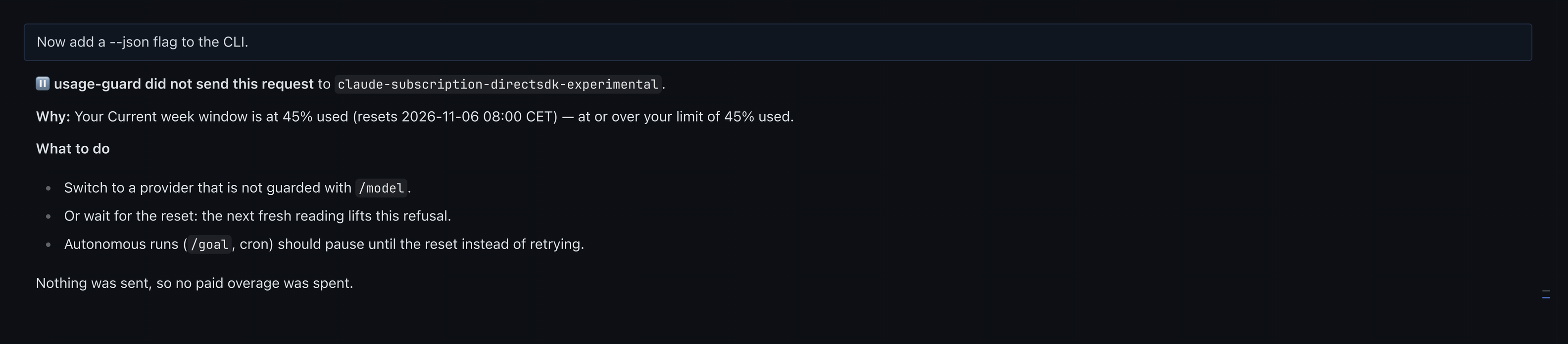
The chip turns red and names the window that tripped.
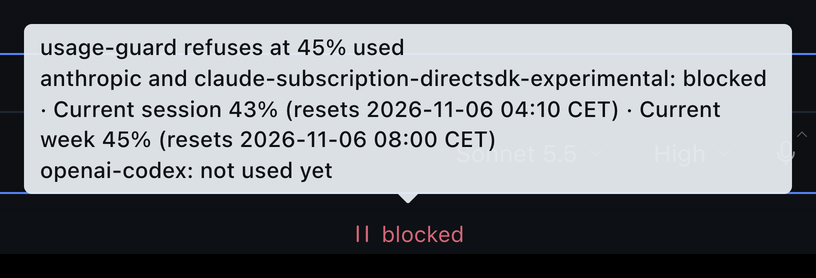
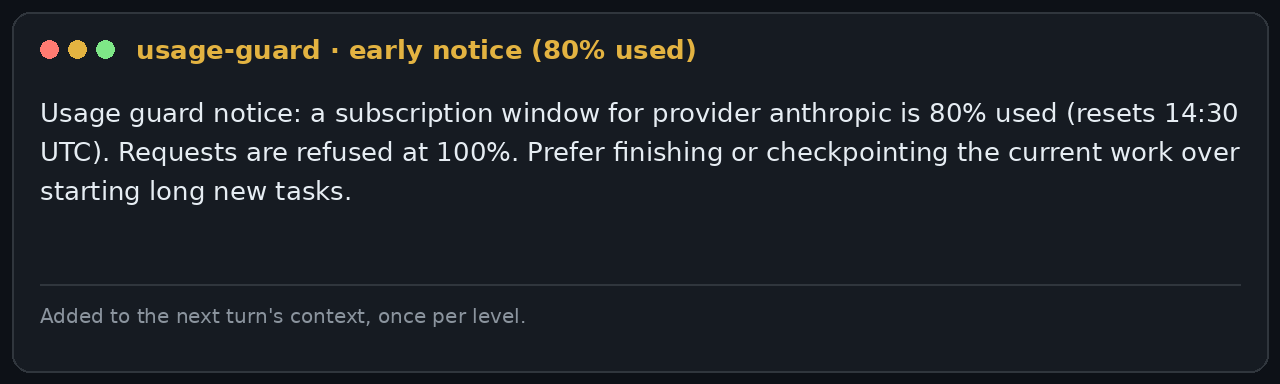
Before the limit. A short note reaches the agent at 80% and 90%, so it can finish or checkpoint the current work.
When the reading is unavailable. The guard refuses rather than guesses, and says why.
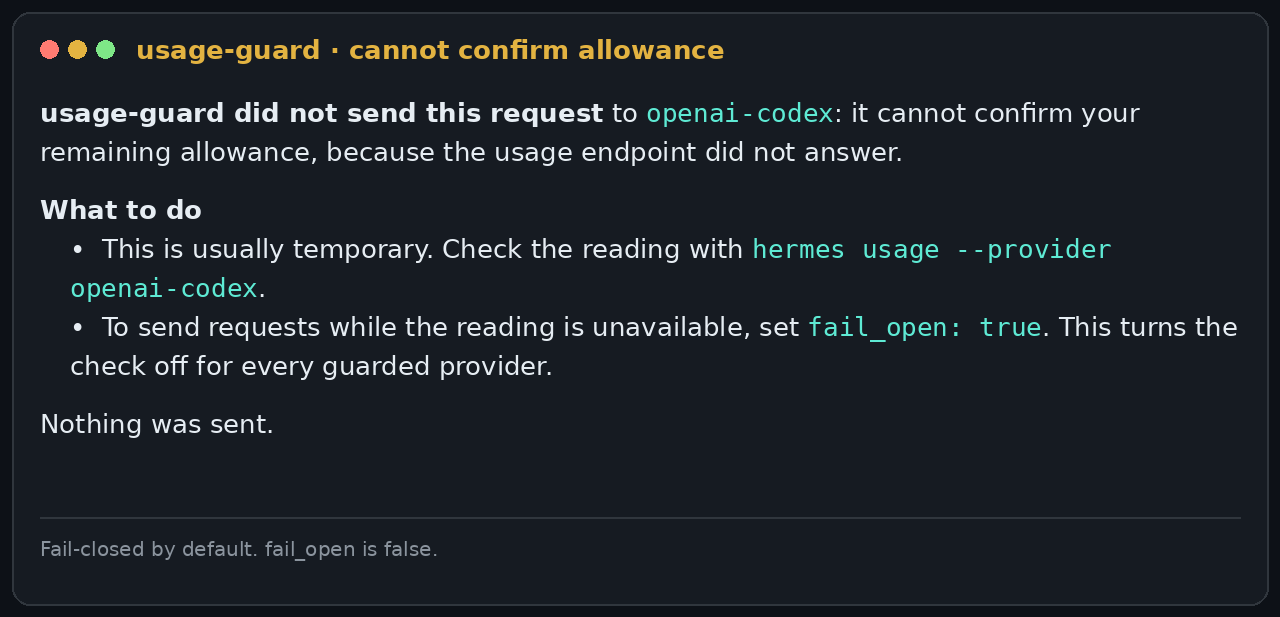
The clip, the chip and the refusal are captured in Hermes Desktop, with the limit lowered for the demo. The two notice cards use example values and are rendered from the plugin's own message text, so the wording is exact.
Quick start
Requires Hermes >=0.21.6. No Python dependencies, no API keys, no account changes.
hermes plugins install usage-guard     # from the Hermes plugin catalog
hermes plugins enable usage-guard
hermes gateway restart                 # middleware binds when the process starts
Install straight from this repository instead, or pin an exact reviewed commit with --ref:
hermes plugins install mister-ideas/usage-guard
Update and remove:
hermes plugins check-updates           # read-only: is a newer version available?
hermes plugins update usage-guard
hermes plugins remove usage-guard
Restart Hermes after an update: the gateway for the guard itself, and Hermes Desktop's backend (or the whole app) for the status chip, whose route is mounted when the backend starts. The catalog pins one reviewed commit, so an update reaches you only after a maintainer merges the new pin.
What it does
- Blocks at the wall. It refuses a provider call once a subscription usage window reads fully used (default
threshold_percent: 100). The request is not sent, so no paid overage is spent. - Warns before the wall. At 80% and 90% one short note goes into the agent's context, so long work can wind down in time.
- Fails closed, except where a low reading is still a fact. Missing or malformed evidence refuses. A past
reset_atdoes not: a window under the threshold stays usable until a fresh reading shows a future reset.fail_openis off by default. - Survives rate limits. A 429 from the usage endpoint never refuses a request by itself. The guard backs off and keeps using the last good reading for up to 15 minutes.
- Covers long runs. Every main-loop request is checked, including each step of a long tool-calling turn and subagent requests, not only the first prompt. MoA turns are checked against every guarded slot.
- Optional output cap. Near the wall it can lower the output budget so an in-flight request spills less. It is off by default, because a cap can cut an answer short.
- Shows its decision.
/usage-guardin any session prints what the guard would decide right now for each guarded provider, with every window and its reset time. In Hermes Desktop a status-bar chip shows the highest window and turns yellow near the wall and red when blocked. Both read the guard's own cache, so checking them never spends a usage request. - Private. It holds no credentials, makes no usage request of its own, and keeps one local cache file of windows and timestamps.
How it compares
| Tool | What it does with usage | Stops a call at the wall? |
|---|---|---|
hermes usage / /usage (native) | Shows the account's limit windows, once | No |
| Usage display plugins: usage-flame, provider-usage, usage-stats, model-usage-status, ai-usage-tracker, token-cost-meter | Live windows, chips and widgets in the Desktop status bar | No. None of these registers middleware, so none can refuse a call |
| lightningai-rate-limit | Throttles one provider's request rate (about 15 per minute) | No. It limits request rate and does not read subscription windows |
| Spend-cap plugins | Estimate spend from token counts and list prices, and stop at a cap you set | On an estimate. They do not read the subscription windows your plan actually enforces |
| usage-guard | Reads your plan's real usage windows, warns at 80% and 90%, refuses the call at your limit before it is sent, and shows it all in a status-bar chip | Yes, fail-closed |
Configuration
Settings live under plugins.entries.usage-guard.settings. The defaults are safe, and most users change nothing.
| Key | Default | What it does |
|---|---|---|
threshold_percent | 100 | Refuse when a window reaches this percent used. Set 97 for a safety margin |
warn_percents | [80, 90] | Levels that trigger the early note. [] turns it off |
fail_open | false | Send requests when the reading is unavailable. Keep false unless you accept the risk |
provider_keys | ["anthropic", "openai-codex"] | Providers that are gated. Add custom provider IDs here |
refusal_mode | notice | notice ends the turn with an explanation. empty sends an empty reply, so Hermes retries and then switches to the profile's fallback_providers; use it only on profiles whose fallback is a different provider (otherwise the turn ends as "(empty)"). The reason is then only in the log; see the reference for the trade-offs |
max_tokens_near_wall | 0 | Output cap near the wall. 0 is off |
hydrate_from_paths | [] | Files to borrow a recent usage snapshot from, instead of spending a request of our own. Empty is off |
The full table, with every key and its meaning, is in docs/reference.md#configuration.
Limits: what it cannot do
- It cannot recall a request that is already running. A request that starts inside the allowance and spills into paid usage within the same provider call is billed. The guard stops the next request.
- It does not gate auxiliary calls on stock Hermes. Compression, titles and background review are not covered. Core change #140694 would close that gap; it is open and not yet released.
- It reads the account, not the request. With credential pools or per-session overrides, treat the reading as account-level evidence.
/usage-guardand multi-profile gateways. When one gateway serves several profiles, Hermes runs a plugin's slash command in the profile the gateway was launched with, so/usage-guardcan report that profile's limit and reading. The guard itself, and the Desktop chip, use the right profile. Run/usage-guardfrom a gateway launched with the profile you want, or read the chip.- It depends on undocumented usage endpoints (Anthropic OAuth and Codex usage), which can change without notice.
- It shares the account's usage budget with everything else that reads it. Those endpoints are limited per account, not per plugin, so a second reader with its own cadence — another plugin, the CLI, a script — can push the account into a 429 and leave the guard with nothing fresh to read. Its cache is a plain JSON file in its plugin data dir (
usage-guard/usage.json:windowsoflabel,used_percent,reset_at), and any reader may prefer that file to a request of its own: it is the cheapest way to keep one read per account per window. The same works in reverse: sethydrate_from_pathsto a file another reader maintains and the guard borrows its reading instead of making its own request.
Details: docs/reference.md#what-stock-hermes-can-and-cannot-gate.
Why it exists
Subscription plans now bill extra usage once a window is exhausted, and on many accounts it is switched on. An unattended agent is exactly the workload that spends it: it keeps working at 100% used, and the first request past the wall is billed. usage-guard makes the agent stop at the wall instead.
Troubleshooting
| Symptom | What is happening | What to do |
|---|---|---|
| Shows 100% right after a reset | On stock Hermes, upstream's Anthropic parser scales any utilization ≤ 1 by 100, so a window at 1% arrives as exactly 100%. Anthropic reports whole percentages, so only 100 is ambiguous. | Nothing to do. A lone 100% is shown as unconfirmed (may really be 1%) and does not refuse while extra usage is off, because Anthropic itself stops requests at a real 100%. A 100% that follows a higher reading in the same window is real and refuses, and so does any 100% while extra usage is on. Upstream fix: PR #139916. |
| Blocked although usage looks fine | The window the notice names is at/over the threshold in the snapshot the guard read. The notice prints the label, the value and the reset time. | Read the notice: it names the window. Compare with hermes usage. A reset that has passed is only treated as replenishment once a new reading shows a future reset — and only while the reading was at/over the limit. |
| Refused, notice says its settings are invalid | A setting has the wrong shape. A broken policy refuses by design rather than silently disabling the guard. | Fix plugins.entries.usage-guard.settings, or run hermes plugins disable usage-guard. The plugins.usage-guard log line names the setting. |
| Refused: "cannot confirm your remaining allowance" | The usage reading is missing, empty or stale beyond stale_grace_s (900s). The notice names the cause. | Run hermes usage --provider <id> to check the reading. Read the plugins.usage-guard log for detail. Set fail_open: true only if you accept sending without a reading. |
| What would it decide right now? | — | Run /usage-guard in a session, or hover the shield chip in the Desktop status bar. Both answer from the cached reading and show the reason for any refusal. |
/usage-guard shows another limit than the refusals | One gateway is serving several profiles, and Hermes ran the command in the launch profile. | The chip and the guard itself are right. See Limits. |
| The Desktop chip does not appear | The chip hides when its status route does not answer. Hermes Desktop's backend mounts plugin routes when it starts, so a plugin installed or updated while it runs is not served yet. | Restart Hermes Desktop (or its backend), then run ⌘K → Reload desktop plugins. |
| It never blocks | The provider may not be listed in provider_keys, the window may genuinely be under the threshold, or the call may not be gated at all. | Check the log: the guard logs usage-guard active: gating providers [...] on its first guarded dispatch, and names each provider that passes through because it is not gated. See also What stock Hermes can and cannot gate. |
| "reports no account usage to guard" warning | The account has no subscription usage surface — an Anthropic API-key account publishes no limits on the OAuth usage endpoint. | Expected: the provider passes through rather than being blocked. Remove it from provider_keys to silence the warning. |
| "usage endpoint rate-limiting" messages | The usage endpoint answered 429. The guard backs off (honouring Retry-After) and keeps deciding on the last good snapshot. | Nothing — a rate limit never refuses a request. Raising a floor or refreshing harder only deepens the backoff. |
| I need to unblock right now | — | Switch /model to another provider, wait for the reset, remove the provider from provider_keys, or hermes plugins remove usage-guard. |
Development
python -m pip install -r requirements-dev.txt
python -m pytest tests -v          # offline suite (host-contract tests skip)
node tests/desktop/stub-sdk.mjs && node --test tests/desktop/chip.test.mjs   # Desktop chip
ruff check .
hermes plugins validate . --install-deps
python scripts/package.py          # dist/usage-guard-<version>.zip
Host-contract tests run against a real Hermes tree: point HERMES_CORE at a checkout (CI pins one):
HERMES_CORE=/path/to/hermes-agent python -m pytest tests/test_host_contract.py -v
See CONTRIBUTING.md and SECURITY.md. Changelog: CHANGELOG.md.
Support, issues and releases
- Bugs and feature requests: the issue forms. The bug form asks for the refusal notice, your versions and the
plugins.usage-guardlog lines — that evidence is what makes a report reproducible. - Questions and ideas: Discussions.
- Security: SECURITY.md — reported privately, never in a public issue.
- Community expectations: CODE_OF_CONDUCT.md.
- Contributing: CONTRIBUTING.md — what is in and out of scope, and how releases are cut.
Releases are SemVer tags with a GitHub Release whose zip the release workflow builds only after the suite passes. There is no fixed cadence: fixes ship when they are ready. The Hermes plugin catalog pins an exact commit SHA, and moving that pin is a reviewed pull request against NousResearch/hermes-agent, so catalog users only ever receive reviewed code.
License
MIT — see LICENSE.
README from the reviewed commit 06c10bf; it updates when the author re-pins.