nosliwhtes
Hermes Minimizer
Less unnecessary scaffolding, with all required behavior intact.



Minimizer adds a cache-safe minimizer.guidance system-prompt section to Hermes: reuse what fits, avoid speculative layers, and prove the requested behavior. It exposes Desktop/TUI settings (preset, extra_guidance) and a read-only /minimizer inspection command. It adds no tools, hooks, scanners, telemetry, or runtime dependencies, and runs cleanly under plugins.isolation: host. It guides the model; it does not enforce outcomes.
Quick start
Install the official catalog's reviewed revision:
hermes plugins install hermes-minimizer --enable
Start a new Hermes session or process, then try:
Review this change for over-engineering without editing it. Identify unnecessary scaffolding or existing behavior we can reuse. Preserve every requirement and safeguard; explain the tests or invariants each proposed cut must preserve.
Check installation and enablement:
hermes plugins doctor hermes-minimizer --ci
hermes plugins list --enabled --plain
The enabled list should include hermes-minimizer; doctor checks native discovery and registration, not model behavior. Existing persisted prompts can retain their original section bytes.
See the verified examples
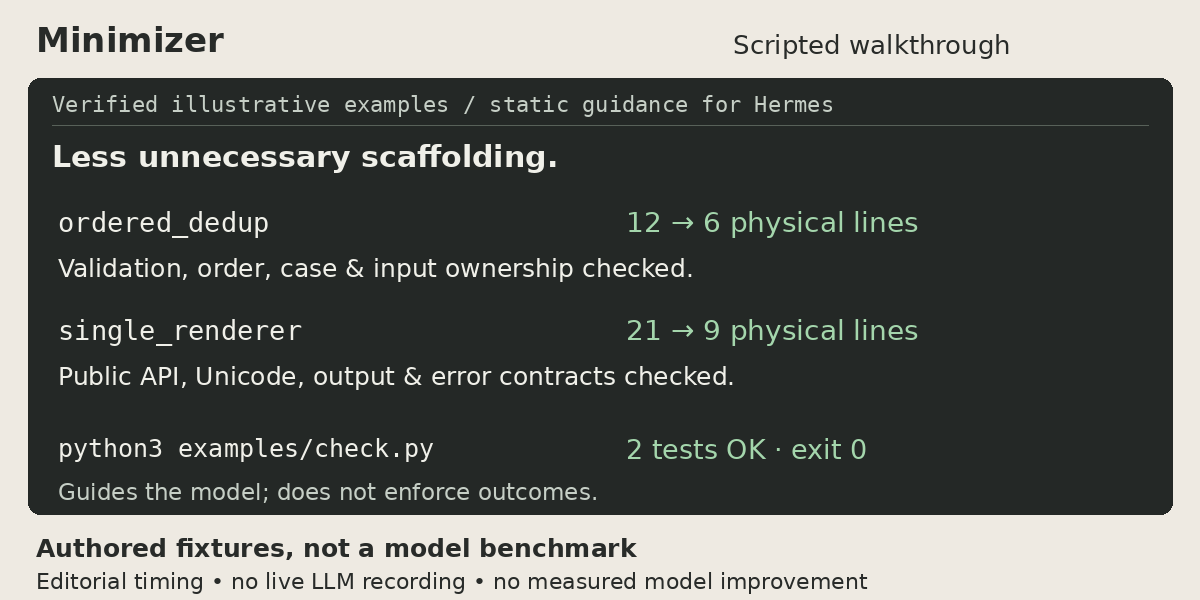
Scripted walkthrough of verified, authored fixtures—not a live LLM recording or a plugin-vs-baseline benchmark.
Watch MP4 · Animated GIF · Static PNG / reduced-motion option
Settings and /minimizer command
Configure Minimizer in Hermes Desktop (Settings -> Plugins -> hermes-minimizer) or config.yaml:
plugins:
  entries:
    hermes-minimizer:
      settings:
        preset: standard   # standard (~3,150 chars) or compact (~1,490 chars)
        extra_guidance: "" # optional team or repo addendum (bounded to 4,000 chars total)
compactsaves roughly half the prompt budget when you run several prompt-section plugins inside Hermes' shared 8,000-character limit.extra_guidanceis appended after the core policy, strips reserved persistence markers, and truncates safely inside Hermes' 4,000-character per-section cap so invalid settings never drop the section.- New prompts use the latest settings. Resuming from a persisted prompt keeps its saved text until Hermes rebuilds it.
- Keep secrets and private material out of
extra_guidance: Hermes can send it to your model provider and/minimizer policydisplays it in the calling chat.
Use the in-session /minimizer helper anytime:
/minimizer(or/minimizer status): show active preset,extra_guidancestate, and exact rendered size vs. Hermes' 4,000/8,000-character limits./minimizer policy: preview the section for current settings, not a readback of this session's frozen prompt. Hermes can still skip it if the shared budget is full./minimizer review: output the copyable advisory over-engineering review prompt.
Everyday use
The examples below are ordinary-language prompts, not magic activation phrases. The guidance is present whenever the plugin is enabled for the session.
- “Be lazy: reuse the existing implementation if its semantics fit this requirement.”
- “Apply YAGNI here. Remove only speculative extension points, not required behavior.”
- “Review this diff for over-engineering. Suggest cuts before making changes.”
For a copyable advisory review format and a build/review workflow, see Workflows. No separate skill or Journey installation is required.
Runnable evidence
These are authored illustrative fixtures, not code mined from users or measurements of model effectiveness. Both versions execute against the same behavioral expectations. No performance, token, or installation savings have been measured.
| Simplification | Before | After | Physical lines |
|---|---|---|---|
Ordered string deduplication using dict.fromkeys | examples/ordered_dedup/before.py | examples/ordered_dedup/after.py | 12 → 6 (−6) |
| Remove a one-implementation renderer factory | examples/single_renderer/before.py | examples/single_renderer/after.py | 21 → 9 (−12) |
Run locally with stdlib Python 3.10+; no Hermes or model access is needed:
python examples/check.py
The verifier also works by absolute script path from another directory. It exits nonzero on failure and counts all physical source lines, including imports, comments, and blanks, using splitlines(). The fixtures are not imported by the plugin.
Scope and preserved invariants: deduplication accepts a list of strings, retains first-occurrence order and case, returns a fresh list, leaves input unchanged, and preserves type errors. The renderer keeps the public render_message(name, *, style="plain") entrypoint, whitespace trimming, Unicode, output, and error types/messages/order; only plain is supported. Its internal classes are not public API. Empty inputs, invalid types, unsupported styles, and keyword-only calling are checked. Neither example is a recommendation to remove validation or a factory with a real architectural purpose.
Boundaries and FAQ
What must not be simplified away? Authorization, trust-boundary validation, security, data-loss prevention, required error handling, accessibility, calibration, migration/rollback safety, concurrency protection, compatibility, required tests, or explicitly requested behavior. System, user, and repository requirements outrank this guidance. Correctness and ownership matter more than line count.
Is this the Minimizer skill? No. This repository ships a native Python plugin, not a Journey kit or skill. Optional skills are separate procedures; see plugin vs. skill and Ponytail provenance.
Does it guarantee simpler or safer code? No. It is not an authorization layer, sandbox, test runner, or policy enforcement engine. Static guidance is deterministic; model responses are not. Review changes and run the required checks.
Enabled, but no guidance? Start a new session/process; resumed prompts may retain frozen sections. Hermes' shared prompt-section budget (8,000 characters by default across plugins) can omit sections, and safe worker contexts may suppress plugins. Check doctor output and the consuming context, not just the enabled list.
Older Hermes? Requires Hermes >=0.22.0 and PluginContext.register_system_prompt_section. Missing the native API fails registration visibly with an upgrade message; there is no monkeypatch or silent fallback.
Update, disable, or remove
hermes plugins update hermes-minimizer
hermes plugins disable hermes-minimizer
hermes plugins remove hermes-minimizer
These are separate actions: update to refresh the installed source; disable to keep it installed but off; remove to uninstall it. Start a new session/process after a change. Disabling is config-only in a running process and does not rewrite already-persisted prompts. Re-run doctor and the enabled-list check after updating.
The catalog tracks a reviewed commit and can lag this repository's releases. For intentional branch-source installation instead, use hermes plugins install nosliwhtes/hermes-minimizer --enable; that is not the catalog's reviewed pin.
Compatibility and development
Native integration has been execution-tested against official Hermes commits e06df9c2eae6901f4c88f464e0ae6e753c0428b8 (v0.22.0) and ae2a81ccc00e9b7c06301523e5bb09608397149c (v0.23.2), including plugins.isolation: host. This is not a claim that every intermediate version or model was tested.
Development commands and test setup · Contributing · Changelog
Feedback: open an issue with the plugin/Hermes versions, a minimal public reproducer, expected behavior, and observed checks. Remove private code, prompts, credentials, and transcripts first.
License
MIT. Copyright (c) 2026 Seth Wilson. Third-party notices.
README from the reviewed commit b5e58fc; it updates when the author re-pins.