 Adolanium
Hermes Sheets
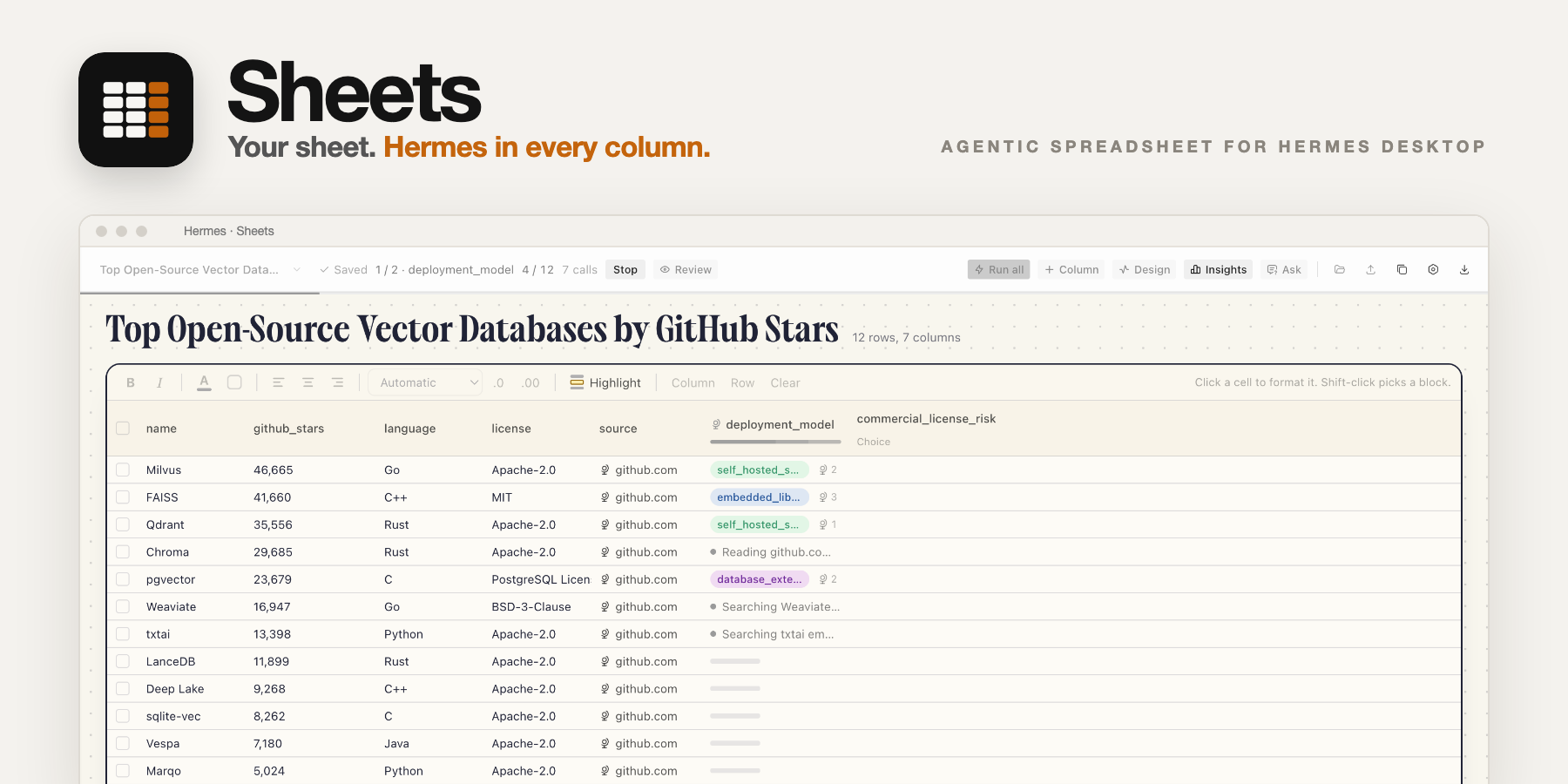
Ask for a sheet, or bring your own. Hermes answers in every column.
Sheets is an agentic spreadsheet inside Hermes Desktop. Describe the table you want and a Hermes agent
finds the rows on the web, each with its source. Or drop in customer reports, tickets, or leads.
Hermes reads the sheet, suggests the columns worth adding, and explains what the answers add up to.
Any Hermes chat can read your grids too. You decide what runs, and nothing an agent writes lands until you approve it.
POWERED BY HERMES AGENT · COMMUNITY PLUGIN · VERSION 0.1.10
Part of Hermes Folio, with Data and Whiteboard. Each works alone.
See it work · Install it · Understand the data
Powered by Hermes
Sheets is a community-built agentic spreadsheet for Hermes Desktop. It is not a Google Sheets connector. Your grids stay in Hermes on your own computer. It uses the Hermes plugin SDK, your configured models, native Hermes sessions for agent work, and the same profile-aware desktop you already use.
The grid gives Hermes something concrete to work on. A row becomes a typed answer, a finding, or an agent task without leaving the app.
A sheet with an agent in the room
Most AI spreadsheet tools fill the cells and stop there. Sheets gives every answer a declared shape, shows you what it will cost before it runs, and keeps a way back.
| ReadPaste rows, or open an Excel workbook or a CSV. Hermes reads the column names and a few rows, says what the data is, and suggests the columns worth adding, each with a reason. | ChooseTick the suggestions you want, or write your own column in plain words. The button shows the exact number of model calls before anything runs. |
| UnderstandInsights charts every column. One call turns the counts into findings, and one click narrows the sheet to the rows a finding is about. | Hand offSend exactly those rows to a tool-enabled Hermes session, or ask about a sheet from any chat. Hermes proposes cell fixes, new columns, and new rows. You approve them one at a time, and every applied set can be restored. |
Sheets never fills a column you didn't pick, and an agent never writes to the sheet on its own.
Ask for a sheet
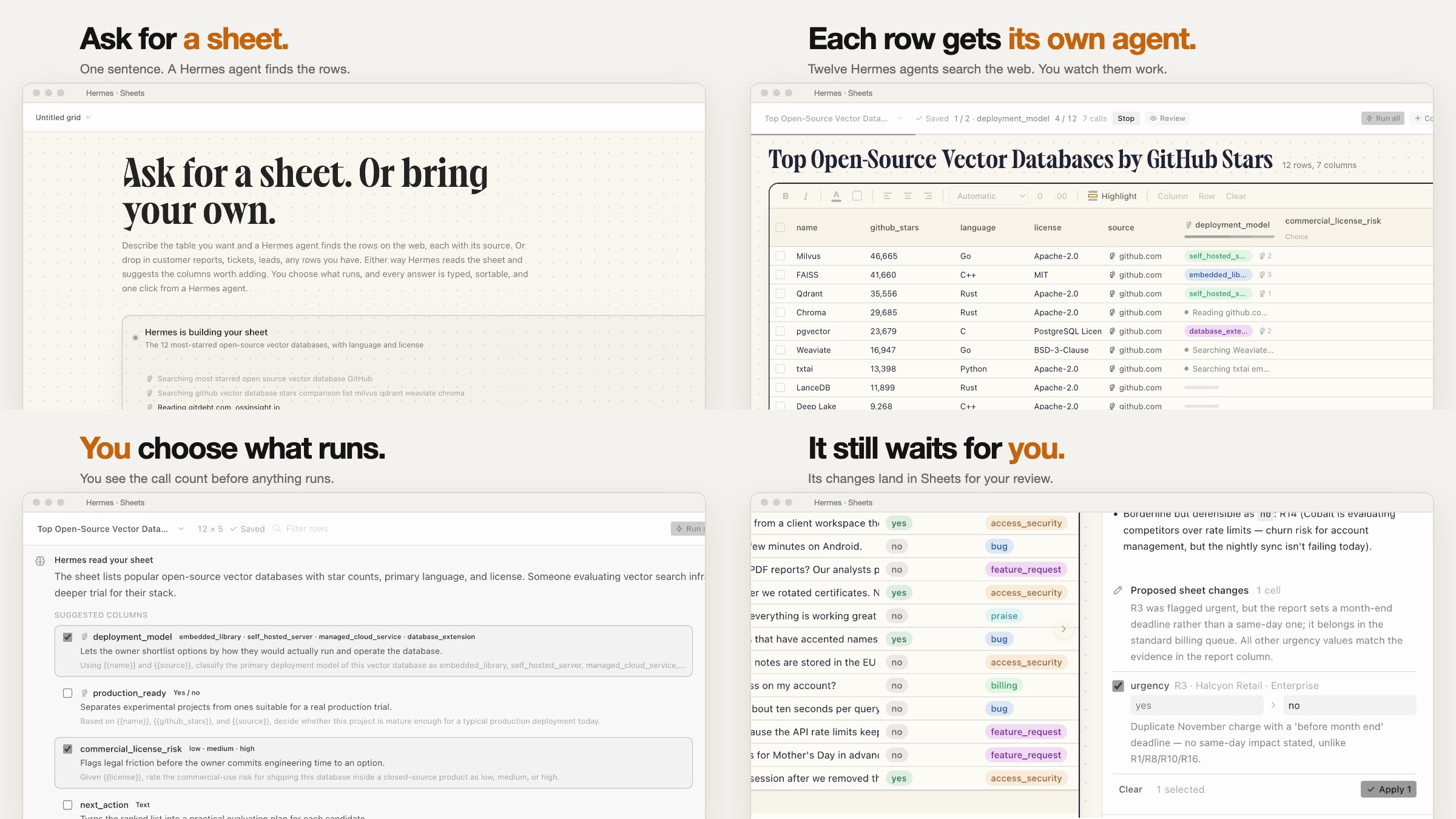
Type one sentence on the start page, like The 12 most-starred open-source vector databases, with language and license, and click Build sheet. One hidden Hermes session searches the web and comes back with a small table. The last column of every row is the page that row came from.
You watch it work. The start page shows each step the agent takes, such as Searching the web or Reading github.com, with a step count and a Stop button. The build ends on its own after five minutes or 40 tool calls, and a sheet holds at most 40 rows and 8 columns.
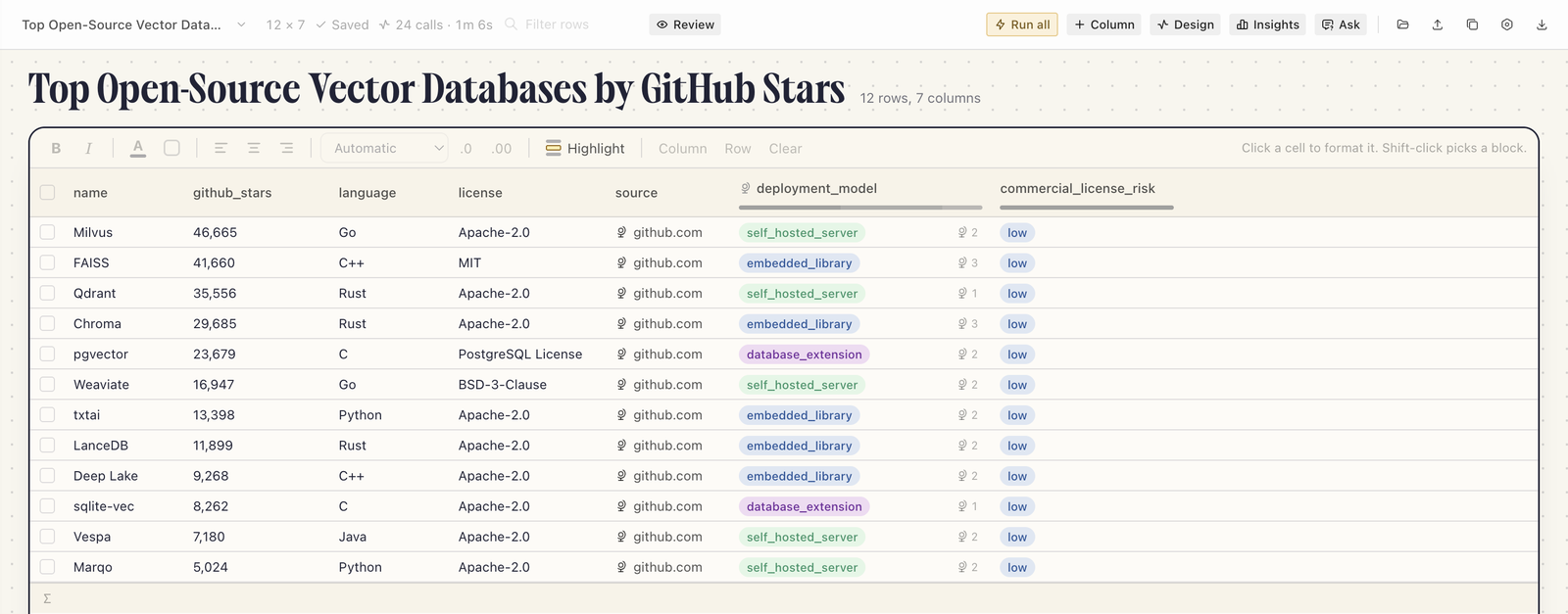
The agent gets a look-it-up-only brief, the same one research columns use. When the rows land, Hermes reads the sheet and suggests columns like it does for a sheet you bring. Nothing fills until you pick it.
Or drop in your own. Hermes reads it.
Reading the sheet is one model call. Hermes sees the column names and the first eight rows, then suggests columns like urgency, issue category, or next action, and says why each one helps.
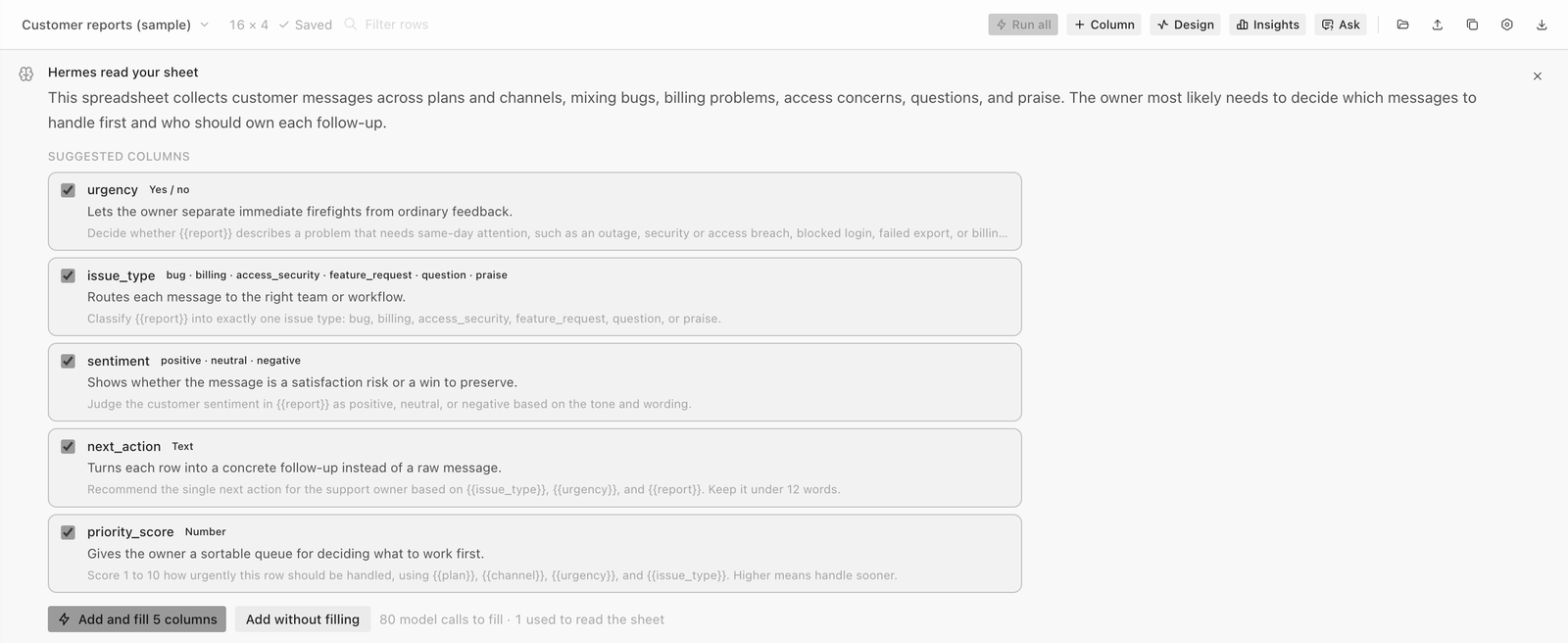
Untick what you don't need. Every column costs one call per row, so 3 columns on 24 rows is 72 calls, and the button says so. Then every row gets an answer in the shape the column declared.
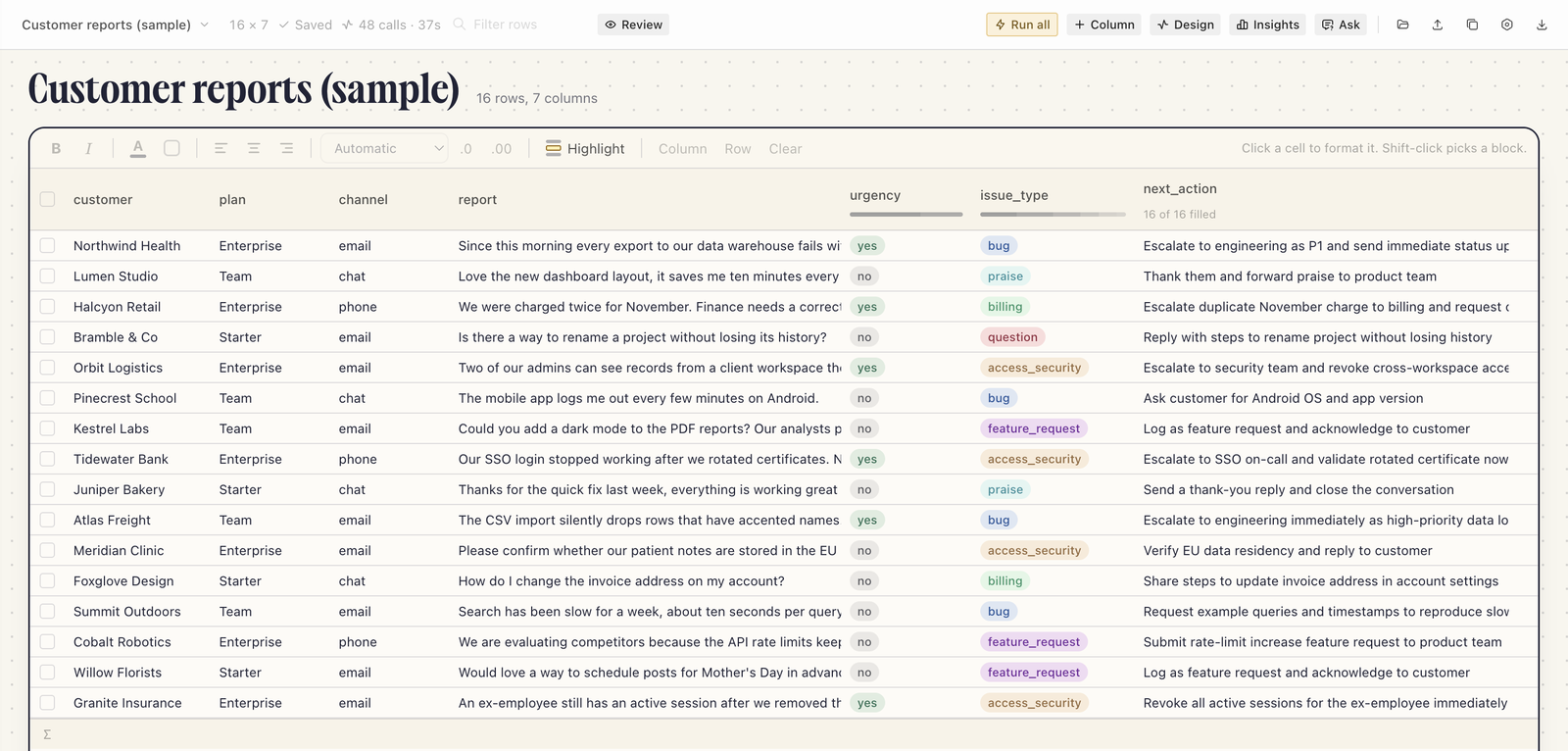
Or ask your own question
The suggestions are a starting point. Click Column, name it, and write the question. Reference any other column by name:
deadline = Does {{report}} state a deadline? Reply with just that time or day, or none.
Pick the answer shape: text, yes/no, number, a choice from your own list, or JSON. Test this row runs the real prompt on one row without saving anything, so you can fix the wording before paying for the whole sheet.
A choice column refuses to guess. An answer that matches two of your options, or none of them, shows up as a failed cell you can retry instead of a quietly wrong value.
Then it tells you what the answers add up to
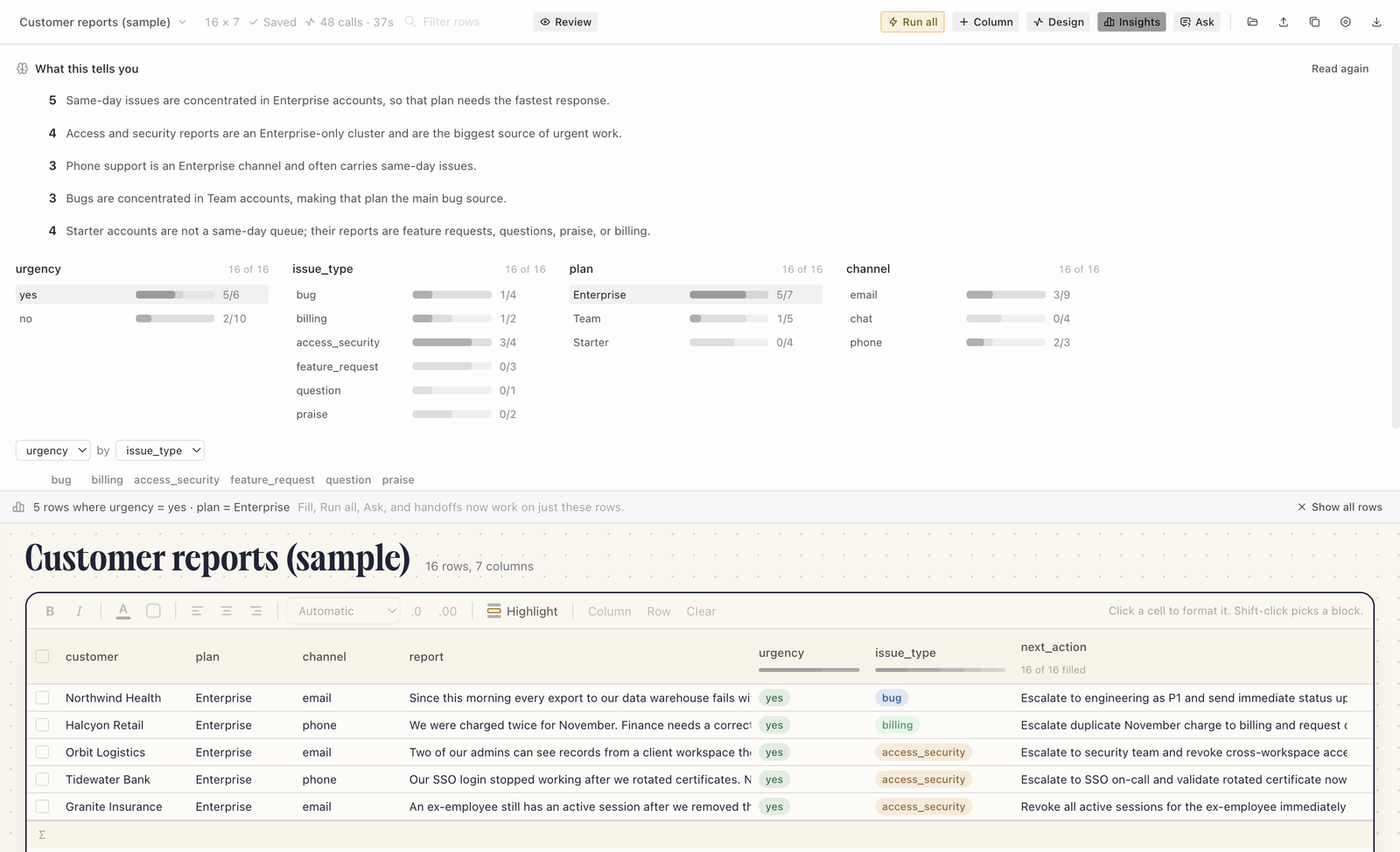
Insights charts every column worth charting. What this tells you is one call in which Hermes reads the counts Sheets computed, never your row text, and says what stands out. Sheets counts each finding's rows itself, so the model never states a number.
Click a finding, a bar, or a cell of a cross-tab, and the grid narrows to those rows. Every other chart splits inside that focus, and fill, Run all, and Ask all work on exactly those rows.
Nothing enters the sheet you didn't approve
Ask hands the focused rows to a real Hermes session with tools. Ask it to draft the replies, check the facts, fix the categories, or add a column. Its proposal comes back as a review list:
- Cell changes show the old value, the new value, and the agent's reason. A change to your own imported data is tagged so you notice it.
- New columns come in two kinds. A prompt column (like churn risk: low, medium, or high) lands empty and shows what filling it would cost, so nothing runs until you click Fill. A values column carries answers the agent already found.
- New rows show every value they would add.
Untick anything you don't want, then apply the rest.
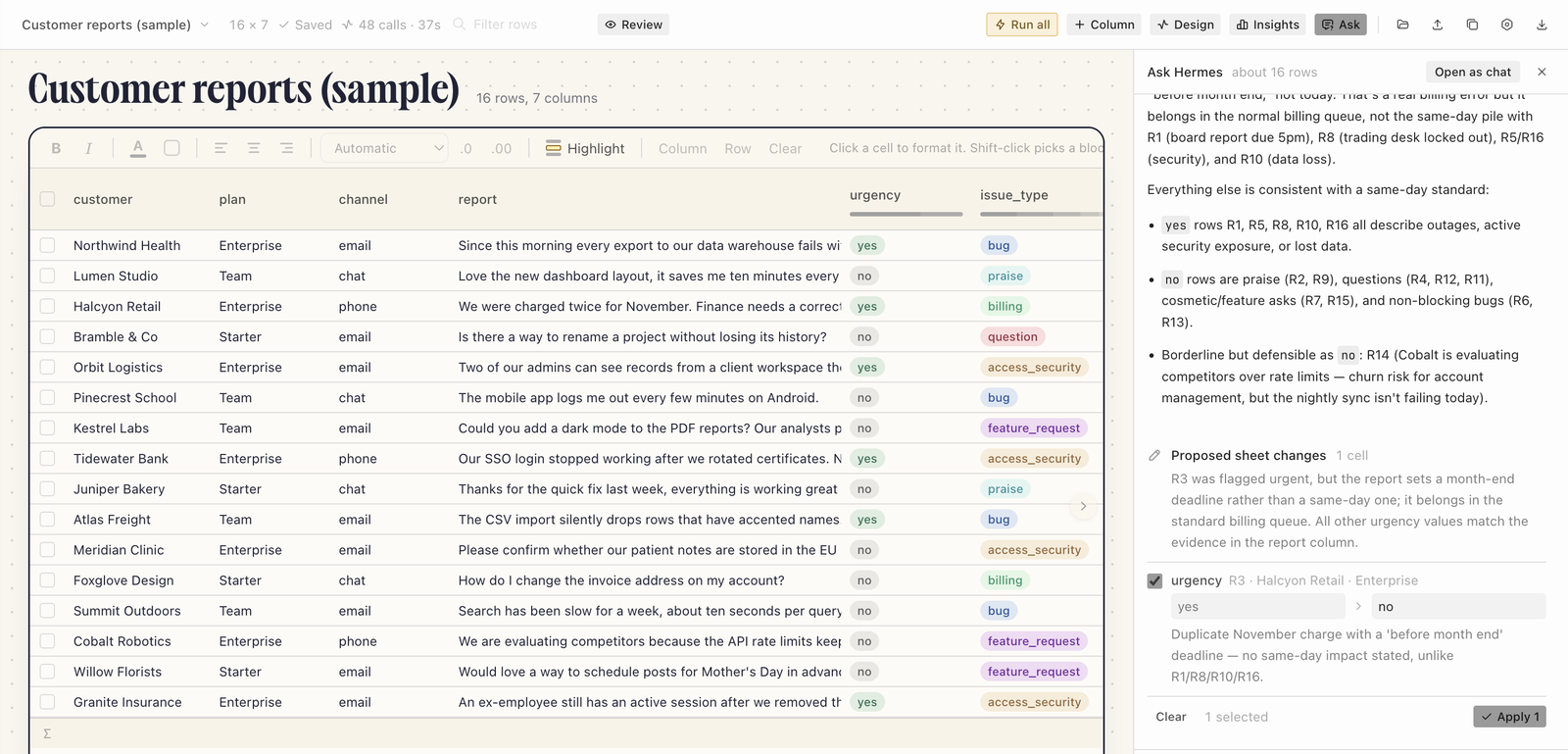
Sheets writes the whole set or none of it. If a cell changed after the agent looked at it, that proposal is disabled. Cells you typed by hand are protected, and no later fill overwrites them.
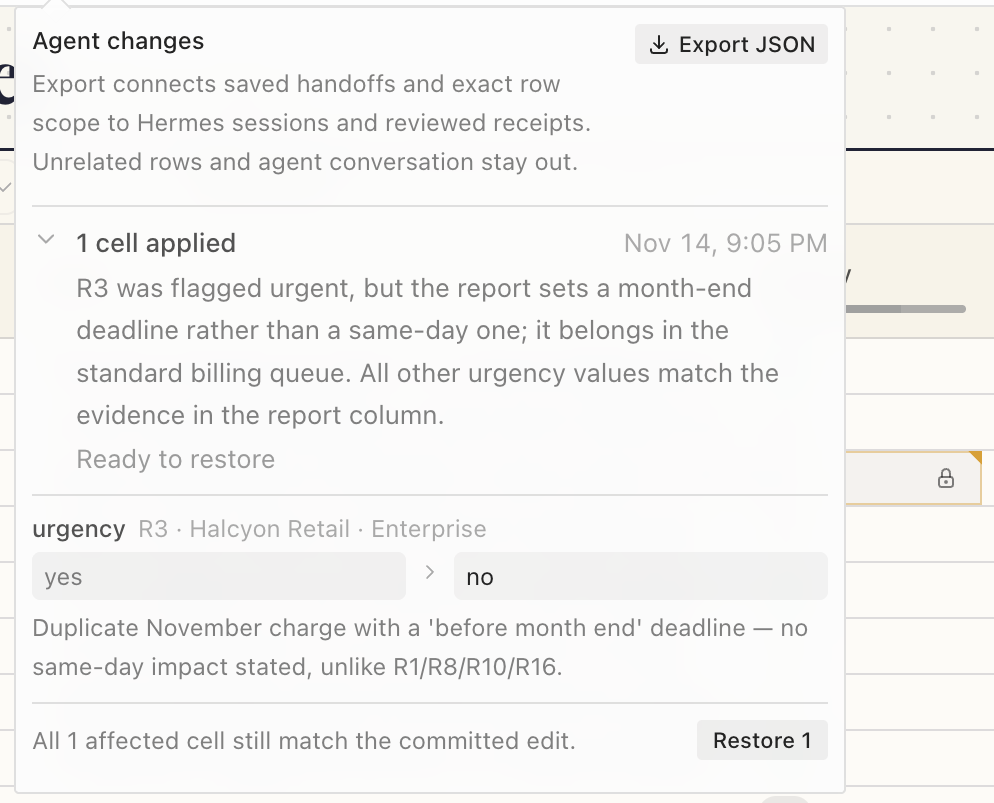
Cells Hermes changed keep a thin outline, with the reason on hover, until you or a fill change them again. Every applied set becomes a receipt with the exact before and after values. Restore puts the cells back and takes added columns and rows out again, in one click. It stays disabled if anything has touched them since, including a fill of an added column, so it never erases newer work.
Ask about your sheet from any chat
Sheets gives Hermes four tools, so you can talk about a sheet without opening it. Chat access starts off. Turn on Run settings › Chats can read my grids first:
sheets_listandsheets_readread your grids, with filters and paging for big ones.sheets_proposesends cell fixes, new columns, and new rows to a grid. They wait on that grid in Sheets, in the same review list as Ask, until you apply or dismiss them. A toast says when a suggestion arrives.sheets_createopens a new grid from data Hermes gathered, such as a list of companies it researched. It never touches an existing grid.
Ask a chat "which of my overnight reports need attention first?" and it reads the grid, answers in the chat, and suggests an owner column for you to review in Sheets. The sheets:grids skill teaches it to read before it answers, to treat cell text as data, and to leave every decision to you.
While chat access is on, chats read a copy of each grid that Sheets keeps in Hermes plugin data while the page runs. The copies live in the plugin data of the profile you are in, and each profile where Sheets is installed gets its own when you open Hermes on it. Turning Chats can read my grids off deletes the copies in the profile you are in straight away, and in each other profile the next time you open Hermes on it. Until you turn it on, the tools tell the chat that access is off and how you can change that.
When the answer isn't in the row, send an agent
Some questions need the web. What is this project's latest release? Which license does it use? A research column gives every row its own hidden Hermes session that searches and reads, and its answer goes through the same typed check as any other column.
While it works, each cell shows what its agent is doing, like Reading github.com. The finished answer carries a source chip with the pages it read, its tool calls, and its time. One more click opens the agent's whole conversation as a normal Hermes chat.
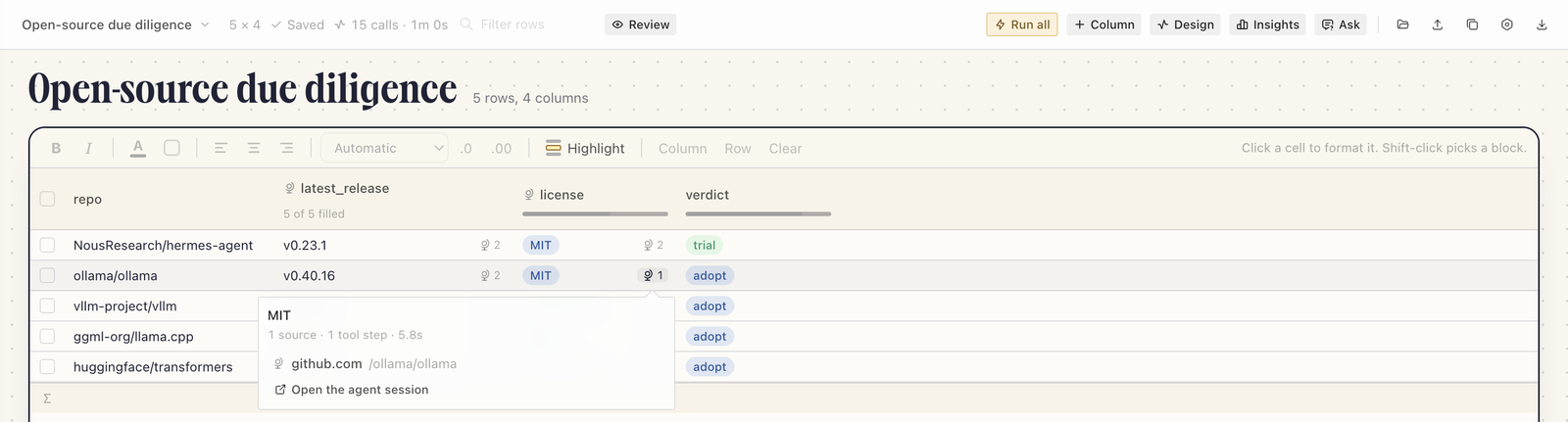
Research agents get a look-it-up-only brief and treat the row as evidence, not instructions. A tool call that could change something, like a shell command or a file write, is flagged on the cell. Approval prompts inside these hidden sessions are denied automatically, because nobody could see them.
Less copying. More deciding.
Sheets handles the small things that make a sheet worth opening again:
- Run all fills columns in dependency order, and the red count on a column header retries only the failed cells.
- A fill interrupted by a restart comes back as paused rows that resume where they stopped.
- Saved views reopen a filter, sort, and handoff by name. Opening one changes nothing and costs nothing.
- A grid can start from your Hermes chats, installed skills, scheduled jobs, or a folder you grant.
- Export writes an Excel workbook or a CSV, whichever you name in the save dialog. Number columns stay numbers in Excel, and text that starts with
=stays text. Both keep research sources in a<column>_sourcescolumn next to each answer. - The format bar above the grid sets bold, italic, text colour, fill and alignment on the cells you pick. Click a cell, shift-click to pick a block, or stretch the pick over a whole column or row. Cmd B and Cmd I work too.
- A column can show its numbers as plain numbers, pounds, dollars, euros, yen or percentages, with the decimal places you choose. The format changes what a cell shows and never what it holds, so formulas, sorting and totals are unaffected, and a total reads the way its column does.
- Highlight rules paint a cell or its whole row when a column meets a condition, such as margin under 20%. They keep working as the data changes. Suggest with Hermes proposes rules from the column names and a summary of each column, and nothing is added until you accept it.
- The Excel export carries all of it: number formats, bold, italic, colours, fills and alignment. Rule fills are written as plain fills.
- Yes/no and choice columns edit from a drop-down of their allowed values.
- Formula columns compute each row from its other columns with no model call, such as
{{price}} * {{quantity}}orIF({{urgency}} = "high", 3, 1). They use column names, not cell addresses, so sorting and new rows never break them. Functions: SUM, AVERAGE, MIN, MAX, COUNT, ROUND, ABS, IF, AND, OR, NOT, CONCAT, LEN, UPPER and LOWER. - The totals row under the grid shows a Sum, Average, Min, Max or Count for any column, over the rows on screen.
- Export JSON writes one grid's audit, or the whole workspace, with every handoff, session, and receipt linked.
- Chart opens the rows on screen as a report in the Data plugin, where Hermes suggests the charts. Data's Open in Sheets sends a table back as a new grid. The button only shows while Data is installed and on.
- Pin to board sends the rows you ticked to your open board in the Whiteboard plugin, one note each, up to 24 at a time. It shows while Whiteboard is installed and on.
- Copy grid card puts a
::sheetscard in a Hermes chat, which shows a live, compact view of that grid in the transcript.
Built for real sheets, not a demo list
The page is a single desktop plugin file, and the chat tools are a small Python package next to it. Sheets runs on stock Hermes Desktop with no fork, upstream patch, build step, or package manager.
Import handles what real exports look like: quoted fields with commas and line breaks inside them, a byte-order mark, blank or duplicate column names, and tab-separated pastes straight out of Excel or Google Sheets. It opens .xlsx workbooks too, one sheet at a time, and asks which sheet when there are several. Dates, currency and percentages come in the way Excel shows them.
Make it yours
Install
From the command line:
hermes plugins install Adolanium/hermes-sheets
Or in Hermes Desktop, open Capabilities › Plugins › Install from Git and paste https://github.com/Adolanium/hermes-sheets.
A desktop plugin installed from the command line starts switched off. Open Capabilities › Plugins, find Sheets, and switch it on. If it doesn't appear in the sidebar, quit Hermes Desktop completely and open it again. The chat tools load in the next chat you start.
More than one Hermes profile
The Sheets page is part of the Desktop app, so it shows in every profile and your grids are the same in all of them. Anything Hermes does from the page runs in the profile you have selected.
Opening and saving files and the chat tools go through the agent half of the plugin. Hermes installs and switches on that half for each profile separately. To use Sheets fully in another profile, install it for that profile as well:
hermes -p <profile> plugins install Adolanium/hermes-sheets
Then switch it on in Capabilities › Plugins while that profile is selected. In a profile without it, the page says its backend is not running there.
Open it
Choose Sheets in the sidebar, run Open Sheets from the command palette, or go to /sheets. Describe a sheet and click Build sheet, paste rows, open an Excel workbook or a CSV, or click Try 16 sample customer reports. Hermes reads the sheet, you tick the columns you want, and you click Add and fill.
The sample reports and starter grids are labelled synthetic rows. The answers are real model output from your configured Hermes models.
AI, when you ask
Every model call starts from a click, and Sheets shows the count first.
- Building a sheet from a sentence is one hidden Hermes session with web tools. It stops after five minutes or 40 tool calls.
- Reading a sheet is one call. A filled column is one call per row.
- Suggest with Hermes in the highlight rules is one call. It sends each column's name and a summary of it: lowest, highest and average for number columns, and the six most common values for text columns.
- What this tells you is one call over the computed counts.
- Research columns, Build sheet, and Ask use hidden Hermes sessions with tools, because that is the path with search and follow-ups. Three research rows run at once, and each stops after three minutes or 24 tool calls.
- Sheets' chat tools make no model calls of their own. A chat that uses them runs on that chat's model.
Model calls apply your provider's normal usage costs.
Privacy you can explain in one breath
Your Hermes Desktop  →  local grid storage  →  your configured Hermes models (only when you run something)
                     ↘  a copy in Hermes plugin data (only after you let chats read your grids)
                     ↘  the web, through your Hermes web tools (only when you build a sheet, run a research column, or use Ask)
Grids live in Hermes plugin storage on this desktop under hermes.plugin.sheets.*, one key per grid. Chats can read my grids is off until you turn it on. While it is on, Sheets also keeps a copy of each grid under plugin-data/sheets/ in your Hermes home, so the chat tools can read it. A chat sees a grid only when it calls one of those tools. Sheets has no server of its own, no telemetry, and no key handling.
Two things reach past that storage, and each starts with a click from you.
-
Hermes sessions with tools. Build sheet, research columns, and Ask start hidden Hermes sessions that use your Hermes tools. They search and read third-party sites, and a research answer lists the pages it read. An approval prompt inside a build or research session is denied automatically, because nobody could see it.
-
Sheets, Data and Whiteboard hand things to each other inside the app window, with a browser event between the pages, and only when you click. Nothing is written to disk for it, no backend is called and no model is involved. A table that arrives becomes a new grid and never changes an existing one. Any other Desktop plugin you have switched on runs in the same window and could send or read such an event.
-
Files and folders you pick. Import reads the one text, CSV or Excel file you choose in the system file dialog. A workbook is read with the Python standard library only, so no macro runs and no formula is evaluated, and a workbook over 8 MB or one that carries a DTD is refused. Export writes the one Excel, CSV or JSON file you name there. The page hands that path to Sheets' own backend in Hermes, which reads or writes that file and refuses other file types and anything inside your Hermes home. The one exception is import in the Hermes webapp in a browser: the browser uploads the file you pick, Hermes stages a copy in your profile's
uploadsfolder, and Sheets reads that copy. The folder source reads text files in a folder you grant, up to 150 of them. Sheets itself reads and writes nothing else outside Hermes storage, runs no shell commands, and starts no background process. -
Read-back writes. Sheets reads every save back before it reports success. A save that didn't land shows Not saved, with export as the way out.
-
Bounded context. A column call sends one row: its imported columns, plus any generated column the prompt names. Findings send counts, not row text.
-
Saved handoffs hold no data. They store a name, an instruction, and the column names they need. Row values and answers stay in the grid.
-
Proposals hold only what they change. A chat's proposal stores the cells, columns, and rows it would change, plus what each cell held when the chat read it, so Sheets can tell when a value changed in the meantime.
-
Clean removal. Removing the plugin drops the page and the tools. Your grids and Hermes sessions stay where they are.
Compatibility
Sheets needs Hermes 0.22.6 or later. It uses the desktop plugin SDK and standard gateway methods, and it works around a few missing ones. When session.set_hidden is missing, hidden sessions are created hidden instead.
It is checked by hand on macOS with Hermes Desktop 0.22.7. Windows and Linux use the same code path but haven't been checked by hand yet. The plugin file is about 600 KB, which Desktop 0.21.6 and later load (older shells stopped at 512 KiB).
Limits
- A sheet built from a sentence has at most 40 rows and 8 columns.
- Hermes reads the first 8 rows of a sheet to suggest columns, and findings cover up to 8 columns.
- Workflow design proposes up to 5 columns at a time.
- The chats source reads up to 100 conversations. The folder source reads up to 150 text files, each under 1 MB, keeping the first 1,500 characters.
- Hermes gives plugins no way to delete sessions, so build, research, and Ask sessions stay hidden in your session store. That also keeps every answer's trace openable.
- A proposal adds at most 5 columns, 50 rows, and 50 cell changes. Chats read up to 5,000 rows of a grid and up to 200 rows per call.
- Chats only see your grids while Hermes Desktop is running with Sheets switched on, because the page writes the copies.
- Formulas work across one row's columns, not across rows or cell ranges. Excel export writes the computed values on one sheet.
- Formatting covers bold, italic, seven colours, alignment and number formats. There are no fonts or font sizes, borders, merged cells or custom format strings. A sheet holds up to 12 highlight rules.
- An imported workbook brings its values, not its formatting or formulas. Hidden sheets are skipped, and a sheet over 5,000 rows or 60 columns is refused rather than cut short.
- A highlight rule and a hand-set look only show on the Sheets page and in the Excel export. CSV export and the copies chats read hold the plain values.
Development checks
node check.mjs
node --test --test-force-exit tests/workspace.test.mjs
python -m pytest tests/test_tools.py
hermes plugins validate .
check.mjs catches what a disk plugin can't survive: a stray import specifier, an icon the app doesn't ship, a hardcoded color, or a file over the size limit. The test suite runs the actual plugin against a simulated SDK and covers import, coercion, fills, research cells, insights, write-back, new columns and rows, chat proposals, receipts, and audit export. tests/test_tools.py covers the chat tools: reading, filters, the sharing switch, and how proposals are checked before they are sent. It also covers the backend that reads and writes a picked file, including the Excel workbook it builds, with its formats and cell looks, and the workbooks it reads.
The page uses only the Desktop SDK. It opens file dialogs with ctx.os and sends the picked path to its own backend with ctx.rest, so hermes plugins validate should pass with no note about the desktop bridge.
Community project
Sheets is an independent community plugin. It is not affiliated with, endorsed by, sponsored by, or officially associated with Nous Research or the Hermes Agent project. Hermes, Hermes Agent, and Nous Research are names and marks belonging to their respective owners.
License
MIT
README from the reviewed commit 4067d8d; it updates when the author re-pins.