hermes-account-pool
Run several accounts of one provider in Hermes Agent and manage them from one command, hermes account, or from an Accounts page in Hermes Desktop. Add accounts with a verified email, see live usage per account, spread the load before an account runs out, start an idle account's 5-hour window early, park accounts for a while or on a weekly schedule, see which bot is on which account and how many tokens each bot uses, mask the emails for a screenshot, and get an alert or a daily summary.
Version 4.0.1 · MIT · Hermes Agent ≥ 0.21.6 · Linux or Windows 10/11 · Indonesian PDF guide in docs/
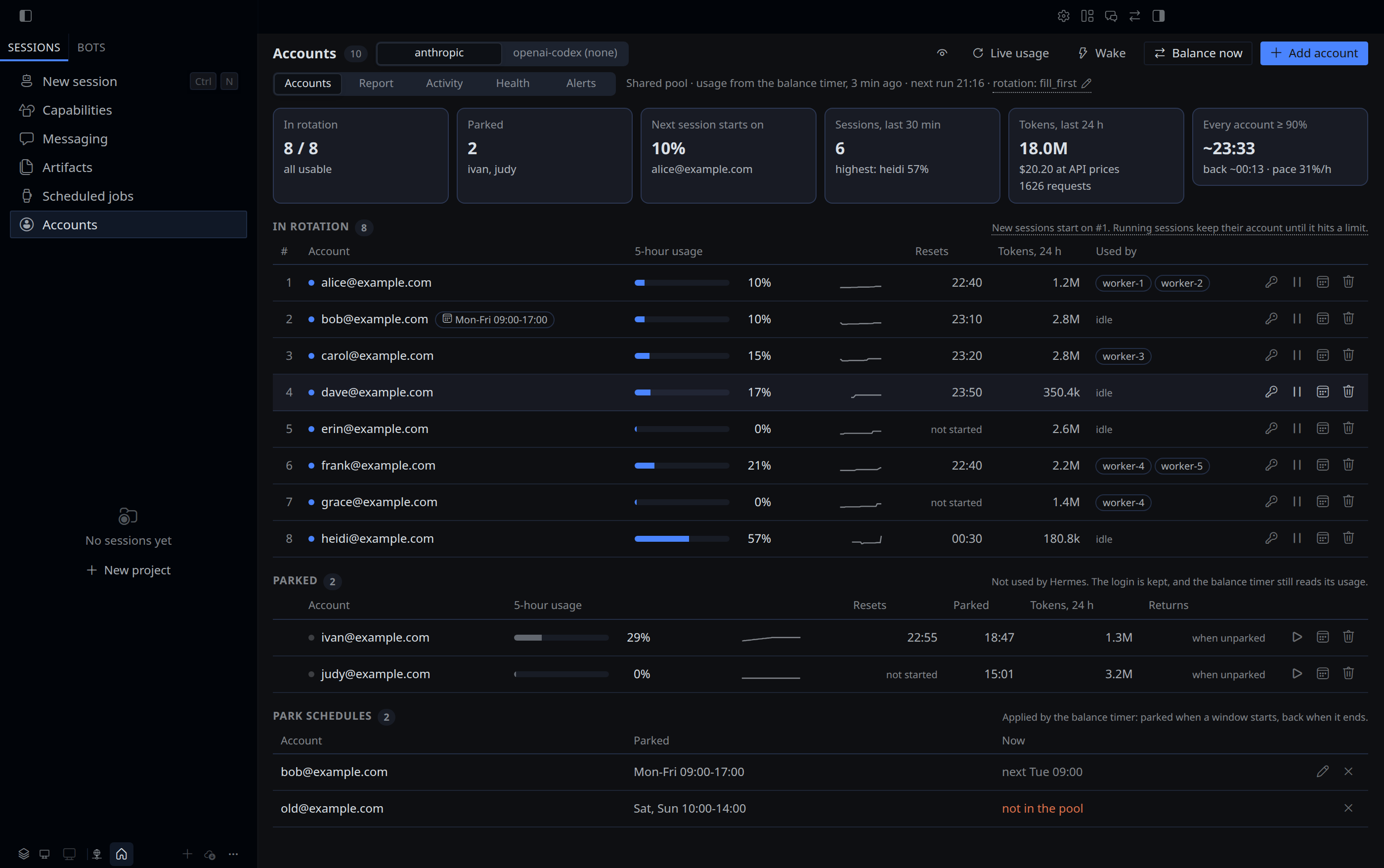
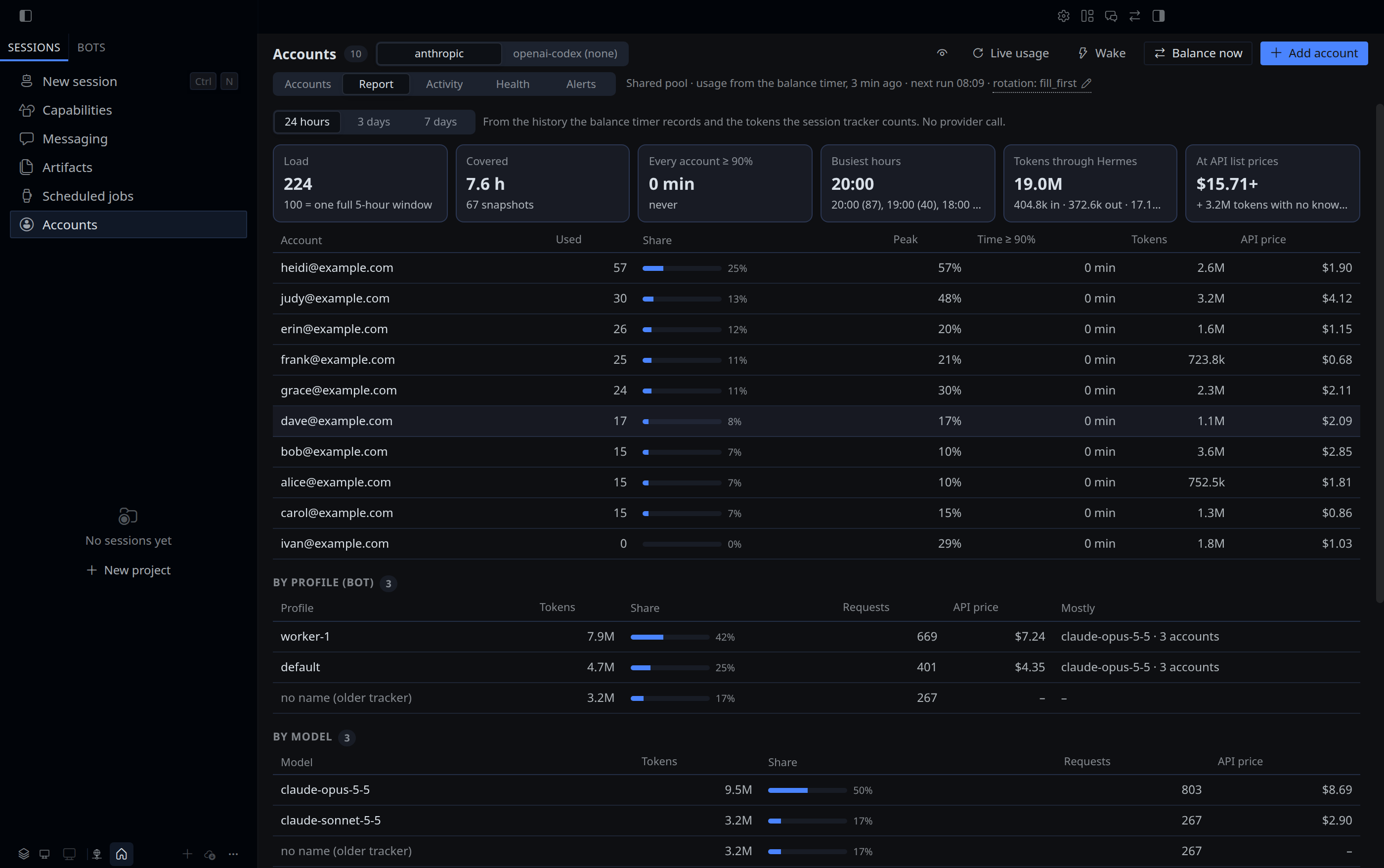
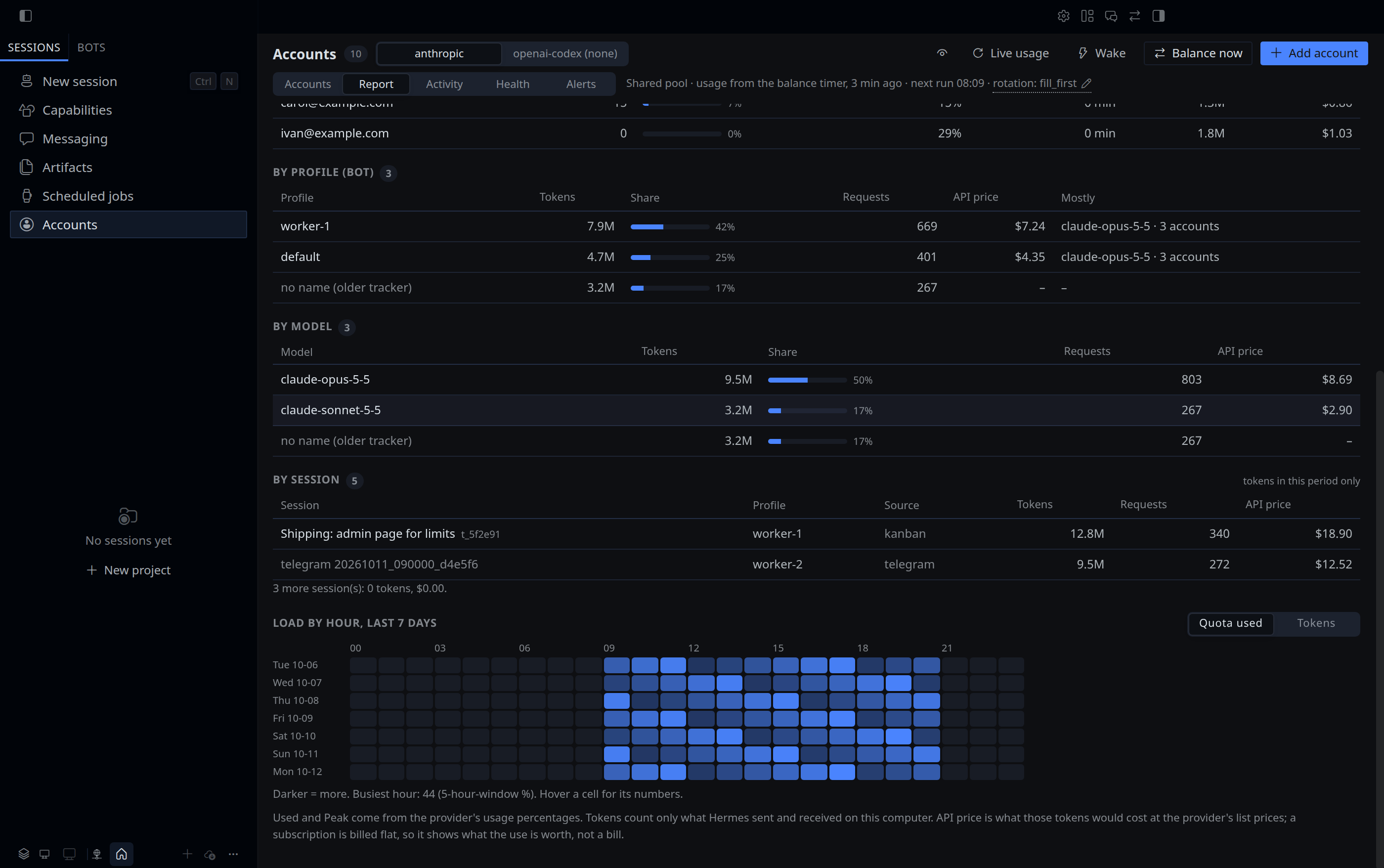
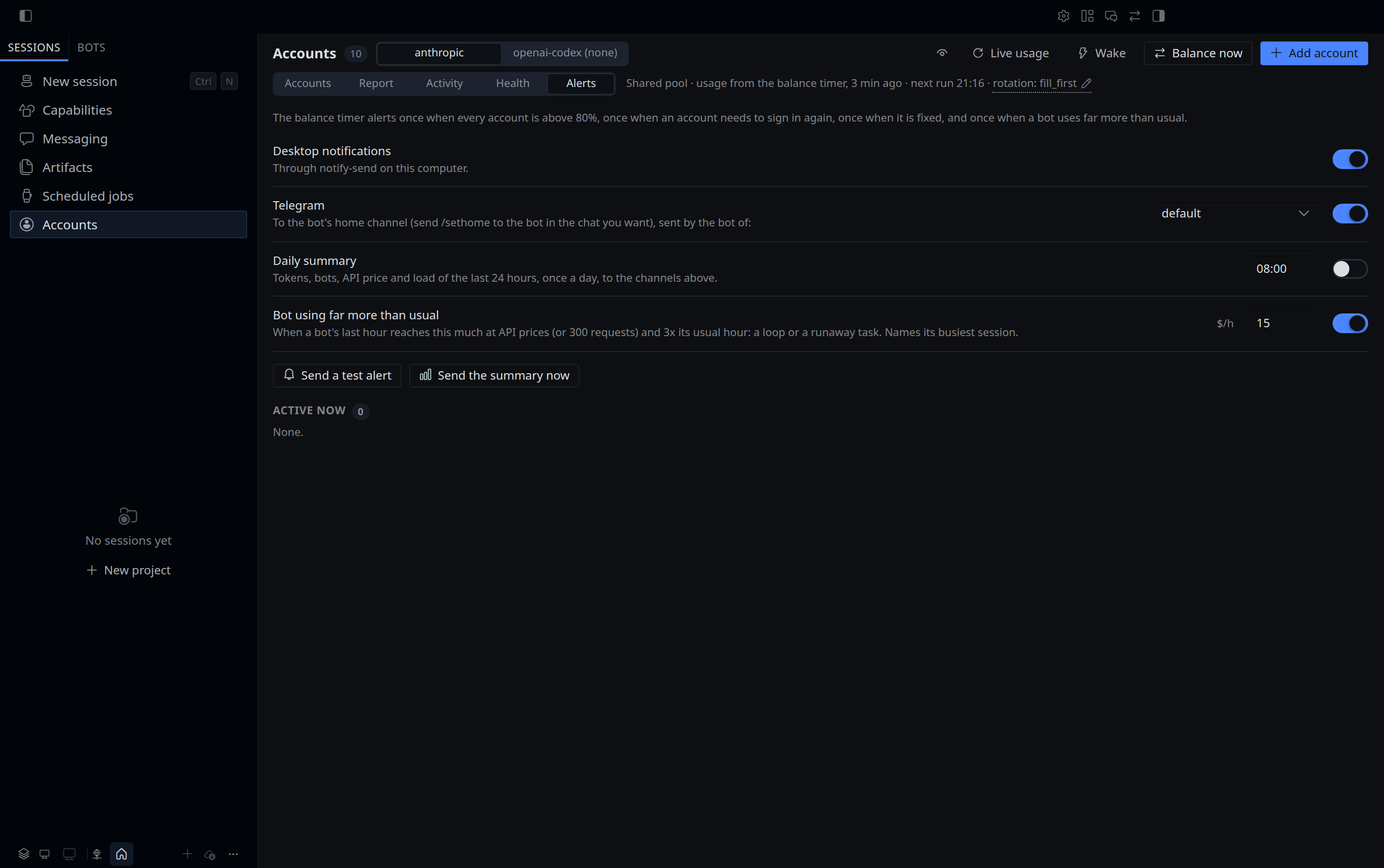
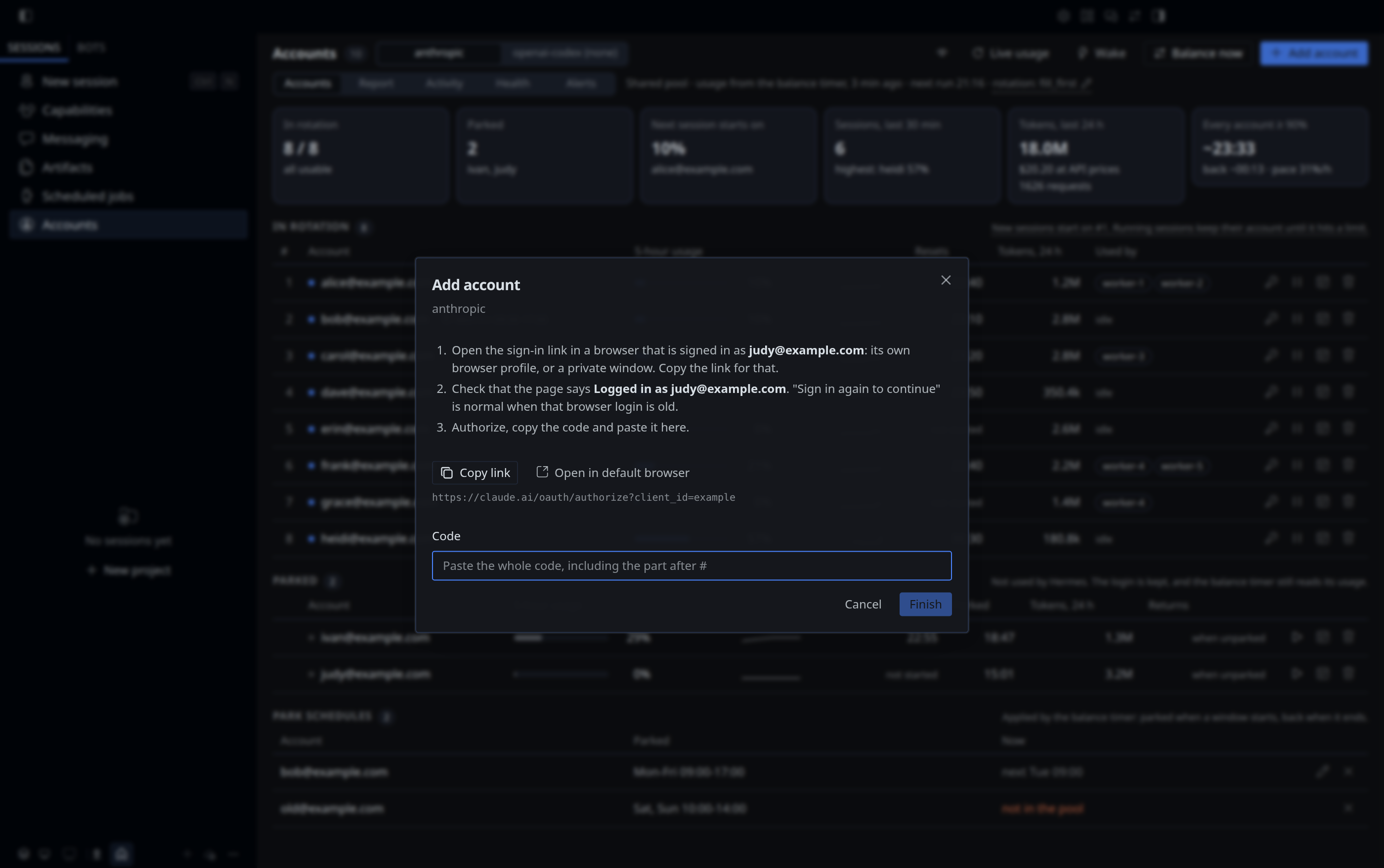
More of the page: Report · tokens by session and load by hour · Activity · Alerts · Add account · Add a Codex account · Wake · emails masked. All screenshots show made-up accounts from the test fixtures.


Contents
- Why this plugin
- Quick start
- Requirements
- Install, update, uninstall
- Hermes plugin catalog
- Upgrading from 3.x
- Concepts
- Adding and removing accounts
- Command reference
- Hermes Desktop page
- Alerts
- How balance works
- The timer
- Providers
- Files and security
- Security and privacy disclosure
- Troubleshooting
- FAQ
- Limitations
- Contributing, changelog, license
Why this plugin
Hermes already keeps a pool of accounts per provider and moves a session to the next account when the current one hits a limit. What it does not do on its own:
| You want to | Plain Hermes | With this plugin |
|---|---|---|
| Add an account | hermes auth add, no check of which account you actually signed in as |
add verifies the real email and throws away wrong or duplicate sign-ins |
| See how full each account is | Not shown | usage, live, parked accounts included |
| Avoid sessions waiting on a nearly full account | A session waits up to 600 s on a 429, then rotates | balance puts the least-used account first and benches accounts at ≥ 90% |
| Take an account out for a few hours | Delete it and sign in again later | park --until 17:00: Hermes keeps the login and skips the account until then |
| Keep an account free at the same hours every week | Not possible | schedule <account> --every "mon-fri 09:00-17:00" |
| Know which bot uses which account | Not shown | who |
| Know how many tokens each bot uses, and what that would cost on the API | Not shown | report: tokens per account, bot and model, priced at API list prices, and the load per hour for the last 7 days |
| Hear about a dead login or a full pool | Not reported | Desktop and Telegram alerts, and an optional daily summary |
| Recover accounts stuck after a network drop during a token refresh | Waits for the cooldown | Retried automatically every 5 minutes |
| Have an idle account's 5-hour window reset sooner | The window starts with the account's first request | wake starts it now; wake auto-on keeps every window running |
| Share a screenshot or your screen without the account emails | Not possible | privacy on, or the eye button on the page: al•••e@e•••.com |
| See all of it in one place | Not shown | The Accounts page in Hermes Desktop |
The plugin changes the pool only through Hermes: its CredentialPool API and its own hermes auth add / hermes auth remove. It never stores a login of its own: every token stays in Hermes' auth.json, and Hermes refreshes it. It uses no AI tokens, except for wake, which you run or switch on yourself: one tiny request per wake.
Quick start
git clone https://github.com/roqianjas/hermes-account-pool.git
cd hermes-account-pool
./install.sh --set-strategy     # the plugin, every profile, the 5-minute timer, fill_first

hermes account anthropic add alice@example.com   # one sign-in per account, verified
hermes account anthropic add bob@example.com
hermes account anthropic doctor                  # everything OK?
hermes account anthropic usage                   # live usage per account
On Windows, in PowerShell (no WSL needed):
git clone https://github.com/roqianjas/hermes-account-pool.git
cd hermes-account-pool
powershell -ExecutionPolicy Bypass -File .\install.ps1 -SetStrategy

hermes account anthropic add alice@example.com
hermes account anthropic doctor
Without a git checkout, hermes plugins install does the same in two commands, on Linux and Windows alike (Install with hermes plugins install). From then on the timer keeps the pool ordered. Day to day you mostly need usage, who, park and doctor. In Hermes Desktop, restart the app once and switch the page on in Capabilities > Plugins to get the same in a page (Hermes Desktop page).
Requirements
- Hermes Agent ≥ 0.21.6 on Linux or on Windows 10/11 (Hermes' own Windows install, no WSL needed). The timer uses systemd user services on Linux (
systemctl --user) and Task Scheduler on Windows, without admin rights. On macOS the commands work; runhermes account all balancewith launchd or cron instead of the timer. - Two or more accounts of the same provider. Built-in usage support: Claude Pro / Max / Team (
anthropic) and ChatGPT Plus / Pro / Team (openai-codex). Other providers get the generic commands (see Providers). - Optional: desktop alerts need
notify-sendon Linux (packagelibnotify-bin); Windows shows them as Windows notifications through Windows PowerShell, which every Windows 10 and 11 has. Telegram alerts need a Telegram bot set up in Hermes, with a home channel (send/sethometo the bot in the chat that should get them) or a chat id given withnotify telegram-to=. - Optional: Hermes Desktop with desktop plugins, for the Accounts page. Tested with Hermes Agent 0.21.6.
Install, update, uninstall
A plugin install puts a plugin into one profile. This project needs a little more: its session tracker in every profile (so who sees every bot), account-pool listed in every profile (so Hermes Desktop can show the page whichever profile it runs) and, if you want it, the timer. hermes account <provider> setup does that part, after either way of installing.
Install from git
git clone https://github.com/roqianjas/hermes-account-pool.git
cd hermes-account-pool
./install.sh --set-strategy
Run it as the user Hermes runs as. install.sh copies account-pool (with the Hermes Desktop page and the session tracker) to $HERMES_HOME/plugins/ (default ~/.hermes/plugins/), enables it in the default profile, runs hermes account <provider> setup --yes --timer for each provider (--strategy too with --set-strategy), then doctor. On an update from 3.x, setup also removes the separate account-pool-tracker plugin, after install.sh has backed it up.
| Option | Effect |
|---|---|
--provider <name> |
Provider to run setup for (default anthropic); repeat for several. It matters for --set-strategy, which sets fill_first for each one. The timer balances every provider with accounts whichever you name. |
--set-strategy |
Set fill_first for each provider in every profile. Without it the strategy is left alone and doctor tells you if it is wrong. |
--no-timer |
Skip the timer. Run balance yourself. |
-h, --help |
Show the options. |
Install on Windows
Hermes runs natively on Windows, and so does this plugin: no WSL. In PowerShell, as your own user (no admin rights):
git clone https://github.com/roqianjas/hermes-account-pool.git
cd hermes-account-pool
powershell -ExecutionPolicy Bypass -File .\install.ps1 -SetStrategy
install.ps1 does what install.sh does: it copies the plugin to %LOCALAPPDATA%\hermes\plugins\ (or $env:HERMES_HOME\plugins\), enables account-pool, runs hermes account <provider> setup --yes --timer and then doctor. -ExecutionPolicy Bypass applies to this one run only; it is needed because Windows blocks downloaded scripts by default.
| Option | Effect |
|---|---|
-Provider anthropic,openai-codex |
Providers to run setup for (default anthropic) |
-SetStrategy |
Set fill_first for each provider in every profile |
-NoTimer |
Skip the Task Scheduler task |
Without git, use hermes plugins install below; it works the same on Windows. What is different on Windows:
| Linux | Windows | |
|---|---|---|
| Timer | systemd user units in ~/.config/systemd/user/ |
the Task Scheduler task Hermes Account Balance, with its files in %LOCALAPPDATA%\hermes\account-pool-timer\ |
| Timer log | journalctl --user -u hermes-account-balance.service |
account-pool-timer\balance.log (kept under 1 MB) |
| When the timer runs | always, also before you sign in | while you are signed in to Windows; a missed run is made up when you sign in |
| Desktop alerts | notify-send |
Windows notifications (shown under Windows PowerShell's name) |
| The plugin in other profiles | a symlink | a symlink, or a directory junction when Windows does not allow symlinks (no Developer Mode) |
| Uninstall from git | ./uninstall.sh |
powershell -ExecutionPolicy Bypass -File .\uninstall.ps1 |
Everything else, the commands and the Accounts page included, is the same.
Install with hermes plugins install
The same folder, straight from this repository, without a git checkout:
hermes plugins install roqianjas/hermes-account-pool#plugins/account-pool --enable
hermes account anthropic setup --timer --strategy
Run them in the default profile (without -p): the command lives there, and setup links the plugin from there into the other profiles, so its session tracker runs in every profile (What setup does).
Hermes scans a plugin from GitHub before it installs it, and stops when the scan has findings. For account-pool it reports 16, all expected:
- 15
subprocesscalls:notify-send(desktop alerts on Linux),hermes send(Telegram alerts),systemctl --userfive times (timer state fordoctorand the page,setup --timeron Linux),schtasksand Windows PowerShell inwinsys.py(the timer and desktop alerts on Windows),hermes config set(the fallback forstrategyandsetupwhen Hermes' own config writer cannot be imported),hermes auth addtwice (addandreloginin a terminal; Add account and Sign in again on the page, insignin.py),taskkill(stops a cancelled page sign-in on Windows),hermes auth remove(remove), andhermes plugins remove account-pool-tracker(setup, once, on an update from 3.x); - 1 read of
/proc/self/cgroup, to know whether the process is the timer's service (Linux only).
Each one is in the Security and privacy disclosure. In a terminal, Hermes lists the findings and asks Install anyway? Only continue if you trust the source. [y/N]: read them and answer y. Without a terminal (a script, an agent's shell) it stops instead; add --force there. hermes plugins update installs new versions without asking again, and install.sh copies the folder itself, so neither is stopped by the scan.
What setup does
$ hermes account anthropic setup --timer
[anthropic] Setup: the default profile and 2 other profile(s) in /home/you/.hermes
  Accounts page    backend listed in 0 of 2 other profile(s)
  Session tracking 4.0.1, active in 1 of 3 profile(s)
  Balance timer    not installed
  Rotation         fill_first in all 3 profile(s)
Changes:
  - list account-pool in plugins.enabled of worker-1 (Hermes Desktop serves the page's backend from there; the profile gets no command and no tools)
  - list account-pool in plugins.enabled of worker-2 (...)
  - link account-pool into worker-1 (/home/you/.hermes/profiles/worker-1/plugins/account-pool -> /home/you/.hermes/plugins/account-pool), so its session tracking runs there
  - link account-pool into worker-2 (...)
  - install the balance timer: systemd user units in /home/you/.config/systemd/user, every 5 minutes runs hermes account all balance (every provider with accounts, now: anthropic; providers you add later are included by themselves)
Apply these changes? [y/N] y
  done: list account-pool in plugins.enabled of worker-1 (...)
  ...
It shows what it found and every change it would make, asks once, then makes them one by one; each one is a line in the activity log. A second run says Nothing to change.
| Part | What setup changes |
|---|---|
| Accounts page | Adds account-pool to plugins.enabled of every profile under $HERMES_HOME/profiles/ (why). Profiles get no command and no tools from it. A profile with account-pool in plugins.disabled is skipped and named. |
| Session tracker | Links plugins/account-pool of every other profile to the default profile's copy (a profile loads plugins only from its own plugins/ folder). There the plugin registers its session tracker, a post_api_request hook, and nothing else: no command, no tools. One copy means one update for every profile. A profile with account-pool in plugins.disabled is left alone. |
| The plugin before 4.0 | Removes the separate account-pool-tracker plugin: its links and plugins.enabled entries in the other profiles, and the plugin itself in the default profile with hermes plugins remove account-pool-tracker. It would count every API call a second time. |
--timer |
Linux: writes hermes-account-balance.service and hermes-account-balance.timer to ~/.config/systemd/user/, enables the timer and starts a first run in the background. Windows: writes balance.cmd and balance.vbs to %LOCALAPPDATA%\hermes\account-pool-timer\, registers the Task Scheduler task Hermes Account Balance for your user (every 5 minutes, no admin rights, no window) and starts a first run. The service runs hermes account all balance every 5 minutes: every provider with accounts, so a provider that gets its first account later (Codex, for example) is balanced from the next run, with no second setup. A unit from 3.10.2 or older has one line per provider; setup --timer for a provider it lacks switches it to all. A custom HERMES_HOME is written into the service. Options you added by hand (--threshold 85) and a changed interval are kept. |
--strategy |
Sets credential_pool_strategies.<provider>: fill_first in every profile that has another value. balance needs it (see Concepts). |
--undo |
Removes the plugin links and the plugins.enabled entries in the other profiles, and takes the provider out of the timer: the timer then runs the other providers with accounts, one line each, and no longer picks up new ones; it goes when no provider is left. It keeps the plugin in the default profile, the accounts, parked accounts, settings, data files and strategies, and names parked accounts that would stay out of rotation. |
--yes |
No question. Without a terminal (cron, an agent's shell) setup shows the plan and changes nothing unless --yes is given. |
Every config change goes through hermes config set, so the files keep Hermes' own format and checks. On a system without systemd or Task Scheduler (macOS), --timer says so; run balance some other way (launchd, cron).
A custom HERMES_HOME is respected. Running sessions load the session tracker after /reset or after a gateway or desktop restart. After an update, doctor and the Accounts page name each process that still runs an older one. A process that still has the 3.x account-pool-tracker loaded keeps counting with it until it restarts; the new tracker stays out of its way, so no call is counted twice. The Accounts page needs two more steps in Hermes Desktop, see Turn the page on. A profile created later needs setup again before Hermes Desktop can show the page while it runs that profile; doctor names such profiles.
Check the result:
hermes account anthropic doctor
systemctl --user list-timers hermes-account-balance.timer      # Linux
schtasks /Query /TN "Hermes Account Balance"                   # Windows
Update
hermes plugins install:
hermes plugins update account-pool
hermes account anthropic setup        # usually "Nothing to change"
Hermes replaces the plugin folder in the default profile. The links in the other profiles point at that folder, so every profile gets the new version with one update. Coming from 3.x, read Upgrading from 3.x first.
Git install:
cd hermes-account-pool
git pull
./install.sh                # add the same --set-strategy / --provider options you installed with
On Windows: git pull, then powershell -ExecutionPolicy Bypass -File .\install.ps1 with the options you installed with.
The previous plugin folder is backed up to $HERMES_HOME/plugin-backups/<name>.<timestamp> (outside plugins/, so Hermes never loads it twice). Accounts, parked accounts, history and settings are kept. install.sh without --set-strategy leaves your strategy as it is. Restart Hermes Desktop after any update so it loads the new page and its backend.
Uninstall
Unpark parked accounts first if you want them back in rotation (hermes account <provider> unpark <account>). A parked account stays in Hermes' pool, but Hermes skips it until its park time ends: the --until time, or up to 30 days for a park without one. Without the plugin, hermes auth reset <provider> puts every held account of that provider back at once.
hermes plugins install:
hermes account anthropic setup --undo     # plugin links, page entries, the timer
hermes plugins remove account-pool
Git install:
./uninstall.sh                                                  # Linux
powershell -ExecutionPolicy Bypass -File .\uninstall.ps1        # Windows
It removes the timer, the plugin (the Accounts page included), its links in the other profiles, the account-pool entry in each profile's plugins.enabled, and a leftover account-pool-tracker from 3.x. Your accounts in the credential pool are not touched. Parked accounts are not returned to rotation: the script warns you and asks first. Data files and credential_pool_strategies stay; the script lists the files you can delete by hand.
Hermes plugin catalog
The Hermes plugin catalog lists plugins that never hold a login themselves: OAuth tokens and API keys stay with Hermes (catalog rule 11). Up to 3.13 account-pool kept parked accounts' logins in a file of its own and ran sign-ins in its own code, so it was installed from this repository only. Version 4.0 hands all of that to Hermes and has been submitted to the catalog:
| Feature | How it works since 4.0 |
|---|---|
park, unpark and schedules |
The account stays in Hermes' pool. The plugin asks Hermes' pool to skip it until a reset time (mark_exhausted_and_rotate, reason parked) and to take it back (reset_status). Its own park list holds labels, ids and times, no token. |
usage, balance, check, the email check after a sign-in |
The plugin sends the account's access token, as Hermes stores it, to the provider's usage and profile endpoints. An expired token is refreshed by Hermes (try_refresh_matching), which saves the new pair in its pool. |
| Add account and Sign in again on the Accounts page | The page's backend runs Hermes' own hermes auth add and shows its link and prompts. Hermes signs in and stores the login; the plugin never sees a code verifier or a token. |
| Telegram alerts | Sent with hermes send -t telegram to the bot's home channel, or to the chat you name. The plugin reads no .env. |
| Accounts of every profile | Read through Hermes' read_credential_pool, never from auth.json directly. |
| Session tracker | Part of account-pool (a post_api_request hook), no longer a second plugin. |
What the plugin still does with tokens is listed under Security and privacy disclosure. Until the catalog lists it, install it from this repository as above.
Upgrading from 3.x
4.0 changes where parked accounts live and folds the session tracker into account-pool. Update the plugin as usual (hermes plugins update account-pool, or git pull and ./install.sh), then run setup once:
hermes plugins update account-pool
hermes account anthropic setup --timer       # links the plugin into every profile, removes account-pool-tracker
hermes account anthropic doctor
[anthropic] Setup: the default profile and 2 other profile(s) in /home/you/.hermes
  Accounts page    backend listed in 2 of 2 other profile(s)
  Session tracking 4.0.1, active in 1 of 3 profile(s)
  Balance timer    runs every provider with accounts (now: anthropic), active
  Rotation         fill_first in all 3 profile(s)
Changes:
  - link account-pool into worker-1 (/home/you/.hermes/profiles/worker-1/plugins/account-pool -> /home/you/.hermes/plugins/account-pool), so its session tracking runs there
  - link account-pool into worker-2 (...)
  - remove the retired account-pool-tracker from worker-1 (its link and plugins.enabled entry)
  - remove the retired account-pool-tracker from worker-2 (its link and plugins.enabled entry)
  - remove the retired account-pool-tracker plugin from the default profile (hermes plugins remove account-pool-tracker): account-pool counts sessions itself now
Apply these changes? [y/N] y
What happens to your data:
- Parked accounts. The first
hermes accountcommand after the update (or the next timer run) moves every account fromaccount-pool-parked.jsonback into Hermes' pool, held out of rotation the wayparkdoes now, keeps its--untiltime, and deletes the old file. A park whose time is already over comes back in rotation. The activity log gets one line per provider. If anything fails, the old file stays and the next run tries again, so no login is lost.listshows the same parked accounts before and after. - Tokens, sessions and history.
account-pool-tokens.json,account-pool-sessions.jsonand the history keep their format; counting goes on where the old tracker stopped. - Running bots. A gateway, Hermes Desktop or long session started before the update still has the old tracker loaded and keeps counting with it until it restarts; the new tracker stays out of its way, so nothing is counted twice.
doctornames those processes. - Telegram alerts. 3.x sent them to the first user in
TELEGRAM_ALLOWED_USERS. 4.0 sends them to the bot's home channel. If the bot has none yet, send/sethometo it in the chat that should get the alerts, or name the chat:hermes account anthropic notify telegram-to=<chat id>.doctor,notifyand the Alerts tab say so while it is missing. - Hermes version. 4.0 needs Hermes Agent 0.21.6 or newer.
Concepts
Credential pool. Hermes keeps the accounts of each provider in one list in ~/.hermes/auth.json. Every profile shares it, unless a profile was given its own pool by running hermes -p <profile> auth add (doctor warns about that).
Rotation strategy. Which account a new session takes is a Hermes setting, per profile and provider: credential_pool_strategies.<provider>. Hermes owns it. The plugin shows it (strategy, the Accounts page header), doctor checks it, and it changes it only when you ask: with strategy or from the page. Both write through Hermes' own hermes config set.
| Strategy | A new session takes | With this plugin |
|---|---|---|
fill_first (Hermes' default) |
the first usable account in the list | Use this. balance puts the account with the most quota left first, so each new session starts on it. |
round_robin |
the next account in turn, which then moves to the end of the list | Fights balance: both rewrite the order, and turns ignore how much quota is left. |
least_used |
the account this computer picked least often | Counts picks, not quota: use in claude.ai or Claude Code is not seen. |
random |
any usable account | The order balance sets is ignored. |
fill_first plus the balance timer is a rotation by quota: the top spot moves to whichever account has the most room, every 5 minutes. hermes account <provider> strategy fill_first and install.sh --set-strategy set fill_first in every profile.
Running sessions keep their account. The order decides where a new session starts. A running session stays on its account until that account hits a limit; then Hermes moves it to the next usable account, which balance keeps the least used. So the accounts with sessions on them drift down the list as their usage grows, and the top account is usually idle: it is waiting for the next session. A session picks its account again after /reset, in a new chat, or after a gateway or Hermes Desktop restart. Moving running sessions earlier would throw away their prompt cache, and resending a long context costs more quota than it saves.
Account states.
| State | Set by | In rotation | Ends when |
|---|---|---|---|
active / ok |
yes | ||
BENCHED |
balance, at ≥ threshold (90%) |
no | the usage window resets, or usage drops under the threshold |
LIMITED / RATE LIMITED |
Hermes, after a 429 or 402 from the provider | no | the provider's reset time (or 1 hour) |
COOLING DOWN |
Hermes, after a failed token refresh (often a network drop) | no | balance retries the refresh every 5 minutes |
DEAD |
Hermes, when the provider rejects the refresh token | no | you run relogin |
PARKED |
you, with park |
no: Hermes keeps the login and skips the account (hermes auth list shows it as exhausted, reason parked) |
you run unpark, or the --until time passes |
The 5-hour window. Claude and ChatGPT limit an account per 5-hour window. The window does not run on a clock of its own: it starts with the account's first request after the previous one ended, and resets 5 hours later. An idle account has no window running, which the page shows as not started under Resets. wake starts it with one tiny request, so it resets sooner.
Park, bench, remove. Park is your decision; the login stays in Hermes' pool and Hermes keeps refreshing it. Bench is automatic and temporary. Remove deletes the login; using that account again needs a new sign-in.
Adapter. Usage and real-email lookups need each provider's own API. That code lives in one adapter per provider in providers.py. Without an adapter the generic commands still work.
Default profile only. The hermes account command is installed in the default profile, so worker bots cannot add, remove or reorder accounts. Accounts added from the default profile are shared by every profile. (Every profile lists account-pool in plugins.enabled for the Hermes Desktop page, but the command and everything else stay in the default profile, see Why every profile lists account-pool.)
Adding and removing accounts
Run these from the default profile (no -p).
Add an account
hermes account anthropic list                 # make sure the email is not in the pool yet
hermes account anthropic add you@example.com
- Answer
y. Hermes prints a sign-in link. - Open the link in a browser that is signed in as that account: its own Chrome profile, or a private / incognito window where you sign in. Check that the page says
Logged in as you@example.com; if not, click Switch account. A browser signed in as another account would hand Hermes that account instead. - If the page says "Sign in again to continue", that is normal: Anthropic asks for a fresh sign-in when the browser's login is old. Click it and sign in as the same account. Plain
hermes auth addgets the same page. - Authorize, copy the code, paste it into the terminal and press Enter.
- Look for
Verified: you@example.comandAdded .... The account is balanced right away. - Check it:
hermes account anthropic check(real email) andhermes account anthropic usage.
$ hermes account anthropic add you@example.com
Add you@example.com to anthropic
  1. Open the sign-in link in a browser that is signed in as THIS account:
     its own Chrome profile, or a private / incognito window.
  2. Make sure the page says: Logged in as you@example.com  (otherwise: Switch account)
     "Sign in again to continue" is normal when that browser login is old.
  3. Authorize, then paste the code back here.
  The account is kept only if the sign-in really is that account and not a duplicate.
Continue? [y/N] y
   ... Hermes sign-in: open the link, authorize, paste the code ...
Verified: you@example.com
Added you@example.com (id=4f1c2a) to anthropic.
What add can answer:
| Situation | Message | Pool |
|---|---|---|
| Correct sign-in | Verified ... Added ... |
account added and ordered |
| Browser signed in as another account | Signed in as X, not you@example.com. The sign-in was discarded. |
unchanged |
| Browser signed in as an account already in the pool | X is already in the pool as '...' (id=...). The duplicate sign-in was discarded. |
unchanged |
| Email already in rotation | ... is already in rotation. To sign it in again: ... relogin ... |
unchanged, refused before sign-in |
| Email is parked | ... is parked. Return it with: ... unpark ... |
unchanged, refused before sign-in |
| Sign-in failed | Sign-in did not complete. Nothing was added. |
unchanged |
| You pressed Ctrl+C | Cancelled (Ctrl+C). Nothing was added. (exit code 130) |
unchanged; a half-saved entry is removed |
After a discarded message, switch the browser to the right account (or use a fresh private window) and run add again. Running sessions keep their current account; the new account is used from the next session (or after /reset).
Options: --yes skips the confirmation. --key adds an API-key account instead of an OAuth sign-in: the plugin asks for the key without echoing it, so it never shows up on the command line or in ps.
Remove an account
$ hermes account anthropic remove bob@example.com
Remove bob@example.com (id=9f2a02) from anthropic.
Its login is deleted; to use it again you must sign in again (add).
To take it out of rotation for a while instead: hermes account anthropic park bob@example.com
Delete it? [y/N] y
Removed bob@example.com.
The target can be an email or an id. remove refuses the last working account and also deletes parked accounts. To take an account out only for a while, use park.
Avoid
hermes -p <profile> auth add: that profile gets its own separate pool and stops using the shared accounts (doctorreports it).- Plain
hermes auth add: there is no email check, so labels can be wrong and duplicates can slip in. - Copying Hermes' tokens to another app or machine: refresh tokens are single use, so one side gets signed out. Signing in to the same account separately in another app is fine.
Codex
The same commands work for openai-codex (ChatGPT Plus, Pro, Business and Enterprise). The sign-in is different: by default it goes through the browser and comes back to this computer, so there is no code to paste.
hermes account openai-codex list
hermes account openai-codex add you@example.com
- Answer
y. Hermes prints a sign-in link atauth.openai.com. - Open it in a browser on this computer that is signed in to ChatGPT as that account: its own Chrome profile, or a private window where you sign in.
- Pick the workspace if ChatGPT asks, and authorize.
- The browser opens
http://localhost:1455/auth/callback?...and shows OpenAI Codex authorization received. That page comes from Hermes on your computer: the sign-in is done and the tab can be closed. The code in its address works only once and is already spent. - Look for
Verified: you@example.comandAdded ..., then check withhermes account openai-codex checkandusage.
$ hermes account openai-codex add you@example.com
Add you@example.com to openai-codex
  1. Open the sign-in link in a browser ON THIS COMPUTER that is signed in to ChatGPT as THIS
     account: its own Chrome profile, or a private / incognito window.
  2. Pick the workspace and authorize. The browser then opens a localhost:1455 page that says
     "authorization received", and the sign-in finishes here by itself.
     Browser on another computer? Use the Accounts page in Hermes Desktop (it takes the
     address the browser ends on), or sign in with a code: add --device.
  The account is kept only if the sign-in really is that account and not a duplicate.
Continue? [y/N] y
   ... Hermes prints the link and waits for the browser ...
Verified: you@example.com
Added you@example.com (id=7c41e0) to openai-codex.
Why the browser and not a code. ChatGPT Business and Enterprise workspaces turn device-code sign-in off unless an owner turns it on, and OpenAI then answers "Please contact your workspace admin to enable device code authentication". The browser sign-in works either way. It is the same authorization-code + PKCE flow Codex CLI uses, run by Hermes' own hermes auth add openai-codex --browser.
Device code (--device): hermes account openai-codex add you@example.com --device shows a code; open https://auth.openai.com/codex/device, enter it and confirm. Useful when the browser runs on another computer and you are not using the Accounts page. On a Business or Enterprise workspace an owner first turns on Settings > Permissions & roles > Codex and Work Local > Enable device code sign-in for Codex (personal accounts: Settings > Security); the setting can take a while to apply.
Codex CLI and VS Code are not touched. Hermes creates its own login for the account. ~/.codex/auth.json and your Codex CLI and VS Code history stay as they are, and signing in here does not sign them out.
The timer picks them up by itself. With the balance timer installed, its next run balances the Codex accounts too (usage history, order, benching, alerts): no second setup. On a timer from 3.10.2 or older, run hermes account openai-codex setup --timer once; doctor says so.
Using the accounts is a Hermes setting. add only puts the account in the pool. A profile uses Codex when its own config.yaml says so: as the main model, in fallback_providers, or for images (image_gen.provider: openai-codex). Check hermes config of the profiles if you want to know where Codex quota goes.
Command reference
hermes account <provider> <action> [target] [options]

  list                                  accounts in rotation and parked accounts
  check                                 health: dead, rate-limited, wrong label, duplicate, real email
  usage                                 live usage per account, parked included (adapter)
  who      [--minutes N]                which session is on which account (default 30 min)
  report   [--hours N] [--chart]        load and tokens per account, bot and model, API price;
                                        --chart: load by hour for the last 7 days
  sessions [--hours N]                  the sessions (tasks) with the most tokens, with their API price
  log      [--hours N]                  what the timer, the command and the page changed
  add      <email> [--key] [--yes]      sign in a new account: verified, no duplicates
           [--device]                   openai-codex: a device code instead of the browser
  remove   <target> [--yes]             delete an account's login (parked accounts too)
  park     <target> [--until T]         take an account out of rotation
  unpark   <target>                     return a parked account to rotation
  schedule [<target> --every SPEC]      park an account every week at set hours; no target: list
  unschedule <target>                   remove an account's park schedule
  relogin  <target> [--yes] [--device]  sign an account in again, verified, same label and position
  balance  [--dry-run] [--threshold N]  order by usage, bench >= N% (90), auto-recover, alerts
  strategy [<name>] [--only P,...]      Hermes' rotation strategy per profile: show it, or set it
  doctor                                check strategy, timer, files, pools, alerts
  setup    [--timer] [--strategy] [--undo] [--yes]
                                        profiles, session tracker and timer after an install
  notify   [status|test|summary|...]    alert channels (desktop, Telegram) and the daily summary
  wake     [<target>[,...]] [--dry-run] start the 5-hour window of idle accounts now (one tiny request each)
           status|models|auto-on|auto-off|model=<id>
                                        the setting and every window; the timer keeps windows running
  privacy  [on|off|status]              mask emails in the output, alerts and the page: al•••e@e•••.com
  help                                  show the help

hermes account all balance [--dry-run] [--threshold N]   balance every provider with accounts (the timer)
A target is an account label (email), its number in list, or its id. unpark takes a label or id. hermes account, hermes account help, hermes account --help and hermes account <provider> help all show the help.
The examples below are based on a real pool, with the accounts renamed. Clock times are illustrative.
list
$ hermes account anthropic list
[anthropic] in rotation (8):
  #1  erin@example.com                   id=12e90b  status=ok
  #2  frank@example.com                  id=025bb6  status=ok
  ...
  #8  heidi@example.com                  id=36c28f  status=ok
[anthropic] parked (1):
  -   ivan@example.com                   id=9e95ee  since 2026-10-10 18:07  until 2026-10-10 21:00
The order is the order new sessions take accounts in. Changes nothing.
check
$ hermes account anthropic check
[anthropic] in rotation: 8   parked: 1
  OK #1 id=12e90b  label=erin@example.com
        account : erin@example.com
  ...
  -- parked  id=9e95ee  label=ivan@example.com  (since 2026-10-10 18:07)
  All accounts in rotation are healthy.
account is the real email reported by the provider (adapter needed). Problems appear as issue lines, and the exit code is 1 when any account needs attention.
| Issue | Meaning | Fix |
|---|---|---|
DEAD: sign in again |
The provider rejected the refresh token | relogin <target> |
RATE LIMITED (HTTP 429) |
The provider's own limit | Wait for the reset; Hermes uses other accounts meanwhile |
BENCHED by balance |
At or above the threshold | Nothing: released at the reset |
COOLING DOWN |
A token refresh failed, usually a network drop | Nothing: balance retries it |
WRONG LABEL: the real account is X |
The label is not the account that signed in | relogin in a browser signed in as the labelled account, or remove it |
DUPLICATE |
The same account is in the pool twice | remove <id> of one of them |
usage
$ hermes account anthropic usage
[anthropic] 5-hour usage
  account                            state     used                          resets
  -- in rotation --
  frank@example.com                  active      2%  [....................]  21:00
  erin@example.com                   active      3%  [....................]  20:10
  dave@example.com                   active      3%  [....................]  21:30
  ...
  heidi@example.com                  active     17%  [###.................]  19:50
  -- parked (not used by Hermes) --
  ivan@example.com                   PARKED     29%  [=====...............]  20:30
- The percentages are the same numbers claude.ai shows as "Current session". For
openai-codexthe line ends with both windows, for example(5h 12% · week 78%), and the stricter one is used. - If the usage endpoint does not answer, the line shows the value the timer recorded last,
(last known, 3 min ago), at most 15 minutes old and only while that window has not reset. Otherwise it shows the reason, for examplen/a (usage endpoint rate-limited, retry in a few minutes),n/a (sign-in rejected (401))orn/a (usage endpoint unreachable ...). API-key entries showAPI key: no account usage. - An expired access token is refreshed first, by Hermes itself (
try_refresh_matching), which saves the new token pair in its pool at once (refresh tokens are single use). Parked accounts included: a parked account stays signed in. When the provider rejects a parked account's refresh token, its line sayssign-in expired: hermes account <provider> remove <account>, then add <account>. - The last line is the forecast:
Forecast (balance timer history): At the last hour's pace (31% of one 5-hour window per hour), every account is at 90% or more around 16:40, until about 17:20 when the first one resets.
who
$ hermes account anthropic who
[anthropic] sessions active in the last 30 min: 2
  erin@example.com                   (idle)
  frank@example.com                  (idle)
  ...
  heidi@example.com
      worker-2             cli       20261010_181340_51b808 claude-sonnet-5-5    4m ago
      worker-1             cli       20261010_181338_ad9f75 claude-sonnet-5-5    6m ago
Columns: profile, platform, session id, model, last API call. --minutes 120 widens the window. A session that rotated shows (moved from <account>). The data comes from the session tracker; a session appears after its next API call.
report
$ hermes account anthropic report --hours 24
[anthropic] usage report: last 24h (288 snapshots, 23.9h covered, from 10-10 06:20)
  'used' adds up 5-hour-window percent: 100 = one full 5-hour window.
  account                              used  share  peak  time >= 90%    tokens     API $
  bob@example.com                       126    27%   60%         0 min     2.7M     $1.53
  carol@example.com                     117    25%   60%         0 min     2.8M     $1.45
  alice@example.com                     112    24%   60%         0 min     3.0M     $1.45
  dave@example.com                      106    23%   60%         0 min     2.5M     $1.23
  total                                 461                               10.9M     $5.66
  Tokens through Hermes: 18.8k input, 252.3k output, 10.1M cache read, 567.8k cache write
  647 requests.
  API $ = these tokens at the provider's API list prices (a subscription is billed flat).
  By profile (bot)                  tokens  requests     API $  share
    worker-1                          5.6M       353     $2.54    51%
    worker-2                          2.4M       136     $1.10    22%
    default                           1.9M       102     $1.72    17%
    worker-3                          1.1M        56     $0.29    10%
  By model                          tokens  requests     API $  share
    claude-sonnet-5-5                 8.0M       489     $3.64    73%
    claude-opus-5-5                   1.9M       102     $1.72    17%
    claude-haiku-4-5                  1.1M        56     $0.29    10%
  Busiest hours: 08:00-09:00 (26), 10:00-11:00 (24), 12:00-13:00 (24)
  Time with EVERY account >= 90%: 0 min
  Forecast: At the last hour's pace (12% of one 5-hour window per hour), the 4 accounts last beyond the next 5 hours.
  Load by hour for the last 7 days: hermes account anthropic report --chart
used: the sum of usage increases. 100 equals one full 5-hour window.peak: the highest value seen.time >= 90%: how long the account was nearly full.tokens: the tokens Hermes sent and received on the account in the period: input, output, cache read and cache write, summed. The two lines under the table split the total and count the requests. The session tracker counts them on every API call from the moment it is installed, so a period that starts earlier sayscounted since.-: no call counted.API $: what those tokens would cost at the provider's API list prices, per model (input, output, cache read and cache write each at their own price). A subscription is billed flat, so this is what the use is worth, not a bill. Prices come from Hermes itself: its bundled price list, else its models.dev cache; the plugin makes no request for them.+means some tokens have no known price (a model without a listed price, or tokens counted byaccount-pool-trackerolder than 1.3.0, the separate tracker plugin of 3.x, which did not record the model); those are left out, not guessed.By profile (bot)andBy modelsplit the same tokens by the Hermes profile that made the call and by the model. Tokens counted by anaccount-pool-trackerolder than 1.3.0 show as(older tracker, no name): they were counted before that update, or by a process that kept the old tracker until it restarted. They leave the report within 8 days.usedandtokensmeasure different things.usedis the provider's own percentage, which includes the account's use in other apps (claude.ai, Claude Code) and weights token types differently (a cache read costs much less than an output token).tokenscovers only Hermes on this computer.- With at least 2 hours of data and some real load, the report adds advice: when every account was ≥ 90% at the same time, it suggests adding an account; when one account carried more than half the load, it points you to
who. - The default window is 24 hours (
--hours N). History covers at least the last 14 days.
--chart draws the load per hour for the last 7 days, one row per day, one column per hour (local time). The darker the cell, the more load; · is none. The first block is quota used (from the timer's history), the second tokens through Hermes:
$ hermes account anthropic report --chart
[anthropic] load by hour (local time; one row per day, one column per hour)
  Load by hour, last 7 days: quota used (5-hour-window percent). Darkest = 26 in one hour.
             00 03 06 09 12 15 18 21
  Mon 10-05  ························
  ...
  Sat 10-10  ······▒██▓█▓██▓▓▓▓█▓▓█▓▓
  Sun 10-11  ▓█▓███░·················
  Load by hour, last 7 days: tokens through Hermes. Darkest = 710.6k in one hour.
             00 03 06 09 12 15 18 21
  ...
sessions
$ hermes account anthropic sessions --hours 24
[anthropic] sessions by API price, last 24 h (23 sessions)
  profile              source    tokens requests     API $  title
  worker-1             kanban     12.8M      340    $18.90  Shipping: admin page for limits (t_5f2e91)
  worker-2             telegram    9.5M      272    $12.52  Daily stock digest
  default              desktop     2.1M       61     $4.10  Plan the release
  ...
  20 more: 6.3M tokens, $7.75.
  Total: 30.7M tokens in 801 requests, $43.27 at API list prices.
  Tokens count only the time in this period; the title comes from Hermes' session list.
The sessions with the most tokens in the period (15 at most), ranked by API price. Use it to see which task or chat used the tokens a bot shows in report, or after a bot alert.
- Tokens per session are counted from the session tracker's first API call (in 3.x:
account-pool-tracker1.5.0 and later). A period that starts earlier sayscounted per session since ...; a bot that still runs an older tracker is missing here until it restarts (doctornames the processes). titleandsource(cli, telegram, kanban, cron, desktop, ...) come from Hermes' own session list in each profile'sstate.db, read-only. A session without a title shows its source and id. The Kanban task is added in brackets when the session ran one.- The same buckets as
report: 15 minutes, last 8 days. Tokens before the period are left out, so a long session shows only its part inside it.
log
$ hermes account anthropic log --hours 24
[anthropic] activity, last 24 h: 4 events (newest last)
  10-11 08:05  timer  balance     bench alice@example.com (91%) until 10:40
  10-11 09:00  timer  schedule    schedule: parked dave@example.com until 17:00 (Mon-Fri 09:00-17:00)
  10-11 10:12  page   strategy    Rotation strategy [anthropic]: fill_first in worker-3 (was round_robin).
  10-11 10:40  timer  balance     release alice@example.com (12%)
What changed in the pool and its settings, and who did it: timer (the balance timer), cli (a hermes account command) or page (the Accounts page).
- Logged: bench and release, timed unparks and schedule parks, token refresh recoveries, alerts sent, wakes,
park,unpark,remove,add,relogin,schedule,unschedule,strategy, alert, wake and masking settings. Not logged: reading commands (list,usage,report, ...) and the new order after each balance, which changes on most runs. - Stored in
account-pool-activity.jsonl, mode 600, 30 days. Lines hold labels, times and the command's own message, never a credential.
park and unpark
hermes account anthropic park frank@example.com                    # until you unpark it
hermes account anthropic park frank@example.com --until 17:00      # today, or tomorrow if 17:00 has passed
hermes account anthropic park frank@example.com --until +2h        # also 90m, 1d
hermes account anthropic park frank@example.com --until '2026-10-12 08:00'
hermes account anthropic unpark frank@example.com
Parking keeps the account and its login in Hermes' pool and asks Hermes to skip it: Hermes marks the account exhausted, with the reason parked and a reset time. That is the --until time, or 30 days for a park without one; every balance run moves those 30 days on, so the park holds until you unpark. hermes auth list shows the account as exhausted, and usage still shows its usage. The plugin keeps a park list, account-pool-parking.json, with labels, ids and times only. A timed park ends at its time: Hermes takes the account back by itself, and the next timer run clears it from the list. If something returns a parked account earlier (hermes auth reset, or Hermes seeing a Codex quota come back), the next balance run parks it again and logs it; until then doctor names it. An account removed from the pool while parked shows as not in the pool and is forgotten at the next balance run. The last working account cannot be parked. Typical uses: keep an account's quota free for your own use in claude.ai, or rest an account that is close to its weekly limit. For the same hours every week, use a schedule.
A parked account's 5-hour window keeps running: work done just before parking still counts until it resets, and other apps signed in to the account can still use it. So the balance timer keeps reading its usage (a usage read is not a model request and costs no quota), and Hermes refreshes its token when it expires. The page shows a parked account's usage, reset time and trend like any other, and the trend's tooltip gives the highest reading of the last 24 hours. These readings stay out of the pool's own numbers (order, alerts, report, forecast, the hourly chart and the daily summary), because whatever uses a parked account is not Hermes.
schedule and unschedule
$ hermes account anthropic schedule dave@example.com --every "mon-fri 09:00-17:00"
Schedule saved [anthropic]: dave@example.com is parked Mon-Fri 09:00-17:00.
Next: Mon 10-12 09:00.
Unparking it by hand inside a window keeps it in rotation until the next window.
Undo: hermes account anthropic unschedule dave@example.com

$ hermes account anthropic schedule
[anthropic] park schedules: the balance timer parks the account when a window starts and returns it when it ends.
  dave@example.com                   Mon-Fri 09:00-17:00          next Mon 10-12 09:00
Remove: hermes account anthropic unschedule <target>
A schedule parks an account on set days and hours, every week. Use it when you work in claude.ai or Claude Code with that account at fixed hours and want Hermes to leave its quota alone then.
--everytakes days and a time range in local time. Days:montosun, ranges (mon-fri,fri-mon), lists (sat,sun),daily,weekdays,weekend. A range that ends before it starts runs past midnight:daily 22:00-06:00. One schedule per account; saving again replaces it.- The timer applies it: on its first run after the window starts it parks the account until the window's end, with the same timed park as
park --until, so it comes back on the first run after the end.listand the page mark such a park(schedule). - Each window is applied once. Unpark the account by hand inside a window and it stays in rotation until the next window. An account you parked yourself is left as it is.
- The last working account is never parked; the timer tries again on its next run.
unschedule <target>removes the schedule. If the schedule has the account parked at that moment, it stays parked until the window ends;unparkit to return it sooner.- Schedules are stored in
account-pool.jsonby label, so they surviverelogin. A schedule whose account was removed shows asnot in the poolanddoctorwarns about it.
balance
$ hermes account anthropic balance --dry-run
2026-10-10 18:39:48 [anthropic] balance (dry run):
  - order: frank(2%) > erin(3%) > dave(3%) > alice(4%) > carol(5%) > bob(7%) > grace(12%) > heidi(17%)
The timer runs hermes account all balance (every provider with accounts) every 5 minutes; you rarely need it by hand. --dry-run shows the plan without changing anything. --threshold N (1 to 100, default 90) sets the bench level. Other lines you may see: unpark X (park --until ... reached), recovered: X (token refresh retried), bench X (93%) until 17:10, release X (40%). See How balance works.
relogin
hermes account anthropic relogin alice@example.com
Signs an OAuth account in again, for example after DEAD or WRONG LABEL. The new login is added first and its real email checked. If it matches, it replaces the old entry in the same position with the same label. If it does not, the new login is discarded and the old entry is left as it was. Parked accounts must be unparked first. Needs an interactive terminal, where the sign-in link is shown (and, for Anthropic, the code pasted). Ctrl+C cancels cleanly. For openai-codex it signs in through the browser like add; --device uses a device code instead.
strategy
$ hermes account anthropic strategy
[anthropic] rotation strategy per profile (Hermes: credential_pool_strategies.anthropic):
  default                      fill_first
  worker-1                     fill_first
  worker-2                     round_robin
  ...
Balance is built for fill_first: the order it sets decides where new sessions start.
Change: hermes account anthropic strategy <fill_first|round_robin|random|least_used> [--only <profile>,...]

$ hermes account anthropic strategy fill_first
Rotation strategy [anthropic]: fill_first in worker-2 (was round_robin).
New sessions there use it from now; running sessions keep their account.

$ hermes account anthropic strategy round_robin --only worker-2
WARNING: round_robin ignores the order balance sets, so a new session can start on a nearly full account.
Set round_robin in worker-2? [y/N]
Shows or sets credential_pool_strategies.<provider> in every profile, or only in the profiles given with --only (comma-separated). The list also explains the four strategies.
- The value is written with Hermes' own
hermes config set, one profile at a time, then read back. The rest of eachconfig.yamlis left as it was. Profiles that already have the value are not touched; a profile without the setting already usesfill_first, sostrategy fill_firstleaves it alone. - New sessions use the new strategy at once, with no restart: Hermes reads it each time it loads the pool. Running sessions keep their account.
- Anything other than
fill_firstasks for confirmation (--yesskips it), because those strategies ignore the orderbalancesets. The output then gives the command that goes back. - The page does the same from the
rotation: ...link in its header; see What the page shows.
doctor
$ hermes account anthropic doctor
[anthropic] doctor
  OK    strategy fill_first in 6 profiles
  OK    every profile uses the shared account pool
  OK    session tracking active in every profile
  OK    running sessions count with session tracking 4.0.1
  OK    Accounts page backend enabled in every profile
  OK    account-pool-parking.json permissions 600
  OK    balance timer active, last run 2026-10-10 18:36:09 WIB
  OK    usage history last written 4 min ago
  OK    8 accounts in rotation, 1 parked
  OK    usage endpoint reachable
  OK    alert channels: desktop, telegram via default to the bot's home channel (delivery is tested with: ...)
  0 failure(s), 0 warning(s).
Run it after installing, after a Hermes update, or when bots behave oddly. Every FAIL or WARN line includes the fix. A process loads the session tracker when it starts, so after an update the gateway, Hermes Desktop and long sessions keep the old one; doctor then warns session tracker 4.0.1 is not loaded yet by: the gateway (...); Hermes Desktop (...) with the restart each one needs. Tokens without a bot name in the last half hour mean an account-pool-tracker 1.2.0 or older is still running. For parked accounts it warns when Hermes has one in rotation again, when one left the pool, when Hermes holds an account as parked that the park list does not name, and when a park without an end time has no balance timer to renew it. For Telegram it warns when the bot has no home channel. A leftover account-pool-tracker from 3.x is a WARN with Fix: hermes account <provider> setup. A profile on another strategy is a FAIL (Fix: hermes account <provider> strategy fill_first); a value Hermes does not know is only a WARN, because Hermes then uses fill_first. Exit code 1 when there is a FAIL. For a provider with no accounts it says not in use, nothing to check.
setup
Sets up what a plugin install leaves out: the Accounts page backend and the session tracker in every profile (and, on an update from 3.x, removes account-pool-tracker), with --timer the balance timer, with --strategy fill_first everywhere; --undo takes the profile and timer parts back. It shows the plan and asks first. See What setup does.
notify
hermes account anthropic notify                       # status
hermes account anthropic notify test                  # send a test alert to every channel
hermes account anthropic notify desktop-off           # desktop-on to undo
hermes account anthropic notify telegram-off          # telegram-on to undo
hermes account anthropic notify telegram-to=<chat id>  # send to this chat; telegram-to=home: the bot's home channel
hermes account anthropic notify telegram-via=<profile>  # send with another profile's bot
hermes account anthropic notify daily=08:00           # daily summary at 08:00; daily-off to stop
hermes account anthropic notify summary               # send the summary now
hermes account anthropic notify bots=15               # bot alert from $15 per hour; bots-off, bots-on
See Alerts.
wake
$ hermes account anthropic wake --dry-run
2026-10-12 07:04:56 [anthropic] wake (dry run): 3 to wake, 0 failed, 5 left alone.
  - would wake carol@example.com
  - would wake erin@example.com
  - would wake heidi@example.com
  - skip frank@example.com: window running, resets 08:34
  - skip dave@example.com: window running, resets 11:04
  ...

$ hermes account anthropic wake
2026-10-12 07:04:56 [anthropic] wake: 3 woken, 0 failed, 5 left alone.
  - woke carol@example.com (claude-haiku-4-5): its 5-hour window starts now, resets about 12:04
  - woke erin@example.com (claude-haiku-4-5): its 5-hour window starts now, resets about 12:04
  - woke heidi@example.com (claude-haiku-4-5): its 5-hour window starts now, resets about 12:04
  - skip frank@example.com: window running, resets 08:34
  ...
The next balance run (within 5 minutes) reads the new reset times.

$ hermes account anthropic wake auto-on
Automatic wake on [anthropic]: the balance timer wakes an account in rotation whose 5-hour window is not running, with one tiny request to claude-haiku-4-5. At most about 5 a day per account.

$ hermes account anthropic wake models
[anthropic] models for the wake request (the account's own list, read now):
  claude-opus-4-5-20251101
  claude-sonnet-4-5-20250929
  claude-haiku-4-5-20251001
Now: claude-haiku-4-5 (default). Set: hermes account anthropic wake model=<id>|model=default
An account's 5-hour window starts with its first request. An account that sits idle until 10:00 and is then used hard can be full by 11:00 and stays full until 15:00. Woken at 07:00, its window resets at 12:00 instead of 15:00: the work that hit the limit at 11:00 waits one hour, not four. wake sends that first request now: one request through the account that asks for a one-word answer.
| Provider | The wake request | How the plugin sees a window that is not running |
|---|---|---|
anthropic |
claude-haiku-4-5, one output token, through Hermes' own Anthropic client (the same headers and Claude Code identity as a Hermes session) |
the usage answer has no reset time |
openai-codex |
the smallest model the account offers (from its model list, as Hermes reads it), low reasoning, a one-word answer on the Codex Responses endpoint | 0% with a reset a full 5 hours away, which moves with every reading. The 5-hour window counts, also when the weekly one is fuller |
- Which accounts. Accounts in rotation whose window is not running. A running window gains nothing from a wake, so it is left alone, and so are benched, rate-limited, dead, API-key and parked accounts.
- Without a target it reads each account's usage first (one usage request per account, as
usagedoes) and wakes the idle ones. With a target (a label, list number or id, or several separated by commas) it wakes that account unless its window is known to be running, also when its usage cannot be read.--dry-runshows what it would do. wake statusshows the setting, the model, each account's window from the last balance run and its last wake. It sends nothing.wake auto-onhas the balance timer wake an account as soon as its window is not running. Once a window runs, nothing is sent until it ends: at most about 5 requests per account per day. An account woken in the last hour is not woken again, so a wake that did not start a window costs one request an hour, not one every 5 minutes.wake auto-offstops it. It needs the timer;doctorwarns when the timer is off, and when wakes failed in the last 6 hours.wake model=<id>sends the wake to another model;model=defaultgoes back to the adapter's choice.wake modelslists the models the account offers, read now from the provider through the first signed-in account in rotation (a second one if that fails). Listing models is not a model request and uses no quota. Anthropic's list is the one Hermes' model picker reads (/v1/models); Codex's leaves out the-900kvariants andspark, which has its own usage limit, so a request to it would not start the 5-hour window. The model in use is on the last line, and marked in the list when the list has it (Codex's default is the smallest model in the list; Anthropic'sclaude-haiku-4-5is an alias the list shows with its date). The list is saved inaccount-pool-state.json: when the provider cannot be reached,wake modelsshows the saved one and says why, andmodel=<id>with an id the saved list lacks is still set, with a note.- A failed wake says why (
rate-limited: the account is at a limit, so its window is running already,sign-in rejected (401): sign in again,model ... not accepted) and the command exits with 1. Every wake, good or failed, goes into the activity log. - What it does not do. It adds no quota: the limits stay the same, only the start of the window moves. A pool whose accounts are busy all day has its windows running anyway, so there is nothing to wake.
privacy
$ hermes account anthropic privacy on
Email masking on: the Accounts page, alerts and the output of hermes account show emails as al•••e@e•••.com, for every provider. Targets still take the full email, the list number or the id.

$ hermes account anthropic list
[anthropic] in rotation (8):
  #1  ca•••l@e•••.com                    id=2a1b2c  status=ok
  #2  e•••@e•••.com                      id=4a1b2c  status=ok
  #3  he•••i@e•••.com                    id=7a1b2c  status=ok
  ...
For screenshots, screen sharing and pasting output into a chat.
- The rule. The first two letters and the last letter of the name (only the first letter for a name of four letters or fewer), the first letter of the domain, and the top-level domain:
alice@example.combecomesal•••e@e•••.com. Enough to tell your own accounts apart, not enough to read them. - Where. Every line
hermes accountprints (columns stay aligned), desktop and Telegram alerts and the daily summary, and the whole Accounts page: tables, cards, dialogs, tooltips, messages and the status-bar chip. The eye button in the page header switches it as well. - Display only.
auth.json, the activity log, the history and the settings file keep the real emails, soprivacy offshows them again at once, andpark alice@example.comstill works while they are masked. The page's backend sends the real labels to the page, which masks what it shows. privacy(orprivacy status) shows the setting. One setting for every provider (mask_emailsin the settings file).
Errors and exit codes
Wrong input is refused with a short message:
$ hermes account anthropic lst
'lst' is not an action. Did you mean: list?
$ hermes account anthropic usage --hours 5
--hours only applies to: report
$ hermes account anthropic park frank@example.com --until 25:99
Cannot read --until '25:99'. Use HH:MM (e.g. 17:00), +2h, 90m, or 'YYYY-MM-DD HH:MM'.
$ hermes account anthorpic list
Unknown provider 'anthorpic'. Providers in your pool: anthropic. All providers: hermes auth list
| Exit code | Meaning |
|---|---|
| 0 | Done |
| 1 | The command ran and found a problem: check or doctor failures, a discarded or failed sign-in, a refused remove, a confirmation answered with no (or Ctrl+D, or no terminal to answer), add or relogin without a terminal, notify test or notify summary reached no channel, unschedule of an account without a schedule, a strategy or setup step that could not be written, a wake that failed for an account |
| 2 | Wrong usage: missing or unknown action, provider, target or option |
| 130 | Cancelled with Ctrl+C |
Hermes Desktop page
account-pool also brings an Accounts page to Hermes Desktop: the pool, its usage, who is on which account, and the actions of hermes account, behind buttons. The command keeps working as before; the page uses the same code.
Turn the page on
- Install the plugin and run
hermes account <provider> setup(orinstall.sh, which runs it). The page comes withaccount-pool;setuplistsaccount-poolin every profile. - Restart Hermes Desktop. The desktop starts the page's backend together with the other enabled plugins, so the page has no data until this restart.
- In Capabilities > Plugins, find account-pool (Agent + Desktop; its desktop name is Accounts) and switch on its Desktop half. The page ships switched off, so nothing appears until you do.
Accounts now appears in the sidebar. The command palette (Ctrl+K, ⌘K on macOS) has Accounts: open the account pool, and the status-bar chip opens it too.
Why every profile lists account-pool
Hermes Desktop runs its backend under the profile you last used (hermes --profile <name> serve), and a backend loads a plugin's page routes only when the plugin is in plugins.enabled of that profile. With account-pool in the default profile alone, the page works while Desktop runs the default profile and shows The account-pool backend did not answer while it runs any other.
So setup (and install.sh, which runs it) adds account-pool to plugins.enabled of every profile, and links the profile's plugins/account-pool to the default profile's copy. What a profile gets from it:
- The agent in a profile loads plugins from that profile's own
plugins/folder. Thereregister()sees the profile and adds only the session tracker (apost_api_requesthook that writes labels, ids and token counts). No command and no tool:hermes -p <profile> account ...stays an unknown command, and bots cannot change the pool. - The page's backend always works on the shared pool in the default Hermes home, whichever profile Desktop runs.
doctor checks this when Hermes Desktop has the page: Accounts page backend enabled in every profile, or a warning naming the profiles that miss it.
What the page shows
The header has a provider switch (providers with accounts in the pool, plus the two with built-in adapters), the eye button that masks emails, Live usage, Wake, Balance now and Add account. The line under it says how old the usage numbers are and when the timer runs next.
| Tab | Content |
|---|---|
| Accounts | The header line shows Hermes' rotation strategy (hover for what each one does, click to change it); a banner names any profile that does not use fill_first, with a Use fill_first button. Five cards: accounts in rotation, parked accounts, the account the next session starts on with its usage, sessions in the last 30 minutes, tokens in the last 24 hours with their API price. A sixth card is the forecast: when every account will be at 90% or more at the last hour's pace (hover for the details). Then the rotation table in pool order: status, 5-hour usage bar, trend over the last 5 hours (hover for its range and the highest reading of the last 24 hours), reset time (back HH:MM while benched, not started while no window runs), tokens in the last 24 hours (hover for input, output, cache, requests, API price, the main model and the current 5-hour window), the profiles using the account (hover for session, platform, model, since when the session is on this account, and the account it moved from) and the row buttons Sign in again, Park, Park on a schedule and Remove. A calendar chip next to an account shows its schedule. Parked accounts follow with the same 5-hour usage, trend and reset time (the timer keeps reading them; not started once their window has ended), since when they are parked, when they return ((schedule) when a schedule parked them), and Unpark, Park on a schedule and Remove. Then the park schedules, with what each one does now (parked until, next window, or not in the pool) and buttons to change or remove it. Active alerts show as a banner on top, a dead account with a Sign in again button and a bot alert with See sessions. An info banner names any process that still runs an older session tracker, with its fix. |
| Report | The report numbers for 24 hours, 3 days or 7 days: load per account, share, peak, time at 90% or more, tokens and their API price, busiest hours and the advice line. Then tokens by profile (bot), by model and by session (the sessions list: title, Kanban task, profile, source; hover a title for its accounts, models, times and token split), and a chart of the load per hour for the last 7 days (quota used or tokens; hover a cell for its numbers). |
| Activity | The log for 24 hours, 3 days or 7 days, newest first: when, who (timer, cli, page) and what happened. |
| Health | Timer state, age of the usage history, active alerts. Run doctor runs the doctor checks; Check accounts runs check and shows its output. |
| Alerts | Desktop and Telegram switches, the profile whose bot sends Telegram alerts, the daily summary (switch and time), the bot alert (switch and dollars per hour), Send a test alert, Send the summary now, and the alerts active now. |
Park asks when the account comes back: when you unpark it, in 1 hour, in 2 hours, or at a time you type (17:00, +90m, 2026-10-12 08:00, the same formats as --until). Park on a schedule asks for the days and the hours (09:00 to 17:00), the same as schedule --every. Remove and Balance now ask before they act. Every action reports the same message as the command.
Wake opens the wake dialog: every account in rotation with its 5-hour window (not running, running, resets 11:02) and its last wake. The accounts whose window is not running are ticked; Wake N accounts wakes the ticked ones, the same as wake <id>,<id>, and shows the result. Accounts with a running window cannot be ticked. The box in the header ticks every account that can be woken, or clears them all; it shows a dash when only some are ticked. When every window is running, the dialog says so, with the first reset time, and nothing can be ticked: there is nothing to wake.
Keep windows running is wake auto-on. Model for the wake request is a list of the models the account offers, from the provider (the same list as wake models), with Default first; below it the dialog says where the list comes from and when it was read. The dialog reads the list when the saved one is older than 6 hours; otherwise it opens without a request. A model set by hand that the list lacks stays selected, marked not in the list. When no list can be read, a text field takes the id instead. Save settings appears once you change a setting; Wake N accounts saves a changed model first, so the wake goes to the model you picked. The button reads Wake: auto while automatic wake is on.
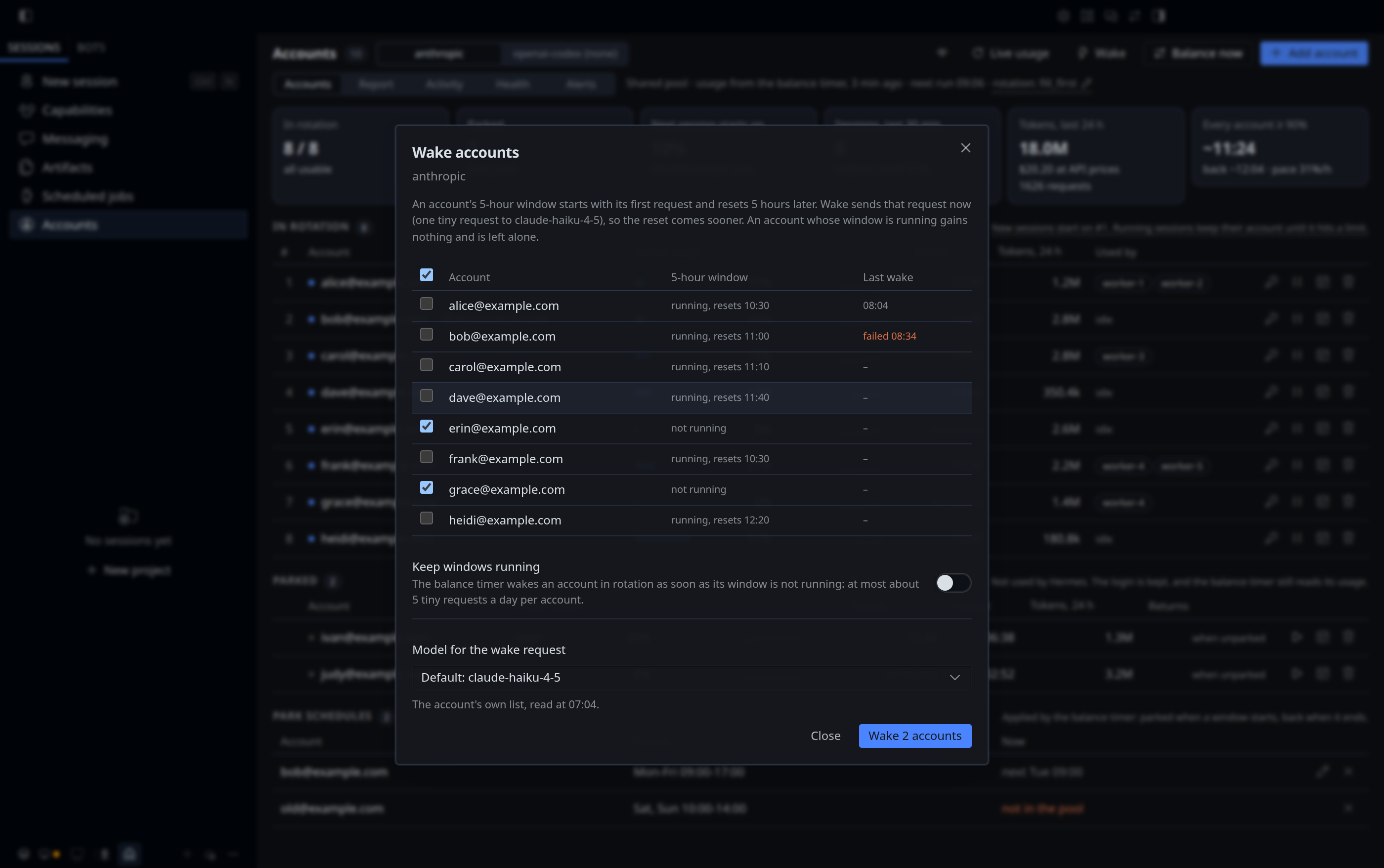
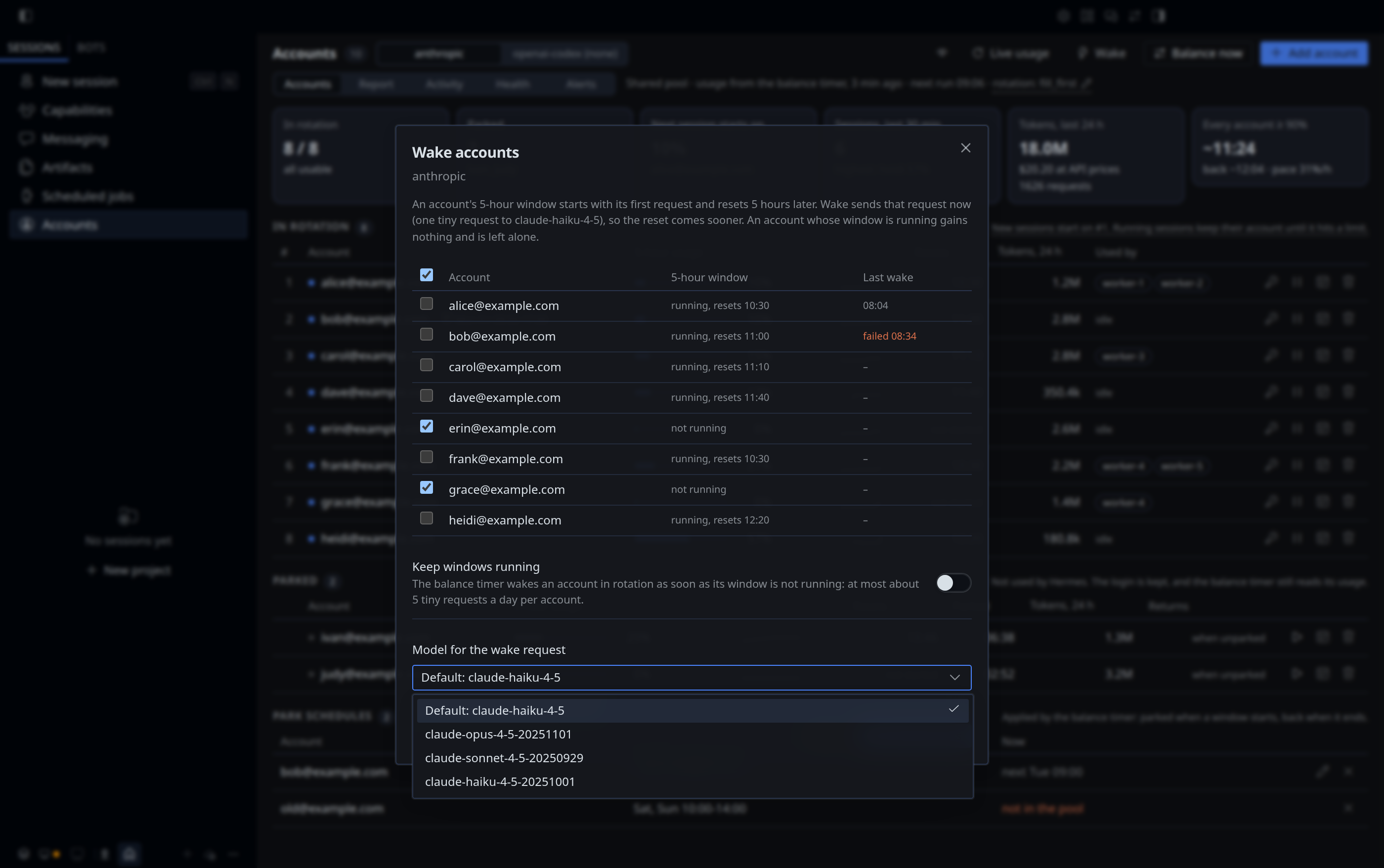
The eye button masks every email on the page (al•••e@e•••.com), the same setting as privacy on, so it also masks alerts and the command's output. Click it again to show them. The page remembers it, so a reload does not flash the real emails.
rotation: … in the header opens the rotation dialog: one picker per profile with its current strategy, an Every profile row that sets them all, and what each strategy does. While any profile is off fill_first the dialog says why that fights balance. Save writes only the profiles you changed, the same as strategy --only. The banner's Use fill_first does the same for the profiles it names, after a confirmation.
The status-bar chip reads 8/8 · 12%: 8 of 8 accounts in rotation are usable, and the account the next session starts on is at 12%. A dot appears when an alert is active (amber) or no account is usable (red). The chip hides while the provider has no accounts or the backend is not loaded.
Add an account or sign in again from the page
- Add account, type the account's email, Start sign-in. For an existing account, use the key button on its row (or Sign in again on a dead-account banner); that is
relogin. - Anthropic: click Copy link and open the link in a browser signed in as that account (its own browser profile, or a private window). Check
Logged in as ..., authorize, copy the code, paste it into the page and click Finish. - Codex asks how to sign in, Browser on this computer (the default) or Device code:
- Browser on this computer: click Copy link, open it in a browser on this computer signed in to ChatGPT as that account, pick the workspace and authorize. The browser lands on a
localhost:1455page that says authorization received, and the dialog finishes by itself a moment later. If the browser runs on another computer, its last page does not load: copy the whole address it ended on (http://localhost:1455/auth/callback?code=...), paste it into the dialog and click Finish. - Device code: open the page shown, enter the code; the dialog finishes by itself once you confirm. ChatGPT Business and Enterprise workspaces often turn this off (see Codex).
- Browser on this computer: click Copy link, open it in a browser on this computer signed in to ChatGPT as that account, pick the workspace and authorize. The browser lands on a
- The result is the same as on the command line:
addkeeps the sign-in only when the email matches and the account is not in the pool yet, then balances;reloginswaps the new login in at the same position only when it is the same account.
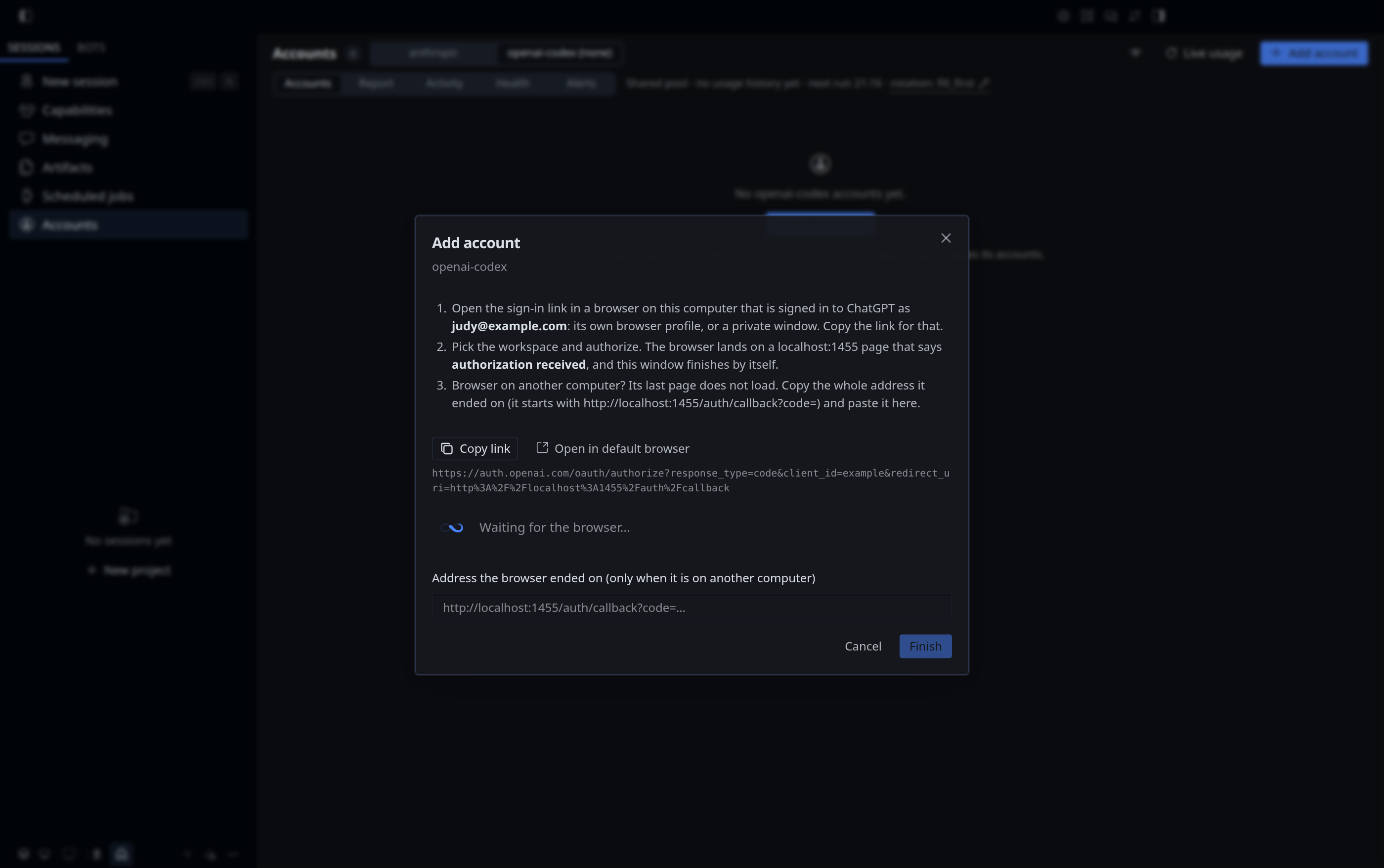
Open in default browser is there too, but your default browser is often signed in as another account; Copy link into the right browser profile is the safe way. A sign-in that is not finished within 15 minutes expires, and Cancel drops it at once. Each sign-in can be finished only once. A sign-in OpenAI refuses (you clicked Cancel there, or the link expired) takes the dialog back to its first step, with the email kept.
Who does the sign-in. Hermes. The page's backend runs hermes auth add <provider> --type oauth --label <email> (for the Codex browser sign-in with --browser --no-browser, the same command add runs in a terminal), shows the link and code Hermes prints, and passes what you paste back to it. Hermes exchanges the code, saves the account in its pool and keeps the code verifier; the plugin never sees a token. Before a pasted code or address reaches Hermes, the backend checks that it belongs to this sign-in (the state in the link), so a code from another sign-in gets a code for another sign-in instead of a failed exchange.
For the Codex browser sign-in Hermes listens on 127.0.0.1:1455, the only address OpenAI sends the browser back to; an address you paste is handed to that listener. A browser callback that does not belong to the sign-in ends it with Hermes' state mismatch. Hermes stops listening when the sign-in finishes, is cancelled, or after 15 minutes. One Codex browser sign-in waits at a time: starting a second one ends the first. When another program holds the port (a Codex CLI login, or hermes auth add openai-codex --browser in a terminal), Hermes signs in with a device code instead, and the dialog says why.
Requests to the provider
| You | Requests |
|---|---|
| Open the page, switch tabs, look at the chip | None. Usage comes from the history the timer writes every 5 minutes, tokens from the session tracker, API prices from Hermes' own price list. |
| Live usage | One usage request per account, parked accounts included. At most once every 2 minutes per provider; the button counts down. |
| Balance now | The same as balance. At most once a minute, shared with Check accounts. |
| Check accounts | One profile request per account. |
| Wake | One usage request per ticked account, then one tiny model request per account whose window is not running. At most once a minute, shared with Balance now and Check accounts. |
| Eye button, wake settings | None. |
| Run doctor | One usage request. |
| Add account, Sign in again | The sign-in, then one profile request to verify the email. |
The usage endpoint limits requests per account (see Troubleshooting), so the page never calls it on its own.
How the page is built and secured
- The page is the plugin's
desktop/plugin.js, a Hermes Desktop plugin. It imports only the Hermes plugin SDK and React, and talks only to its own backend. - The backend is
dashboard/plugin_api.py, mounted by Hermes under/api/plugins/account-pool/whenaccount-poolis inplugins.enabledof the profile Desktop runs. Hermes requires the desktop's session token for every request. - Responses carry labels, ids, states, percentages and times. Tokens never leave the backend. A sign-in in progress is a
hermes auth addprocess the backend talks to; its PKCE verifier and device id stay inside that Hermes process. - The page always works on the shared pool in the default Hermes home, whichever profile the window shows. Bots cannot use it: it is part of the desktop app, not a tool.
- One action runs at a time; a second click while one runs gets
Another account action is still running.
Alerts
| Alert | When | Sent |
|---|---|---|
| Account needs sign-in | An account becomes DEAD |
Once per account |
| Every account above 80% | Every account in rotation is at or above 80% (adapter needed) | Once, plus a message when the pool recovers |
| A bot uses far more than usual | A profile's last hour reaches $15 at API prices or 300 requests, and 3 times its usual hour | Once per bot, at most every 6 hours |
The bot alert catches a loop or a runaway task before it eats the pool:
Hermes: worker-1 is using far more than usual
Last hour: $20.00 at API prices, 100 requests, 5.0M tokens, 20x its usual $1.00 per active hour.
Busiest session: Shipping: admin page for limits (kanban, task t_5f2e91, 100 requests).
Check: hermes account anthropic sessions --hours 1
- Usual = the mean of the profile's active hours (hours with at least one request) in the 7 days before. Until a profile has 3 active hours there is no usual yet, and the floor counts double ($30 or 600 requests).
- Both conditions must hold, so a bot that is always busy does not alert, and a quiet bot that doubles its small use does not either.
- A bot near the floor goes over and under it from one timer run to the next. It gets one message per 6 hours (
alert_bot.cooldown_h); the page shows the banner whenever it is over. - Counted from the session tracker's files, with no request to the provider. Tokens without a bot name are left out.
notify bots=25changes the dollar floor (and turns the alert on),notify bots-offturns it off. The request floor, the factor and the cooldown arealert_bot.requests,alert_bot.factorandalert_bot.cooldown_hin the settings file.
Alerts are sent by balance, so they need the timer. Channels:
- Desktop:
notify-sendon Linux, a Windows notification on Windows; on by default. - Telegram: on automatically when Hermes has a Telegram bot. The message goes with Hermes' own
hermes send -t telegram, using the default profile's bot, to the bot's home channel: the chat where you sent/sethometo the bot. To send to another chat, give its id:notify telegram-to=<chat id>(telegram-to=homegoes back to the home channel). If the default profile has no working bot, use another profile's:notify telegram-via=<profile>. While the bot has no home channel,doctor,notifyand the Alerts tab say so, because nothing would arrive. The plugin reads no.envand no Telegram setting of its own.
Run notify test after setting up.
Daily summary
notify daily=08:00 sends a summary of the last 24 hours once a day, on the first timer run after 08:00, to the same channels as the alerts. There is one per provider, and only for a provider with something to report: requests counted, usage above 0%, or an account that needs a new sign-in. A provider whose accounts sat idle all day sends none. Turned on after that time, the first one comes the next day. notify summary sends one at once, which is also a preview.
Hermes anthropic: last 24 h
Tokens: 10.9M in 647 requests, $5.66 at API list prices.
Bots: worker-1 5.6M, worker-2 2.4M, default 1.9M, worker-3 1.1M.
Share of the load: bob 27%, carol 25%, alice 24% and 1 more. Highest 5-hour usage: 60% (bob). Every account >= 90% at once: 0 min.
Busiest hour: 08:00-09:00.
Now: 4 in rotation, 0 parked; new sessions start on alice (59%).
Accounts that need a new sign-in and the report's advice are added when there are any, plus the forecast when the pool had load in the last hour and the session with the highest API price. The summary is built from the plugin's files, with no request to the provider. notify daily-off stops it.
Settings file
Settings are stored in $HERMES_HOME/account-pool.json, created on the first change. You can also edit it; the alert level is alert_all_above, the daily summary time notify.daily, the bot alert alert_bot (usd per hour, requests per hour, factor over the usual hour, cooldown_h between two messages for the same bot), park schedules are under schedules, automatic wake and the wake model per provider under wake, and email masking is mask_emails:
{"notify": {"desktop": true, "telegram": "auto", "telegram_via": "default", "daily": "08:00"},
 "alert_all_above": 80,
 "alert_bot": {"on": true, "usd": 15, "requests": 300, "factor": 3, "cooldown_h": 6},
 "schedules": {"anthropic": [{"label": "dave@example.com", "id": "a3b2c3", "days": [0, 1, 2, 3, 4], "from": "09:00", "to": "17:00"}]},
 "wake": {"anthropic": {"auto": true}, "openai-codex": {"auto": false, "model": "gpt-6-luna"}},
 "mask_emails": true}
Forecast
usage, report, the daily summary and the Accounts page say when every account will be at 90% or more if the pool keeps the last hour's pace:
Forecast: At the last hour's pace (31% of one 5-hour window per hour), every account is at 90% or more around 16:40, until about 17:20 when the first one resets.
- The pace is the sum of every account's usage increases in the last hour, from the timer's history. Nothing is requested from the provider.
- The forecast spends that pace minute by minute on the least-used account below 90%, the way
balanceandfill_firsthand out new sessions, and gives an account its headroom back when its window resets. It looks one window length ahead (5 hours for Anthropic). - It assumes accounts of the same plan (the percentages add up) and a steady load; a bot that starts or stops changes it within the hour. Read it as "at this pace", not as a promise.
- With less than 25 minutes of recent history, or no account with a known usage, there is no forecast. With no load in the last hour it says so.
How balance works
hermes account <provider> balance balances one provider; hermes account all balance, which the timer runs, does it for every provider with accounts (in rotation or parked), one after the other. A provider that fails does not stop the others; the exit code says that one did.
Each run, for one provider:
- Timed parks: unparks accounts whose
--untiltime has passed (schedule windows that ended included). - Schedules: parks accounts whose schedule window has started, until the window ends.
- Parks kept in step with Hermes: parks again an account Hermes put back in rotation before its time, renews the 30-day hold of parks without an end time, forgets the park of an account that left the pool, and returns an account Hermes holds as parked that the park list does not name.
- Recovery: retries the token refresh for accounts in a refresh cooldown.
- Usage (adapter needed): reads every account's usage; Hermes refreshes an expired access token first.
- Bench and release: accounts at or above the threshold are benched until their window resets; benched accounts that dropped below it are released. Benches are marked
[account-pool], and limits set by the provider itself are never touched. - Order: least used first, then benched accounts, then accounts whose usage could not be read, then
DEADaccounts. - Wake (only with
wake auto-on): one tiny request through each account in rotation whose 5-hour window is not running, from the usage read in step 5. Seewake. - History: one snapshot per run for
reportand for thelast knownfallback. Values taken from that fallback are never written back. - Alerts for new problems (an account that needs sign-in, every account high, a bot far above its usual use), and the daily summary when it is due.
- Activity log: every change from steps 1 to 10 goes to
account-pool-activity.jsonl(seelog).
Safety rules:
- If every account is at or above the threshold, only accounts at 100% are benched, so the pool is never emptied for being nearly full.
- If no usage can be read at all, the order is left unchanged. Recovery, timed unparks, schedules, alerts and the daily summary still run.
- Running sessions are not moved. Moving a session to another account would throw away its prompt cache.
Why benching at 90% helps: when an account hits its limit, Hermes retries once and can wait up to 600 seconds before rotating. Benching just before the limit means new sessions start on an account with room.
The timer
hermes account <provider> setup --timer installs it; doctor and the Accounts page show its state, last run and next run on both systems.
Linux (systemd)
systemctl --user list-timers hermes-account-balance.timer           # status and next run
journalctl --user -u hermes-account-balance.service -n 20 -o cat    # recent runs
systemctl --user start hermes-account-balance.service               # run now
systemctl --user disable --now hermes-account-balance.timer         # stop
systemctl --user enable --now hermes-account-balance.timer          # start again
- Interval:
systemctl --user edit --full hermes-account-balance.timer, changeOnUnitActiveSec=5min. Every run reads each account's usage once, so do not go much below 5 minutes. - Threshold:
systemctl --user edit --full hermes-account-balance.service, add--threshold 85to theExecStartline. - Providers: the timer runs
hermes account all balance, so every provider with accounts is balanced, including one that gets its first account later. On a unit from 3.10.2 or older (oneExecStartline per provider),doctorwarns about a provider with accounts that the timer misses;hermes account <provider> setup --timerswitches the unit toall. - Only some providers: replace the
allline with one line per provider (ExecStart=... account anthropic balance), or runhermes account <provider> setup --undofor the one to leave out. - Remove:
hermes account <provider> setup --undowith only that provider left removes the timer;systemctl --user disable --now hermes-account-balance.timerstops it at once.
Windows (Task Scheduler)
schtasks /Query /TN "Hermes Account Balance" /V /FO LIST            # status, last and next run
Get-Content "$env:LOCALAPPDATA\hermes\account-pool-timer\balance.log" -Tail 20   # recent runs
schtasks /Run /TN "Hermes Account Balance"                          # run now
schtasks /Change /TN "Hermes Account Balance" /DISABLE              # stop
schtasks /Change /TN "Hermes Account Balance" /ENABLE               # start again
The task runs wscript.exe balance.vbs, which runs balance.cmd with no window, so nothing flashes on the screen every 5 minutes. Both files are in %LOCALAPPDATA%\hermes\account-pool-timer\ (under HERMES_HOME when you set one).
- When it runs: every 5 minutes while you are signed in to Windows, on battery too. After the computer was off or asleep, the missed run is made up at once. It never runs two at a time and stops a run after 10 minutes.
- Threshold: add
--threshold 85to theaccount all balanceline inbalance.cmd.setupkeeps options you added there, as it does on Linux. - Interval: open Task Scheduler (
taskschd.msc), task Hermes Account Balance, Triggers, and change Repeat task every. Do not go much below 5 minutes. - Only some providers: replace the
allline inbalance.cmdwith one line per provider, or runhermes account <provider> setup --undofor the one to leave out. - Remove:
hermes account <provider> setup --undowith only that provider left deletes the task and its files;uninstall.ps1does too. - Log: each run appends to
balance.log; at 1 MB the file moves tobalance.log.1.last-run.jsonnext to it holds the start, end and exit code of the last run, whichdoctorand the page read.
The timer uses no AI tokens unless you turn on automatic wake (wake auto-on): it calls the usage endpoints and, for alerts and the daily summary, your notification channels. With automatic wake it also sends one tiny model request when an account's window is not running.
Providers
| Feature | Providers |
|---|---|
list, check, add/remove, park/unpark (also --until), schedule, who, tokens and API price, doctor, sign-in alerts, daily summary, refresh-cooldown recovery |
Every provider in the credential pool (OAuth and API-key entries) |
relogin |
Every provider with OAuth sign-in. Email verification needs an identity adapter. |
usage, report, usage-based balance, wake, "all accounts high" alert, real-email lookup |
Providers with an adapter. Built in: anthropic (Claude Pro / Max / Team, 5-hour window) and openai-codex (ChatGPT Plus / Pro / Team, 5-hour and weekly window). |
Without an adapter, usage and report say so plainly, and balance still unparks timed parks, retries refresh cooldowns and sends sign-in alerts, but leaves the order unchanged.
Codex. The stricter of the 5-hour and weekly limits drives balance, and usage shows both (5h 12% · week 78%). A Codex account that is also signed in to Codex CLI or VS Code shares its quota with them. Hermes keeps its own Codex sign-in and never reuses ~/.codex/auth.json.
The plugin only manages accounts inside a provider. Whether a profile uses a provider at all (main model, fallback order) stays a normal Hermes setting, and the plugin never changes it. A provider with no accounts yet is idle: hermes account openai-codex doctor says "not in use".
Adding an adapter for another provider is a single class; see CONTRIBUTING.md.
Files and security
| Piece | Role |
|---|---|
plugins/account-pool/ |
The hermes account command (__init__.py) and the provider adapters (providers.py). The command registers in the default profile only. |
plugins/account-pool/tracker.py |
The session tracker: a post_api_request hook that records {profile, session, platform, model, account label, tracker version, process id, Kanban task} and adds each call's token counts to its account, profile and model. Registered in every profile; no commands, no tools, no credentials. It swallows every error so it can never break a bot. |
plugins/account-pool/signin.py |
Add account and Sign in again on the Accounts page: runs hermes auth add and relays its link and prompts to the page. |
plugins/account-pool/desktop/ |
The Accounts page for Hermes Desktop (plugin.js). Hermes Desktop copies it to $HERMES_HOME/desktop-plugins/account-pool/. |
plugins/account-pool/dashboard/ |
The page's backend (plugin_api.py) and its manifest. dist/index.js only tells the browser dashboard that the page lives in Hermes Desktop. |
plugins/account-pool/winsys.py |
The Windows parts: the Task Scheduler task and its two files, Windows notifications, directory junctions. Loaded on Windows only. |
install.sh, uninstall.sh |
Install and remove from a git checkout on Linux. install.sh copies the plugin and runs setup; the systemd units are written by setup. |
install.ps1, uninstall.ps1 |
The same for Windows, in PowerShell. The Task Scheduler task is written by setup. |
docs/screenshots/ |
Screenshots of the Accounts page, taken by tests/ui/screenshots.mjs from a Hermes Desktop that shows the test fixtures. |
Data files in $HERMES_HOME (%LOCALAPPDATA%\hermes on Windows), mode 600 on Linux; on Windows they inherit your user folder's permissions, which only you and administrators can read:
| File | Content |
|---|---|
account-pool-parking.json |
The park list: label, pool id, when it was parked and until when. No token: the login stays in Hermes' pool. (3.x kept account-pool-parked.json with the logins; 4.0 moves them back into the pool once and deletes it.) |
account-pool-sessions.json |
Sessions and their account, last 24 hours (no tokens) |
account-pool-tokens.json |
Token counts per account, profile and model, and per profile, session and model, in 15-minute buckets, last 8 days. Numbers and session ids only. |
account-pool-activity.jsonl |
The activity log: what the timer, the command and the page changed. Last 30 days, mode 600. |
account-pool-history.jsonl |
Usage snapshots, one per timer run. Parked accounts are included and listed under parked, which the report, forecast, chart and daily summary leave out. Trimmed to the last 14 days once the file passes 3 MB. |
account-pool-alerts.json |
Alerts already sent, so each incident is reported once |
account-pool-state.json |
When the daily summary was last sent, which schedule windows were already applied, each account's last wake (time, model or the reason it failed), and the last model list per provider (time and ids) |
account-pool.json |
Settings: alert channels, daily summary, park schedules, wake, email masking |
account-pool-timer/ |
Windows only: balance.cmd, balance.vbs, balance.log and last-run.json of the timer |
How tokens are handled:
- The plugin stores no token. Logins live in Hermes' pool (
auth.json), and the plugin reaches them through Hermes' pool API. - Tokens are never printed or logged. The plugin puts an account's access token only into request headers to that provider's own usage, profile, model-list and (for
wake) model endpoints. - Token refresh and sign-in are Hermes' own:
try_refresh_matchingfor an expired token,hermes auth addfor a sign-in. Hermes saves the result. - For alerts and the daily summary the plugin talks to Telegram through Hermes' own
hermes send. Nothing else. API prices come from files Hermes already has. - The Accounts page gets no tokens: its backend returns labels, ids, states and numbers only.
- API keys for
add --keyare read without echo inside the plugin and handed to Hermes'auth_add_command, never put on a command line. - The repository's
.gitignoreexcludes*.json,*.jsonland.env, so state files cannot be committed by accident.
Security and privacy disclosure
What the plugin does outside its own files, in one place: what you should know before you run it. It follows the disclosure the Hermes plugin catalog rules ask for (rule 13); see Hermes plugin catalog.
It changes Hermes' credential pool, and holds no login itself. Managing accounts is the point of account-pool, so unlike a read-only plugin it changes the pool ($HERMES_HOME/auth.json), always through Hermes:
add,relogin,remove,park,unpark,scheduleandbalancechange the pool through Hermes' ownCredentialPoolAPI (load_pool,remove_index,mark_exhausted_and_rotate,reset_status,try_refresh_matching) or throughhermes auth addandhermes auth remove. Nothing editsauth.jsonas text, and nothing reads it directly: the accounts of a profile come from Hermes'read_credential_pool.parkleaves the account in the pool and asks Hermes to skip it:mark_exhausted_and_rotatewith the reasonparkedand a reset time (the--untiltime, or 30 days, renewed by every balance run).unparkisreset_status. The plugin's park list,account-pool-parking.json, holds labels, ids and times, no token. While an account is parked,balancestill reads its usage; Hermes refreshes its access token when it expires (try_refresh_matching) and saves the new pair.- On the first run after an update from 3.x, the logins in the old
account-pool-parked.jsongo back into the pool once (add_entry), held out of rotation as above, and the file is deleted. addandreloginin a terminal, and Add account and Sign in again on the Accounts page, run Hermes' ownhermes auth add <provider> --type oauth --label <email>(for the Codex browser sign-in with--browser --no-browser). The page's backend shows the link and code Hermes prints and passes what you paste back to Hermes; the PKCE verifier, the device id and the tokens stay inside Hermes. The backend reads thestatefrom the printed link to tell you when a pasted code belongs to another sign-in.add --keyreads an API key without echo and hands it to Hermes'auth_add_command.- It sends model requests only for
wake. Each wake is one request through the account, with a one-word answer: for Anthropic through Hermes' own client (build_anthropic_client:claude-code/<version> (external, cli),x-app: cli, and the Claude Code system line Hermes sends with every subscription request); for Codex on the Codex Responses endpoint with the headers below. It runs when you runwake, click Wake, or, afterwake auto-on, from the timer. Nothing else in the plugin calls a model. - Usage and profile requests send the same client headers as Hermes' own usage fetcher:
User-Agent: claude-code/2.1.0withanthropic-beta: oauth-2025-04-20for Anthropic,codex_cli_rs/0.0.0 (Hermes Agent)withoriginator: codex_cli_rsfor Codex. Without them Anthropic rate-limits the usage endpoint far sooner. - It uses these Hermes internals, checked against Hermes 0.21.6:
agent.credential_pool(load_pool,PooledCredentialand the pool methods above),hermes_cli.auth(read_credential_pool,PROVIDER_REGISTRY),hermes_cli.auth_commands(auth_add_commandforadd --key,auth_remove_command,_normalize_provider, and_OAUTH_ADD_SPECS, read to know which providers sign in with OAuth),gateway.config.load_gateway_config(whether the Telegram bot has a home channel),agent.codex_headers.codex_account_headers,agent.anthropic_adapter(build_anthropic_client,_CLAUDE_CODE_SYSTEM_PREFIX),hermes_cli.models._fetch_anthropic_modelsandhermes_cli.codex_models.get_codex_model_idsforwakeand its model list,hermes_constants(the Hermes home and its per-profile override),hermes_cli.secret_prompt.masked_secret_prompt,hermes_cli.config.set_config_value,hermes_yaml, andagent.usage_pricing(_lookup_official_docs_pricing,resolve_billing_route) withagent.models_dev._load_disk_cachefor API prices. A Hermes update that changes them breaks the affected command with an error; it cannot corrupt the pool, because every write still goes through the pool API. - Tokens are never printed, logged, returned to the page, or sent anywhere but the provider's own endpoints.
Network. Only these, and only when a command, the timer or a page button asks:
| Host | What | When |
|---|---|---|
api.anthropic.com |
/api/oauth/usage, /api/oauth/profile |
usage, check, balance (every 5 minutes with the timer), the email check after a sign-in, Live usage, Run doctor |
api.anthropic.com/v1/messages |
one tiny request per wake (claude-haiku-4-5, one output token) |
wake, Wake, and the timer after wake auto-on |
api.anthropic.com/v1/models, through Hermes' _fetch_anthropic_models |
the account's model list (no quota) | wake models; the Wake dialog when the saved list is older than 6 hours |
chatgpt.com/backend-api/wham/usage |
Codex usage | as for Anthropic usage |
chatgpt.com/backend-api/codex/responses, .../codex/models |
one tiny request per wake; the account's model list, to pick the smallest model and fill the Wake dialog's list | as for the Anthropic wake and model list |
Telegram, through hermes send |
alerts and the daily summary | when an alert fires or the summary is due, if Telegram alerts are on |
Sign-in (claude.ai, auth.openai.com, their token endpoints) and token refresh are Hermes' own requests, made by hermes auth add and by the pool when the plugin asks it to refresh. There is no telemetry, no update check and no other host. Opening the page or switching tabs makes no request at all; the Wake dialog reads the model list only when the saved one is older than 6 hours.
Local listener. None of its own. During a Codex browser sign-in, hermes auth add --browser listens on 127.0.0.1:1455 (loopback only) for the browser's return from OpenAI, as it does in a terminal.
Background work. Nothing runs on its own unless you install the timer (setup --timer, or install.sh / install.ps1 without the no-timer option). The timer is a systemd user unit on Linux and a Task Scheduler task for your user on Windows; it runs hermes account all balance every 5 minutes, for every provider with accounts: it reads every account's usage, reorders the pool, benches and releases accounts, applies timed parks and schedules, retries token refreshes and sends alerts. After wake auto-on it also wakes accounts whose 5-hour window is not running (at most about 5 tiny requests per account per day). The session tracker runs inside every Hermes process that loads the plugin, as a post_api_request hook (tracker.py). It writes only the sessions and tokens files, and never runs in a profile that lists account-pool in plugins.disabled.
Commands it runs.
| Command | Why |
|---|---|
systemctl --user |
Linux: timer state for doctor and the page; setup --timer and --undo install, start and remove the units |
schtasks |
Windows: the same for the Task Scheduler task (/Create /XML, /Query /XML, /Run, /Delete) |
notify-send |
Linux: desktop alerts |
powershell.exe |
Windows: desktop alerts, as a Windows notification (the script is passed with -EncodedCommand; title and text through environment variables) |
hermes config set |
strategy, setup (plugins.enabled, credential_pool_strategies), only when Hermes' own config writer cannot be imported |
hermes plugins remove account-pool-tracker |
setup, once, on an update from 3.x |
hermes auth add |
add and relogin in a terminal; Add account and Sign in again on the page |
taskkill |
Windows: stops the hermes auth add of a page sign-in you cancelled |
hermes auth remove |
remove |
hermes send -t telegram |
Telegram alerts and the daily summary |
Reads outside its own files. Every profile's config.yaml (strategy and plugin lists), every profile's state.db read-only (session titles for sessions), /proc/self/cgroup on Linux (whether the process is the timer's service, so the activity log says timer rather than cli; on Windows the timer's balance.cmd sets HERMES_ACCOUNT_POOL_TIMER=1 instead), Hermes' gateway settings (gateway.config: whether the Telegram bot has a home channel; no token is read), the command line of Hermes processes (doctor: which process still runs an older tracker; /proc/<pid>/cmdline on Linux, psutil on Windows), Hermes' price files, and the state of the systemd units or the Task Scheduler task. hermes plugins validate lists the /proc/self/cgroup read as a caution; that is all it is for.
Writes outside its own files. The credential pool, through Hermes, as above. config.yaml of the profiles, only through Hermes' config writer (or hermes config set), only from setup, strategy and the page's rotation dialog. The plugin links profiles/<name>/plugins/account-pool (a symlink, or a directory junction on Windows). The systemd units in ~/.config/systemd/user/ on Linux; the Task Scheduler task Hermes Account Balance and account-pool-timer/ on Windows.
Who can use it. The command registers in the default profile only, so bots in other profiles cannot run it, and it registers no tools. In other profiles the plugin registers only the session tracker. The page is part of Hermes Desktop and its backend requires Desktop's session token. One account action runs at a time.
Troubleshooting
| Symptom | Likely cause | Fix |
|---|---|---|
usage shows n/a (usage endpoint rate-limited ...) or last known |
The usage endpoint was queried very often in a short time (by this plugin, other usage tools, or Hermes Desktop's model picker). This is the measuring endpoint, not your model quota. | Wait a few minutes. Bots are not affected, and balance keeps accounts without data after the others. |
setup or doctor stops with ModuleNotFoundError: No module named 'yaml' |
Plugin 3.12.0 or older on Hermes 0.21.6 or later, which no longer installs PyYAML | hermes plugins update account-pool (3.12.1 reads YAML with Hermes' own module), then run setup again |
| Sign-in page says "Sign in again to continue" | The browser's login is old (Anthropic policy) | Click it and sign in as the same account |
add says discarded |
The browser was signed in as another account, or as one already in the pool | Use that account's own Chrome profile or a fresh private window, then run add again |
Cancelled (Ctrl+C). Nothing was added. |
You pressed Ctrl+C during sign-in | Expected. Run add again when ready. |
| A bot says "retrying in 600s" | Its account hit a 429 before balance benched it |
hermes account anthropic balance, then stop and resend the message in that session |
check: DEAD |
Login revoked, or the token was used by another app or machine | hermes account anthropic relogin <email> |
check: WRONG LABEL or DUPLICATE |
Added with plain hermes auth add while signed in as another account |
relogin the right account, or remove <id> the extra entry |
sessions lists nothing |
The bots still run an account-pool-tracker older than 1.5.0 |
hermes gateway restart, restart Hermes Desktop; doctor names the processes |
who is empty |
Sessions started before the plugin was installed, or Hermes runs plugins with plugins.isolation: host |
/reset the session, or restart the gateway or desktop. Under host isolation the tracker cannot see the account (see Limitations) |
doctor: session tracker X is not loaded yet by ... |
The gateway, Hermes Desktop or a long session started before the tracker was updated | hermes gateway restart; restart Hermes Desktop; a session switches when it ends |
| No Telegram alert | The bot has no home channel, or the bot token of the sending profile is invalid | Send /sethome to the bot in the chat that should get alerts, or notify telegram-to=<chat id>; then notify test. A broken bot: switch with notify telegram-via=<profile> |
report: not enough history |
The timer is off or was just installed | doctor, then wait for a few runs |
A --until park did not end |
The timer is off | hermes account <provider> setup --timer |
| A schedule did not park its account | The timer is off, it is the last working account, or you unparked it by hand inside the window | hermes account <provider> schedule shows the state of each schedule |
| A parked account shows no reset time and a flat trend | Before 3.11.1 the timer did not read parked accounts. On 3.11.1 the next timer run fills them in. A flat trend at 0% with not started means its window has ended; hover the trend for the highest reading of the last 24 hours |
Wait for the next timer run (5 minutes) or press Live usage |
| No daily summary | The timer is off, no alert channel is on, it was turned on after its time today, or the provider had nothing to report (no requests, no usage, no account to sign in again) | notify shows the time and the last day it was sent; notify summary tests delivery |
doctor: the balance timer does not run openai-codex |
The timer unit is from 3.10.2 or older and has one line per provider | hermes account openai-codex setup --timer (switches it to every provider with accounts) |
report: API $ shows - or ends in + |
The model has no price in Hermes' price list, or the tokens were counted by an account-pool-tracker older than 1.3.0 |
Nothing to fix; those tokens are left out of the price |
doctor: strategy is not fill_first |
A profile uses round_robin or another strategy |
hermes account <provider> strategy fill_first, or Use fill_first on the page |
doctor: profiles with their OWN pool |
Someone ran hermes -p <profile> auth add |
Remove those entries in that profile (hermes -p <profile> auth remove ...) and add the accounts from the default profile |
doctor: last run failed |
The timer's last balance failed |
Linux: journalctl --user -u hermes-account-balance.service -n 20. Windows: the end of %LOCALAPPDATA%\hermes\account-pool-timer\balance.log |
Windows, doctor: the timer's last run was a while ago |
Task Scheduler runs the task only while you are signed in, so this is normal after the computer was off or signed out | Nothing, if you were away; it runs again within 5 minutes of signing in. Otherwise see balance.log and Task Scheduler's history for Hermes Account Balance |
Windows, setup: Task Scheduler refused the task |
A company policy blocks scheduled tasks for normal users | Ask the administrator, or run hermes account all balance yourself now and then |
Windows: install.ps1 cannot be loaded because running scripts is disabled |
Windows blocks downloaded scripts by default | Start it as powershell -ExecutionPolicy Bypass -File .\install.ps1 (this run only) |
| Windows: no desktop alert | Windows notifications are off for Windows PowerShell, or Focus / Do not disturb is on | Settings > System > Notifications, allow Windows PowerShell; hermes account <provider> notify test |
hermes account: unknown command |
Run with -p <profile>; the plugin is in the default profile only |
Run it without -p |
Accounts page: The account-pool backend did not answer |
Hermes Desktop runs a profile that does not list account-pool (a profile created after the install, or an install older than 3.5.1), or was not restarted after the install |
hermes account <provider> setup, then restart Hermes Desktop. doctor names the profiles that miss it |
add needs a terminal or relogin needs a terminal |
It ran from cron, an agent's shell or another place without a terminal, where nobody can paste the sign-in code | Run it in a terminal, or use Add account / Sign in again on the Accounts page |
no terminal to answer, so no |
A command that asks first ran without a terminal | Run it in a terminal, or add --yes |
doctor: the retired account-pool-tracker plugin is still in: ... |
The update to 4.0 was not followed by setup |
hermes account <provider> setup |
doctor: parked, but Hermes has them in rotation again |
hermes auth reset, or Hermes saw a Codex quota come back |
hermes account <provider> balance parks them again; the timer does it within 5 minutes |
doctor: parked accounts that are no longer in the pool |
The account was removed (hermes auth remove) while parked |
Nothing: the next balance run forgets the park |
doctor: held as parked in Hermes, but not parked here |
The park list was deleted or restored from an older copy | hermes account <provider> balance puts them back in rotation; park them again if you want them out |
doctor: parked without an end time while the balance timer is off |
Hermes holds a park without --until for 30 days; only balance runs renew it |
hermes account <provider> setup --timer |
doctor: Telegram alerts go to the bot's home channel, but it has none |
Hermes sends to the bot's home channel, and none is set | Send /sethome to the bot in the chat that should get alerts, or notify telegram-to=<chat id> |
| No Accounts entry in the sidebar | The Desktop half of the plugin is off | Capabilities > Plugins, account-pool, switch on Desktop. After an update: Ctrl+K, Reload desktop plugins |
| Live usage button greyed out | Live usage ran less than 2 minutes ago | Wait for the countdown on the button |
Sign-in in the page: This code belongs to another sign-in |
The code came from another sign-in link, or was copied without the part after # |
Open the link from this window again and copy the whole code |
| Codex: "Please contact your workspace admin to enable device code authentication", Continue greyed out | The ChatGPT workspace turned device-code sign-in off | Sign in without --device (the default), or pick Browser on this computer on the page. Or have an owner turn on Enable device code sign-in for Codex, which can take a while to apply |
Codex: the browser ends on a localhost:1455 page that does not load |
The browser runs on another computer than Hermes, or the sign-in in Hermes already ended | Page: paste that whole address into the dialog. Terminal: use the page, --device, or the SSH tunnel Hermes prints |
Codex page sign-in: Port 1455 on this computer is taken ..., so Hermes signs in with a code instead |
A Codex CLI login or hermes auth add openai-codex --browser is waiting on the port |
Enter the code on OpenAI's page, or cancel, finish or stop the other sign-in, and start again |
Codex: OpenAI refused the sign-in or Token exchange failed |
You cancelled on OpenAI's page, or the link was older than a few minutes | Start the sign-in again |
Codex: This address belongs to another sign-in |
The pasted address came from an older sign-in link | Open the link from this dialog again and paste the address it ends on |
wake failed ...: model ... not accepted |
The account's plan does not offer the wake model | Pick a model from the list in the Wake dialog, or hermes account <provider> wake models and wake model=<id> with one of them, or model=default |
| The Wake dialog has a text field instead of a model list | The model list could not be read (no signed-in account in rotation, or the provider did not answer); the line below says why | Type the id, or leave it empty for the default; hermes account <provider> wake models shows the same reason |
wake failed ...: rate-limited |
The account is at a limit, so its window is running already | Nothing to fix; the next run finds the window running |
Resets shows not started |
No 5-hour window is running on that account | Normal for an idle account. Wake starts it if you want it to reset sooner |
| Automatic wake does nothing | The timer is off, or every window is already running | hermes account <provider> wake status; doctor |
Emails show as al•••e@e•••.com |
Email masking is on | hermes account <provider> privacy off, or the eye button on the page |
FAQ
My quota in claude.ai (or another usage tool) is fine. Why does usage say rate-limited?
Two different limits. Your model quota is what the bots spend. The usage endpoint that tools read to display that quota has its own request limit. When it is hit, only the display is affected: bots keep running, and the plugin shows the last known value.
Do I need WSL on Windows? No. Since 3.13.0 the plugin runs on Hermes' own Windows install: the timer is a Task Scheduler task, alerts are Windows notifications, and the commands and the Accounts page work as on Linux. A Hermes inside WSL works too; it then counts as Linux.
Does the plugin use AI tokens?
Only for wake, and only when you run it or switch on wake auto-on: one request with a one-word answer per wake, which leaves the window at 0%. Everything else reads usage and reorders the pool without calling a model.
Should I turn on automatic wake? It helps a pool with idle hours: an account that waits for work has its window running already, so it resets sooner once the work comes. It costs at most about 5 tiny requests per account per day. A pool that is busy around the clock gains little, because its windows run anyway. It adds no quota.
Does masking hide the emails from the files?
No. It masks what is shown: the command's output, alerts and the page. The files keep the real emails, so that targets and privacy off keep working.
Does balance move running sessions to a less used account?
No. A running session keeps its account until it hits a limit; moving it would discard the prompt cache. New sessions take the least used account.
Why are the accounts in use in the middle of the list, and #1 idle? That is balance working. A session started on the account that was #1 at the time. Its usage grew, so the next runs moved fresher accounts above it. #1 is where the next new session starts. See Running sessions keep their account.
Is there a round-robin mode?
Hermes has one (round_robin), next to fill_first, least_used and random; the plugin has no mode of its own. You can switch with strategy or on the page, but with this plugin keep fill_first: balance then rotates by quota left instead of by turn. The table under Concepts compares the four.
Does the plugin change my fallback provider or models?
No. Fallback, models and which provider a profile uses stay in your Hermes configuration. The only model-related setting the project writes is credential_pool_strategies, and only when you ask: setup --strategy, install.sh --set-strategy, hermes account <provider> strategy, or the page's rotation dialog. setup also writes plugins.enabled of each profile and links the plugin there, for the page and the session tracker.
Can I use the same account in claude.ai, Claude Code or Codex CLI at the same time?
Yes, with a separate sign-in there. The quota is shared, so that use shows up in usage. Never copy Hermes' tokens to another app or machine.
What happens if the provider changes the usage endpoint?
usage, report and usage-based ordering stop, doctor reports FAIL, and Hermes' built-in rotation keeps working as before.
Can a worker bot run hermes account?
No. The command is installed in the default profile only, on purpose. In their profiles the plugin registers only its session tracker, which records which account they use and how many tokens they spent on it.
Why does an account show many tokens but a low percentage, or the other way round? The percentage is the provider's, for everything on the account, weighted by token type. Most of what Hermes sends is cache reads, which count for little. Use against Claude Code or claude.ai raises the percentage without adding Hermes tokens.
Is API $ what I pay?
No. A subscription (Claude Pro, Max or Team, ChatGPT Plus, Pro or Team) costs the same however much you use it. API $ prices the same tokens as if they had gone through the provider's API, so you can see what the subscription is worth and which bot costs the most.
How many accounts do I need?
At least two. report tells you when the whole pool was nearly full at the same time, which is the signal to add one.
Limitations
- Usage comes from undocumented endpoints:
https://api.anthropic.com/api/oauth/usageandhttps://chatgpt.com/backend-api/wham/usage(the one behind Codex CLI's/status). They can change or rate-limit without notice. The plugin sends the same client headers as Hermes' own usage fetcher. - Anthropic weekly quotas are not exposed for Team accounts, so
balanceuses the 5-hour window foranthropic. wakerelies on what the usage endpoints show today: Anthropic gives no reset time while no window runs, Codex shows a full untouched window that moves with every reading. If a provider changes that,wakecannot tell an idle window and leaves the account alone (a named account is still woken). A wake is a request made with the account like any Hermes session, so it falls under the same plan terms.- Email masking covers what the plugin shows. Other places that show account labels, such as
hermes auth listor Hermes' own logs, are not masked. - Adapters exist for
anthropicandopenai-codex. The generic commands were tested for other providers with API-key entries only. Codex was verified with a real ChatGPT Business account: the browser sign-in,check,usage,who,report,sessions,log,doctorandbalance --dry-run. Park, unpark, the parked-token refresh through Hermes, balance and the page's sign-ins were tested in a sandbox with fake tokens (tests/codex_sandbox.py,tests/api_sandbox.py); the page's sign-in tests run Hermes' realhermes auth addcode with the network calls replaced (tests/hermes_auth_add.py). - Token counts start when the session tracker first runs (in 3.x,
account-pool-tracker1.1.0) and cover Hermes on this computer only. They are kept for 8 days, in 15-minute buckets, so a period starts at the nearest quarter hour. Bots pick up a new tracker when their gateway or session restarts. API $uses list prices for the standard context length; long-context surcharges and batch discounts are not applied.whofinds the agent object by scanning running thread frames, because Hermes'post_api_requesthook does not name the pool entry a call used. That needs Hermes' defaultplugins.isolation: in_process: underhostisolation the tracker records nothing, sowho, token counts, the session list and the bot alert stay empty, while usage, balance, park, schedules and the forecast keep working. A call without a session id is not counted, so tokens are never put on a guessed account. A future Hermes refactor may also leavewhoempty, but it can never break the bots.- The plugin is built for Hermes' default
plugins.isolation: in_process. Underplugins.isolation: host, Hermes does not register plugin CLI commands, sohermes accountis not there (the timer'sbalanceincluded), the tracker records nothing, and the Accounts page backend runs in the plugin host, where it has not been tested. Switch back withhermes config set plugins.isolation in_process. addandreloginneed a terminal (or the Accounts page) to show the sign-in link, paste the code or type the key. Without one they stop at once with the command to run, instead of waiting for input.- The Codex browser sign-in needs the browser on the computer that runs Hermes (or the Accounts page, which hands the pasted address to Hermes). OpenAI accepts only
http://localhost:1455/auth/callbackas the return address for the Codex client, so the port cannot be changed. - The Accounts page follows the Hermes Desktop plugin SDK as of Hermes Agent 0.21.6. A future SDK change can break the page; the command is not affected.
- The timer needs systemd (Linux) or Task Scheduler (Windows 10 and 11). On macOS run
hermes account all balanceevery few minutes with launchd or cron. On Windows the task runs only while you are signed in. - Windows support (3.13.0) is covered by
tests/windows_sandbox.py, which drives the Windows code with a stand-in for Task Scheduler. The Windows pieces (balance.cmdandbalance.vbsthroughcmd.exeandwscript.exe, junctions, the file locks) were also run with Windows' own Python under Wine. Registering the task with the real Task Scheduler follows how Hermes registers its own gateway task on Windows; thetestsworkflow (.github/workflows/tests.yml, started by hand) runs it on a Windows runner. Please report what you see on your machine.
Contributing, changelog, license
- Adapters for more providers are welcome. CONTRIBUTING.md covers the adapter interface, the rules for handling tokens, the Hermes Desktop page, and how to test in a sandbox without touching your real pool.
- CHANGELOG.md lists every release.
docs/hermes-account-pool.pdfis the full guide in Indonesian.docs/make_doc.pyregenerates it (reportlab, DejaVu fonts).- License: MIT, see LICENSE.