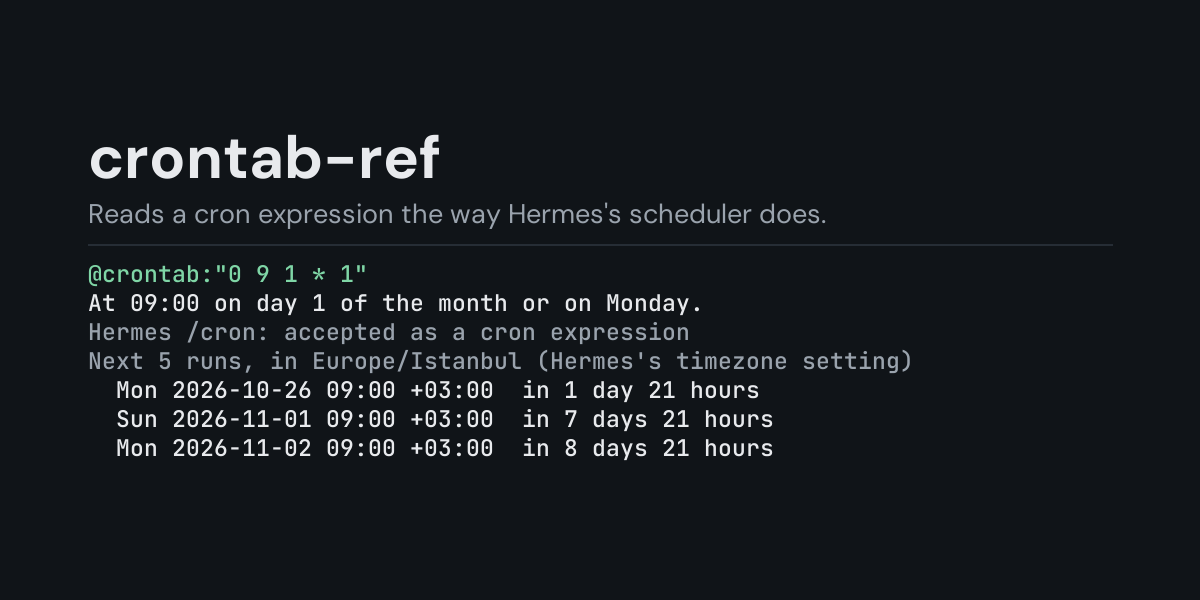
crontab-ref
@crontab: references for Hermes: put @crontab:"0 9 * * 1-5" in a message and Hermes
replaces it with what that cron expression means, worked out on your machine: a sentence in
plain words, each field on its own row, whether Hermes's /cron accepts it, its next five runs
in Hermes's timezone, and notes for the cases people usually get wrong.
Cron expressions are short and easy to misread, for people and for models: 0 9 1 * 1 does not
mean "the first Monday", * 9 * * * runs sixty times, */7 does not run every seven minutes
across the hour, and @daily is not something Hermes's /cron takes. The model gets the
reading already done, by the same library Hermes's scheduler uses, instead of working it out in
its head.
Install
hermes plugins install crontab-ref --enable
Requires Hermes 0.21.5 or newer. No API key, no configuration. It uses croniter, which Hermes already installs for its own scheduler; nothing else is installed.
Use
@crontab:"0 9 * * 1-5"      five fields: minute hour day-of-month month day-of-week
@crontab:"*/15 9-17 * * *"  steps, ranges and lists
@crontab:"0 9 * * MON-FRI"  month and weekday names
@crontab:"0 9 L * *"        L (last day of the month), L5 (last Friday), 5#3 (third Friday)
@crontab:"* * * * * 30"     a 6th field (seconds) and a 7th (year), as croniter reads them
@crontab:@daily             the shortcuts @yearly @annually @monthly @weekly @daily @midnight @hourly
An expression has spaces, so it goes in quotes (", ' or a backtick); Hermes reads a
reference up to the end of the line. A shortcut such as @daily needs no quotes.
Example, from the end-to-end test (one-shot hermes chat turns run on 2026-10-24 with
timezone: Asia/Kolkata in config.yaml). The message When does this fire? @crontab:"0 9 * * 1-5" reaches the model as the message followed by:
Cron expression "0 9 * * 1-5", as Hermes's scheduler (croniter) reads it
  At 09:00 on Monday through Friday.
  minute        0    0
  hour          9    9
  day of month  *    any
  month         *    any
  day of week   1-5  Monday through Friday
Hermes /cron: accepted as a cron expression
Next 5 runs, in Asia/Kolkata (Hermes's timezone setting)
  Mon 2026-10-26 09:00 +05:30  in 1 day 14 hours
  Tue 2026-10-27 09:00 +05:30  in 2 days 14 hours
  Wed 2026-10-28 09:00 +05:30  in 3 days 14 hours
  Thu 2026-10-29 09:00 +05:30  in 4 days 14 hours
  Fri 2026-10-30 09:00 +05:30  in 5 days 14 hours
From the same run, @crontab:@daily says that /cron needs the five fields:
Cron expression "@daily", as Hermes's scheduler (croniter) reads it
  At 00:00 every day.
  same as 0 0 * * *
  ...
Hermes /cron: Hermes's /cron does not take @daily; write the five fields instead: 0 0 * * *
and @crontab:"*/7 * * * *" ends with:
Notes
  - */7 in the minute field starts again every hour: after :56 the next run is :00, 4 minutes later, not 7
What the notes point out:
- Day of month and day of week both set (
0 9 1 * 1): a day that matches either one runs, so this is "the 1st, and every Monday", not "the 1st if it is a Monday". croniter applies this rule to*/2too. *in the minute field with a set hour (* 9 * * *): every minute of that hour.- A step that does not divide the hour or the day (
*/7,0 */5 * * *): the gap at the turn of the hour or the day is shorter. - Days 29-31: months without that day are skipped;
Lis the last day of every month. - 7 in day of week is Sunday, the same as 0.
- A date that never comes (
0 9 31 2 *): no runs are listed and the block says so.
How it is read
- The fields are expanded by croniter (
croniter.expand), the library Hermes's/cronscheduler uses, and the sentence is written from that expansion. - "Hermes /cron" repeats the check in Hermes's
cron/jobs.py::parse_schedule: the first five fields may only use digits, letters and* , - /(so?and5#3are not taken as cron there), and croniter must read the expression. Shortcuts like@dailyare not taken either. - The next runs are worked out like
cron/jobs.py::compute_next_run: croniter walks the wall clock of Hermes's timezone setting (timezonein config.yaml, orHERMES_TIMEZONE), so a 09:00 job stays at 09:00 across a daylight-saving change. With no timezone set, it is this computer's local time, and the block says so.
Suggestions
In the TUI and the desktop app, typing @crontab: suggests three example expressions with their
meaning, and @crontab: followed by an expression previews it (@crontab:@daily shows @daily = At 00:00 every day.). The classic CLI does not show reference suggestions.
Security and footprint
register()only registers one context reference provider (@crontab:).- It reads the text of the reference, the system clock, and Hermes's timezone setting
(
HERMES_TIMEZONE, elsetimezonefrom the loaded config throughhermes_cli.config), and only when you write@crontab:in a message. - No network access, no subprocesses, no downloads, no credentials read, no files written. It
does not create, change or run any
/cronjob. - Uses croniter (already installed by Hermes) and the standard library.
Development
python -m pip install "pytest>=8,<10" "croniter>=6,<7"
python -m pytest tests                                               # unit tests, no Hermes needed
PYTHONPATH=<hermes checkout> python tests/e2e/crontab_ref_e2e.py      # real hermes chat turns, Hermes's scheduler, TUI suggestions
hermes plugins validate crontab-ref
Changes
- 1.0.0: first release.
MIT licensed.