hermes-field-notes

Field notes for a Hermes Agent installation: pitfalls with their root cause, local patches of
the Hermes core checked after every hermes update, and an optional pinned Telegram dashboard.
Every long-running Hermes install accumulates two kinds of hard-won knowledge that quietly get lost:
- pitfalls — "the cron job was silent because the user service had no linger", "an unquoted colon in a skill description makes the plugin loader drop the skill without a word". They cost an hour the first time and the same hour again a month later, unless someone wrote them down;
- local core patches — small edits inside
hermes-agentthathermes updatewipes out. You find out when the bug is back.
This skill gives the agent one place for both, and makes the patch half checkable.
What it does
-
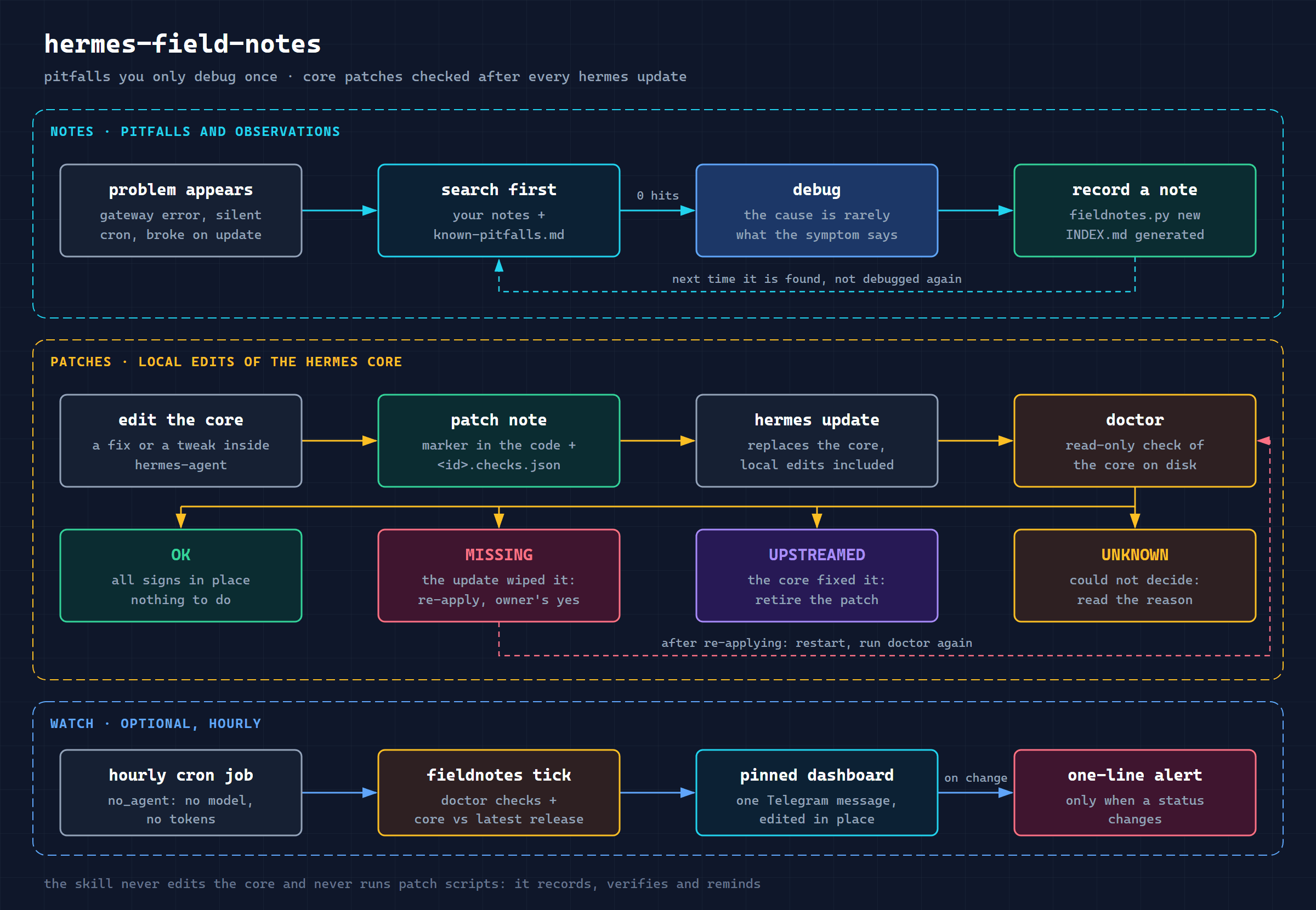
Search before debugging.
fieldnotes.py search <error text>looks through your notes and a bundled list of verified Hermes pitfalls (known-pitfalls.md). -
Record after debugging. Notes are Markdown files with a small frontmatter;
INDEX.mdis generated, never edited by hand.lintcatches broken fields, stale notes and things that look like secrets. -
Every core edit is a patch note with a declarative checks file: which signs must be in which core file, per core version, and which signs mean the core fixed it upstream.
-
After an update,
doctortells you, read-only, which patches areOK,MISSING,UPSTREAMED,N/AorUNKNOWN(with the reason), which core files were changed outside the registry, and which notes were verified on a different core. -
Pinned dashboard (optional): one Telegram message, edited in place by the agent's own bot, plus a one-line alert only when something changes. Runs as a
no_agentcron job — no model call, no tokens. -
Upstream drafts.
issue-draft <id>turns a bugfix note into a masked issue draft. Posting is always the human's call. -
Patch recipes.
patch-recipes.md: five core bugfixes and five customizations one production install carries, each with the place in the core, the edit, what to put intochecks.jsonand the upstream status — a starting point, not a script that patches for you.
The skill never edits the core and never runs patch scripts: it records, verifies and reminds.
Install
As a regular skill (recommended — the agent finds it by its description):
hermes skills install itpartypattaya/hermes-field-notes/skills/hermes-field-notes
Or as a plugin (installed disabled; enable it, the skill is then namespaced):
hermes plugins install itpartypattaya/hermes-field-notes
hermes plugins enable hermes-field-notes
Then set up the store and config, and check the result (after a plugin install the scripts live in
~/.hermes/plugins/hermes-field-notes/skills/hermes-field-notes/scripts/ instead):
python3 ~/.hermes/skills/hermes-field-notes/scripts/install.py
python3 ~/.hermes/skills/hermes-field-notes/scripts/install.py --check
Optional hourly watch and dashboard — edit ~/.hermes/field-notes.json first
(dashboard.enabled, chat_id, thread_id, language, timezone), then:
~/.hermes/hermes-agent/venv/bin/python ~/.hermes/skills/hermes-field-notes/scripts/install_cron.py --dry-run
~/.hermes/hermes-agent/venv/bin/python ~/.hermes/skills/hermes-field-notes/scripts/install_cron.py
Requirements: Hermes Agent ≥ 0.21 (written against 0.21.5), Python 3.11+, standard library only.
Patch checks need the core as a directory; drift additionally needs it to be a git checkout.
Using it
Ask the agent in plain words: "what do we know about this error?", "write this down", "did the patches survive the update?", "show the dashboard". Or run the script yourself:
FN=~/.hermes/skills/hermes-field-notes/scripts/fieldnotes.py
python3 $FN search "no_agent" "silent"
python3 $FN new cron-linger --area cron --title "Cron worker does not start without linger"
python3 $FN new quota-auth --type patch --area gateway --title "429 shown as an auth error"
python3 $FN index && python3 $FN lint
python3 $FN doctor
python3 $FN dashboard --format md
--read-only guarantees no writes and no network (the cron entry point tick refuses it).
Example: doctor after an update
🩺 Hermes 0.21.5 · 🩹 5 ✅ · 1 ❌ · 🪤 24

Core
0.21.5 · rc.33-v0.21.5 · 8d30c4e
Updated 30.09 12:45 (UTC) (6 d ago) · was 0.21.3 (4f1c2a9)
Core changes outside the registry: none ✅

Patches — 6
bugfixes 4 · customizations 2 · workarounds 0
✅ 5 signs in place · ❌ 1 missing · ❔ 0 unknown
⬆️ fixed upstream (all time): 4 · bugfixes without an issue: 2
Core files under patches: 7 · oldest patch: 91 d
  ❌ 429 shown as an auth error · missing · 91 d
  …

doctor: a patch is MISSING — re-apply it (with the owner's consent)
How patches are checked
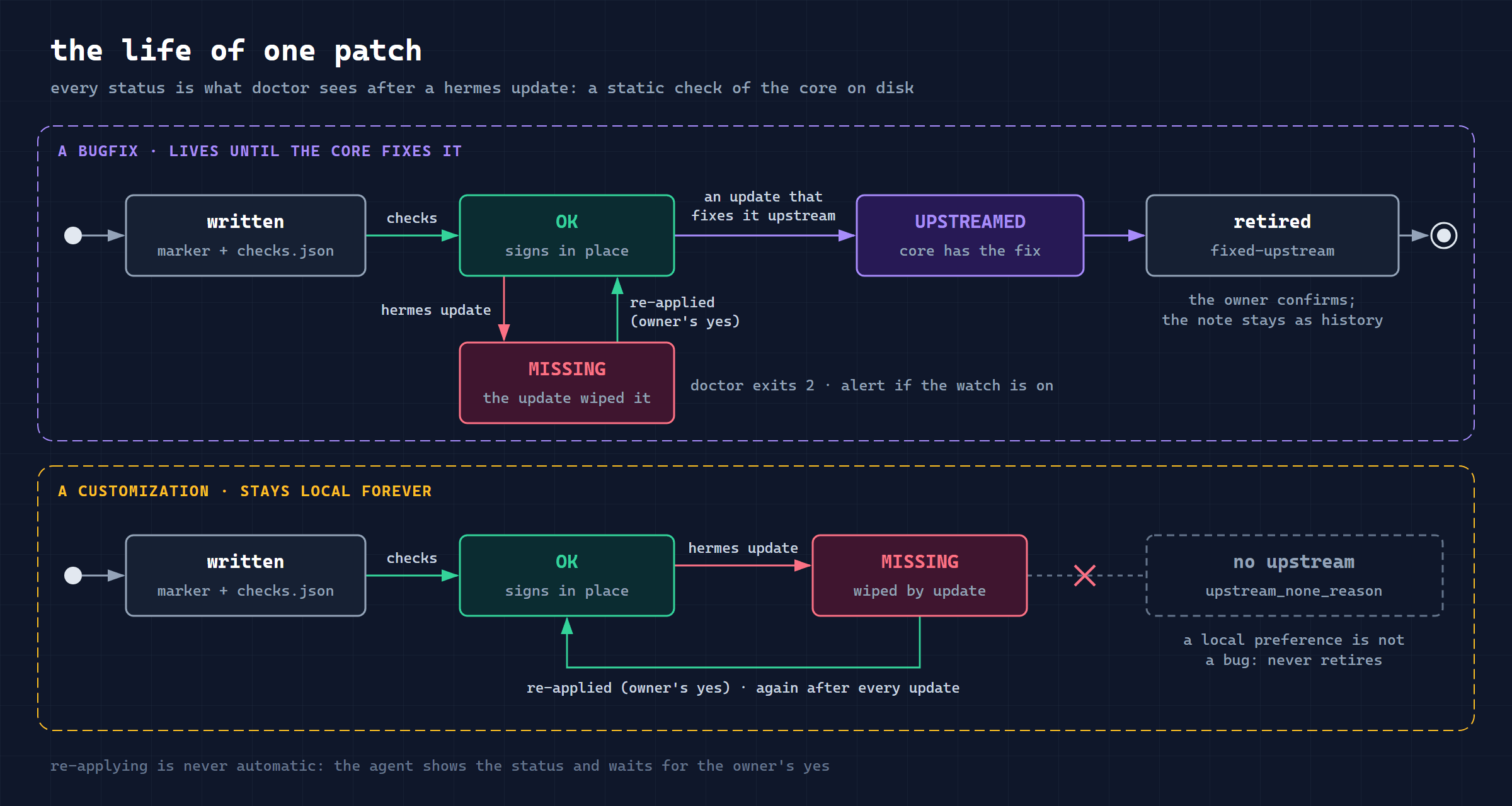
A patch note notes/<id>.md has a sibling notes/<id>.checks.json:
{"schema_version": 1,
 "editions": [{"when": {"min_version": "0.21.3"},
               "targets": [{"file": "gateway/run.py",
                            "contains": ["MY_PATCH_MARKER", "new_line_of_code()"],
                            "not_contains": ["old_line_of_code()"]}],
               "upstream": [{"file": "gateway/run.py", "contains": ["def upstream_fix("]}]}]}
OK means every sign is present — a static check of the tree on disk, not proof the code works.
A marker that survived while the code under it changed shows up as UNKNOWN (partial), not as a
false green. Details: note-format.md,
patch-scripts.md.
Privacy and safety
- Notes stay on your machine (
$HERMES_HOME/field-notes/by default); nothing is uploaded. --read-onlyondoctor,patches,drift,lint,dashboard --formatguarantees no writes and no network;tick(the cron entry point) refuses it.- Network: the Telegram Bot API, only when the dashboard is enabled and only to the chat you set
(the bot token is read from the environment or
$HERMES_HOME/.envand never printed); and the public GitHub API, without credentials, a few requests every 12 hours to compare your core with the latest release (upstream.check: falseturns it off). - Writes: the notes store,
$HERMES_HOME/cache/field-notes-state.json, the cron script copy in$HERMES_HOME/scripts/, and the cron job if you runinstall_cron.py. The core is only read.
Contributing a pitfall
Found a Hermes pitfall that is not specific to your install? Open a PR adding it to
known-pitfalls.md in the same format:
affected setups, verbatim symptom, mechanism in the core, workaround, the version you verified it
on, and the upstream issue if there is one.
Tests
python -m unittest discover -s tests
Standard library only, no network (Telegram is faked). Trigger prompts for the skill:
tests/evals/evals.json.
Issues and pull requests are welcome.
Author
Anton Vaskov — Telegram @passone, GitHub itpartypattaya.