Insight - Selection & Definition for Hermes Desktop
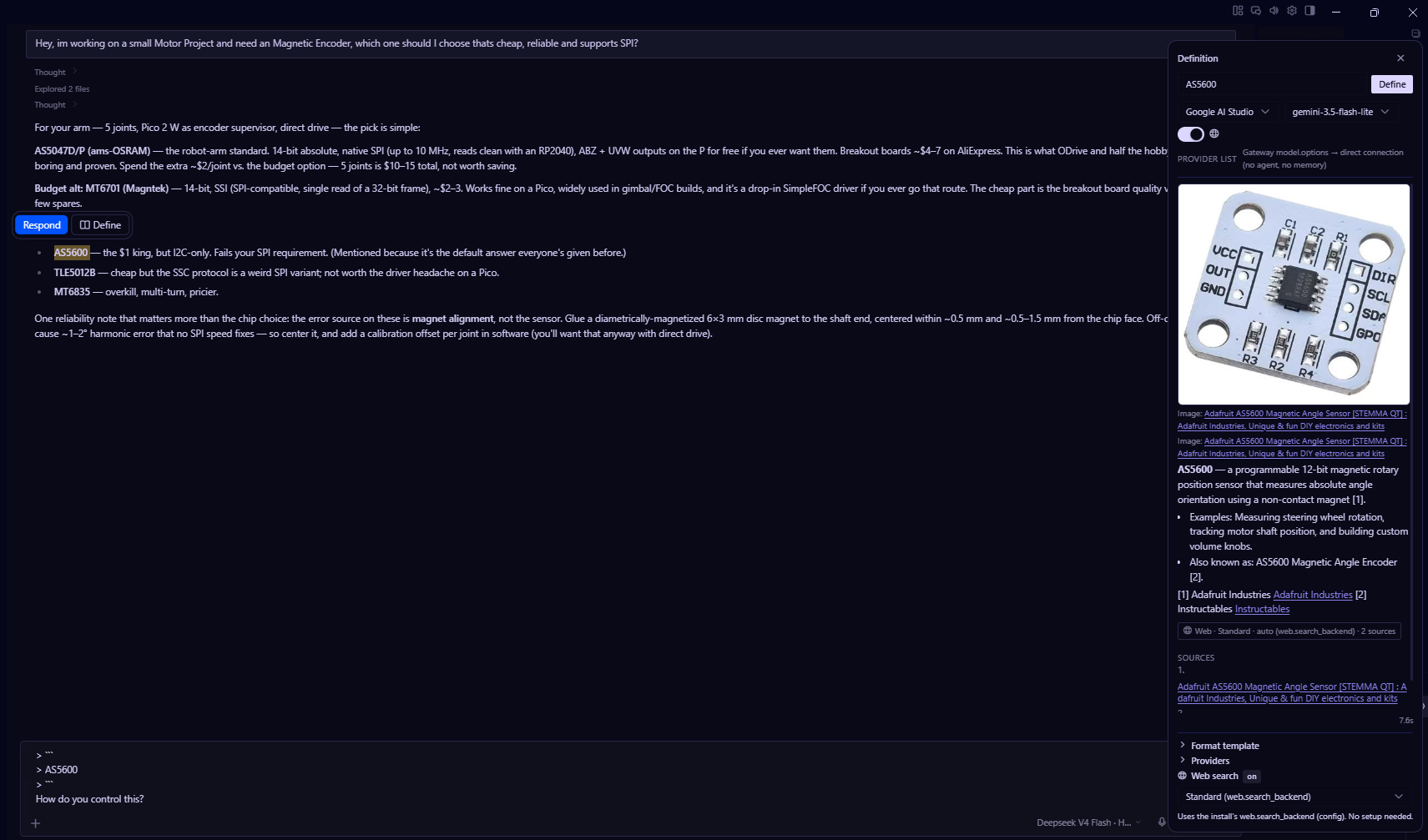
Insight is a two-part plugin for Hermes Desktop that turns any selected text into an immediate definition. Select a word anywhere in the app, hit Define in the popup, and a right-docked panel streams an answer from the provider of your choice - with web search results, inline-cited sources, and thumbnails. The same popup offers Respond, which inserts the selection into the composer as a quoted reply. It is fast by design: stateless completion, the format template as the only system instruction, reasoning off.
- Renderer plugin - a single
plugin.js. Selection popup (Respond + Define), definition panel, markdown rendering. - Backend plugin - a Python backend plugin that runs inside the
gateway where your providers live. It resolves the provider list from your
install config, does web search honoring
web.search_backend, and streams the completion.
Plugin ids: hermes-insight (backend, ships the desktop half at backend-plugin/desktop/plugin.js).
What you get
Select any text in Hermes Desktop and a small popup appears with two actions:
- Respond - inserts the selection into the composer as a quoted
(
>) reply, so you can answer it in line. - Define - opens the side panel and streams a definition of the selected term from the provider of your choice.
Installation
The plugin is in the Hermes plugin catalog as hermes-insight; one install ships both the backend and the desktop half:
hermes plugins install BrokeSkill/Hermes-Insight/backend-plugin
hermes plugins enable hermes-insight
(From the catalog: hermes plugins install hermes-insight + hermes plugins enable hermes-insight.)
Manual
-
Copy
backend-plugin/to~/.hermes/plugins/hermes-insight/(Linux) or%LOCALAPPDATA%\hermes\plugins\hermes-insight\(Windows):plugins\hermes-insight\ __init__.py ← copy from backend-plugin/__init__.py plugin.yaml ← copy from backend-plugin/plugin.yaml desktop\plugin.js ← copy from backend-plugin/desktop/plugin.js -
Enable it:
hermes plugins enable hermes-insightOR add
hermes-insightto theplugins.enabledlist inconfig.yamlnext to any existing entries. -
Restart the gateway (
hermes gateway restart) and reload desktop plugins.
Verify
hermes insight --list-providers # prints every provider from your config
The desktop half talks to the backend only through cli.exec (hermes insight ...), so no server, URL, or daemon is involved.
How it works
Flow:
- You select text in Hermes Desktop → a small popup appears with Respond and Define.
- Respond quotes the selection into the composer (
> ...) through the SDK's composer surface (host.composer.insertText). Define asks the gateway for the provider list once (model.options) and runs the completion throughcli.exec(hermes insight --term ...). - The backend (optional) runs a web search via
web.search_backend, attaches images, then posts a stateless chat completion to the chosen provider:- system message = the format template only (no memory, no skills, no agent)
reasoning_effort: nonefor OpenAI-compatible/local proxies.- no tools - definitions cite the search sources inline instead
- The result renders in the panel with sources, citations and images.
No server, no daemon: the desktop half talks to the backend only through the
SDK's cli.exec door, so nothing listens on any port and nothing outlives the
CLI invocation.
Configuration
Everything comes from your normal Hermes config.
model.base_url/model.default- session model + defaultproviders.*/custom_providers.*- the provider list shown in the dropdown (SELF CONFIGURABLE, OPTIONAL)web.search_backend+web.searxng_url/web.search_url- search + imagesweb.extract_backend- used by search/extract
The panel lets you pick a provider/model per lookup; "Session model (current chat)" uses whatever model you're chatting with.
ToDo / Planned
- Ask-Window inside the Definition-Panel
License
MIT - see LICENSE. Forks and modifications are welcome and permitted; the original author (BrokeSkill) must be attributed.
© 2026 BrokeSkill