timestamp-ref
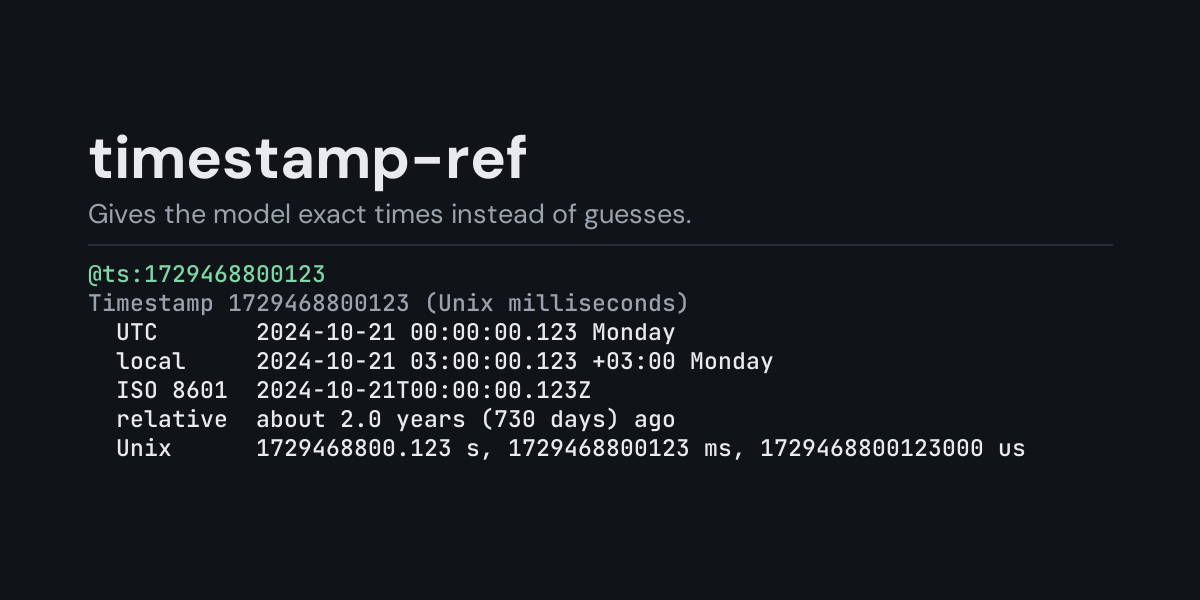
@ts: references for Hermes: put @ts:1729468800123 in a message and Hermes replaces it with
the moment that number stands for, worked out on your machine: UTC, your local time, ISO 8601,
the weekday, how long ago (or how far ahead) it is, and the same moment in Unix seconds,
milliseconds and microseconds. Written dates work too (@ts:2024-10-21T09:00:00+03:00,
@ts:"Mon, 21 Oct 2024 03:00:00 +0300"), and several values in one reference also get the
gaps between them.
Logs, databases, API responses and JWTs are full of Unix timestamps, and a model converting
1729468800123 to a date in its head gets the unit, the day or the time zone wrong often
enough to matter. With @ts: it gets the conversion already done, exactly, together with which
unit the number was read in.
Install
hermes plugins install timestamp-ref --enable
Requires Hermes 0.21.5 or newer. No API key, no configuration, no dependencies.
Use
@ts:1729468800                 Unix seconds (10 digits)
@ts:1729468800123              milliseconds (13 digits), microseconds (16), nanoseconds (19)
@ts:1729468800ms               a suffix (s, ms, us, ns) chooses the unit
@ts:2024-10-21T09:00:00+03:00  ISO 8601; without an offset the value is read as UTC
@ts:"Mon, 21 Oct 2024 03:00:00 +0300"   RFC 2822 (HTTP and mail headers), in quotes
@ts:now                        the current time
@ts:1729468800,1729555200.5    up to 10 values, plus the gaps between them
A bare number is read by its length: up to 11 digits are seconds (that reaches the year 5138),
12-14 milliseconds, 15-17 microseconds and longer ones nanoseconds. The block always says which
unit it used. Negative numbers are before 1970; fractions and _ digit separators are fine.
Values with spaces go in quotes (", ' or a backtick); Hermes reads a reference up to the end
of the line.
Example, from the end-to-end test (one-shot hermes chat turns run on 2026-10-21 on a machine
set to UTC+3). The message When did this job start? @ts:1729468800123 reaches the model as the
message followed by:
Timestamp 1729468800123 (Unix milliseconds)
  note: read as milliseconds from its 13 digits; add s, ms, us or ns to choose
  UTC       2024-10-21 00:00:00.123 Monday
  local     2024-10-21 03:00:00.123 +03:00 Monday
  ISO 8601  2024-10-21T00:00:00.123Z
  relative  about 2.0 years (729 days) ago
  Unix      1729468800.123 s, 1729468800123 ms, 1729468800123000 us
  calendar  day 295 of 2024, ISO week 2024-W43
A written date with an offset also shows the time as written. From the same run,
@ts:2024-10-21T00:00:00+03:00:
Timestamp 2024-10-21T00:00:00+03:00 (ISO 8601)
  as written  2024-10-21 00:00:00 +03:00 Monday
  UTC         2024-10-20 21:00:00 Sunday
  local       2024-10-21 00:00:00 +03:00 Monday
  ISO 8601    2024-10-20T21:00:00Z
  relative    about 2.0 years (730 days) ago
  Unix        1729458000 s, 1729458000000 ms, 1729458000000000 us
  calendar    day 294 of 2024, ISO week 2024-W42
and @ts:1729468800,1729555200.5 ends with:
Differences:
  1 -> 2: +1 day (+86,400.5 s)
- local is the time zone of the computer Hermes runs on. Where the system cannot convert a date (Windows refuses dates before 1970) the row says so instead.
- relative is counted from the moment the message is sent, in at most two units ("3 days 4 hours ago"), or in years past 365 days.
- Times are exact to the microsecond; a nanosecond value says when it drops the rest.
Suggestions
In the TUI and the desktop app, typing @ts: suggests now and the current Unix time, and
@ts: followed by a value previews it (@ts:1729468800123 shows 1729468800123 = 2024-10-21 00:00:00.123 UTC). The classic CLI does not show reference suggestions.
Security and footprint
register()only registers one context reference provider (@ts:).- It reads nothing but the text of the reference itself and the system clock, and only when you
write
@ts:in a message. - No network access, no subprocesses, no downloads, no credentials read, no files read or written.
- Standard library only (
datetime,email.utils).
Development
python -m pytest tests                                              # unit tests, no Hermes needed
PYTHONPATH=<hermes checkout> python tests/e2e/timestamp_ref_e2e.py   # real hermes chat turns and TUI suggestions
hermes plugins validate timestamp-ref
Changes
- 1.0.0: first release.
MIT licensed.