跳到主要内容

hermes-taskbar-badge


❖ Communityv0.1.0

Windows taskbar badge on the Hermes window when a turn finishes. Calls navigator.setAppBadge on the message.complete event while the window is in the background, and clears it when the window regains focus or another session is opened.

Open in Hermes Desktop
hermes plugins install hermes-taskbar-badge

README

From the reviewed commit fabe90e ↗; it updates when the author re-pins.

hermes-taskbar-badge

license platform

A Hermes Desktop plugin that puts a badge on the Hermes taskbar button when a turn finishes.
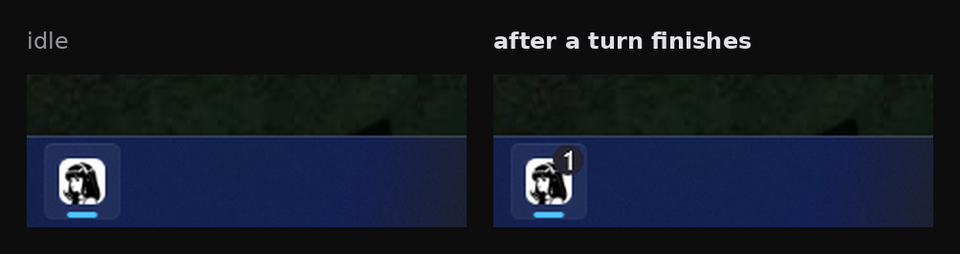
the Hermes taskbar button idle, then badged after a turn finishes

Install

Hermes Desktop loads desktop plugins from its own desktop-plugins folder. Open Capabilities -> Plugins and use Install from Git with BrokeSkill/hermes-taskbar-badge.

To place the file yourself:

git clone https://github.com/BrokeSkill/hermes-taskbar-badge.git /tmp/hermes-taskbar-badge
mkdir -p ~/.hermes/desktop-plugins/hermes-taskbar-badge
cp /tmp/hermes-taskbar-badge/desktop/plugin.js ~/.hermes/desktop-plugins/hermes-taskbar-badge/plugin.js

On Windows the folder is %LOCALAPPDATA%\hermes\desktop-plugins\. The app hot-reloads desktop plugins on save, so there is no restart.

Usage

A finished turn raises the badge while the window is in the background. Returning to the window, or opening another session, clears it.

Requirements

  • Windows. The badge renders on the taskbar there.
  • Hermes Desktop with the message.complete event and host.state.focusedStoredSessionId in the plugin SDK.

Contributing

Issues and pull requests are welcome.

License

MIT. See LICENSE.

hermes-insight❖ Community★ 1

Selection-definition lookup for Hermes Desktop. Select any text, get an AI definition with sources in a popup. Renders the definition inline, runnable code aside. Backend is a stateless hermes insight CLI; panel, providers, and one-click model picking are configurable. Disclosure — definitions are generated with your configured provider keys (the selected term, your format template and optional web-search results are sent to that provider) via a short-lived `hermes insight` CLI run; no background process remains. When web search is on it also queries your configured searxng instance and fetches result thumbnails from their image hosts, inlining them into the panel; nothing is fetched without a searxng URL.

Desktop
hermes-desktop-camera❖ Community★ 0

A camera button for the Hermes Desktop composer. Open the preview, take a photo, and the frame lands in the composer as an image attachment, ready to send.

Desktop
hermes-vision-inline❖ Community★ 0

Attach an image inline to the session model when it can see one, instead of letting an explicit auxiliary.vision backend describe it. Core already attaches images natively by default; what this plugin changes is an explicit auxiliary.vision setting, which it overrides so the model reads the pixels directly. The image stays in context, so follow-ups do not reprocess it. The model's modality comes from the local models.dev cache; no network calls and nothing to configure. Disclosure — replaces the vision_analyze handler through tool_execution middleware: when the local models.dev cache says the main model takes images and its provider carries images in tool results, it attaches the image itself even if you configured an auxiliary.vision backend (agent.image_input_mode: text still turns this off); the image stays in the conversation and is resent on later turns; relies on Hermes private vision helpers, so after a Hermes update it may silently fall back to the normal path.

Tools
turn-bell❖ Community★ 0

A bell in the Hermes desktop composer that pings the ntfy topic Hermes already uses when a turn finishes. Click to cycle off, current turn, or all turns. Disclosure — when enabled, posts the first line of each finished reply plus model, duration, token and cost figures to the ntfy server/topic Hermes is configured with (default ntfy.sh); reads NTFY_* from the profile .env and falls back to the ntfy CLI's ~/.config/ntfy/client.yml login (read-only).

Desktop

← Back to the catalog · catalog built Oct 11, 2026