ntfy-approval
Answer Hermes' approval prompts from your phone.
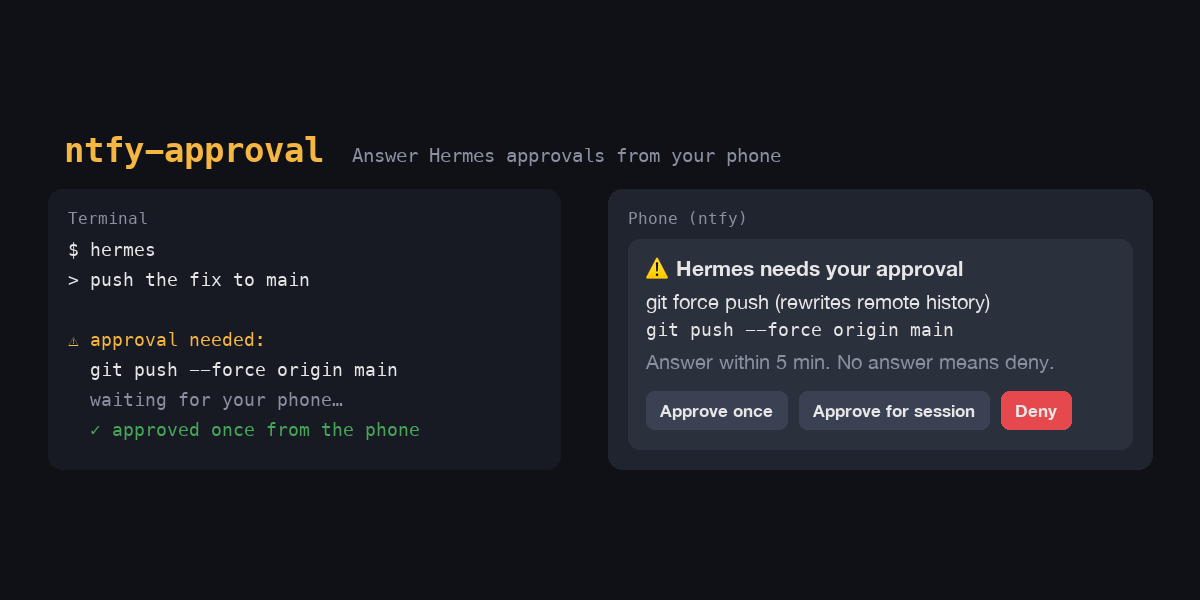
When Hermes wants to run a command it flags as dangerous, it normally stops and waits for you at the terminal or in the chat. With this plugin the question goes to your phone as an ntfy push notification instead:
⚠️ Hermes needs your approval
git force push (rewrites remote history)

git push --force origin main

Answer within 5 min. No answer means deny.
[ Approve once ] [ Approve for session ] [ Deny ]
Tap a button and Hermes continues (or stops) right away. Nothing listens on your machine: the button makes your phone post a one-time answer back to ntfy, and Hermes reads it from there.
It uses Hermes' approval transport interface, so Hermes still decides what needs approval, redacts secrets before anything leaves the machine, checks every answer against the request, and treats silence as a no.
Setup
-
Install the plugin:
hermes plugins install AhmetArif0/hermes-ntfy-approval#ntfy-approval --enable -
Get a private topic name and the next steps:
hermes ntfy-approval setup -
Install the ntfy app (Android, iOS) and subscribe to the printed topic.
-
Save the topic for Hermes (it goes to your profile's
.env):hermes config set NTFY_APPROVAL_TOPIC hermes-… -
Check that a tap reaches Hermes. This sends a sample request; nothing runs:
hermes ntfy-approval test -
Send Hermes' approval prompts to your phone:
hermes config set security.approval.transport ntfy
To go back to terminal and chat prompts: hermes config set security.approval.transport builtin.
What you get
- Approve once: this command runs, nothing is remembered.
- Approve for session: Hermes stops asking about this kind of command in this session. Only shown when Hermes offers it for the request.
- Deny: Hermes blocks the command and tells the agent not to try another way.
- No answer before
approvals.timeout(default 300 s): denied. The notification is then removed from your devices, and a late tap does nothing. - You stop the turn (
/stop, Ctrl-C) while it waits: denied, and the notification is removed right away.
"Always allow" is never offered from the phone: an ntfy notification has room for three buttons, and permanently allowlisting a command from a lock screen is a step better taken at the keyboard.
Where it applies: interactive sessions, which are the CLI, TUI, Desktop, and messaging-gateway
chats. Once selected, the phone replaces the terminal prompt and the chat buttons. Cron jobs,
hermes chat -q and webhook/API sessions never ask a human, so the phone is not used there;
they follow approvals.cron_mode, approvals.single_query_mode and approvals.unattended_mode.
If ntfy can't be reached, the request is denied. To fall back to the normal prompt instead, set
security.approval.transport_fallback: builtin.
Settings
| Setting | Where | Default | |
|---|---|---|---|
| Topic | NTFY_APPROVAL_TOPIC in .env |
none | Required. Treat it like a password (see below). |
| Access token | NTFY_APPROVAL_TOKEN in .env |
none | For servers with access control. |
server |
plugins.entries.ntfy-approval.settings |
https://ntfy.sh |
The server your phone subscribes on. |
priority |
same | high |
min, low, default, high or urgent. |
send_command |
same | true |
false sends only Hermes' reason for asking, not the command. |
The Desktop app shows these on the plugin's settings page. Without a token the topic must be at
least 16 characters; setup makes a 39-character random one.
Self-hosting with access control
On your own ntfy server you can keep requests private and still let the phone's button post its
answer. The button sends no credentials, so the reply topic (your topic plus -reply) must
accept anonymous writes. Nobody can read it, and it only accepts one-time answer codes:
ntfy user add hermes
ntfy access hermes hermes-approvals rw
ntfy access hermes hermes-approvals-reply rw
ntfy access everyone hermes-approvals-reply write-only
ntfy token add hermes          # → NTFY_APPROVAL_TOKEN
Log in on the phone app with a user that can read hermes-approvals, then:
hermes config set plugins.entries.ntfy-approval.settings.server https://ntfy.example.com
hermes config set NTFY_APPROVAL_TOKEN tk_…
hermes config set NTFY_APPROVAL_TOPIC hermes-approvals
Security and footprint
register()only registers: thentfyapproval transport, thehermes ntfy-approvalcommand, and one observer hook,post_approval_response, which only withdraws a notification Hermes has stopped waiting for. The transport stays inactive until you select it (security.approval.transport: ntfy).- Network: only to the configured ntfy server, and only while an approval is pending. The plugin publishes one notification, reads the reply topic until an answer, the timeout, or Hermes stops waiting, and then deletes the notification. Redirects are not followed, and the access token is never put inside a notification.
- What leaves your machine: the notification title, Hermes' reason for asking, the command as
Hermes redacted it (skip it with
send_command: false), and three one-time answer codes. Onntfy.shthis passes through a public service. Use your own server if that matters to you. - Who can answer: anyone who can read the topic, because the answer codes are in the
notification. On
ntfy.shthe topic name is the secret, so keep it private. With access control, only users with read access can answer. Each code works once, only for its own request and button; anything else on the reply topic is ignored. Hermes separately rejects an answer that does not match the request or is not a choice it offered. - No subprocesses, downloads, file writes, config changes or background threads. It reads
the topic and token from your profile's
.env, through Hermes' profile secret scope. - Profiles: each profile has its own settings and topic. On a gateway that serves several profiles from one process, Hermes currently calls approval transports without the profile's context (hermes-agent #114580). The plugin detects this and denies the request rather than use another profile's topic.
Design notes and verified facts: DESIGN.md.
Changelog
1.0.1
Stopping a turn (/stop, Ctrl-C) while an approval was on your phone left its buttons there
until approvals.timeout ran out (5 minutes by default), and for good if Hermes exited in the
meantime. Hermes had already denied the request, so a tap did nothing. The notification is now
removed as soon as Hermes stops waiting.
1.0.0
First release: approvals from ntfy with Approve once, Approve for session and Deny buttons;
hermes ntfy-approval setup and test.
License
MIT