 olric3015
error-ledger
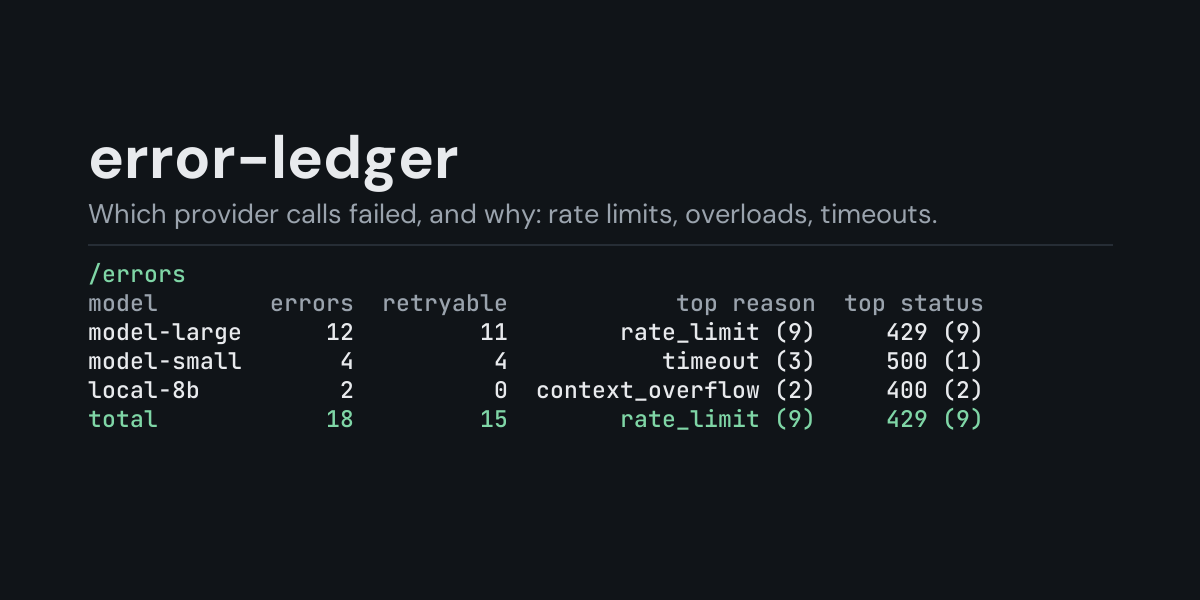
A local ledger of the provider calls that failed, and an /errors command that shows which
model or provider they came from and why.
When a provider call fails, Hermes classifies the failure (rate limit, overload, timeout,
context overflow, auth, ...) and then retries, compresses or falls back. Most of the time the
turn still finishes, and the failure is a line that scrolled past. error-ledger subscribes to
api_request_error and keeps one row per failed attempt, so you can see afterwards that one
model was rate-limited forty times today, or that a provider has been answering 529 all morning.
Install
hermes plugins install error-ledger --enable
Requires Hermes 0.21.5 or newer. No API key, no configuration, no dependencies.
Use
/errors             last 24 hours, by model
/errors session     the most recent session that had a failed call
/errors all         everything in the ledger
/errors 7d          the last 7 days (any number of hours or days: 6h, 30d)
/errors providers   add to any of the above to group by provider
/errors reasons     add to any of the above to group by cause
/errors days        add to any of the above to group by day, newest first
/errors recent      add to any of the above to list the newest 10 failures instead
/errors recent 25   the newest 25 instead (1 to 100)
/errors clear       delete the ledger
Example (/errors all, from the end-to-end test on Hermes 0.21.5: one turn that hit a 429 and
one that hit a 500 before recovering):
Provider errors, all recorded:

model       errors  retryable      top reason  top status
fake-model       2          2  rate_limit (1)     429 (1)

One row per failed attempt Hermes reported; the retry after it may have succeeded.
- errors counts failed attempts, not failed turns: a call Hermes retried three times before
it gave up is three rows. - retryable is how many of them Hermes classified as worth retrying.
- top reason is Hermes's own classification (
rate_limit,overloaded,server_error,
timeout,context_overflow,auth,billing, ...), with how often it occurred. Grouped
byreasons, this column shows the model it happened on most instead. - top status is the most common HTTP status, when the failure had one.
The tables say how often; /errors recent says when. It lists the newest ten failures of the
chosen window, newest first, so you can tell whether a provider is still failing or stopped an
hour ago:
Provider errors, last 24 hours, newest 3 of 41:

when       model  provider      reason  status  retryable
40s ago  m-large    custom  rate_limit     429        yes
2m ago   m-large    custom  rate_limit     429        yes
3h ago   m-small     other  overloaded     529        yes
/errors days puts one day on each line, newest day first, so a bad day stands out. Days are
your computer's local calendar days, and a day with no failures has no line. Example (the
plugin's own output for a sample week):
Provider errors, last 7 days:

day         errors  retryable       top reason  top status
2026-10-08       5          4   rate_limit (4)     429 (4)
2026-10-07      31         31  overloaded (28)    529 (28)
2026-10-06       3          3   rate_limit (2)     429 (2)
total           39         38  overloaded (28)    529 (28)

One row per failed attempt Hermes reported; the retry after it may have succeeded.
A time window counts back from now (/errors 6h, /errors 7d reasons, /errors 30d days,
/errors 30d recent). /errors recent 50 lists more of them, up to 100.
The ledger keeps its newest 5,000 rows, so a long window on a busy install reaches back only as
far as those rows do.
What it does not see
- Only failures that reach Hermes's turn loop are reported through
api_request_error. Newer
Hermes reconnects some dropped or failed streams inside its streaming layer without reporting
them: in the end-to-end test, the recovered 500 is a row on Hermes 0.21.5 and is not on current
main. - Auxiliary calls (titling, compression, vision) use a different hook and are not counted here.
What is recorded
One JSON line per failed attempt in <HERMES_HOME>/plugin-data/error-ledger/errors.jsonl (per
profile):
ts, session_id, platform, provider, model, api_mode, status, reason,
error_type, retryable, retry_count, duration_s.
Not recorded: the error message (only the exception class name), the request, prompts,
responses, base URLs, API keys. The hook hands the plugin the sanitized request and the error
text; the plugin drops both.
The file is bounded: once it passes 2 MB it is rewritten to its newest 5,000 rows.
Security and footprint
register()only registers one hook (api_request_error) and one command (/errors).- No network access, no subprocesses, no downloads, no credentials read.
- Writes only
errors.jsonlunder its own plugin data directory./errors cleardeletes it. - Reads no Hermes state other than the hook payload it is handed.
- The hook is observer-only and never raises: if the ledger cannot be written, the failure is
logged at debug level and Hermes's own error handling is not affected. - Standard library only.
Development
python -m pytest tests                                          # unit tests, no Hermes needed
PYTHONPATH=<hermes checkout> python tests/e2e/error_ledger_e2e.py   # real `hermes chat` turns
hermes plugins validate error-ledger
Changes
- 1.3.0:
/errors recenttakes a row count,/errors recent 25(1 to 100; ten without
one). What is recorded did not change. - 1.2.0:
/errors days, one line per day with failures, newest day first; works with
every window (/errors 30d days). The ledger also reads correctly after a Windows tool has
saved it with a byte-order mark. What is recorded did not change. - 1.1.0: time windows (
/errors 6h,/errors 7d, any number of hours or days) and
/errors recent, the newest ten failures with how long ago each happened. What is recorded
did not change. - 1.0.0: first release.
MIT licensed.
README from the reviewed commit dd64607; it updates when the author re-pins.