 atostivint
Hermes Adaptive Effort


A Hermes plugin that asks a separate scorer to judge a task, then adjusts the reasoning effort of the outgoing model request.
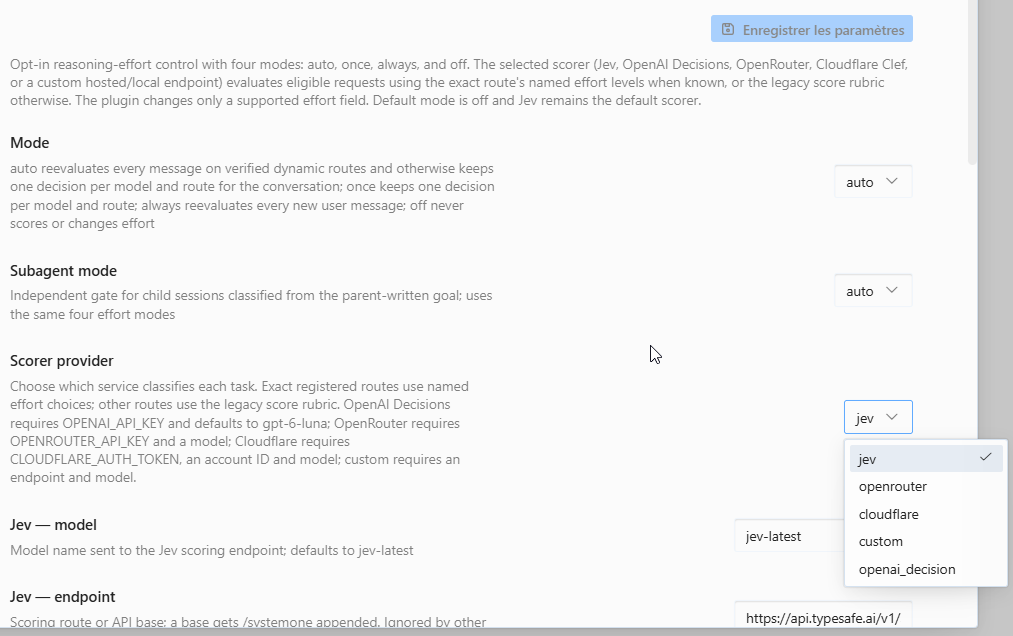
Your conversation model still answers the task. You choose the scorer: Jev (the default), OpenAI Decisions, an OpenRouter decision model (Decisions API), Cloudflare Clef / Clef Flash / Clef Omni, Nace Drex (drex-v2.0, key NACE_API_KEY), a local Ollama model (no key), or a custom System One endpoint.
Preview: v0.3.0 is a pre-release. Live effort acceptance is only partially validated; see the release notes.
The plugin starts off. When you enable routing, it changes a supported effort field and can add a missing field on exact registered routes. If classification fails, the original request continues unchanged. A transient scorer HTTP error (408, 429, 500, 502, 503, 504, 529) is retried once, only inside the timeout_s deadline; timeouts, other errors and received answers are never retried. After three consecutive scorer failures (timeout, transport, HTTP or malformed answer) the selected scorer is paused for 60 seconds and requests skip it with scorer_paused; see scorer_pause_failures and scorer_pause_s in Configuration. The saved latency is unmeasured. The scorer deadline defaults to the selected provider's value (timeout_s: 0; Jev 2 s, custom 10 s, others 3 s), also unmeasured on this plugin's traffic; see Configuration. /hae status shows the p95 of the scorer's observed latency (a bucket bound, counts only, this process) once calls have been made: use it to tune timeout_s. It also shows how often the scorer chose each effort label on the current route (for example Effort labels (kimi-k3): low 12 · medium 30 · high 4), and notes when one label is at least 90% of at least 30 answers, which can mean the scorer collapsed to a fixed effort. Counts are per process and informational only.
Quick start
1. Install and enable the plugin
hermes plugins install 'atostivint/hermes-adaptive-effort' --enable
The repository root is the plugin payload; install without a subdirectory suffix. Hermes manages installation and updates. The payload is not a Python package.
An older CLI may require installation without --enable, followed by:
hermes plugins enable hermes-adaptive-effort
2. Choose a scorer and provide its key
Any one scorer is enough; Jev is only the default. Pick one:
| Scorer | scorer_provider | Key variable | Also required |
|---|---|---|---|
| Jev (TypeSafe) | jev (default) | TYPESAFE_API_KEY | Nothing |
| OpenAI Decisions | openai_decision | OPENAI_API_KEY | Nothing (gpt-6-luna by default) |
| OpenRouter Decisions | openrouter | OPENROUTER_API_KEY | A decision model in scorer_model |
| Cloudflare Clef | cloudflare | CLOUDFLARE_AUTH_TOKEN | Your 32-hex cloudflare_account_id |
| Nace Drex | nace | NACE_API_KEY | Nothing (drex-v2.0 by default) |
| Ollama (local) | ollama | No key | ollama_model |
| Custom / local System One server | custom | none, or CUSTOM_SCORER_API_KEY | custom_endpoint and scorer_model |
Put the key in the .env file of the Hermes profile that serves your requests (~/.hermes/.env on Linux/macOS, %LOCALAPPDATA%\hermes\.env on Windows for the default profile), for example:
OPENAI_API_KEY=YOUR_KEY
Then select the scorer in Desktop (Capabilities → Plugins → Hermes Adaptive Effort) or in the plugins.entries.hermes-adaptive-effort.settings block of config.yaml. Keep keys out of config.yaml.
Get TYPESAFE_API_KEY from your TypeSafe account. No setting is needed; to be explicit:
settings:
  scorer_provider: jev
Use an OPENAI_API_KEY from your OpenAI API account. The plugin calls the fixed Decisions endpoint with gpt-6-luna unless scorer_model names another model.
settings:
  scorer_provider: openai_decision
Create an OpenRouter key as OPENROUTER_API_KEY and name a decision model (a chat model slug does not work):
settings:
  scorer_provider: openrouter
  scorer_model: "typesafe/jev-1.13"   # or another OpenRouter decision model, e.g. cloudflare/clef-omni
In Cloudflare dashboard → Workers AI → Use REST API, create a Workers AI token (CLOUDFLARE_AUTH_TOKEN) and copy your Account ID:
settings:
  scorer_provider: cloudflare
  cloudflare_account_id: "YOUR_32_HEX_ACCOUNT_ID"
  cloudflare_model: clef   # clef, clef-flash or clef-omni
Create a key in the Nace console as NACE_API_KEY (the legacy DREX_API_KEY is still read):
settings:
  scorer_provider: nace
  nace_model: drex-v2.0
No key and no account. Point the plugin at your own Ollama server and name a model you already pulled:
settings:
  scorer_provider: ollama
  ollama_endpoint: "http://localhost:11434"   # default
  ollama_model: "llama3.2:3b"
The plugin posts to <ollama_endpoint>/v1/chat/completions, asks for one token with logprobs, and reads the allowed letter or digit from top_logprobs; an answer outside that set fails open. Use a non-thinking model: only one token is requested, so a thinking model can spend it on reasoning and the answer is rejected. Only a local endpoint keeps task text on your machine. See the configuration guide.
Point the plugin at a server you run that speaks the System One format. No cloud account is needed:
settings:
  scorer_provider: custom
  custom_endpoint: "http://127.0.0.1:8099/v1/systemone"
  scorer_model: "YOUR_SERVED_MODEL_NAME"
  custom_auth: none   # or bearer, with CUSTOM_SCORER_API_KEY in .env
A key exported only in a terminal (export OPENAI_API_KEY=..., or $env:OPENAI_API_KEY = "..." in PowerShell) reaches only a Hermes started from that terminal, not a running gateway or Desktop agent. Since Hermes v0.23, hermes chat also runs its turns in a gateway that it starts on first use and that keeps running between chats, so a key or NACE_BASE_URL exported after that gateway started never reaches the plugin. On the default profile, put scorer keys and endpoint overrides in $HERMES_HOME/.env and stop the gateway if it is already running (hermes gateway stop; the next hermes chat starts a fresh one). Named profiles share the default profile's gateway, so an endpoint override such as NACE_BASE_URL belongs in the default profile's environment. The configuration guide covers each scorer in detail: endpoints, defaults, data handling and failure behavior.
3. Restart the serving Hermes process
Restart your local agent. If hermes chat started the gateway, stop it and the next chat starts a fresh one; if you installed the gateway as a service, restart that service:
hermes gateway stop      # gateway started by hermes chat
hermes gateway restart   # installed gateway service
Desktop connections can use separate agent processes. Reconnect the connection that will serve your requests.
4. Check readiness and choose a mode
In Hermes chat:
/hae status
/hae auto
Status checks readiness without classifying anything. Enabling a routing mode authorizes sharing bounded task text with the selected scorer. The chat command applies to future requests in the current process; save the mode in Desktop plugin settings if it should survive a restart.
Choose when to evaluate effort
| Mode | Behavior |
|---|---|
off (default) | No scoring or request changes |
auto | Evaluate each new user turn on exact verified dynamic routes; otherwise retain one decision per model and route |
once | Retain one decision per model and route for the conversation |
always | Evaluate every new user turn on eligible routes |
/hae status and the Desktop details panel say whether the current route changes effort every turn and why, for example Effort changes: every turn — dynamic (listed), Effort changes: every turn — on trial (1/3) or Effort changes: once, then kept — not dynamic (observed cache loss). The existing Cache: line is unchanged.
Trial of unlisted routes. In auto, a cache-safe route that is not in the exact registry used to keep one decision forever. With dynamic_trial (default true) such a route, if it already carries an effort field, changes effort every turn on trial while the plugin reads the provider's cache counters from Hermes' post_api_request hook. Three effort changes that keep the cache make the route dynamic (observed); a clear cache drop right after a change, a rejected level (HTTP 400/422), or five responses with no cache counters pin it again. Verdicts are remembered in the profile's plugin-data SQLite file, never in config, and keep only token counts and effort values. Claude routes and cache-hostile API modes are never trialled. The thresholds are heuristics; the worst case is one cache miss, and the cost and cache effect are unmeasured. Set dynamic_trial: false to keep one decision per unlisted route.
Every active mode reuses its decision during a tool loop. A route includes the provider, exact model and API mode. Bounded decision memory can be evicted or cleared on reset/reload.
/hae <mode> here sets a mode for the current conversation only, and /hae default here clears it. A conversation override takes precedence over the default mode for that parent conversation; subagents keep subagent_mode.
Use /hae help for all commands. The usage guide explains mode selection, status, probing and troubleshooting.
How a request passes through the plugin
flowchart TD
    A["Outgoing model request"] --> B{"Routing enabled<br/>and eligible?"}
    B -->|"No"| U["Keep original request"]
    B -->|"Yes"| D["Reuse a decision<br/>or ask the selected scorer"]
    D -->|"No valid decision"| U
    D -->|"Named choice or legacy score"| C["Check the route's<br/>accepted effort values"]
    C -->|"No legal value"| U
    C -->|"Supported value"| R["Keep or update the effort field"]
    R --> M["Send to your<br/>conversation model"]
    U --> M
For exact registered routes, the selected scorer chooses directly from that route's allowed levels. For example, Kimi K3 offers low/high/max, OpenAI's GPT-6.1 Sol route offers low/medium/high/xhigh/max, and native Claude Opus 5.5 offers those same five levels. Claude Opus 4.6 offers low/medium/high/max, without xhigh. The exact OpenRouter Chat Completions routes for the listed Claude 5.x models use only the existing top-level verbosity field (the same five levels), and google/gemini-4-argon uses the existing extra_body.reasoning.effort field (low/medium/high). Those OpenRouter routes never receive a new effort field and are not promoted to dynamic routes. The exact native Gemini routes (HTTPS generativelanguage.googleapis.com, chat_completions; not the /v1beta/openai surface) cover gemini-4-argon, gemini-3.8-flash, gemini-3.6-flash, gemini-3.5-flash-lite, gemini-3.1-flash-lite and gemini-3-flash-preview at low/medium/high, plus gemini-3.1-pro-preview at low/high. They rewrite only an existing extra_body.thinking_config.thinkingLevel (or thinking_level), keeping its key style; they never inject, stand down on hidden thoughts or any thinkingBudget, and auto retains a route decision. The same registered models on the OpenAI-compatible Gemini base (HTTPS generativelanguage.googleapis.com, path ending /openai, e.g. /v1beta/openai) rewrite only an existing snake_case extra_body.extra_body.google.thinking_config.thinking_level in the plugin's request dict, preserving include_thoughts and every sibling; a camelCase-only level, a missing carrier, include_thoughts: false, any thinking_budget or a competing top-level effort field stands down, and no field is ever injected there (the server answers HTTP 400 to thinking_config plus reasoning_effort). The exact claude-subscription-directsdk-experimental / chat_completions routes for claude-opus-5-5, claude-sonnet-5-5, claude-haiku-5-5, claude-opus-4-8 and claude-sonnet-5 (each also with its exact [1m] suffix) offer low/medium/high/xhigh/max and rewrite only an existing extra_body.reasoning.effort, which the DirectSDK adapter maps to output_config.effort / --effort. They never receive an injected field (effort_models included), auto retains a route decision and the routes are never dynamic or trialled; Fable 5.1, Opus 5, Haiku 4.5 and Daybreak are not registered. The fifteen exact openai-codex / codex_responses IDs in the plugin's Codex registry (gpt-6.1-sol, gpt-6.1-sol-900k, gpt-6-astra, gpt-6-astra-900k, gpt-6.1-terra, gpt-6-sol, gpt-6-sol-900k, gpt-6-luna, gpt-6-luna-900k, gpt-5.6-sol, gpt-5.6-sol-900k, gpt-5.6-terra, gpt-5.6-terra-900k, gpt-5.6-luna, gpt-5.6-luna-900k) take their levels from Hermes' own codex_supported_efforts table — low/medium/high/xhigh/max, or low/medium/high/xhigh for gpt-6.1-terra — and only gpt-6.1-sol is dynamic. The exact commandcode / chat_completions route for deepseek/deepseek-v4.1-flash offers low/high/max (a normalized medium maps to high) and rewrites only an existing top-level reasoning_effort. One-level routes are fixed without a scorer call. Routes without an exact choice vocabulary keep the legacy finite 0..2 score mapped to low, medium or high; /hae probe also keeps that score contract. A route change re-clamps the stored named level using the compatibility rules and never promotes xhigh to the new route's max automatically.
allow_none (default false) is a separate opt-in for the level below all of these. When it is on, auto and always may offer the scorer none — reasoning disabled for the request — but only when every condition holds: the route is an exact registered model/API pair whose own vocabulary already lists none, it has positive cache-safety evidence, it is not Anthropic, it is not a trial route, and the request already carries a writable effort field. The field is never injected for none, an existing none or enabled: false is still never touched, once, off and /hae probe never use it, and effort_floor still lifts it. Today no registered dynamic route declares none, so enabling the setting changes nothing yet.
When an already classified turn falls back to a request with no writable effort field, its request continues unchanged and status names that fallback route as unsupported. The turn's earlier decision remains available if a later request reaches an eligible route. The exact OpenCode Go mimo-v2.6-flash Chat Completions route is registered to inject top-level reasoning_effort (low, medium, or high) on a fallback without a field. Direct Go requests have accepted these values, but Xiaomi currently treats all non-none levels as enabled reasoning; no cost or reasoning-depth difference is established. See the compatibility matrix.
The scorer receives the latest user text, or the parent-written goal for a registered subagent. Scoring and answering are separate calls with separate costs. The allowed levels are included in the scorer question; model identity and observed effort are shared only when use_target_model_context is enabled, and earlier conversation text only when dialogue_context_messages is above 0.
See Design for the component diagram and Contracts for the tool-loop sequence and failure rules.
Desktop and terminal
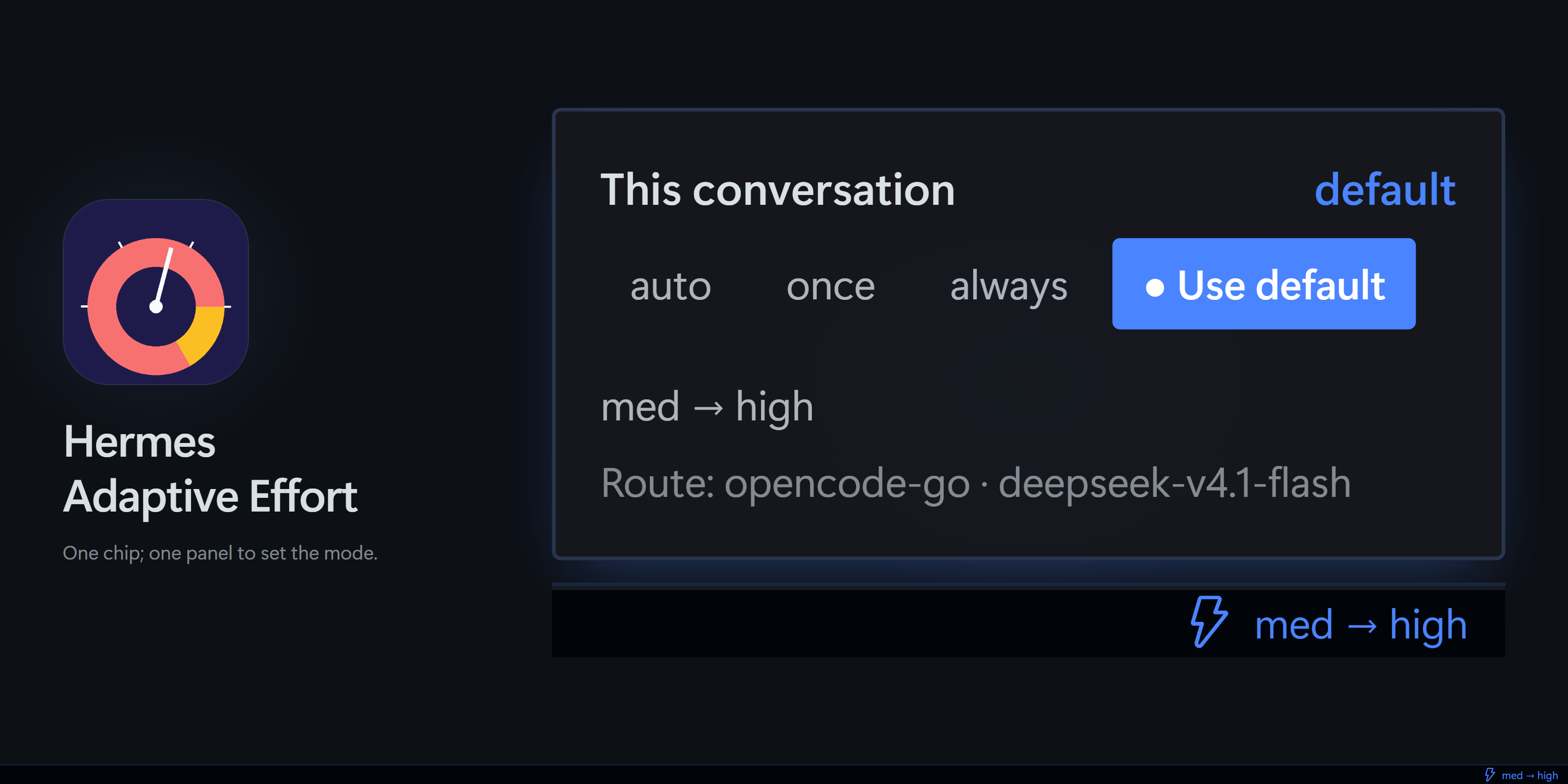
The optional Desktop extension adds an Effort chip. It shortens effort names for display (minimal → min, medium → med; default means the request had no effort field, and N/A means no decision yet) and shows previous → chosen, for example low → high. The chip_display setting (Display → chip display) switches the chip to the chosen effort only, for example med; a value saved by the old in-popup toggle is migrated once at startup. The popup is four rows: this chat's mode as one full-width control, one tertiary line with the effort change and the route, an All chats row that reveals the all-conversations mode buttons, and More, which holds Use default, scorer evaluation and this chat's recent applied changes; Activity shows aggregate status. In a Hermes chat, /hae opens the same conversation's recent history, and /hae status summarizes its model, selected effort and cache behavior.

The popup keeps the four routing modes together. More adds this chat's effort, whether the native selector is synced, and the route:
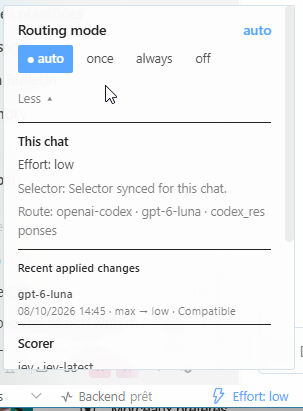
Further down, the popup lists the latest applied change and the selected scorer, with its key and guidance state but never the key itself:
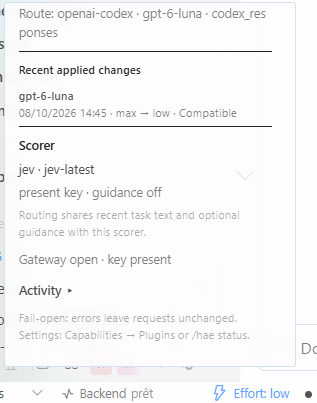
The plugin's settings page lists every scorer provider and its options. The screenshots are from a French-language Desktop.
See the interface guide for notifications, focused-chat status and the native effort selector.
The chip matches decisions to the chat's stored conversation ID; Desktop's temporary runtime ID is used only for session actions. Both live events and status polling follow this distinction.
What to expect
How much effort routing saves depends on how many of your tasks are easy compared with the effort your model uses by default. A workload made of hard tasks saves little, because most requests keep a high level.
Published adaptive-effort systems report output-length reductions from about 13% to 76% depending on the benchmark. Learning When to Think measured 76% on GSM8K, 41% on MATH-500 and about 13% on AIME, where the router sends nearly everything to the long mode; these reductions are against the untrained base model. Ares reports from about 35% to 53% fewer reasoning tokens on agent benchmarks, against fixed high effort. These are other systems on other benchmarks, not comparisons with or without this plugin. This plugin has not been measured, and no saving is promised.
Too much effort can also cost quality, not only money: Ares found medium effort ahead of high on one benchmark (42.0% against 38.0% on TAU-Bench Airline). Treat that as a reason to compare, not as a guarantee.
More systematic evidence points the same way. What Effort Level Should I Choose? (Sun et al., 2026) measured eight models on four benchmarks, including agentic tasks, and found that higher effort can lose tasks a lower level solved; on tasks every level solves, the top level cost up to 42x the lowest; and higher effort changes an agent's strategy (more self-verification and retrieval) rather than only adding deliberation. Their deployable policy - start at the lowest level and retry at the highest only after an externally verified failure ("naive laddering") - matched or beat fixed top effort at lower median cost on most benchmarks. The lesson is to start low and raise on evidence, not to assume a higher level is safer. This plugin cannot perform that fresh retry: tool_error_escalation raises effort inside the same turn after a repeated tool error, so it is a weaker, bounded proxy. The paper does not measure this plugin.
If you want a cost-conscious posture today, keep tool_error_escalation on and use classification_instructions to prefer the lowest level that can plausibly solve the task. Leave effort_ceiling empty so escalation can still reach the top: a ceiling is a hard cap, not a ladder, and it also caps tool-error escalation.
Data sharing and limits
- Enabling routing sends at most
prompt_charstask characters (default 4,000), plus optional classifier guidance and the allowed level names for named-choice routes, to the selected scorer. Target model context is a separate opt-in setting. dialogue_context_messages(default4, maximum 6;0turns it off): when above 0, enabling routing also shares up to that many earlier user and assistant text messages (each at most 1,200 characters, oldest first, labelled as untrusted context) with the selected scorer so a follow-up such as "yes, go ahead" is judged with the task it refers to. System and developer messages, tool calls, tool results and non-text parts are never included, and subagent classification and/hae probenever carry it. With0the scorer request is unchanged.continuation_downgrade_votes(default2, maximum 5;0= off) works only together with dialogue context: it adds a second, separate yes/no request (same text and dialogue block, in parallel with the effort request) so that inalways, andautoon exact dynamic routes, a lower effort choice on a continuation applies only after that many consecutive lower votes. It costs one more scorer request per turn; with either setting at0no second request is made.effort_floor/effort_ceiling(default empty = no bound;offornonealso switch a bound off) are local: they clamp the scorer's answer after it is received and change nothing that is sent to the scorer.allow_none(defaultfalse) is local apart from the level name itself: with it on,nonejoins the allowed names sent to the scorer only on an exact registered route that already declares it, and only forautoandalways. No extra request is made.tool_error_escalation(defaulttrue) is local: it shares nothing and calls no scorer. Only the SHA-256 of a normalised tool error is compared in memory. With continuation hysteresis on, a later turn classified as the same task can hold the raised level under the same vote rule; a new, unrelated turn is unaffected.goal_continuation_escalation(defaultfalse) is local: a/goal,/subgoal, failed-gate or kanban goal-loop continuation is recognised by its host-generated first line and raises effort one level above the previous attempt for that retry turn. It calls no scorer and stores no prompt text. It is off by default because the goal judge can fail open; see raise effort after a failed goal check.respect_manual_effort(defaulttrue) is local too: when the effort of a conversation changes without the plugin having written it (a config or selector change you made), the plugin stands down for that conversation until you pick a mode for it again with/hae <mode> hereor the Desktop mode popup (or the session resets). While stood down it makes no scorer call, rewrites nothing and shares nothing;/hae statussays so. Detection is inference: a manual choice equal to a value the plugin last read or wrote cannot be seen. This default changes behaviour for existing users; setfalsefor the previous behaviour.dynamic_trial(defaulttrue) is local too: it watches the provider's own cache counters (token counts only) and shares nothing with a scorer./hae probe <text>explicitly scores the text you type, even while routing is off. It stores no decision and may incur charges.- The plugin excludes prompts and guidance from status, logs and change events. Provider retention is separate; see data sharing.
- Applied-change history stores only effort transitions, model names and bounded decision metadata in the active Hermes profile. It retains at most 64 changes per conversation and 64 conversations; a conversation reset clears its history. It never stores task or prompt text.
- Reasoning support alone does not prove that a route accepts an effort field. The compatibility matrix distinguishes registered controls, documentation and live observations.
- Explicitly disabled or malformed reasoning controls stay untouched. Subagents have an independent mode that also defaults to
off. - Cost savings, cache benefits and answer-quality improvements remain unmeasured. Classification adds latency and may add cost.
Update or disable
hermes plugins update hermes-adaptive-effort
hermes plugins disable hermes-adaptive-effort
Restart the serving agent after updates or enable/disable changes. /hae off stops routing for future requests in the current process.
For migration from jev-auto-effort, follow migration instructions.
Documentation
| You want to… | Start here |
|---|---|
| Configure a scorer, keys or advanced settings | Configuration |
| Choose a mode or diagnose a missing change | Usage |
| Understand the implementation and trade-offs | Design · Version française expliquée |
| Check exact behavior and API contracts | Contracts |
| Check a model/provider route | Compatibility |
| Contribute and reproduce checks | Development |
| Find dated reports and operator notes | Documentation index |
License
MIT © 2026 Alexandre Tostivint and contributors.
README from the reviewed commit b607a59; it updates when the author re-pins.