atostivint
Whoami
A Hermes Desktop plugin that shows which Hermes profile the composer will create a new session on.
What it does
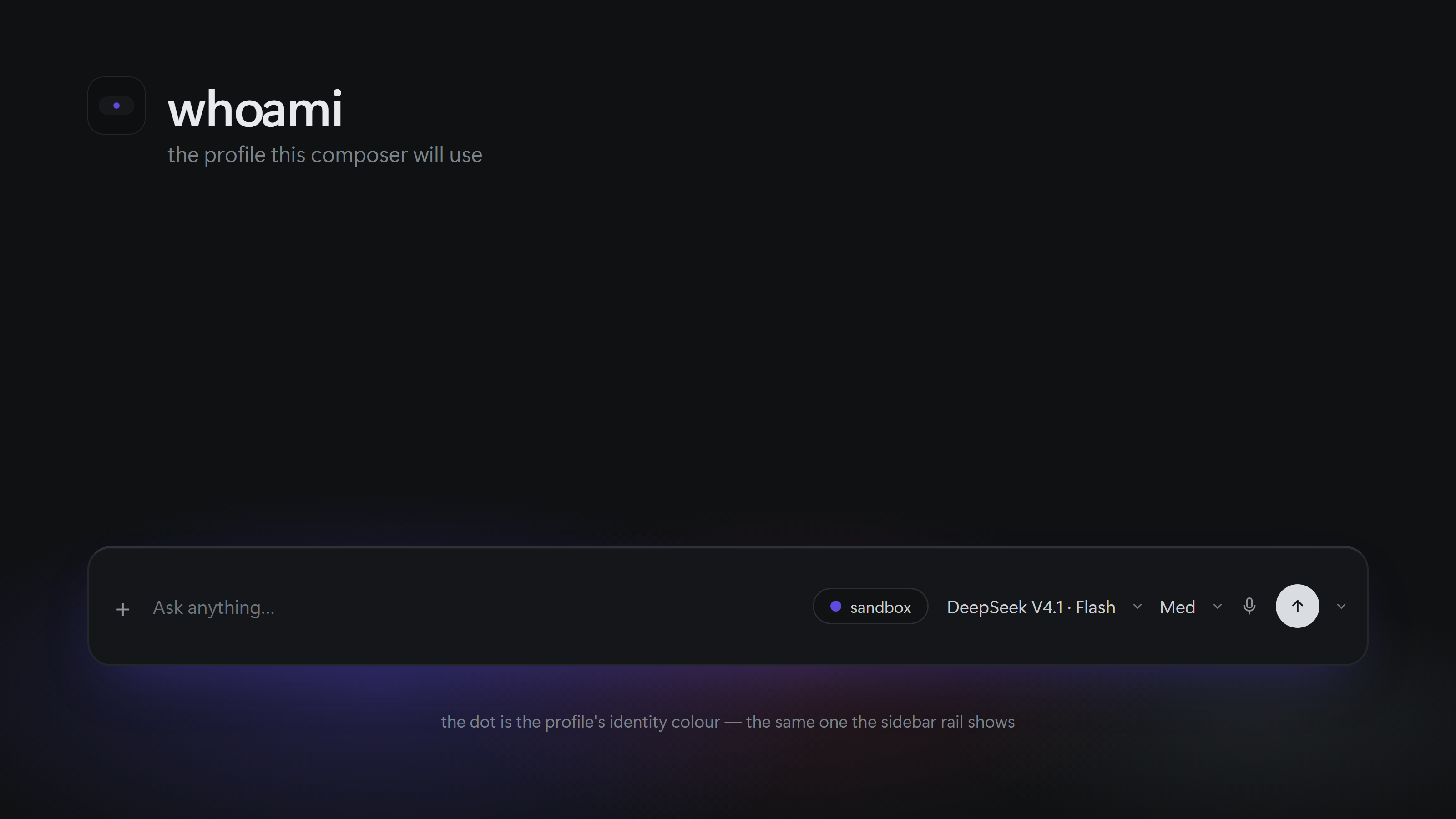
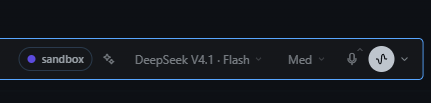
Whoami adds one surface: a coloured pill to the composer toolbar, next to the model pill, with the name of the active profile. The pill reads the live profile state, so the profile a new session will use is visible at a glance. When the app is in the all-profiles scope there is no active profile, and the pill shows a grey no profile instead.
Screenshots
The pill takes the identity colour Hermes Desktop already gives the profile, so it matches the sidebar rail.

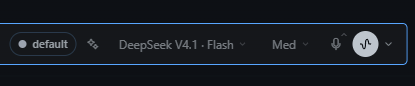
Why
Hermes Desktop does not label the profile you are drafting in. With several profiles configured it is easy to start a session in the wrong one and only notice later. Whoami makes the target profile explicit before you send anything.
Install
A catalog install puts the desktop half in <hermes home>/desktop-plugins/whoami/, with plugin.js at the root of that folder. The plugin folder name must be whoami.
In this repository the plugin entry lives under desktop/, so a manual install copies the contents of desktop/ into the plugin folder — the loader reads <plugins folder>/whoami/plugin.js, not a desktop/ subfolder:
git clone https://github.com/atostivint/hermes-whoami.git
cd hermes-whoami
mkdir -p "$HERMES_HOME/desktop-plugins/whoami"
cp -R desktop/. "$HERMES_HOME/desktop-plugins/whoami/"
On Windows, from the clone, with the default home (%USERPROFILE%\.hermes\desktop-plugins\whoami\):
New-Item -ItemType Directory -Force "$env:USERPROFILE\.hermes\desktop-plugins\whoami" | Out-Null
Copy-Item "desktop\*" "$env:USERPROFILE\.hermes\desktop-plugins\whoami\" -Recurse -Force
Then open the command palette (Command-K, or Ctrl+K on Windows) and run
Reload desktop plugins.
$HERMES_HOME is usually ~/.hermes. On a Linux server it is normally /var/lib/hermes-agent/.hermes. If you are unsure, open Settings -> Plugins, which shows the exact folder Hermes reads plugins from.
Colours
The pill takes the profile's identity colour from Hermes Desktop, the same colour the sidebar rail derives from the profile name, so the two agree. There is no settings pane and nothing to configure: the plugin ships no colour UI.
The colour is resolved in this order, first hit wins — the built-in palette is the last resort:
accentmode, which paints the pill dot withvar(--ui-accent)for every profile.- A preset or hex stored for that profile in
whoami.prefs. - The identity colour Hermes Desktop derives from the profile name, through the SDK's
profileColor(). - The built-in eight-colour palette, used when the host build exports no
profileColor.
A colour picked in the rail's own override is not mirrored: the SDK exposes no resolver for that
override, so the pill keeps the derived identity colour. Adding that resolver is upstream work.
Steps 1 and 2 stay honoured when an older install left a whoami.prefs behind — { "mode": "profile", "colors": { "work": "cyan" } }, in the plugin storage namespace. Nothing in the current version writes that key, so a fresh install always shows the identity colour.
The root profile default gets no colour from the client — it renders that profile untagged — so it
shows the neutral mono dot.
Limitations
- Read-only by design. The SDK exposes
host.state.profilebut no profile-switch verb, so Whoami reports the scope and never changes it. - Requires Hermes Desktop 0.21.5 or newer for the
composer.actionsarea the pill is mounted in. - If the pill shows a stale profile after a switch, open an issue with the values of
host.state.profile.
Development
Run npm run check to parse desktop/plugin.js without executing it. Run npm run smoke to exercise registration, rendering and colour logic offline with plain Node, no Hermes install and no React required. CI (.github/workflows/smoke.yml) runs both on every push and pull request.
Uninstall
Delete the whoami folder from $HERMES_HOME/desktop-plugins/ and reload desktop plugins.
License
MIT
README from the reviewed commit 0b70c85; it updates when the author re-pins.