
hermes-vision-inline
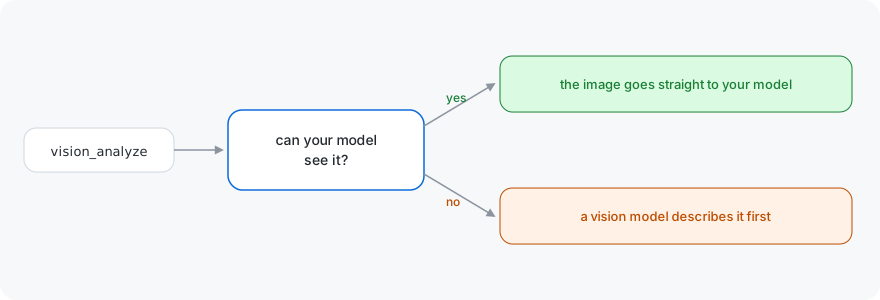
A Hermes plugin that attaches an image to your session model inline when the model can see it, instead of letting the auxiliary vision model write a description.
Core already attaches images natively by default. What this plugin changes is an explicit auxiliary.vision backend: with a captioning model configured, core sends every vision_analyze call there, and this plugin keeps the image in the conversation instead when the main model accepts it. The plugin still respects agent.image_input_mode: text, which turns image attachment off.
Keeping the image inline preserves the full context, supports follow-up questions without reprocessing, and lets the model inspect details directly.
Install
Linux and macOS:
git clone https://github.com/BrokeSkill/hermes-vision-inline
cd hermes-vision-inline
./install.sh
Windows, from PowerShell in a clone:
git clone https://github.com/BrokeSkill/hermes-vision-inline
cd hermes-vision-inline
.\install.ps1
The script copies the plugin to ~/.hermes/plugins/hermes-vision-inline and
enables it. By hand, the same two steps:
hermes plugins enable hermes-vision-inline
systemctl --user restart hermes-dashboard.service
The desktop backend caches its plugin list per process, so a restart is needed.
Usage
When the model calls vision_analyze, the plugin looks up the session model and picks a path:
| condition | path taken |
|---|---|
agent.image_input_mode is text, the provider drops images inside tool results, or the model is not listed as vision-capable |
vision_analyze_tool runs; the auxiliary vision model returns {"success": true, "analysis": "..."} |
| the model accepts images | _vision_analyze_native runs; the image is encoded into the tool result as an image_url part |
How the model is identified
The decision of whether a model is vision-capable comes from the models.dev catalog Hermes keeps on disk
(~/.hermes/models_dev_cache.json, 8000+ models, refreshed by Hermes).
Install without a plugin loader
The plugin is two files. Copy __init__.py and plugin.yaml into
~/.hermes/plugins/hermes-vision-inline/ and the loader picks them up; there
are no dependencies to resolve and nothing to configure.
Uninstall
hermes plugins disable hermes-vision-inline
License
MIT. See LICENSE.