GitHub profile
Plugins by tuancookiez-hub
8 plugins by tuancookiez-hub in the catalog, most-starred first.
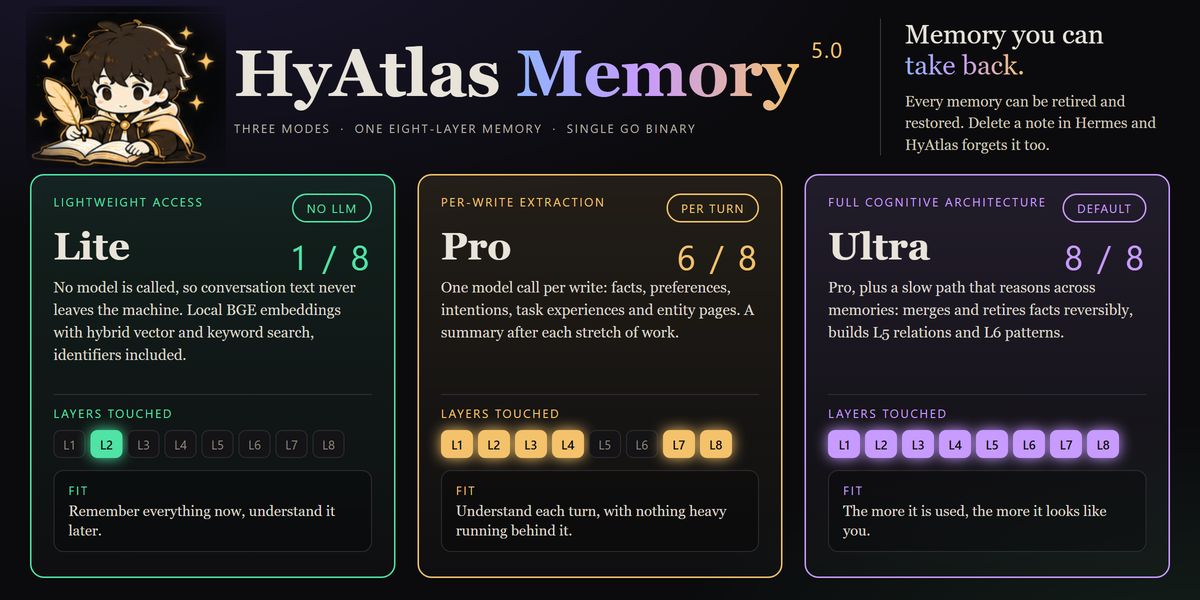
tuancookiez-hubhyatlasHyAtlas 5 — self-hosted 8-layer memory provider backed by a pure-Go single-binary server you run yourself (chromem-go vectors, in-process BGE-small embeddings, hybrid vector + keyword search, bitemporal knowledge graph with source citations). Embeddings, the vector index and stored memories are kept locally. Ships agent tools (hyatlas_status/search/recent/add), a `hermes hyatlas` CLI, a Desktop pane with a starmap graph view, and a web dashboard. Disclosure — requires the separate hyatlas-go server, installed by the user. The plugin never downloads or bundles it, and it talks only to the configured server (default 127.0.0.1:19528). Embeddings are computed locally; stored memories leave the machine only in the LLM calls described below. Extraction is opt-in and uses an LLM you choose: `hermes memory setup` asks for any OpenAI-compatible endpoint, model and key, and stores the key in Hermes's .env as HYATLAS_LLM_KEY. The plugin reads that key only through Hermes's get_secret and reads no Hermes credential. A plain key file named by HYATLAS_LLM_KEY_FILE also works; the server reads it on every call, so do not point it at another program's credentials such as Hermes auth.json. The server has no default endpoint and makes no LLM call until the endpoint, the model and a key are all present; while the endpoint and model are set but no key has arrived, /api/v1/status reports llm "awaiting_key". `hermes memory setup`, the repo installer and the sample launcher pre-fill a free Nous Portal endpoint and model (and setup defaults to ultra mode), but nothing is sent until a key is supplied. A server the plugin starts gets that key in its environment; for a server started another way (the launcher, a service) that reports "awaiting_key", the plugin (at most every 10 minutes) and `hermes hyatlas doctor` POST the key over plain HTTP to /api/v1/llm/key, only when the configured server host is this machine; the server accepts it only from a loopback address and keeps it in memory only, never on disk. Once configured, each turn's user and assistant text goes to that endpoint (not tool output or context summaries; capped at 12,000 characters), together with up to 5 related stored facts, 3 entity pages and 5 open intentions of that owner so the model can update them instead of duplicating them. In the default ultra mode the server also sends topic-grouped batches of up to 50 stored facts to it every 6 hours (every 20 minutes while earlier batches are still pending) and supersedes (hides but keeps) the facts the model marks merged or stale, recording a reason for each drop. It also records relations corroborated across turns in the local knowledge graph (HYATLAS_CONSOLIDATE_GRAPH=off disables that). Once a day per owner (HYATLAS_CROSS_SCHEMA_EVERY; off disables it) ultra also sends up to 40 of that owner's stored patterns to find up to 3 that hold across topics. In pro and ultra modes it also sends each owner's open intentions, recent summaries and newest facts to rewrite a short Now page, at most every 15 minutes (HYATLAS_NOW_EVERY), and, after a 30-minute pause in an owner's writes (HYATLAS_EPISODE_GAP; off disables it), up to 40 of that stretch's facts to write one episode summary. HYATLAS_RECONCILE=on (off by default) adds a second LLM call per write that sends the new facts together with similar stored ones (including those under user IDs grouped with the owner by HYATLAS_USER_ALIASES) so the model can update, replace or link them; it is meant for a local model. An optional HYATLAS_LLM_FALLBACK_MODEL, tried only when a primary call fails, receives the same text; it is sent the primary key only when it uses the same host. Turns written while the endpoint was unreachable or before a key arrived are extracted later by a catch-up pass (every 10 minutes by default, HYATLAS_CATCHUP_EVERY; rows up to 7 days old, HYATLAS_CATCHUP_MAX_AGE), sending the same text a write would have sent. `hermes hyatlas doctor` sends one short test prompt ("Reply with the single word OK.") to the endpoint and writes, finds and deletes one test memory. When you replace or remove an entry with Hermes's memory tool, the plugin asks the local server to retire the matching memory (reversible); nothing leaves the machine. HYATLAS_MODE=lite makes no LLM call. Server endpoints that rewrite stored data are off unless the server runs with HYATLAS_ADMIN=on. The spawned server gets an allowlisted environment (OS essentials plus HYATLAS_*), not the agent's keys. auto_start is off by default; when on, Hermes starts the server as soon as it loads the plugin, and a server started by auto_start or `hermes hyatlas start` keeps running after Hermes exits until `hermes hyatlas stop`. On Windows, if a hyatlas-go.ps1 launcher is configured, `hermes hyatlas start/stop` runs it; the repo's sample launcher reads no credentials (since 4.8.0 it no longer reads Hermes auth.json). No telemetry.Communitymemory31tuancookiez-hubenhance-promptA sparkle beside Send that rewrites the composer draft in place without sending it, deepening it into a clarifier, a task list, then a phased plan on further clicks, with a one-click discard back to the original. Also registers the `/enhance` slash command and the `enhance_prompt` tool for the same rewrite from the agent. Draft read and write go through `host.composer`, so `@file` and `/command` chips survive. Disclosure — every click runs one stateless `llm.oneshot` call on your own gateway with the focused chat's model (the auxiliary title model when no chat is focused), followed by a second short call to score the result, so it spends your model credits. It is not an agent turn: no tools run and nothing is written to a session you cannot see. It overrides no model, sends nothing to a third party, never sends the composer message, and carries no telemetry, no credentials and no self-update.CommunityDesktop app6tuancookiez-hubdiscord-tpsShow live tokens-per-second and the active model on your Discord bot's presence. Disclosure — Replaces the Discord bot's public presence with the live tok/s figure and the model name of the most recent API call in this gateway (any platform or chat), visible to anyone who can see the bot; updates at most every interval seconds (minimum 10) over the gateway's existing Discord connection. Reads no credentials and makes no network calls of its own.Communityplatform1tuancookiez-hubmodel-explainerA Models page for Hermes Desktop built around your own model picker: choose a model to see its Hermes Index score, cost per task, context and output limits, price, abilities and your own measured speed and spend, with a score-against-cost frontier chart, and compare up to four side by side. Every value cites a source and date. Disclosure — one GET of a public JSON data file from the author's GitHub repo (raw.githubusercontent.com/tuancookiez-hub/hermes-model-explainer, main branch, so its contents can change after this pin), at most daily and only when the page opens (can be turned off; the bundled copy works offline; the file is validated data, never code); reads model.options and the focused session's model and usage figures; writes plugin storage, and switches the chat model only when the user presses Use this model (the same config.set request as the built-in picker, scoped to the open chat). Desktop only: no agent tools, hooks, middleware or env vars.Communitymodels1tuancookiez-hubgif-toolShow, edit and compress GIFs in Hermes. `gif_open` turns any GIF, animated WebP, APNG, PNG or JPEG (a file path or an https link) into a card in Hermes Desktop where you add exact captions, change speed, reverse, boomerang, trim, drop frames and crop with a live preview; the original file is never changed. `gif_export` and the card's export buttons compress for Discord (10 MB), Discord emoji (256 KB), Telegram, X (5 MB), under 1 MB, animated WebP or a size you name, shrinking until the file fits and reporting before and after sizes (pure Pillow: shared palette, frame differencing, size-targeted ladder). `gif_edit` gives the agent the same edits. `gif_create` makes a four-frame meme GIF from a prompt. A GIF Studio tab lists every GIF in the profile and takes a dropped file or a pasted link. Disclosure — editing, previews and compression are local; opening a link downloads that one https URL (no cookies or credentials; private, local and link-local addresses refused, redirects and the connected peer re-checked; a GIPHY or Tenor page is followed once to its og:image); `gif_create` sends only the text prompt to chatgpt.com/backend-api/codex/images/generations through Hermes' credentialed_provider_request with the user's OpenAI Codex sign-in, using one image from the user's ChatGPT plan per call, via an undocumented endpoint; projects and rendered files are stored under the profile's plugin-data/gif-tool and cache/generated/images.CommunityDesktop apptuancookiez-hubhermes-mapsA live map you and Hermes share, docked beside the chat. Hermes plots places it finds on the web with real coordinates, flies the camera, drops pins with a note and source link, and draws routes. You click a pin or circle an area and Hermes receives what you picked. Two looks: a clean flat map and a cinematic globe. No keys and no cost. Disclosure — viewing the map sends tile requests (your IP address and the area viewed) to tiles.openfreemap.org; a bundled world outline is the offline fallback. Plotting and place search send place names and search text (and the visible map bounds for a visible-area search) from this machine to photon.komoot.io, a free service with no uptime guarantee; results are kept in memory for an hour. Google Maps links and a pin's source link open in the browser only when clicked. Selections you send become chat messages and reach your model provider. Pins, routes, camera and selections are stored in Hermes plugin storage on this machine. No background processes, no telemetry, no credentials, no self-update.CommunityDesktop apptuancookiez-hubhermes-plantA calm little garden for Hermes Desktop that grows in real time. It sits above the app like the Hermes pet, takes no layout space and can be dragged anywhere. Click a plant for a care wheel: water, prune (you choose which tip to cut, and the piece drops away), rotate, fertilize, repot, pick, sell, or ask Hermes. Four species (leafy plant, fern, cactus, little tree) grow in their own ways, pruning shapes how each one branches, and neglect only pauses them. Care earns play coins, and a small shop sells more plants and fertilizer, up to six pots. Bugs land now and then and can be shooed away. Two agent tools let Hermes check the garden and tend it when you ask. Original blue-ink artwork drawn in code. Reachable from the status bar, the command palette and the keyboard, and it speaks through the Hermes pet when one is showing. Disclosure: no network requests, no background model calls and no background processes; Ask Hermes submits one chat message only when you press it; coins are play money inside the plugin; the garden is kept in Desktop plugin storage and in plugin-data/hermes-plant/data.db; the plugin adds its own floating element to the page (Hermes has no SDK area for one) and removes it on unload, without reading or changing core markup.CommunityDesktop apptuancookiez-hubthreejs-stageLive three.js r187 scenes and GLB, GLTF, STL and OBJ models in Hermes chat. Hermes calls one tool, three_scene, with scene code or a model file. Hermes Desktop draws the result as an interactive card with orbit, zoom, fullscreen, restart, screenshot and Ask Hermes to change this, and other surfaces get a standalone HTML file. With Desktop open, each scene is dry-run in a hidden frame before the tool returns, so a crash or a blank render reaches Hermes in the same turn. Disclosure — scene code written by the model runs in Desktop inside a sandboxed iframe (opaque origin, scripts only) whose content security policy blocks all network requests; three.js r187 is bundled (MIT). The exported HTML file loads three.js from cdn.jsdelivr.net when opened in a browser. Given a model path, the tool reads that file and the .bin, .mtl and image files it references in the same folder (50 MB limit) and copies them to plugin storage; scenes, screenshots and delivered files are stored under plugin-data/threejs-stage and cache/generated/threejs-stage on this machine. The dry run makes the tool wait up to 2.5 s for Desktop and up to 16 s for the result, and can be turned off (verify_scenes). Fix with Hermes and Ask Hermes to change this each send one ordinary chat message. No API keys, no telemetry, no background processes, no self-update.CommunityDesktop app