All plugins

gif-tool

Show, edit and compress GIFs in Hermes. `gif_open` turns any GIF, animated WebP, APNG, PNG or JPEG (a file path or an https link) into a card in Hermes Desktop where you add exact captions, change speed, reverse, boomerang, trim, drop frames and crop with a live preview; the original file is never changed. `gif_export` and the card's export buttons compress for Discord (10 MB), Discord emoji (256 KB), Telegram, X (5 MB), under 1 MB, animated WebP or a size you name, shrinking until the file fits and reporting before and after sizes (pure Pillow: shared palette, frame differencing, size-targeted ladder). `gif_edit` gives the agent the same edits. `gif_create` makes a four-frame meme GIF from a prompt. A GIF Studio tab lists every GIF in the profile and takes a dropped file or a pasted link. Disclosure — editing, previews and compression are local; opening a link downloads that one https URL (no cookies or credentials; private, local and link-local addresses refused, redirects and the connected peer re-checked; a GIPHY or Tenor page is followed once to its og:image); `gif_create` sends only the text prompt to chatgpt.com/backend-api/codex/images/generations through Hermes' credentialed_provider_request with the user's OpenAI Codex sign-in, using one image from the user's ChatGPT plan per call, via an undocumented endpoint; projects and rendered files are stored under the profile's plugin-data/gif-tool and cache/generated/images.

tuancookiez-hubDesktopv1.0.1Updated 55 minutes ago

About

Show, edit and compress GIFs in Hermes. `gif_open` turns any GIF, animated WebP, APNG, PNG or JPEG (a file path or an https link) into a card in Hermes Desktop where you add exact captions, change speed, reverse, boomerang, trim, drop frames and crop with a live preview; the original file is never changed. `gif_export` and the card's export buttons compress for Discord (10 MB), Discord emoji (256 KB), Telegram, X (5 MB), under 1 MB, animated WebP or a size you name, shrinking until the file fits and reporting before and after sizes (pure Pillow: shared palette, frame differencing, size-targeted ladder). `gif_edit` gives the agent the same edits. `gif_create` makes a four-frame meme GIF from a prompt. A GIF Studio tab lists every GIF in the profile and takes a dropped file or a pasted link. Disclosure — editing, previews and compression are local; opening a link downloads that one https URL (no cookies or credentials; private, local and link-local addresses refused, redirects and the connected peer re-checked; a GIPHY or Tenor page is followed once to its og:image); `gif_create` sends only the text prompt to chatgpt.com/backend-api/codex/images/generations through Hermes' credentialed_provider_request with the user's OpenAI Codex sign-in, using one image from the user's ChatGPT plan per call, via an undocumented endpoint; projects and rendered files are stored under the profile's plugin-data/gif-tool and cache/generated/images.

GIF Tool

Show, edit and compress GIFs inside Hermes Agent.

GIFs are the one format every chat app plays and nobody can easily edit, and they are huge. GIF Tool
gives Hermes a real GIF workflow:

  • Show any GIF in chat. Give Hermes a file path or a link ("open this gif …") and it plays in a
    card in Hermes Desktop. On Telegram, Discord and the CLI you get the file as usual.
  • Edit it in the card. Exact captions, speed, reverse, boomerang, trim, per-frame timing, drop
    frames, crop. The preview updates as you type. The original is never changed, so Reset undoes
    everything.
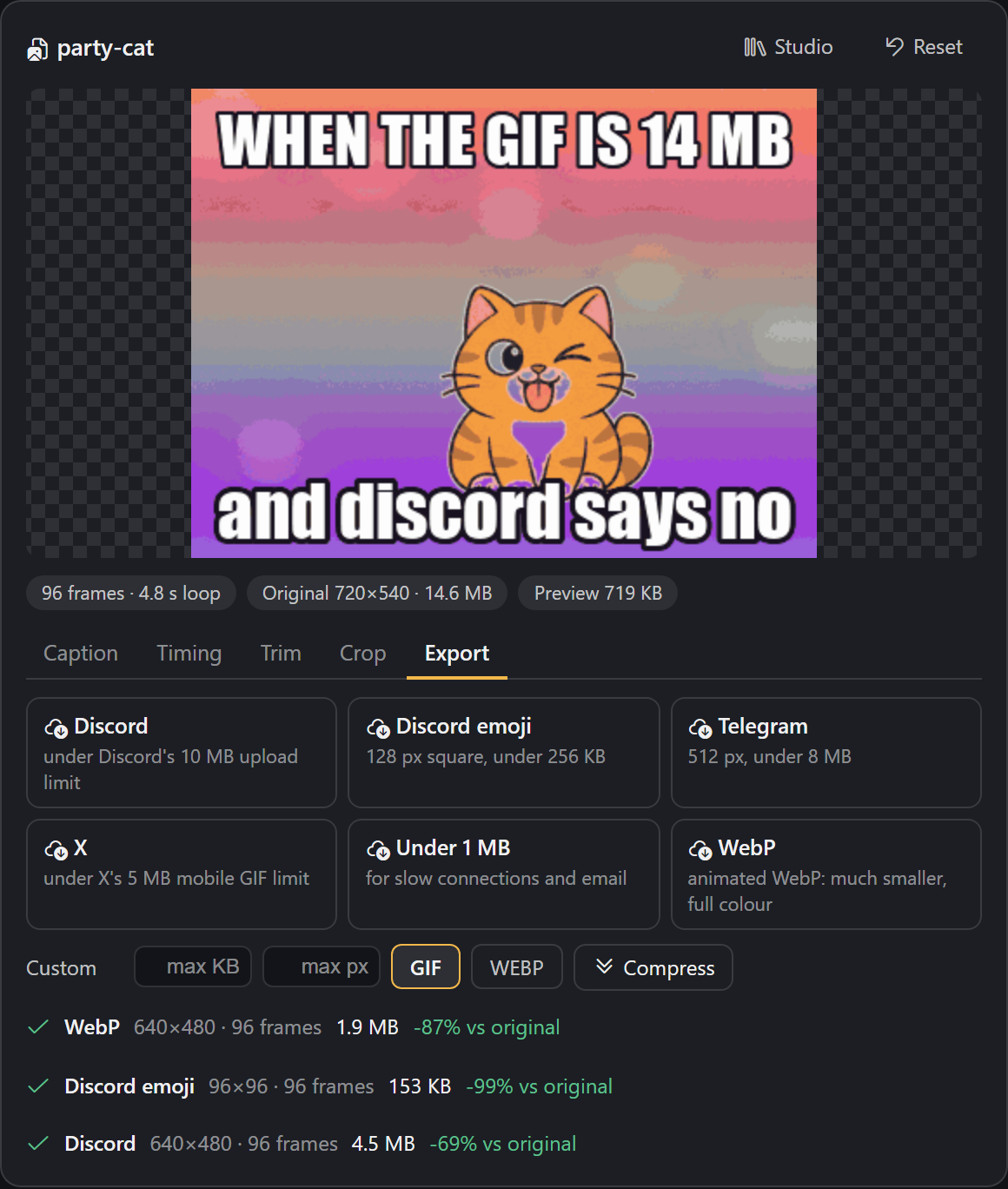
  • Compress it for where it is going. One click for Discord (10 MB), Discord emoji (256 KB),
    Telegram, X (5 MB), "under 1 MB", animated WebP, or your own size limit. The compressor keeps
    shrinking until the file fits and tells you the size before and after.
  • Create one from a prompt. gif_create makes a four-frame meme GIF with the image model behind
    your ChatGPT/Codex sign-in, with captions drawn exactly as you typed them.
  • GIF Studio. Command palette → "GIF Tool: open studio": every GIF in your profile, drop in a
    file or paste a link, no agent turn needed.

Everything except gif_create and downloading a link runs on your machine, costs nothing, and takes
a second or two.
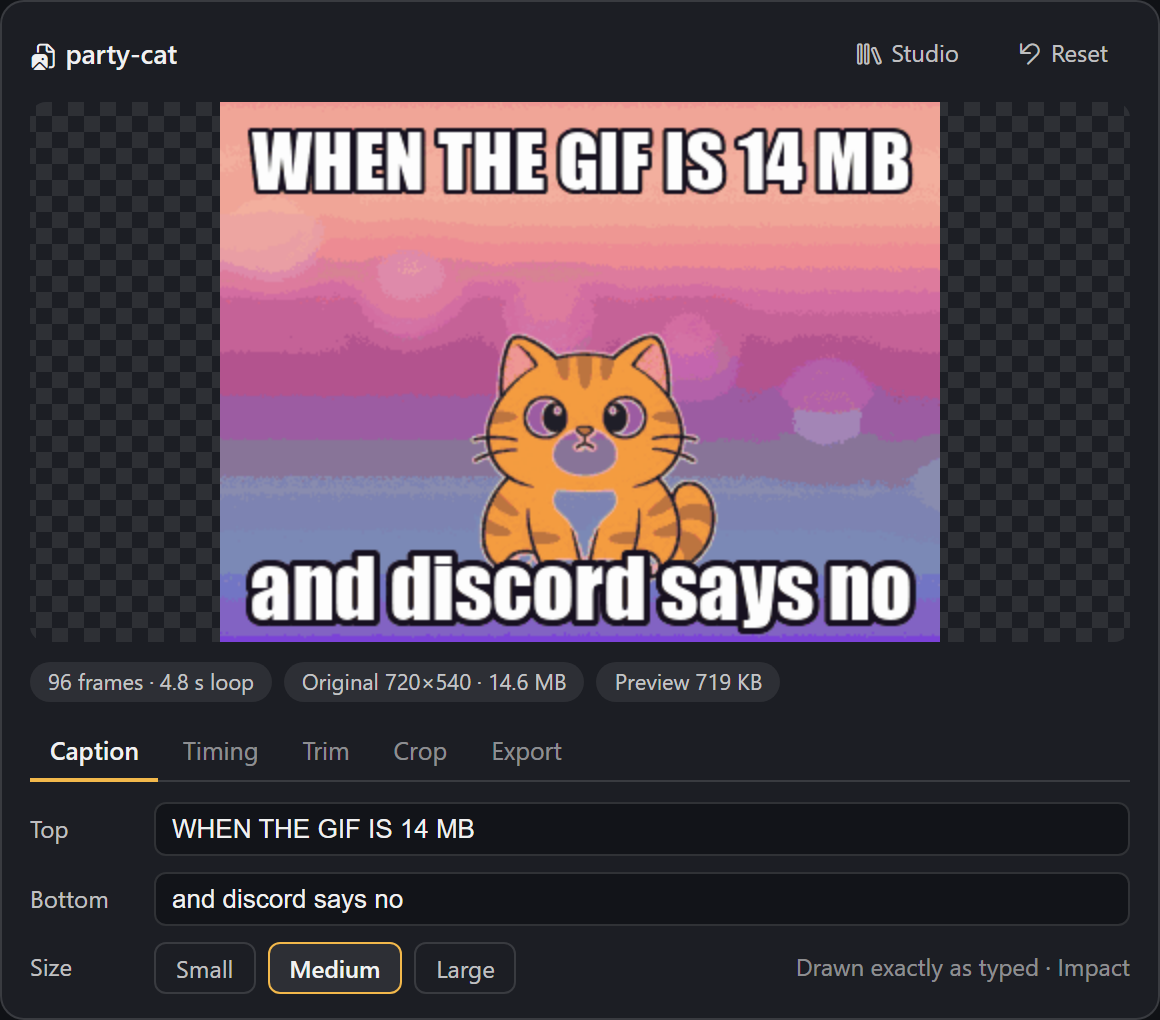
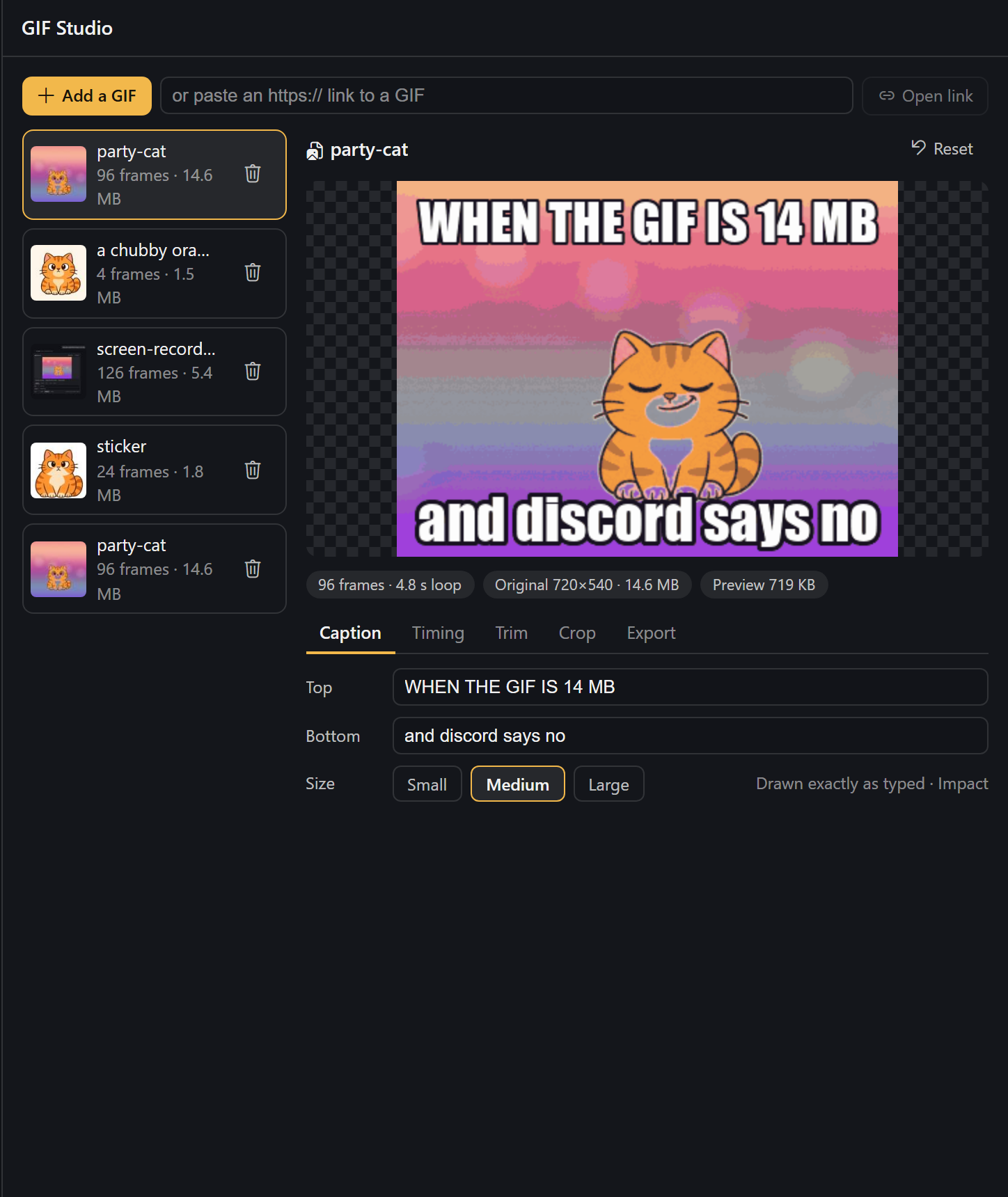
The GIF Tool card: caption editor and live preview
Export presets with before and after sizes
GIF Studio

Screenshots show the card in a test page with a neutral dark theme; in Hermes Desktop it follows your
theme.

Tools

| Tool | What it does | Cost |
|---|---|---|
| gif_open | A GIF / animated WebP / APNG / PNG / JPEG from a path or https link → an editable project, shown in chat | free (downloads the link you give it) |
| gif_edit | Captions, text size, speed, trim, reverse, boomerang, crop, keep every Nth frame, per-frame delays | free, local |
| gif_export | Compress to a preset or to max_kb / max_px, as GIF or WebP; works on a project or straight on a path/link | free, local |
| gif_create | Prompt (+ optional per-frame beats and captions) → a looping 4-frame GIF | one image from your ChatGPT plan, 30–60 s |

Example requests:

  • "Open ~/Downloads/demo.gif, trim it to the first 40 frames and make it 1.5× faster."
  • "This GIF is 14 MB and Discord won't take it. Fix it." → gif_export with the discord preset.
  • "Turn it into a Discord emoji." → 128 px square under 256 KB.
  • "Make a GIF of a smug cartoon cat winking. Top text: WHEN THE BUILD PASSES."

How the compression works

Pure Pillow, no external binaries:

  1. One shared palette for all frames and no dithering (dither noise defeats GIF's LZW coding).
  2. Frame differencing. Pixels that did not change since the previous frame are written as
    transparent, so a static background costs almost nothing. An optional tolerance treats
    nearly-identical pixels as unchanged; it is measured against what is actually on screen, so the
    error never builds up over the animation.
  3. Fit to a size. If the result is over the limit, the compressor walks a ladder (tolerance →
    smaller frame → fewer colours → fewer frames), sized from how far over it was. Long GIFs are
    sized on a 12-frame sample first, so the full encode usually runs once.
  4. Animations with real transparency keep whole frames, so stickers never smear.

Measured on a 14.6 MB, 96-frame, 720×540 test GIF: 5.3 MB for Discord (−64%), 4.1 MB for X,
2.5 MB for Telegram, 785 KB for "under 1 MB" and 1.2 MB as WebP (−92%), each in 2–6 seconds. A
1.8 MB transparent sticker becomes a 114 KB Discord emoji. Results vary with the content: flat
cartoons shrink far more than camera footage.

Requirements

  • Hermes Agent 0.22.0 or newer. The card needs a Hermes Desktop with tool-media renderers; older
    Desktops and other surfaces show the plain GIF.
  • Pillow (>=10.1,<14) and httpx, both of which Hermes already ships.
  • Only for gif_create: signed in to OpenAI Codex in Hermes (Desktop → Providers, or
    hermes auth add openai-codex). Everything else works without it.

Install

hermes plugins install gif-tool

Before the catalog listing is live, install from the repository URL instead:
hermes plugins install <this repo's https URL>.

Restart Hermes once after installing so the card's backend routes mount.

Disclosures

  • Network, gif_open / gif_export with a link, and Studio "Open link": one HTTPS download of
    the link you gave. https only, default port, no cookies or credentials; hosts that resolve to
    private, local or link-local addresses are refused, and every redirect is checked again. A GIPHY or
    Tenor page link is followed once to its og:image. Nothing is uploaded.
  • Network, gif_create: one HTTPS POST to
    https://chatgpt.com/backend-api/codex/images/generations per call. Hermes sends it with your
    Codex sign-in through credentialed_provider_request; the plugin never sees, stores or refreshes
    the token. Only the text prompt is sent. Captions are not sent; they are drawn locally.
  • Cost: each gif_create uses one image from your ChatGPT plan's image allowance. No other
    feature costs anything. When the plan's limit is used up the tool says so and stops.
  • Model: the Codex endpoint ignores the requested model and does not report which model made the
    image, so GIF Tool cannot pick or confirm a specific version. It also ignores the requested size;
    GIF Tool crops locally. Measurements are in docs/codex-image-findings.md.
  • Reads outside its own data: the image file whose path you give gif_open / gif_export, and
    a system font for captions (Impact on Windows/macOS, DejaVu Sans Bold on Linux, else Pillow's
    built-in font).
  • Data stored: each project (a copy of the source image plus a project.json with your edits)
    under $HERMES_HOME/plugin-data/gif-tool/projects/<id>/. Rendered files go to
    $HERMES_HOME/cache/generated/images/, where Hermes delivers MEDIA: files from. Studio's delete
    button removes a project folder.
  • No shell commands, background processes, telemetry, self-updates, or stored credentials.

Limits

  • Sources up to 40 MB and 8192 px. Animations longer than 240 frames are opened at every Nth frame
    (timing is kept). Working resolution is capped at 800 px on the long side.
  • Studio uploads are capped at 25 MB; larger files open through gif_open with a path.
  • gif_create makes 4 frames (one 2×2 sprite sheet). Expression changes and small motions loop
    best. The Codex service refuses direct GIF output, which is why frames are built locally.
  • GIF has 256 colours and no dithering is applied, so smooth gradients can band. The WebP export
    keeps full colour.

Development

python -m pytest tests     # offline: encoder round-trips, compressor, edits, validation
hermes plugins doctor .
hermes plugins validate . --install-deps

desktop/plugin.js is plain ESM with no build step.

License

MIT

README from the reviewed commit 0c3cdbd; it updates when the author re-pins.
More by tuancookiez-hub

8 plugins by tuancookiez-hub in the catalog.

tuancookiez-hubhyatlasHyAtlas 5 — self-hosted 8-layer memory provider backed by a pure-Go single-binary server you run yourself (chromem-go vectors, in-process BGE-small embeddings, hybrid vector + keyword search, bitemporal knowledge graph with source citations). Embeddings, the vector index and stored memories are kept locally. Ships agent tools (hyatlas_status/search/recent/add), a `hermes hyatlas` CLI, a Desktop pane with a starmap graph view, and a web dashboard. Disclosure — requires the separate hyatlas-go server, installed by the user. The plugin never downloads or bundles it, and it talks only to the configured server (default 127.0.0.1:19528). Embeddings are computed locally; stored memories leave the machine only in the LLM calls described below. Extraction is opt-in and uses an LLM you choose: `hermes memory setup` asks for any OpenAI-compatible endpoint, model and key, and stores the key in Hermes's .env as HYATLAS_LLM_KEY. The plugin reads that key only through Hermes's get_secret and reads no Hermes credential. A plain key file named by HYATLAS_LLM_KEY_FILE also works; the server reads it on every call, so do not point it at another program's credentials such as Hermes auth.json. The server has no default endpoint and makes no LLM call until the endpoint, the model and a key are all present; while the endpoint and model are set but no key has arrived, /api/v1/status reports llm "awaiting_key". `hermes memory setup`, the repo installer and the sample launcher pre-fill a free Nous Portal endpoint and model (and setup defaults to ultra mode), but nothing is sent until a key is supplied. A server the plugin starts gets that key in its environment; for a server started another way (the launcher, a service) that reports "awaiting_key", the plugin (at most every 10 minutes) and `hermes hyatlas doctor` POST the key over plain HTTP to /api/v1/llm/key, only when the configured server host is this machine; the server accepts it only from a loopback address and keeps it in memory only, never on disk. Once configured, each turn's user and assistant text goes to that endpoint (not tool output or context summaries; capped at 12,000 characters), together with up to 5 related stored facts, 3 entity pages and 5 open intentions of that owner so the model can update them instead of duplicating them. In the default ultra mode the server also sends topic-grouped batches of up to 50 stored facts to it every 6 hours (every 20 minutes while earlier batches are still pending) and supersedes (hides but keeps) the facts the model marks merged or stale, recording a reason for each drop. It also records relations corroborated across turns in the local knowledge graph (HYATLAS_CONSOLIDATE_GRAPH=off disables that). Once a day per owner (HYATLAS_CROSS_SCHEMA_EVERY; off disables it) ultra also sends up to 40 of that owner's stored patterns to find up to 3 that hold across topics. In pro and ultra modes it also sends each owner's open intentions, recent summaries and newest facts to rewrite a short Now page, at most every 15 minutes (HYATLAS_NOW_EVERY), and, after a 30-minute pause in an owner's writes (HYATLAS_EPISODE_GAP; off disables it), up to 40 of that stretch's facts to write one episode summary. HYATLAS_RECONCILE=on (off by default) adds a second LLM call per write that sends the new facts together with similar stored ones (including those under user IDs grouped with the owner by HYATLAS_USER_ALIASES) so the model can update, replace or link them; it is meant for a local model. An optional HYATLAS_LLM_FALLBACK_MODEL, tried only when a primary call fails, receives the same text; it is sent the primary key only when it uses the same host. Turns written while the endpoint was unreachable or before a key arrived are extracted later by a catch-up pass (every 10 minutes by default, HYATLAS_CATCHUP_EVERY; rows up to 7 days old, HYATLAS_CATCHUP_MAX_AGE), sending the same text a write would have sent. `hermes hyatlas doctor` sends one short test prompt ("Reply with the single word OK.") to the endpoint and writes, finds and deletes one test memory. When you replace or remove an entry with Hermes's memory tool, the plugin asks the local server to retire the matching memory (reversible); nothing leaves the machine. HYATLAS_MODE=lite makes no LLM call. Server endpoints that rewrite stored data are off unless the server runs with HYATLAS_ADMIN=on. The spawned server gets an allowlisted environment (OS essentials plus HYATLAS_*), not the agent's keys. auto_start is off by default; when on, Hermes starts the server as soon as it loads the plugin, and a server started by auto_start or `hermes hyatlas start` keeps running after Hermes exits until `hermes hyatlas stop`. On Windows, if a hyatlas-go.ps1 launcher is configured, `hermes hyatlas start/stop` runs it; the repo's sample launcher reads no credentials (since 4.8.0 it no longer reads Hermes auth.json). No telemetry.Communitymemory31tuancookiez-hubenhance-promptA sparkle beside Send that rewrites the composer draft in place without sending it, deepening it into a clarifier, a task list, then a phased plan on further clicks, with a one-click discard back to the original. Also registers the `/enhance` slash command and the `enhance_prompt` tool for the same rewrite from the agent. Draft read and write go through `host.composer`, so `@file` and `/command` chips survive. Disclosure — every click runs one stateless `llm.oneshot` call on your own gateway with the focused chat's model (the auxiliary title model when no chat is focused), followed by a second short call to score the result, so it spends your model credits. It is not an agent turn: no tools run and nothing is written to a session you cannot see. It overrides no model, sends nothing to a third party, never sends the composer message, and carries no telemetry, no credentials and no self-update.CommunityDesktop app6tuancookiez-hubdiscord-tpsShow live tokens-per-second and the active model on your Discord bot's presence. Disclosure — Replaces the Discord bot's public presence with the live tok/s figure and the model name of the most recent API call in this gateway (any platform or chat), visible to anyone who can see the bot; updates at most every interval seconds (minimum 10) over the gateway's existing Discord connection. Reads no credentials and makes no network calls of its own.Communityplatform1tuancookiez-hubmodel-explainerA Models page for Hermes Desktop built around your own model picker: choose a model to see its Hermes Index score, cost per task, context and output limits, price, abilities and your own measured speed and spend, with a score-against-cost frontier chart, and compare up to four side by side. Every value cites a source and date. Disclosure — one GET of a public JSON data file from the author's GitHub repo (raw.githubusercontent.com/tuancookiez-hub/hermes-model-explainer, main branch, so its contents can change after this pin), at most daily and only when the page opens (can be turned off; the bundled copy works offline; the file is validated data, never code); reads model.options and the focused session's model and usage figures; writes plugin storage, and switches the chat model only when the user presses Use this model (the same config.set request as the built-in picker, scoped to the open chat). Desktop only: no agent tools, hooks, middleware or env vars.Communitymodels1

Developer Mode

Explore built-in Hermes toolsets and actions.

HermesAgent

Developer?

Create a Hermes extension for Desktop or agent workflows.

Developer Section