chmod-ref
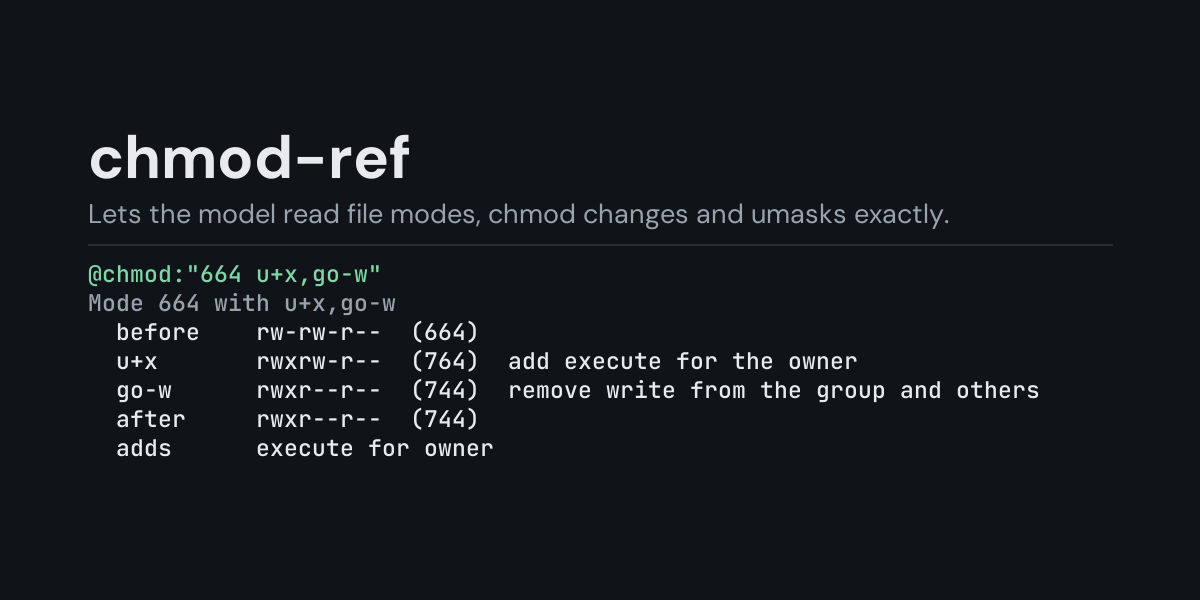
@chmod: references for Hermes: put @chmod:755, @chmod:-rwsr-xr-x or @chmod:"644 u+x,go-w"
in a message and Hermes replaces it with what that file mode means, worked out on your machine:
the mode in both forms (octal and ls -l), each class's rights in words, what setuid, setgid and
the sticky bit do, what a chmod change does to a mode step by step, what changes between two
modes, and what a umask gives new files and directories.
Permission bits are easy to misread: 4755 against 2755, an S against an s, a directory
where x means "enter", a symbolic change whose X only sometimes adds execute. With @chmod:
the model gets the exact bits instead of working them out from the digits.
Install
hermes plugins install chmod-ref --enable
Requires Hermes 0.21.7 or newer (older plugin security scans treat any mention of setuid as critical). No API key, no configuration, no dependencies.
Use
@chmod:755                     an octal mode (0755, 0o755 and 4-digit modes like 4755 too)
@chmod:-rw-r--r--              ls -l text, with or without the file type letter (and + . @ after it)
@chmod:100644                  an st_mode with the file type, as stat and git write it
@chmod:"644 u+x,go-w"          a symbolic change applied to a mode, step by step
@chmod:u+x,go-w                a symbolic change on its own, in words
@chmod:"100644 100755"         what changes between two modes
@chmod:"umask 027"             what new files and directories get
Example, from the end-to-end test (a one-shot hermes chat turn). The message
git says the mode changed: @chmod:"100644 100755" and I ran @chmod:u+x,go-w
reaches the model as the message followed by:
Mode 644 -> 755
  before    rw-r--r--  (644)
  after     rwxr-xr-x  (755)
  adds      execute for owner, group and others
Notes
  - this is the change git shows as old mode / new mode when a file's execute bit flips

Mode 755 (rwxr-xr-x), a regular file
  octal     755
  st_mode   100755 (file type and permission bits, as stat and git write them)
  ls -l     -rwxr-xr-x
  owner     read, write, execute
  group     read, execute
  others    read, execute
  special   none

chmod u+x,go-w
  u+x       add execute for the owner
  go-w      remove write from the group and others
  on 644    rwxr--r--  (744)
  on 755    rwxr-xr-x  (755)
Notes
  - give a starting mode to see one result: @chmod:"644 u+x,go-w"
What the notes point out, when it applies:
- Special bits: what setuid, setgid and sticky do on a program and on a directory, that they
are ignored where they are (setuid on a directory, sticky on a file), and an
ls -lSorTthat means the bit is set without the matching execute. - Who can do what: a mode no one but root can use, one everyone can change, one private to
the owner (what ssh wants for keys), others able to write in a directory without the sticky
bit, and a class with rights the class before it lacks (the kernel uses only the first class
that matches a user, so an owner with
---cannot use the group'srwx). - Files and directories: execute without read (a binary runs, a script does not), a file read-only for its owner, and on a directory write without execute (does nothing) or read without execute (names can be listed, nothing opened).
- Types and git: a symbolic link's own mode, git's 160000 submodule entry, a file mode git
would not keep (it records only 100644 and 100755), and the
+,.and@afterls -lbits (ACL, SELinux context, macOS extended attributes).
Symbolic changes are applied the way GNU chmod applies them: u, g, o and a, the +, -
and = operators (several in one clause, like u+r-w), r, w, x, X, s and t, and
copies like u=g. On a directory, setuid and setgid are kept by = unless s is named, as GNU
chmod does. A change with no u, g, o or a is shown as with a umask of 0, and a note says
so, since chmod leaves out the bits your umask blocks.
Errors say what is wrong ('788' is not octal: 8 is not an octal digit (0-7), a letter in the
wrong place of ls -l text, a clause that is not a chmod change) and reach the model under
Hermes's context warnings.
Suggestions
In the TUI and the desktop app, @chmod: followed by a mode previews it as a suggestion
(750 = rwxr-x---, 644 u+x -> 744 (rwxr--r--), umask 027: new files 640, new directories 750);
with nothing typed yet, it offers three examples. The classic CLI does not show reference
suggestions.
What it does not do
chmod-ref explains the mode you write; it never looks at a file. It does not read file modes, ACLs or ownership from disk, and it does not change anything. Platforms differ in small ways (BSD chmod, for example, refuses the sticky bit on a file for non-root users); the notes say where Linux and macOS behave the same.
Security and footprint
register()only registers one context reference provider (@chmod:).- It reads nothing but the text of the reference itself, and only when you write
@chmod:in a message. - No network access, no subprocesses, no downloads, no credentials read, no files read or
written, no permission changed. The plugin keeps no copy of what you write, but the
@chmod:reference and the explanation become part of the message sent to your model provider and saved in the session history. - Standard library only (
re).
Development
python -m pytest tests                                           # unit tests, no Hermes needed
PYTHONPATH=<hermes checkout> python tests/e2e/chmod_ref_e2e.py   # real hermes chat turns and TUI suggestions
hermes plugins validate chmod-ref
The unit tests check every one of the 4,096 permission bit patterns against Python's own
stat.filemode, and on Linux compare symbolic changes with the real GNU chmod and umask
results with real new files.
Changes
- 1.0.0: first release.
MIT licensed.