跳到主要内容

interim-ledger

❖ Communityv1.0.0★ 0

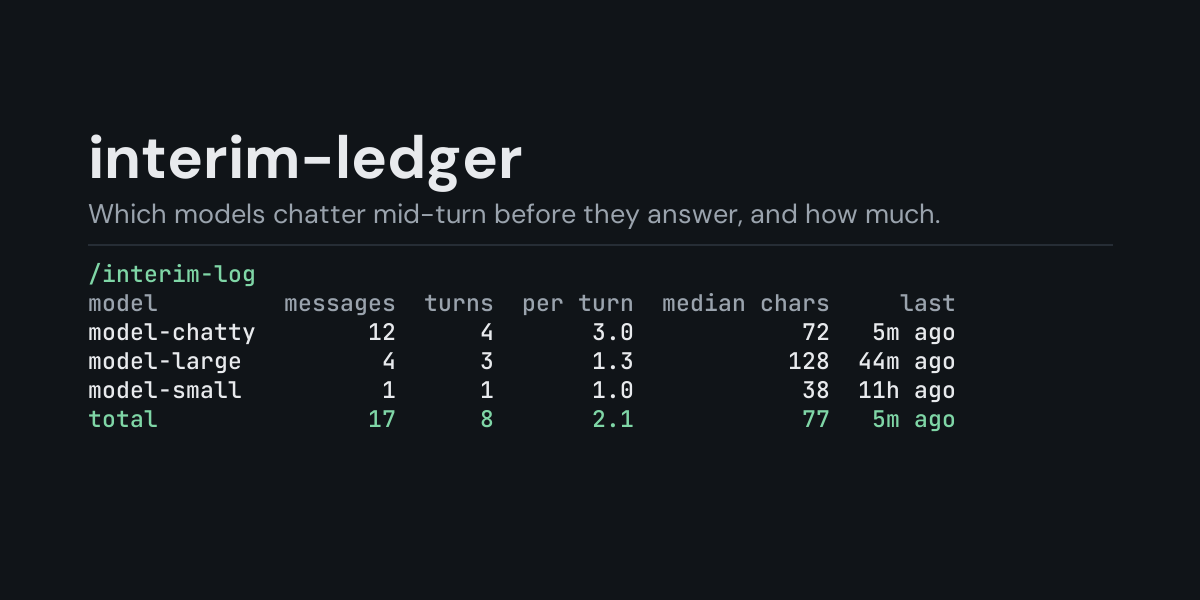
Local ledger of the messages models write in the middle of a turn, before their final answer (the text that comes with a tool call, which on chat platforms can arrive as messages of their own): /interim-log shows how many each model wrote, in how many turns, how many per such turn, their median length and how long ago the last one was, per model, provider, surface or day, for the last 24 hours, any number of hours or days, the latest session or everything recorded; /interim-log recent lists the newest messages (ten, or up to 100 with /interim-log recent 50). Counted even where display.interim_assistant_messages hides them.

Open in Hermes Desktop
hermes plugins install interim-ledger

What it adds

Hooks 1

on_interim_message

README

From the reviewed commit ed94f43 ↗; it updates when the author re-pins.

interim-ledger

A local ledger of the messages models write in the middle of a turn, before their final answer, and an /interim-log command that shows which models write them, how many per turn and how long they are.

Many models say something before they call a tool: "Let me check the config first", "Now I'll run the tests". Hermes calls these mid-turn (interim) messages. In the terminal they scroll past with the tool output, but on Telegram, Discord or Slack each one can arrive as a message of its own, so a chatty model fills the chat with them. interim-ledger subscribes to on_interim_message, which Hermes fires for each of them, and keeps one row per message. You can see afterwards that one model writes three of them per turn and another almost none, and decide whether to switch models or turn them off with display.interim_assistant_messages.

Install

hermes plugins install interim-ledger --enable

Requires Hermes 0.21.5 or newer. No API key, no configuration, no dependencies.

Use

/interim-log             last 24 hours, by model
/interim-log session     the most recent session
/interim-log all         everything in the ledger
/interim-log 7d          the last 7 days (any number of hours or days: 6h, 30d)
/interim-log providers   add to any of the above to group by provider (or surfaces, days)
/interim-log recent      add to any of the above to list the newest 10 messages instead
/interim-log recent 25   the newest 25 instead (1 to 100)
/interim-log clear       delete the ledger

Example (/interim-log all, from the end-to-end test: two hermes chat turns, the first with one message before its tool call, the second with two):

Mid-turn messages, all recorded:

model       messages  turns  per turn  median chars    last
fake-model         3      2       1.5            57  3s ago

Counted even where display.interim_assistant_messages hides them.
  • messages counts mid-turn messages, and turns the turns that had at least one.
  • per turn is messages divided by turns: how many a model writes when it writes any.
  • median chars is the middle length of those messages, in characters.
  • last is how long ago the newest one was. The model with the most messages comes first.

Hermes fires the hook whether or not your chat shows these messages, so a model's habit is counted even where display.interim_assistant_messages is off.

/interim-log recent lists the newest ten messages of the chosen window, newest first (/interim-log recent 25 lists 25, up to 100). From the same run:

Mid-turn messages, all recorded, newest 3 of 3:

when         model  surface  step  chars  streamed
3s ago  fake-model      cli     2     52        no
3s ago  fake-model      cli     1     57        no
7s ago  fake-model      cli     1     57        no

surface is where the turn ran (cli, telegram, discord, ...), step which model call of the turn wrote it, and streamed whether Hermes reports the text as already streamed live.

/interim-log days puts one day on each line, newest day first; days are your computer's local calendar days. A time window counts back from now (/interim-log 6h, /interim-log 7d days). session and all take precedence over a time window. The ledger keeps its newest 5,000 rows, so a long window on a busy install reaches back only as far as those rows do.

What it does not see

  • A turn whose model calls tools without writing anything first: there is no message to count.
  • The final answer of a turn: only messages before it are mid-turn messages.

What is recorded

One JSON line per mid-turn message in <HERMES_HOME>/plugin-data/interim-ledger/interim.jsonl (per profile):

ts, session, turn, surface, model, provider, iteration, chars, streamed.

The text of the message is never written, only its length. session and turn are the first 12 hex digits of a SHA-256 of Hermes's session and turn ids, enough to tell them apart.

The file is bounded: once it passes 2 MB it is rewritten to its newest 5,000 rows.

Security and footprint

  • register() only registers one hook (on_interim_message) and one command (/interim-log).
  • Observer only: Hermes runs the hook on its own background thread, so it cannot delay, change or hide a message. Each hook call appends one line to the ledger, and nothing else.
  • No network access, no subprocesses, no downloads, no credentials read.
  • Writes only interim.jsonl under its own plugin data directory. /interim-log clear deletes it.
  • The hook never raises: if the ledger cannot be written, the failure is logged at debug level.
  • Standard library only.

Development

python -m pytest tests                                               # unit tests, no Hermes needed
PYTHONPATH=<hermes checkout> python tests/e2e/interim_ledger_e2e.py   # real hermes chat turns
hermes plugins validate interim-ledger

Changes

  • 1.0.0: first release.

MIT licensed.

approval-ledger❖ Community★ 0

Local ledger of Hermes's approval prompts (dangerous commands, protected writes, MCP consent, smart-mode verdicts): /approval-log shows how often each rule asked, how many prompts were approved, denied or left unanswered, and how long a person took to answer, per rule, per surface or per day, for the last 24 hours, any number of hours or days, the latest session or everything recorded; /approval-log recent lists the newest decisions (ten, or up to 100 with /approval-log recent 50). Disclosure — writes decision metadata (session id, surface, rule label, answer, timings; no command, description or session key) to plugin-data/approval-ledger/approvals.jsonl, trimmed to 5,000 rows past 2 MB; observer only, cannot answer or change an approval; no network

Tools
aux-ledger❖ Community★ 0

Local ledger of Hermes's auxiliary LLM calls (titling, compression, vision, approval): /aux shows tokens, time and failures per task, model, provider or day, or lists the newest calls (ten, or up to 100 with /aux recent 50), for the last 24 hours, any number of hours or days, the latest session or everything recorded. Disclosure — writes auxiliary-call metadata (ids, models, timings, token counts, no prompt or response text) to plugin-data/aux-ledger/calls.jsonl, trimmed to 5,000 rows past 2 MB; no network

Tools
command-ledger❖ Community★ 0

Local ledger of the slash commands you run in Hermes (built-in commands in the CLI, built-in and plugin commands on messaging platforms): /command-log shows how often each command was used, its share, in how many sessions and when last, per command, platform, surface or day, for the last 24 hours, any number of hours or days, the latest session or everything recorded; /command-log recent lists the newest commands (ten, or up to 100 with /command-log recent 50) with the alias typed. Disclosure — writes command metadata (command name, alias typed, surface, platform, a 12-digit hash of the session key; no arguments, session key or user id) to plugin-data/command-ledger/commands.jsonl, trimmed to 5,000 rows past 2 MB; observer only, cannot block or change a command; no network

Tools
edit-ledger❖ Community★ 0

Local ledger of the turns in which the agent changed files with write_file or patch: /edit-log shows how many turns changed files, how many files in all, the median per turn, the most changed file type and how long ago the last one was, per model, platform or day, a table of file types (extensions), or the newest turns, for the last 24 hours, any number of hours or days, the latest session or everything recorded; /edit-log recent lists the newest turns (ten, or up to 100 with /edit-log recent 50). A turn another plugin keeps going is counted once. Disclosure — subscribes to pre_verify as an observer only: always returns nothing, so it never keeps the agent going or changes a turn; writes turn metadata (model, platform, file count, files per extension, a 12-digit hash of the session id; never a path, file name or answer text) to plugin-data/edit-ledger/edits.jsonl, trimmed to 5,000 rows past 2 MB; never opens the changed files; no network

Tools
error-ledger❖ Community★ 0

Local ledger of failed provider calls (rate limits, overloads, timeouts, context overflows): /errors shows how many attempts failed per model, provider or cause, how many Hermes could retry, and the most common HTTP status, for the last 24 hours, any number of hours or days, the latest session or everything recorded; /errors days puts one day on each line, newest first; /errors recent lists the newest failures (ten, or up to 100 with /errors recent 50) and how long ago each happened. Disclosure — writes failed-attempt metadata (ids, provider, model, HTTP status, Hermes's failure class, exception class name, timings; no error message, request or prompt text) to plugin-data/error-ledger/errors.jsonl, trimmed to 5,000 rows past 2 MB; no network

Tools
stop-ledger❖ Community★ 0

Local ledger of the turns you stopped while Hermes was still working (/stop, or /new and /reset during a running turn, on messaging platforms, the TUI and the desktop app): /stop-log shows how many running turns were stopped, how many by /stop and by /new, in how many sessions and how long ago the last one was, per platform or per day, for the last 24 hours, any number of hours or days, the latest session or everything recorded; /stop-log recent lists the newest stops (ten, or up to 100 with /stop-log recent 50). Disclosure — writes stop metadata (platform, /stop or /new, Hermes's label for the stop, a 12-digit hash of the session key; no session key or chat content) to plugin-data/stop-ledger/stops.jsonl, trimmed to 5,000 rows past 2 MB; observer only, cannot delay or undo a stop; no network

Tools

← Back to the catalog · catalog built Oct 18, 2026