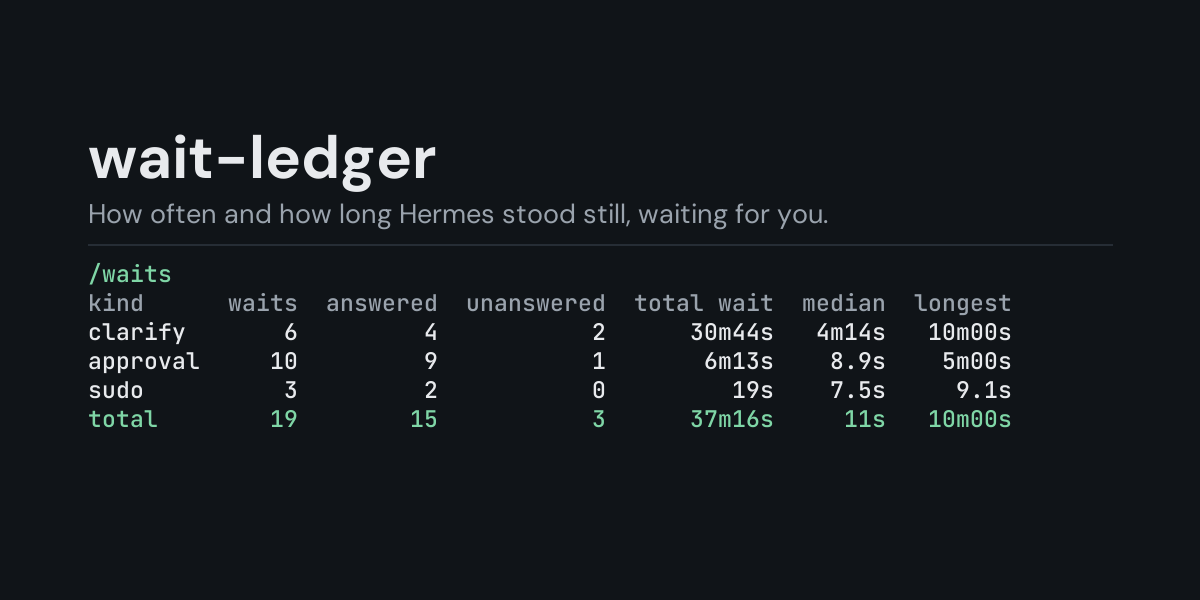
wait-ledger
A local ledger of the times Hermes stopped and waited for you, and a /waits command that
shows how often it waits, on what, how those waits end and how long they take.
Hermes blocks on a person in three places: an approval prompt for a dangerous command, a
clarify question it asks you mid-task, and a password prompt for a command that needs one. While
it waits, the task stands still. wait-ledger subscribes to on_human_input_request and
on_human_input_resolved and keeps one row per wait, so you can see afterwards that a task
spent twenty minutes waiting on you today, that clarify questions on your phone mostly time
out, or that one kind of prompt holds things up far more than the others.
Install
hermes plugins install wait-ledger --enable
Requires Hermes 0.21.6 or newer (the release that added these hooks). No API key, no configuration, no dependencies.
Use
/waits             last 24 hours, by kind of prompt (approval, clarify, sudo)
/waits session     the most recent session that waited
/waits all         everything in the ledger
/waits 7d          the last 7 days (any number of hours or days: 6h, 30d)
/waits platforms   add to any of the above to group by where it waited
/waits days        add to any of the above to group by day, newest first
/waits recent      add to any of the above to list the newest 10 waits instead
/waits recent 25   the newest 25 instead (1 to 100)
/waits clear       delete the ledger
Example (/waits all, from the end-to-end test: two approval prompts, three clarify questions
of which one timed out and one failed, and two password prompts of which one got an empty
answer; each answered a fraction of a second late on purpose):
Waits, all recorded:

kind      waits  answered  unanswered  total wait  median  longest
approval      2         2           0        0.8s    0.4s     0.5s
clarify       3         1           1        0.7s    0.2s     0.4s
sudo          2         1           0        0.5s    0.3s     0.3s
total         7         4           1        2.0s    0.3s     0.5s

Unanswered: timed out, withdrawn or never delivered. An empty answer or a failed prompt
counts in waits only.
- kind is Hermes's own label for the prompt:
approval,clarifyorsudo(the password prompt). Grouped byplatforms, the first column is where it waited instead (cli,telegram, ...). - waits counts prompts. answered is an approval you allowed or denied, a clarify question you answered, or a password you gave. unanswered is a prompt nobody answered: it timed out, the turn ended or was interrupted, or the message could not be delivered.
- total wait, median and longest are how long Hermes stood still, from the prompt appearing to the wait ending, however it ended. The largest total wait comes first.
/waits recent lists the newest ten waits of the chosen window, newest first (/waits recent 25 lists 25, up to 100). From the same run:
Waits, all recorded, newest 7 of 7:

when        kind  platform      ended  wait
2s ago      sudo       cli    skipped  0.2s
2s ago      sudo       cli   provided  0.3s
2s ago   clarify       cli      error  0.1s
2s ago   clarify       cli  timed_out  0.2s
3s ago   clarify       cli  submitted  0.4s
3s ago  approval       cli       once  0.3s
4s ago  approval       cli       deny  0.5s
ended is how Hermes reported the end of the wait: an approval answer (once, session,
always, deny, timeout, ...), a clarify outcome (submitted, timed_out, undelivered),
a password prompt outcome (provided, skipped, timeout, cancelled), or error.
/waits days puts one day on each line, newest day first; days are your computer's local
calendar days. A time window counts back from now (/waits 6h, /waits 7d platforms,
/waits 30d days). The ledger keeps its newest 5,000 rows, so a long window on a busy install
reaches back only as far as those rows do.
What it does not see
- Waits Hermes never has: an approval you already gave for the session or permanently,
approvals.mode: off, yolo mode, and one-shot (-q) or cron runs, where nobody could answer. - Prompts that are not one of Hermes's human-input points (for example a smart-mode approval verdict, which is a model's answer, not yours).
What is recorded
One JSON line per wait in <HERMES_HOME>/plugin-data/wait-ledger/waits.jsonl (per profile):
ts, session_id, platform, kind, outcome, result, wait_s.
Not recorded: the prompt text (the command, the question), the session key (it can hold a platform chat id), and what you answered. Your answers and passwords never reach the hooks at all, and Hermes redacts the prompt text before handing it over; the plugin drops it anyway. Only the prompt's random id and the time it opened are held in memory, until the wait ends.
The file is bounded: once it passes 2 MB it is rewritten to its newest 5,000 rows.
Security and footprint
register()only registers two hooks (on_human_input_request,on_human_input_resolved) and one command (/waits).- Observer only: it cannot answer, delay or change a prompt. Each hook call notes a time or appends one line to the ledger, and nothing else.
- No network access, no subprocesses, no downloads, no credentials read.
- Writes only
waits.jsonlunder its own plugin data directory./waits cleardeletes it. - The hooks never raise: if the ledger cannot be written, the failure is logged at debug level and the prompt is not affected.
- Standard library only.
Development
python -m pytest tests                                            # unit tests, no Hermes needed
PYTHONPATH=<hermes checkout> python tests/e2e/wait_ledger_e2e.py   # Hermes's own prompts
hermes plugins validate wait-ledger
Changes
- 1.0.0: first release.
MIT licensed.