reaction-ledger
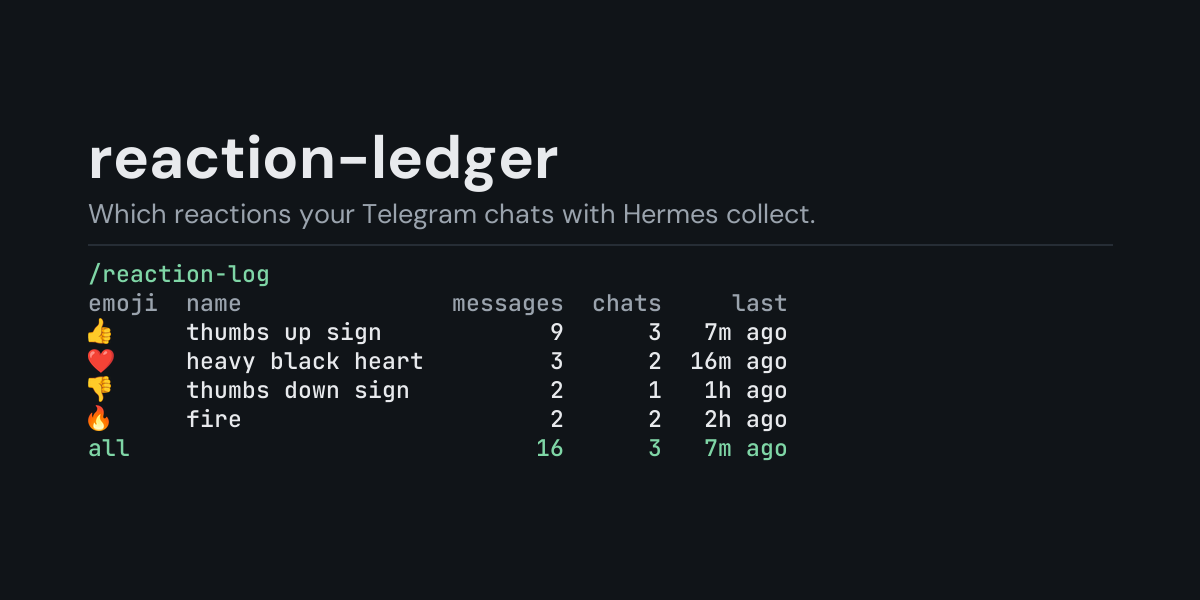
A local ledger of the emoji reactions people leave on messages in your Telegram chats with
Hermes, and a /reaction-log command that shows which emoji were used, on how many messages, in
how many chats and how recently.
A 👍 or 👎 on a reply is the quickest feedback anyone gives an assistant, and it is gone from
view as soon as the chat scrolls. reaction-ledger subscribes to gateway_platform_event, which
Hermes fires when an authorized Telegram user sets, changes or removes the reactions on a
message, and keeps one row per change. You can see afterwards that this week's replies collected
eleven 👍 and three 👎, or that the 👎 all came on one day.
Install
hermes plugins install reaction-ledger --enable
Requires Hermes 0.21.5 or newer and the Telegram gateway. No API key, no configuration, no dependencies.
Use
/reaction-log             last 24 hours, by emoji
/reaction-log all         everything in the ledger
/reaction-log 7d          the last 7 days (any number of hours or days: 6h, 30d)
/reaction-log days        add to any of the above to group by day, newest first
/reaction-log recent      add to any of the above to list the newest 10 reaction changes instead
/reaction-log recent 25   the newest 25 instead (1 to 100)
/reaction-log clear       delete the ledger
Example (/reaction-log all, from the end-to-end test: in one chat a message got 👍 and then 👎
instead, another got ❤️ that was taken back again, and in a second chat a message got 🔥 and a
custom emoji):
Reactions, all recorded:

emoji   name              messages  chats    last
👎       thumbs down sign         1      1  2s ago
🔥       fire                     1      1  2s ago
custom  custom emoji             1      1  2s ago
all                              2      2  2s ago

Each message counts once, with the reactions it has now.
Reactions were removed again from 1 message(s).
- Each message counts once, with the reactions it has after its latest change in the chosen window: the 👍 that became 👎 counts as 👎 only, and the ❤️ that was taken back counts nowhere.
- name is Unicode's name for the emoji. Telegram's custom (premium) emoji have no Unicode form and are counted together as custom.
- messages is how many messages carry that emoji now, chats in how many chats, and last how long ago it was last set. The emoji on the most messages comes first; all counts every message that still has a reaction (one message can carry several emoji).
/reaction-log recent lists the newest ten reaction changes of the chosen window, newest first
(/reaction-log recent 25 lists 25, up to 100), including the ones that were later changed or
taken back. From the same run:
Reaction changes, all recorded, newest 5 of 5:

when    reactions       message          chat
2s ago  (removed)  d64a5e92aff0  534d342c1a85
2s ago  🔥 custom   aa4c3f356c10  ca0b080adc88
2s ago  👎          46c4ac9c4d6e  534d342c1a85
2s ago  ❤️         d64a5e92aff0  534d342c1a85
2s ago  👍          46c4ac9c4d6e  534d342c1a85
message and chat are short hashes that tell messages and chats apart without naming them.
/reaction-log days puts one day on each line, newest day first, with the day's most used emoji
(top); a message counts on the day its reactions last changed, in your computer's local
time. A time window counts back from now (/reaction-log 6h, /reaction-log 7d days). The
ledger keeps its newest 5,000 rows, so a long window on a busy install reaches back only as far
as those rows do.
What it does not see
- Other platforms: today Hermes reports reactions as platform events on Telegram only.
- Reactions from users the gateway does not authorize: Hermes checks the reacting user against
the same allowlists (
TELEGRAM_ALLOWED_USERSand the rest) before any plugin hears of it. - Reactions set by bots, Hermes's own included: Telegram does not send those. In a group, Telegram sends reactions only to a bot that is an administrator of the group.
- Which message was reacted to: Telegram reports only the message's id, so a reaction to a message someone else wrote in the chat counts the same as one to Hermes's reply.
What is recorded
One JSON line per reaction change in <HERMES_HOME>/plugin-data/reaction-ledger/reactions.jsonl
(per profile):
ts, platform, chat, message, emojis, custom.
emojis are the standard emoji the message has after the change (an empty list when its
reactions were removed) and custom how many custom emoji it has. chat and message are the
first 12 hex digits of a SHA-256 of the chat id (and of the chat and message ids), not the ids
themselves: a Telegram chat id names a person or a group. No user id, user name, custom emoji id
or message text is kept; message text never reaches this hook.
The file is bounded: once it passes 2 MB it is rewritten to its newest 5,000 rows.
Security and footprint
register()only registers one hook (gateway_platform_event) and one command (/reaction-log).- Observer only: it cannot change or block anything the gateway does. A reaction change appends one line to the ledger; every other platform event (such as an edited message) is ignored without writing anything.
- No network access, no subprocesses, no downloads, no credentials read.
- Writes only
reactions.jsonlunder its own plugin data directory./reaction-log cleardeletes it. - The hook never raises: if the ledger cannot be written, the failure is logged at debug level.
- Standard library only.
Development
python -m pytest tests                                                # unit tests, no Hermes needed
PYTHONPATH=<hermes checkout> python tests/e2e/reaction_ledger_e2e.py   # Hermes's own Telegram adapter and gateway
hermes plugins validate reaction-ledger
Changes
- 1.0.0: first release.
MIT licensed.